

.jpg)
.avif)
9 examples of MCP servers that can power your AI agents



Jon Gitlin
As you build AI agents, you’ll likely need to connect them to Model Context Protocol (MCP) tools.
MCP tools can help your agents support key workflows, from creating product issues to coordinating candidate interviews to updating sales opportunities.
To help you pinpoint the best MCP servers for your agents, we’ll review several popular options.
Linear MCP server
Linear’s MCP server enables your agents to manage a wide range of issue management workflows.
In-demand tools
- <code class="blog_inline-code">create_comment</code>
- <code class="blog_inline-code">resolve_comment</code>
- <code class="blog_inline-code">get_issue </code>
- <code class="blog_inline-code">list_issues</code>
- <code class="blog_inline-code">create_issue</code>
- <code class="blog_inline-code">list_cycles</code>
Common use cases for your agents
- Automated triage: Automatically label, prioritize, and assign incoming Linear issues based on the issue’s title, description, comments, etc.
- Ticket management: Enable users to create, update, or get information on issues within your business communications platform (e.g., Slack)
- Cross-system workflows: Create issues in Linear when specific events occur in other systems, like a case for a product issue getting created in the CRM
- Cycle planning assistance: Analyze cycle data to help teams with sprint planning and capacity management (e.g., providing recommendations on the number of issues your team should tackle in the next cycle)
- Custom reporting: Build tailored reports by querying issues with specific filters, statuses, or labels
Related: Common examples of MCP integrations
Slack MCP server
A Slack MCP server lets your agents interact with users within the business communications platform in seemingly endless ways.
In-demand tools
- <code class="blog_inline-code">list_channels</code>
- <code class="blog_inline-code">create_channels</code>
- <code class="blog_inline-code">archive_channel</code>
- <code class="blog_inline-code">post_message</code>
- <code class="blog_inline-code">get_user_conversations</code>
- <code class="blog_inline-code">get_user_profile</code>
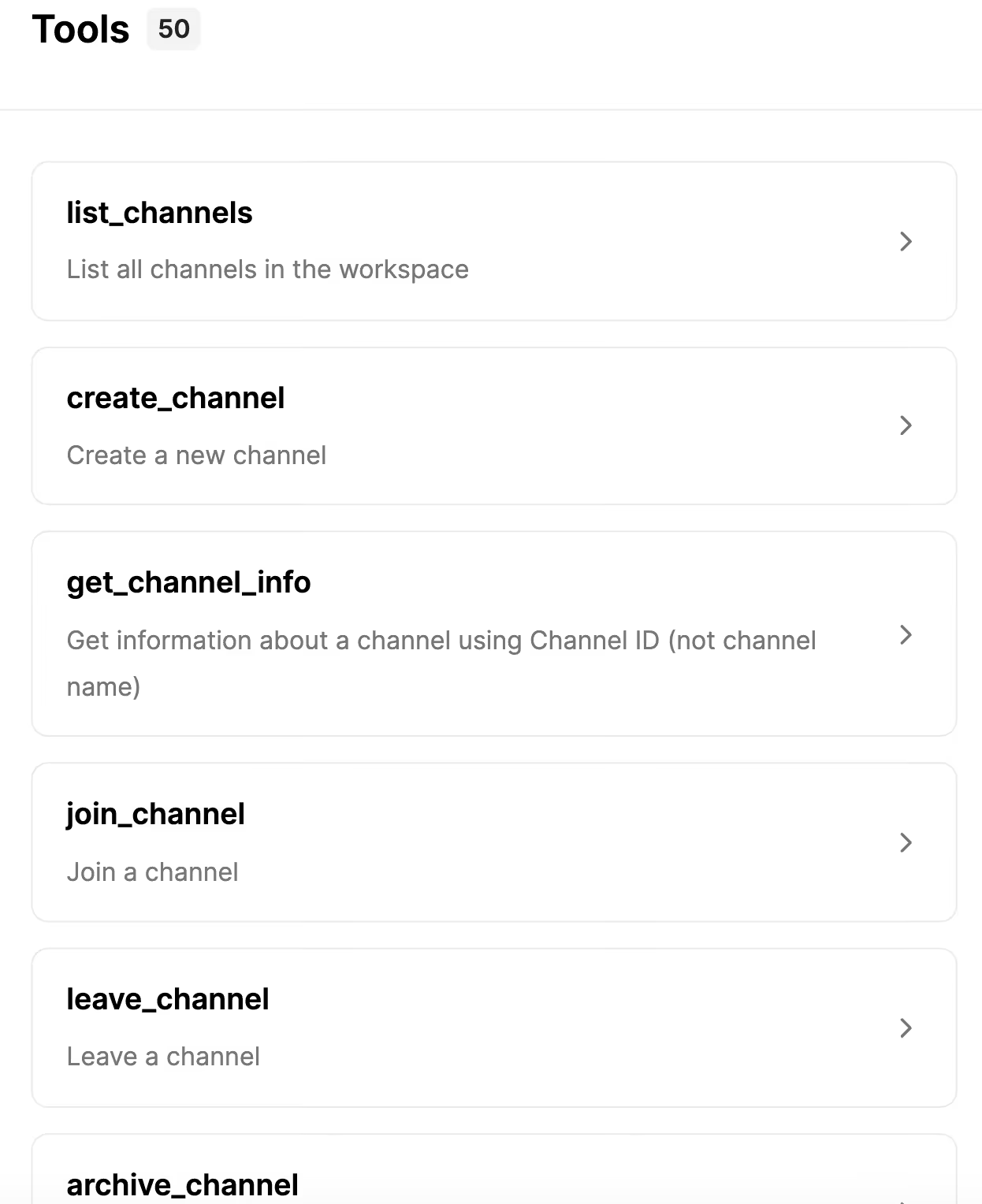
Common use cases for your agents
- Employee sentiment monitoring: Analyze message patterns, emoji reactions, and language across channels to detect team morale trends, identify potential burnout signals, or flag when discussions become heated. Your agent can then privately alert managers or HR with context
- Employee onboarding: Welcome new hires when they join Slack, automatically guide them through relevant channels, answer common questions about their team’s processes, and surface important historical threads or documents they should read based on their role
- Incident response coordination: When a product issue gets escalated in a project management platform, your agent can automatically create a dedicated incident channel in Slack, invite the on-call team, and share relevant context on the issue
- Document generation: After an important conversation happens in Slack, a user can click a button like “document this conversation.” This could prompt the agent to summarize the conversation, extract action items and decisions, and automatically create or update documentation in an app like Notion
Related: Examples of email MCP servers
Google Calendar MCP server
A Google Calendar MCP server enables your agents to coordinate schedules and manage invitations across the company, teams, and individual employees.
In-demand tools
- <code class="blog_inline-code">get_calendar</code>
- <code class="blog_inline-code">create_event</code>
- <code class="blog_inline-code">update_event</code>
- <code class="blog_inline-code">list_events</code>
- <code class="blog_inline-code">add_calendar_to_list</code>
Common use cases for your agents
- Interview scheduling: Coordinate the entire interview process, from scheduling candidates across multiple interviewers to automatically rescheduling if conflicts arise or candidates request to reschedule
- Productivity insights: Analyze calendar patterns to generate personalized insights for users, like "You spent 60% of your week in meetings vs. 40% last month." Your agent can also identify users’ most fragmented days, suggest optimal meeting-free days based on users’ scheduling patterns and preferences, and more
- Intelligent time blocking: Automatically block focus time on users’ calendars when there are spikes in their assigned tasks in their project management tools
- Availability Coordination: Monitor team calendars for out-of-office events, and automatically redistribute team responsibilities if needed. For example, if an engineer is going to be OOO when they’re scheduled to be on-call, your agent can automatically assign another engineer to be on-call that week
Salesforce MCP server
A Salesforce MCP server can help your agents manage a wide range of workflows across leads and customers.
In-demand tools
- <code class="blog_inline-code">update_opportunity</code>
- <code class="blog_inline-code">get_opportunity</code>
- <code class="blog_inline-code">create_opportunity</code>
- <code class="blog_inline-code">list_opportunities</code>
- <code class="blog_inline-code">create_opportunity</code>
Common use cases for your agents
- Automated updates from calls: As sales reps speak to prospects, your agent (or voice agent, in this context) can capture key discussion points, action items, and next steps in the appropriate records within Salesforce
- Intelligent account research: Pull data from Salesforce and other sources (e.g., ticketing platforms) to compile comprehensive account research before sales calls, including recent activity history, competitive intel, and customer health scores. Your agent can then share this with the rep directly in an app like Slack
- Opportunity identification: Monitor support tickets for upsell or cross-sell signals and automatically create or update related opportunities in Salesforce with context from the support interaction
- Deal closure orchestration: Coordinate actions across Salesforce and other tools when a deal closes. For example, your agent can update the opportunity in Salesforce, notify the team in Slack, and create onboarding tasks in Jira
Related: Examples of CRM MCP servers
GitHub MCP server
A GitHub MCP server can help your agents manage development workflows by creating issues, reviewing pull requests, and coordinating code changes across repositories.
In-demand tools
- <code class="blog_inline-code">create_issue</code>
- <code class="blog_inline-code">update_issue</code>
- <code class="blog_inline-code">get_pull _requests</code>
- <code class="blog_inline-code">create_pull_request</code>
Common use cases for your agents
- Automated issue creation from product feedback: When users report bugs or feature requests in your product, your agent can automatically create GitHub issues with the relevant context, error logs, and reproduction steps in the appropriate repository
- Incident escalations: When a critical bug is detected, your agent can create a GitHub issue and mark it as high priority before notifying the engineering team in Slack with a link to the issue
- Code review assistance: Your agent can gather recent pull requests, code changes, and implementation patterns from GitHub and use them to help developers understand project updates, find specific code implementations, or identify security patterns
- Streamlined bug fixes: When minor bugs are reported, your agent can pull the relevant GitHub repository, set up the developer environment, make the appropriate code changes, and create a PR that tags certain engineers for review
Figma MCP server
A Figma MCP server lets your agents add comments to Figma files, get specific project files, download images from a file, and more.
In-demand tools
- <code class="blog_inline-code">get_comments</code>
- <code class="blog_inline-code">post_comment</code>
- <code class="blog_inline-code">get_file</code>
- <code class="blog_inline-code">get_team_projects</code>
Common use cases for your agents
- Design-to-development handoff automation: Pull the latest frames, components, and specs from a Figma file and package them into an engineering-ready handoff (links, exports, key annotations)
- Comment triage and routing: Read new comments, cluster them by topic (copy, layout, interaction), and post follow-up questions or assign next steps via threaded comments
- Design system governance: Detect off-system colors, text styles, or components in a file and leave targeted comments suggesting approved tokens and components
- Asset export + delivery: Export approved frames or components (e.g., SVG/PNG) and organize them by platform or surface (web, iOS, Android) for downstream use
- Automated design review prep: Scan a file for what changed since the last review, summarize updates, and flag likely review hotspots (new components, updated variants, renamed layers)
Snowflake MCP server
A Snowflake MCP server enables your agents to create a particular database, modify specific databases, fetch specific data from a database, and more.
In-demand tools
- <code class="blog_inline-code">list_databases</code>
- <code class="blog_inline-code">alter_database</code>
- <code class="blog_inline-code">create_schema</code>
- <code class="blog_inline-code">get_schema</code>
Common use cases for your agents
- Natural-language “analyst” for Snowflake: Translate questions into safe, scoped SQL, runs queries, and returns results with short explanations and links to the underlying tables/views
- Automated data quality monitoring and incident creation: Run scheduled checks (row counts, freshness, schema drift, null spikes, etc.), detect anomalies, and open a ticket with the failing queries and impact summary
- Pipeline debugging and root-cause analysis: When a job fails or data looks wrong, an agent inspects recent loads, query history, and affected objects, then proposes likely causes and concrete next steps
- Cost and performance optimization: An agent reviews expensive/slow queries and warehouse usage patterns, recommends changes (query rewrites, clustering/partitioning strategy, warehouse sizing), and produces a prioritized punch list
- Governed self-serve data access: An agent helps users find the right datasets, explains what they mean, and provisions access through pre-approved roles/policies while keeping an audit trail of what was granted and why
Box MCP server
A Box MCP server lets your agents create files, download files, update permissions for users, and more.
In-demand tools
- <code class="blog_inline-code">get_collaboration</code>
- <code class="blog_inline-code">get_comment</code>
- <code class="blog_inline-code">download_file</code>
- <code class="blog_inline-code">delete_file</code>
- <code class="blog_inline-code">Create_comment</code>
Common use cases for your agents
- Create and tidy folder structures: Create a standard project folder tree, then rename and move files to match your rules. Archive stale folders automatically
- Contract and document intake: Extract key fields from new contracts, rename them consistently, and file them into the right client folder. Surface renewal dates for tracking
- Review and final packaging: Bundle the latest versions into a review folder and generate a brief “what changed” note. After approval, copy assets into a “Final” folder
- Search and answer in Box: Answer natural language questions by locating the most relevant Box files and summarizing the key points. Return links to the sources used
- Access and compliance hygiene: Scan for risky shared links, unexpected external access, or sensitive files in the wrong place. Produce a fix list and optionally apply changes if permitted
Firecrawl MCP server
A Firecrawl MCP server lets your agents scrape web pages, crawl sites, extract structured data, and monitor content changes at scale.
In-demand tools
- <code class="blog_inline-code">start_crawl</code>
- <code class="blog_inline-code">get_crawl_status</code>
- <code class="blog_inline-code">start_extract</code>
- <code class="blog_inline-code">start_batch_scrape</code>
- <code class="blog_inline-code">map_site</code>
Common use cases for your agents
- Competitive intelligence on autopilot: Scrape competitor pricing pages, product listings, and feature announcements on a schedule. Summarize changes and flag anything that warrants a response
- Lead and prospect enrichment: Given a list of company URLs, crawl each site to extract firmographic data like company description, team size signals, and tech stack mentions. Feed results directly into your CRM
- Content gap research: Crawl a competitor's blog or docs site, map all URLs, and identify topics they cover that you don't. Return a prioritized list of content opportunities
- Structured data extraction at scale: Point the agent at any product catalog, job board, or directory and extract fields into a clean structured format. No custom scraper needed per site
- Site monitoring and alerting: Periodically scrape key pages and diff the content against a previous snapshot. Send alerts when pricing, terms, or critical copy changes
Why you should use Merge’s MCP servers
Once you decide on the MCP servers you want to use, you’ll then need to decide on the type of MCP provider to leverage.
You can use the application provider’s official MCP server, those provided in a public community, or ones from a 3rd-party integration platform.
In most cases, the last option is your best one.
Official MCP servers are generally launched for marketing the brand. They’re rarely maintained and improved on, which can make them a performance and security risk for your agents. And community MCP servers can be an even bigger risk, as the provider may be little known, if known at all.
Merge Agent Handler, on the other hand, offers dozens of enterprise-grade MCP servers with thousands of tools.
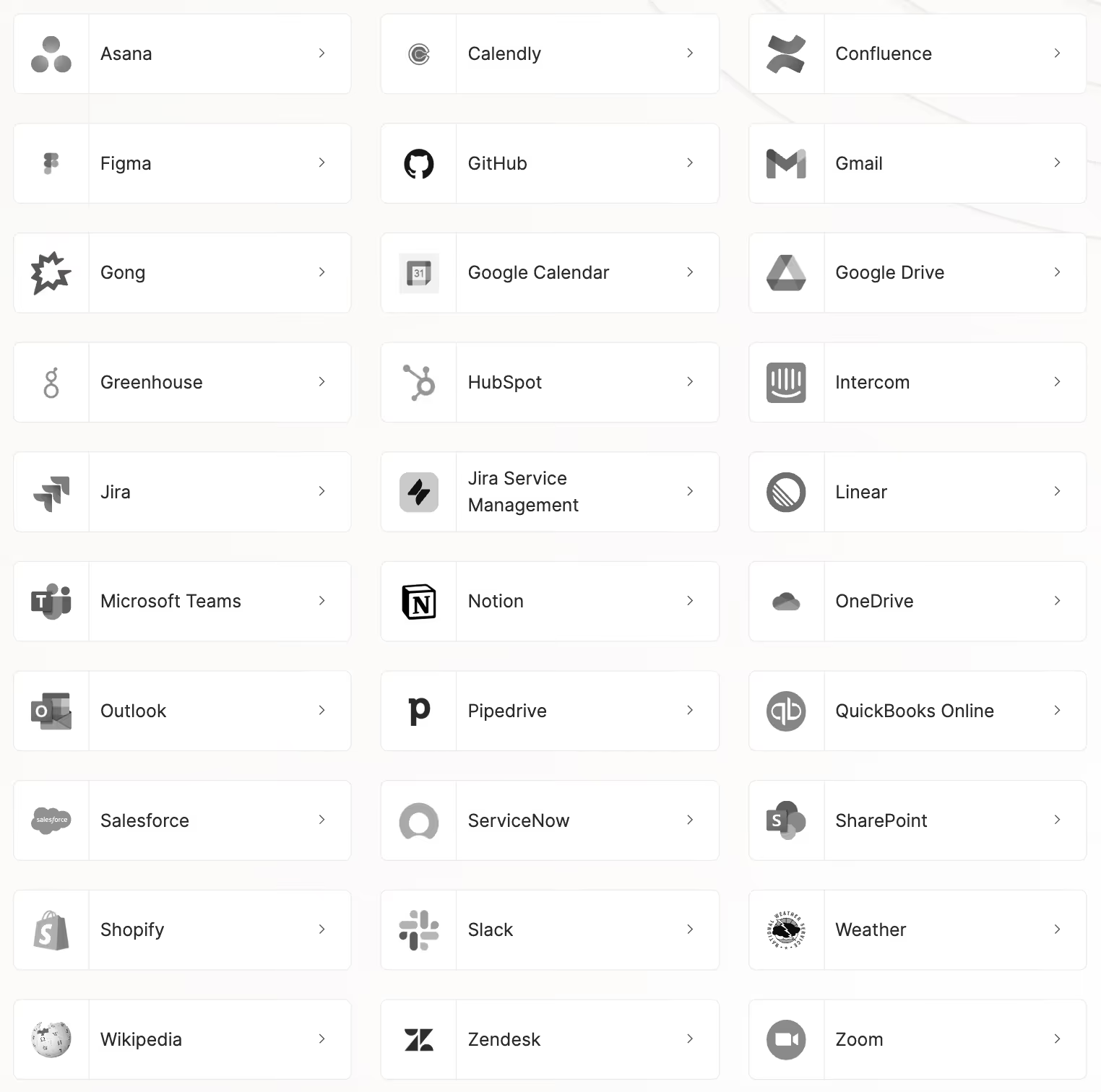
Merge Agent Handler also provides:
- Built-in security and governance: Every tool call is authenticated with proper credentials, logged for audit trails, scoped to specific user permissions, and monitored through customizable rules that can detect, flag, or block sensitive data
- Battle-tested MCP tools: Leading AI companies like Perplexity leverage Merge Agent Handler successfully
- Extensible connectors: You can edit existing Merge-managed connectors or build custom ones using AI-assisted generation from OpenAPI specs, API documentation, or GitHub URLs
Start connecting your agents with MCP servers today by signing up for a free trial.
MCP server FAQ
In case you have any more questions on MCP servers, we’ve addressed several more below.
What’s the difference between an official MCP server and a 3rd-party hosted MCP server?
An official MCP server is any the software provider offers themself. For example, Notion, a leading knowledge management platform, offers an official MCP server and outlines how to use it in their developer docs.
A 3rd-party hosted MCP server is an MCP server that an integration vendor offers. For example, Merge Agent Handler supports dozens of MCP servers out of the box, including one with Notion.
Related: A guide to using hosted MCP servers
Should I use an official MCP server or a 3rd-party-hosted MCP server?
Based on our research, we recommend using a 3rd-party-hosted MCP server.
According to our state of agentic integrations research report, 75% of companies plan to outsource their integrations with MCP tools.

This comes down to a few factors:
- Security: 72% of companies lack the internal expertise to handle potential issues like credential leaks, malicious servers, and tool poisoning
- Technical complexity: 69% of companies don’t have the internal expertise to implement authentication, error handling, and normalized data models
- Engineering resources: 75% of companies report that building and maintaining MCP servers in-house would require hundreds of developer hours a year
What makes for a “good” MCP server?
An enterprise-grade MCP server typically includes:
- A comprehensive set of tools that use battle-tested schemas, names, and descriptions
- Authentication support, particularly OAuth2
- Built-in observability, which includes fully-searchable logs and customizable rules for detecting potential issues
- Proactive support and a strong SLA policy to prevent potential issues from persisting
What types of MCP servers are most popular?
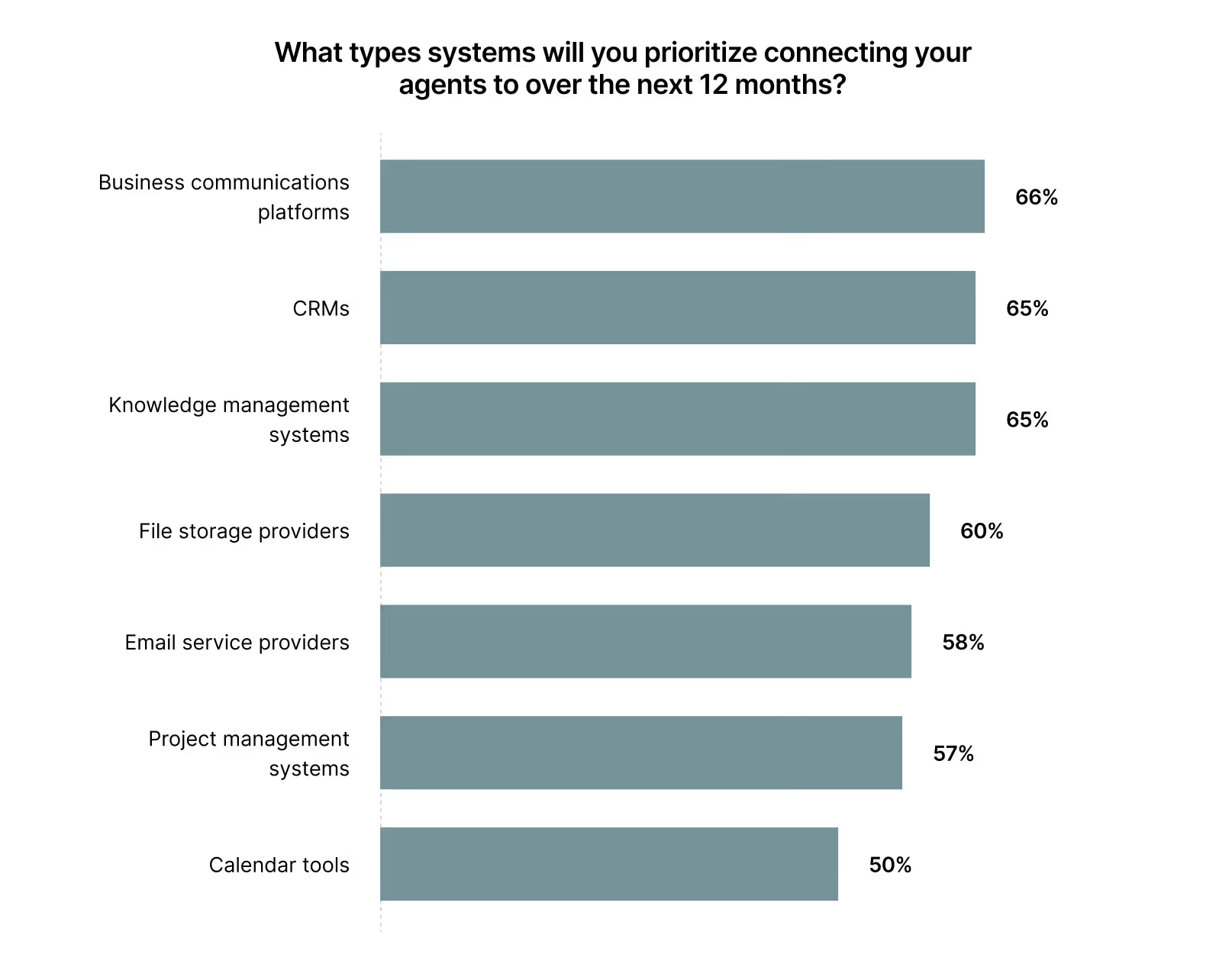
According to our research, business communications platforms like Slack are most popular. This is quickly followed by CRMs (e.g., Salesforce), knowledge management systems (e.g., Notion), and file storage providers (e.g., Google Drive)
Jon Gitlin




But Merge isn’t just a Unified
API product. Merge is an integration platform to also manage customer integrations. gradient text
But Merge isn’t just a Unified
API product. Merge is an integration platform to also manage customer integrations. gradient text
But Merge isn’t just a Unified
API product. Merge is an integration platform to also manage customer integrations. gradient text
But Merge isn’t just a Unified
API product. Merge is an integration platform to also manage customer integrations. gradient text