


.avif)
Introducing AI Data Transformations for Merge Unified: product-ready data, without custom code



Yash Gogri
Customer adoption shouldn’t be blocked by integration nuances.
Yet for many products, it is.
Every new customer brings unique data requirements, from custom eligibility rules to complex pay calculations.
Getting that data into the shape your product expects quickly becomes the bottleneck to onboarding and often requires custom logic for every customer.
That’s why we built AI Data Transformations into our unified APIs.
Just describe the outcome you need in plain English. It then generates production-ready transformation logic in seconds, no custom code, no downstream cleanup, no delays. Your integrations adapt to each customer's requirements from day one.
How AI Data Transformations works
Using natural language, you can now transform fields directly within Merge’s Field Mappings, shaping data at the source instead of cleaning it up downstream.
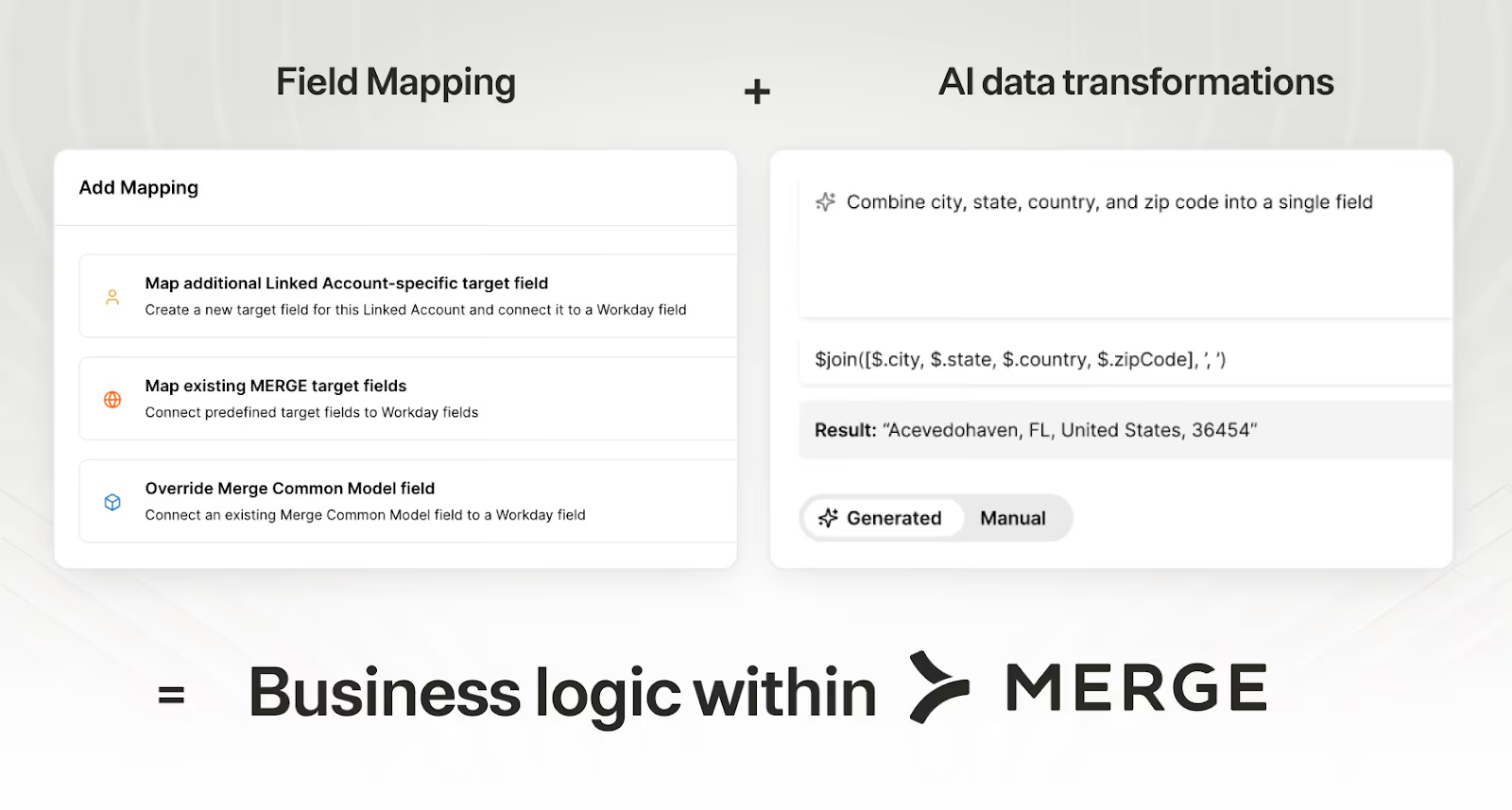
You simply describe the rule, and Merge generates the JSONata expressions that enforce the business logic:
- Compute derived values (e.g., calculate tenure from a hire date field)
- Apply conditionals (e.g., mark a user active only if status = full_time AND contract_end is null)
- Handle fallbacks (e.g., use a secondary field if the primary returns null)
- Restructure objects (e.g., flatten nested payroll data into a single row)
- Format fields (e.g., normalise date formats across five different HRIS systems)
How to use AI Data Transformations
The best use cases for your product depend on the types of integrations you support. That said, here are a few we see come up often.
- Define “Active” employee status: Every enterprise defines 'active' differently. One customer flags contractors as inactive after 90 days; another includes them indefinitely. Avoid writing custom logic for each by describing the rule in plain English. Merge then enforces it automatically, including rules tied to custom fields
- Create one “Best contact email” field: Some tools store multiple emails or bury the right one in custom fields, forcing teams to write fallback logic. Describe the precedence rule in plain English (e.g., “use work email; else primary; else most recent”), and Merge enforces it automatically
- Combine location fields into one standardized output: Location data is split across fields and varies by provider, so teams end up maintaining formatting and fallback logic; instead, outline the desired format once in plain English (e.g., “City, State ZIP, Country”), and Merge automatically assembles a single consistent location string across linked accounts
How to get started
AI Data Transformations is available in the Merge Unified API Dashboard for all Professional and Enterprise accounts as part of the Field Mappings functionality.
Not on a Professional or Enterprise plan yet? Schedule a demo with one of our integration experts to see it in action. Already on one of these plans? Reach out to your CSM to get started today!
Yash Gogri



But Merge isn’t just a Unified
API product. Merge is an integration platform to also manage customer integrations. gradient text
But Merge isn’t just a Unified
API product. Merge is an integration platform to also manage customer integrations. gradient text
But Merge isn’t just a Unified
API product. Merge is an integration platform to also manage customer integrations. gradient text
But Merge isn’t just a Unified
API product. Merge is an integration platform to also manage customer integrations. gradient text