

Table of contents
Just for you
No items found.
CRM MCP servers: overview, examples, and use cases



Jon Gitlin
To help your agents use customer and prospect data across their workflows, you can leverage CRM Model Context Protocol (MCP) servers.
We'll help you use any by breaking down how they work, highlighting different ways to use them, and sharing real-world examples of MCP servers to start testing today.
What is a CRM MCP server?
It’s an MCP server that exposes data and functionality from a CRM solution via tools. For example, a CRM MCP server can expose a <code class="blog_inline-code">get_account</code> tool to help AI agents gather a range of information on a particular account.

Related: A guide to using project management MCP servers
CRM MCP server use cases
The best use cases for CRM MCP servers depend on the types of agentic workflows you need to support. That said, here are a few common use cases across teams.
Note: Most of these examples can end with the agent providing the insights it’s gathered to the appropriate stakeholders via Slack or Microsoft Teams.
For sales operations
- Intelligent lead routing: Your agent can automatically assign incoming leads to the right sales reps based on their location (from your HRIS), current pipeline capacity (from your CRM), and availability (via the rep’s status in Slack or Microsoft Teams)
- Meeting preparation briefs: Your agent can generate pre-call briefings for sales reps by aggregating data from your CRM, recent interactions from email and calendar, support tickets from ticketing systems, product usage data from a data warehouse, and more
.avif)
For customer success and retention:
- Proactive churn detection: Your agent can monitor signals across CRM, ticketing, product analytics platforms, and more to detect decreased engagement, declining support ticket resolution satisfaction, reduced product usage, etc.. Based on these insights, your agent can message the appropriate post-sales stakeholder(s)
- Expansion opportunity identification: Your agent can detect upsell and cross-sell opportunities by analyzing customer data from your CRM, product usage patterns from your analytics platform, support interactions from your ticketing system, and/or feature requests from your project management tool
For data intelligence and insights:
- Competitive intelligence tracking: Your agent can aggregate competitor mentions from lost opportunity reasons, support ticket conversations, Slack or Teams channel discussions, email threads, and deal notes in a project management system to identify market trends, competitive threats, and create comprehensive competitive intelligence reports

- Customer sentiment analysis: Your agent can parse CRM activity logs, email interactions, support tickets and their satisfaction scores, survey responses from a feedback tool, and product usage behavior from an analytics platform to assign reliable customer health scores across accounts
Related: Popular use cases for email MCP servers
Examples of popular CRM MCP servers
There are three types of CRM MCP servers:
- Official CRM MCP servers: These are any that the software provider offers and maintains themselves
- 3rd-party CRM MCP servers: These include any that an integration provider builds and supports (e.g., Merge Agent Handler)
- Community CRM MCP servers: A developer or group of developers can build and sustain these via a platform like GitHub
To help bring these different types of MCP servers to life, we’ll review a real-world example for each.
Merge Agent Handler’s Salesforce MCP server
Merge Agent Handler offers a Salesforce MCP server that supports 50 tools and OAuth 2.0 authentication out of the box.
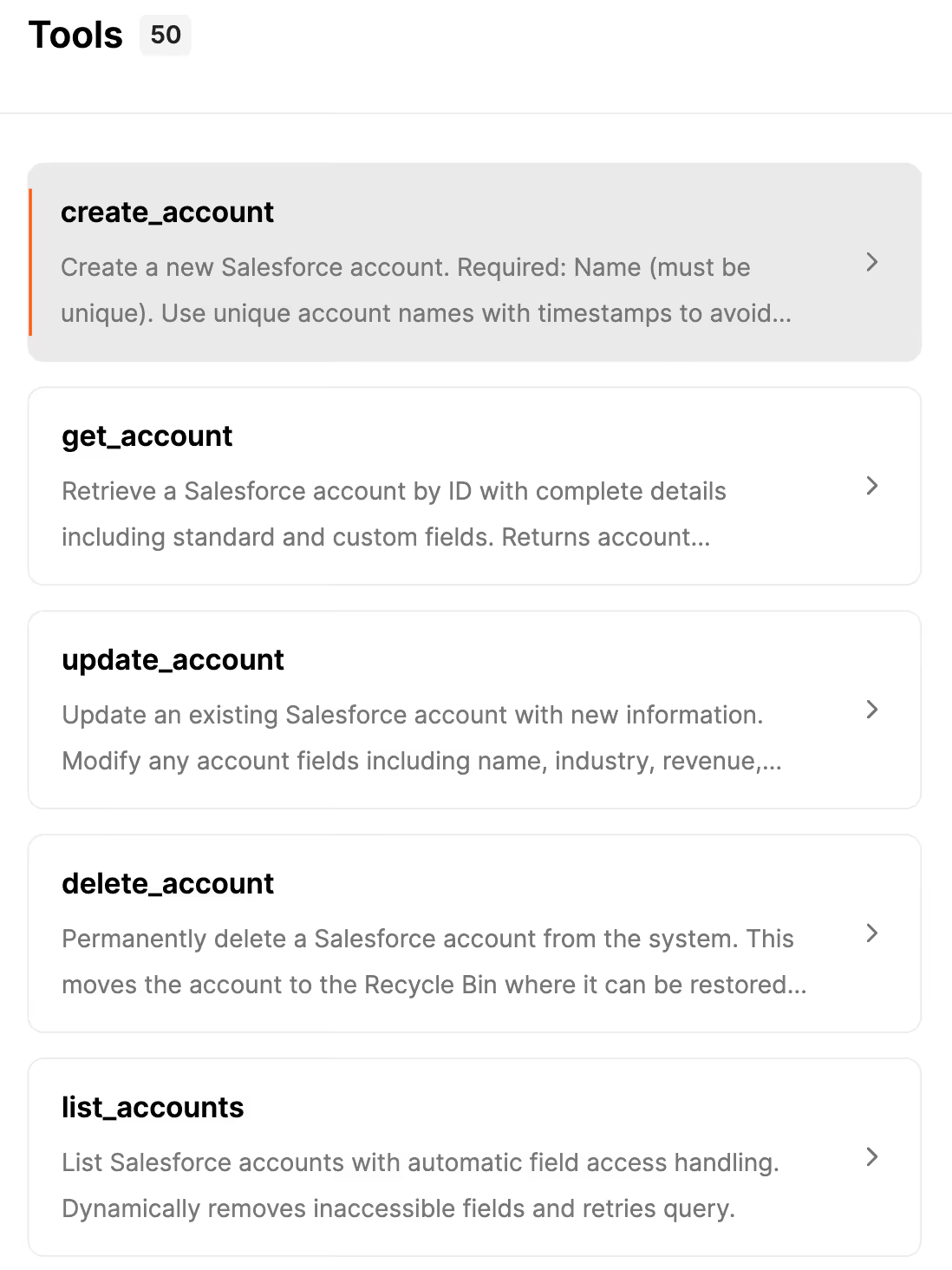
Top features:
- Customizable toolset: In addition to supporting 50 tools, you can easily modify any and add your own

- Enterprise-grade security: Merge Agent Handler lets you configure rules to block, redact, or mask sensitive information. This ensures that sensitive information, like deal amounts, customer contact details, or contract terms, doesn’t get leaked by your agents
- Real-time observability. You’ll have access to fully searchable-logs for every tool call. And each log includes API request details, status codes, and JSON responses. This helps simplify debugging, monitoring, and compliance reviews over time
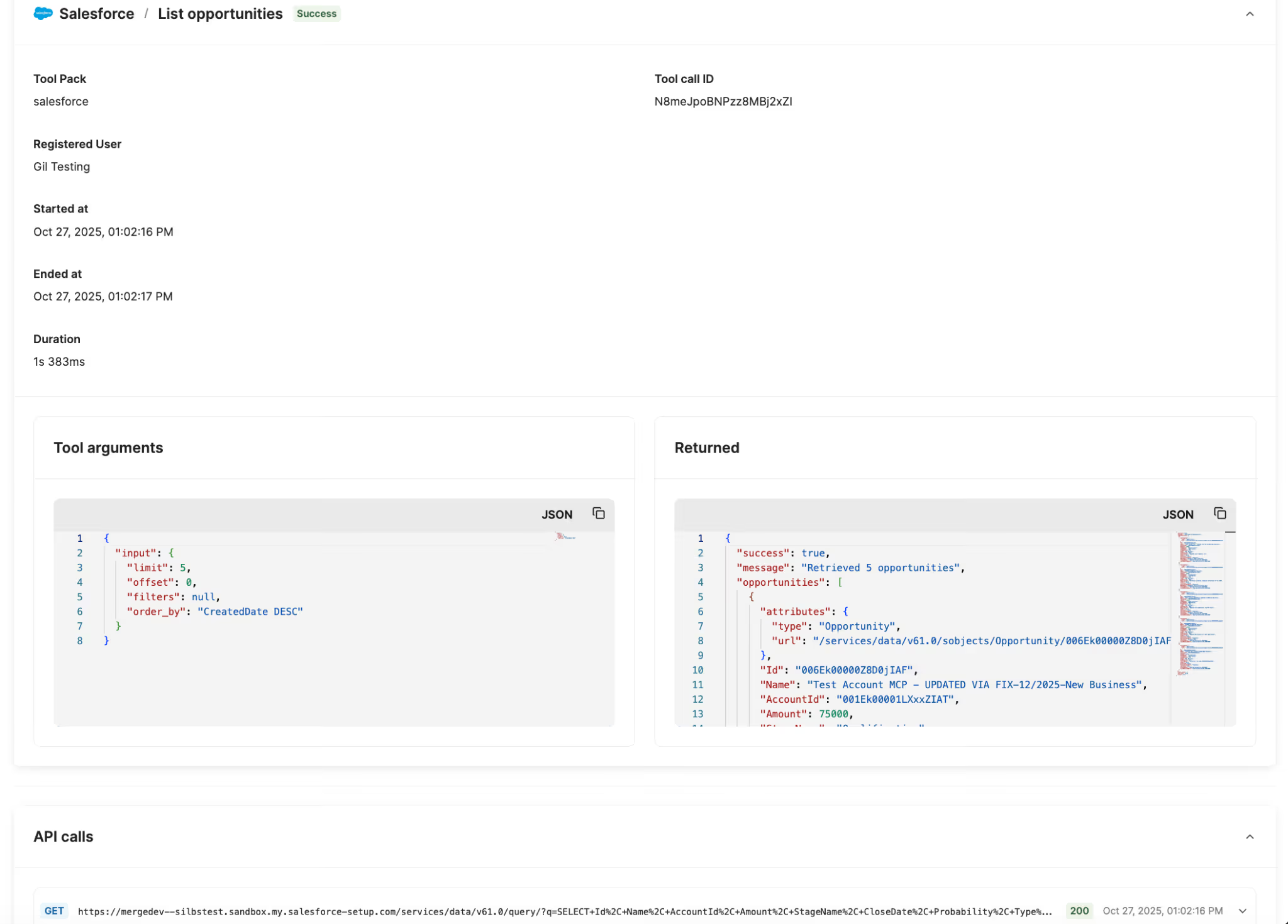
{{this-blog-only-cta}}
HubSpot’s official MCP server
HubSpot’s official MCP server lets you access more than a hundred tools across contacts, companies, deals, and other data types.
Top features:
- Developer MCP server: In addition to their Remote MCP server, HubSpot provides a Developer MCP server that lets you test and explore tools locally during development
- Authentication support: The HubSpot MCP server supports OAuth 2.0 for authentication, which lets you enforce granular data permissions across tool calls
- Tool extensibility: If you’re building HubSpot AI agents, you can give them new abilities by installing apps from the HubSpot Marketplace (these apps come with extra tools)
Community MCP server for Pipedrive
Will Dent and Juho Koskela contributed a Pipedrive MCP server in GitHub that lets you access 16 tools spanning users, leads, pipelines, organizations, and more.

Top features:
- Real-only access: As you can tell from the screenshot above, this Pipedrive MCP server lets your agents discover and retrieve various types of data, but your agents can’t go on to perform actions on the data
- Prompt templates: The contributors include prompts your agents can use to gather helpful information, quickly
- Rate limit and auth support: The MCP server uses built-in rate limiting to prevent server abuse and lets you use JWT auth to enforce secure data access across your agents
{{this-blog-only-cta}}
Jon Gitlin
.png)

.png)

Adopt enterprise-grade CRM MCP servers
Merge Agent Handler’s CRM MCP servers are fully extensible, provide built-in security, observability, and operational guardrails, and are constantly improving


But Merge isn’t just a Unified
API product. Merge is an integration platform to also manage customer integrations. gradient text
But Merge isn’t just a Unified
API product. Merge is an integration platform to also manage customer integrations. gradient text
But Merge isn’t just a Unified
API product. Merge is an integration platform to also manage customer integrations. gradient text
But Merge isn’t just a Unified
API product. Merge is an integration platform to also manage customer integrations. gradient text