

Table of contents
.png)
How to connect a Trello MCP to Cursor (4 steps)



Jon Gitlin
Developers building Trello integrations in Cursor have to leave the editor to discover what their board actually looks like: list IDs, label IDs, and webhook event shapes.
That means configuring API access separately, running test calls, and copying responses back into the session where the code lives.
To help your developers inspect board structures and card schemas without leaving Cursor, we'll show you how to connect Trello with Merge Agent Handler's Trello MCP server.
How it works
Merge Agent Handler connects Cursor to the Trello API through the Merge CLI.
Install the CLI, authenticate once, and run a single setup command from your project root.
That command writes a ## Merge CLI section to the project's .cursorrules file, which tells Cursor's agent when to call merge search-tools and merge execute-tool to reach Trello.
Once connected, Merge handles Trello OAuth token storage and refresh so you never manage API keys or configure auth state in the project.
Here's the registration command:
Related: A guide to connecting a Trello MCP with Codex
Prerequisites
Before getting started, you'll need the following:
- A Merge Agent Handler account
- Cursor installed
- pipx installed (run
pipx --versionto confirm, or install viapip install pipx) - A Trello account with access to the boards you want to connect
If you want to connect Merge Agent Handler's Trello MCP with internal or customer-facing agentic products, you can follow the steps in our docs.
1. Install the Merge CLI
Install with pipx and verify: pipx install merge-api
Verify your installation: merge --version
Related: How to use a Trello MCP in Claude Code
2. Log in to Merge
Authenticate the CLI with your Merge Agent Handler account: merge login
This links the CLI to your account so it can make authorized requests to Trello on your behalf.
3. Connect the CLI to Cursor
Run the following from the root of the project where you want to use Merge tools:
This writes a ## Merge CLI section to .cursorrules so Cursor knows to use the CLI for third-party services. The command is idempotent, safe to re-run if you need to reset.
4. Authenticate Trello
Open a Cursor chat in your project and start with a query that reflects real development work. For example: "Fetch one of my Trello boards and return the full JSON, including all list structures, card fields, member data, and label definitions, so I can write accurate TypeScript interfaces for my board automation tool."
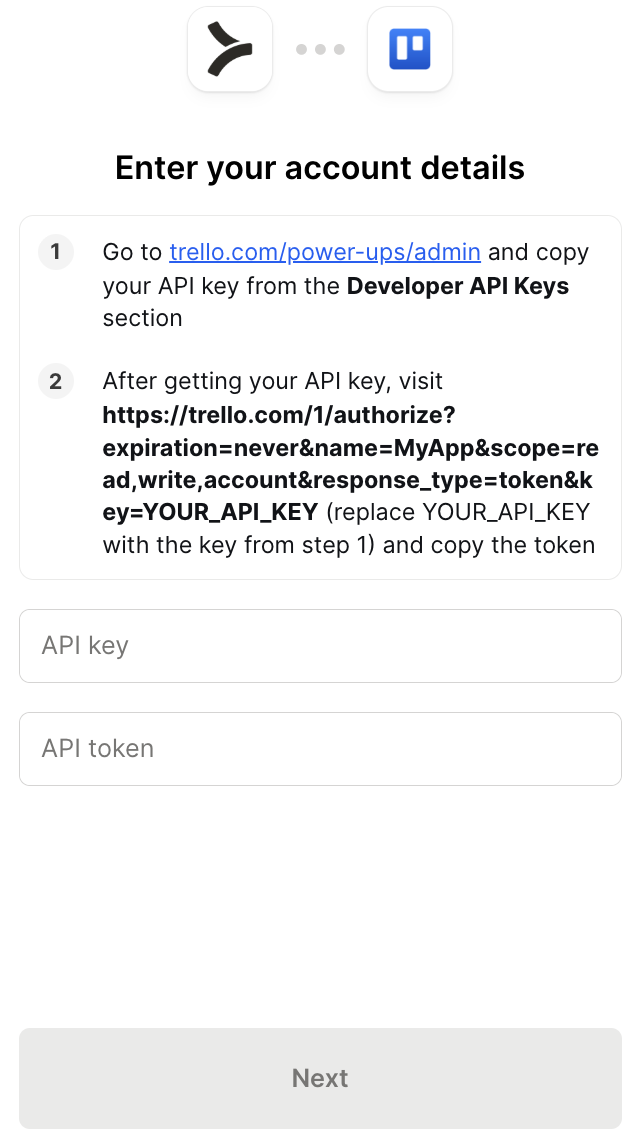
The first time you invoke a Trello tool, a Magic Link will appear to complete connector authentication.
{{this-blog-only-cta}}
Trello MCP FAQ
In case you have more questions on setting up and using the Trello MCP in Cursor, we've addressed several more commonly-asked questions below.
What can you do once the Trello MCP is connected to Cursor?
With Trello connected, Cursor can:
- Inspect card field schemas while writing data models: fetch real card objects from a live board to see the actual field names, nested member objects, and due date formats before defining the TypeScript interfaces your integration depends on
- Fetch list IDs while coding card creation automation: query a board's actual list structure to get the IDs your card creation logic needs to target before writing it, rather than hardcoding IDs that may differ across workspaces
- Pull label definitions while implementing triage logic: retrieve a board's full label set with IDs and color values before writing the label-assignment code your triage automation depends on, so the identifiers match the board's actual configuration
- Check member permission structures while building access control features: query board member records with role and permission fields to understand the values your access control logic needs to evaluate before writing the conditional checks
- Retrieve checklist item formats while writing task tracking integrations: fetch cards that include checklists to see the nested item structure and completion state format your sync or reporting logic needs to handle before coding against it
- Look up webhook event shapes while implementing trigger-based automation: pull real board activity to understand the event field structure your trigger handler needs to parse before writing the routing and filtering logic
Why use Merge Agent Handler vs. a self-hosted Trello MCP server?
You can build a self-hosted MCP server on top of Trello's REST API. Atlassian's documentation is thorough, OAuth is well-supported, and for a single workspace the setup is manageable.
The problem is workspace and user scale.
Trello OAuth tokens are scoped to individual user accounts. If your integration needs to read or write cards across multiple workspaces or on behalf of multiple users, each requires a separate authorization flow, a separate token pair, and its own refresh cycle.
A self-hosted server handles none of that; you still own the credential storage and token refresh logic for every connected user.
Atlassian also doesn't offer an official Trello MCP server, so there's no supported path beyond Merge or a community build,which vary in maintenance quality and have no audit logging or enterprise support.
Merge Agent Handler handles multi-user OAuth across Trello workspaces and manages token refresh centrally.
You can control exactly which Trello operations each agent is allowed to call: an agent that creates cards, for example, can get access to board list and card creation tools, but never reaches board deletion or member removal unless those are explicitly included. Every call is also logged.
For teams running agents against shared workspaces, that access control layer is worth having.
Why connect Trello to Cursor?
Trello is where task state lives for teams that prefer a board-based workflow. For developers building integrations that create cards from upstream events, update card status based on external triggers, or sync board state with other systems, the board structure and field schemas need to be understood before the code can be correct.
With the Trello MCP connected, Cursor can query board structure, retrieve card schemas, and surface list and label configurations inline while you write the code that depends on them.
Jon Gitlin

.png)
.png)

Connect Cursor to thousands of tools with Merge Agent Handler
Use Merge Agent Handler’s 150+ connectors (including Trello) to power reliable, secure, and powerful agents.


But Merge isn’t just a Unified
API product. Merge is an integration platform to also manage customer integrations. gradient text
But Merge isn’t just a Unified
API product. Merge is an integration platform to also manage customer integrations. gradient text
But Merge isn’t just a Unified
API product. Merge is an integration platform to also manage customer integrations. gradient text
But Merge isn’t just a Unified
API product. Merge is an integration platform to also manage customer integrations. gradient text