

.png)
.png)
How Merge uses Agent Handler’s Ahrefs connector to automate SEO and AEO research



Jon Gitlin
As usage patterns for LLMs and search continue to change, the opportunities for gaining visibility and traffic will shift.
Identifying new opportunities and acting on them in time requires an easy and robust way to execute keyword and prompt research.
That’s exactly what Merge Agent Handler’s Ahrefs connector supports!
We’ll help you leverage the connector by breaking down how our team uses it in Claude Code and the steps for getting started.
How we use our Ahrefs connector
Our Ahrefs connector offers 30+ tools that cover a wide range of tasks in the platform, from uncovering the search volume of specific queries to identifying keyword gaps with certain competitors to finding broken pages.
In short, the connector can basically do any task you already perform in Ahrefs.

Here’s the highest impact use cases for our team:
Prioritizing the most impactful keywords
Each of our products (Agent Handler, Unified, Gateway) has countless non-branded search opportunities.
Instead of going through a never-ending list and prioritizing based on search volume, we use Claude to help us work smarter.
We ask Claude to score each content opportunity by traffic potential, keyword difficulty, and relevance to a certain product.
Based on the scores, we then ask Claude to create tiered opportunities.

Executing competitive research
Each of our products also has a unique set of competitors.
Keeping tabs on the content they each create and where they outperform us isn’t sustainable to do manually.
To help us automate this with our Ahrefs MCP, we set up a cron-based remote agent in Claude Code that analyzes the top keyword gaps across our competitors weekly and reports on the top findings.
This lets us not only track net-new gaps but also see whether we’re closing them over time.

Identifying content refreshes
Content naturally decays in performance over time, whether that’s traffic and/or LLM visibility.
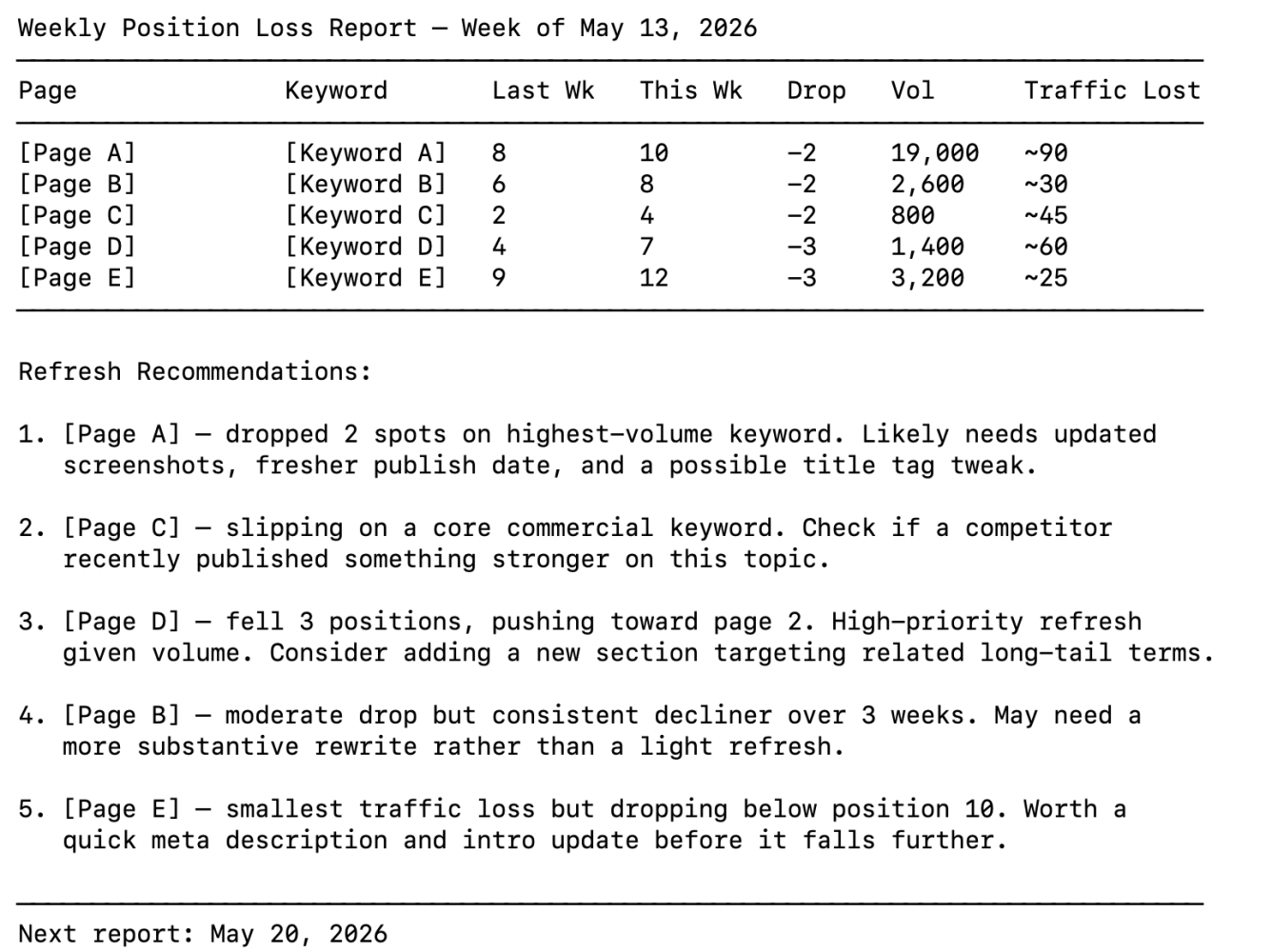
To help us spot the biggest drops in performance and the most lucrative refresh opportunities, we run another remote agent in Claude Code every week.
It shows us the biggest traffic and position drops week over week, and it gives us specific recommendations for improving each page.
How to start using our Ahrefs connector
It was incredibly easy for our team to set up the Ahrefs connector in Claude Code, and the process won’t be any different on your end.
Here’s all you’ll need to do:
1. Install the Merge CLI by running pipx install merge-api.

2. Run merge login to authenticate your session and link the CLI to your Merge Agent Handler account.
3. Add the Agent Handler MCP server to Claude Code by running merge setup claude-code.
4. Open Claude Code and run /mcp to confirm agent-handler appears with a connected status.

5. Select agent-handler from the MCP list. A browser window will open where you can choose Ahrefs and complete the authentication flow.

Once authentication is successful, Merge stores and manages your credentials going forward.
6. You can now open a new Claude Code session and start using Ahrefs data within your terminal.
Start testing Agent Handler for free by creating your own account!
Jon Gitlin

.png)
.png)


But Merge isn’t just a Unified
API product. Merge is an integration platform to also manage customer integrations. gradient text
But Merge isn’t just a Unified
API product. Merge is an integration platform to also manage customer integrations. gradient text
But Merge isn’t just a Unified
API product. Merge is an integration platform to also manage customer integrations. gradient text
But Merge isn’t just a Unified
API product. Merge is an integration platform to also manage customer integrations. gradient text