

Table of contents
Just for you
No items found.
How to connect Jira MCP to Cursor (4 steps)



Jon Gitlin
Building against Jira's API requires knowing the exact field names a response returns, which custom field IDs your org uses, and which transition names are valid for a given issue type.
That information sits in Jira's admin UI, not in the editor. So getting it means breaking context: opening a browser, navigating to Jira, running a manual API call, copying the output, and switching back.
To help your developers query Jira data without leaving Cursor, we'll show you how to connect Jira with Merge Agent Handler's Jira MCP server.
How it works
Merge Agent Handler connects Cursor to Jira's API through the Merge CLI.
Install the CLI, authenticate once, and run a single setup command from the project root.
That command writes a ## Merge CLI section to the project's .cursorrules file, which tells Cursor's agent when to call merge search-tools and merge execute-tool to reach Jira.
Once connected, Merge manages Atlassian OAuth credentials so you never store tokens locally or configure auth state in the project.
Here's the registration command:
Related: How to use a Jira MCP in Claude Code
Prerequisites
Before getting started, you'll need the following:
- A Merge Agent Handler account
- Cursor installed
- pipx installed (run
pipx --versionto confirm, or install viapip install pipx) - A Jira account with access to the projects you want to connect
If you want to connect Merge Agent Handler's Jira MCP with internal or customer-facing agentic products, you can follow the steps in our docs.
1. Install the Merge CLI
Use pipx to install the Merge CLI and confirm it's available: pipx install merge-api
Confirm the installation succeeded: merge --version
2. Log in to Merge
Authenticate the CLI with your Merge Agent Handler account: merge login
This links the CLI to your account so it can make authorized requests to Jira on your behalf.
3. Connect the CLI to Cursor
Run the following from the root of the project where you want to use Merge tools:
This writes a ## Merge CLI section to .cursorrules so Cursor knows to use the CLI for third-party services. The command is idempotent, safe to re-run if you need to reset.
Related: A guide to connecting a Jira MCP with Codex
4. Authenticate Jira
Open a Cursor chat in your project. A good first query is something you'd actually need before writing integration code: inspecting the field schema for a Jira issue type to see exactly what your type definitions need to model.
For example, try this command: "List all the fields returned on a Story issue type in my default project, including any custom fields and their data types, so I can write accurate TypeScript interfaces before I start coding the integration."
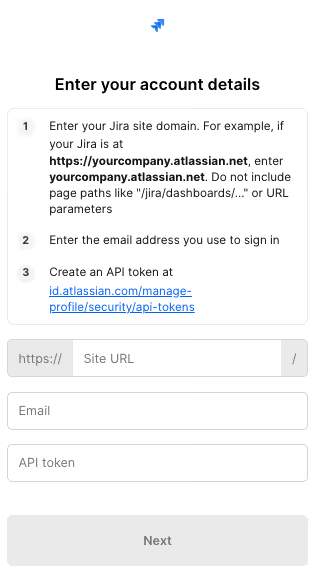
The first time you invoke a Jira tool, a Magic Link will appear to complete connector authentication.
{{this-blog-only-cta}}
Jira MCP FAQ
In case you have more questions on setting up and using the Jira MCP in Cursor, we've addressed several more commonly-asked questions below.
What can you do once the Jira MCP is connected to Cursor?
With Jira connected, Cursor can:
- Look up custom field IDs and their accepted values: retrieve your org's custom field definitions before writing API calls that reference them, so you're not guessing at IDs or hardcoding values that will fail at runtime
- Inspect the full issue JSON schema: fetch the complete field set for a given issue type to write accurate type definitions and data models without making manual API calls outside the editor
- Fetch valid transition names and IDs: retrieve the full list of available transitions for an issue type before building a state machine, so the transition IDs in your code match what Jira's API actually accepts
- Check project permission schemes: pull the permission configuration for a project to understand what access levels exist before implementing access-control logic in your integration
- Retrieve field configuration schemes: see which fields are required, optional, or hidden on specific issue types to ensure your issue creation and update code satisfies the project's field rules
Why use Merge Agent Handler vs. a self-hosted Jira MCP server?
Running a self-hosted Jira MCP server is feasible for a single developer. You generate an Atlassian API token, define the tool schemas you need, and point your MCP client at your local server. That works in isolation.
It stops working cleanly at team scale.
Each developer needs their own Atlassian credentials configured separately, because Jira API tokens are tied to individual accounts. There's no shared place to define which Jira projects or operations an agent is permitted to access, which means access decisions happen implicitly through whichever credentials each developer happens to use.
Merge Agent Handler moves authentication and access scoping out of each developer's local environment and into a centralized layer.
You define which Jira operations each agent is allowed to perform, and Merge enforces those boundaries. Every tool call is also logged, so you have a full audit trail of what an agent queried or modified in Jira.
For teams where Jira contains sensitive project data, unreleased roadmap details, or proprietary specification work, that combination of scoped access and observability makes a production deployment defensible rather than ad hoc.
Why connect Jira to Cursor?
Writing a correct Jira integration requires understanding Jira's data model at the field level.
What does an issue object actually return? Which custom fields has your organization configured, and what are their IDs? What transition names are valid for the projects your code will interact with? These are questions that have to be answered before the code can be written correctly, and the answers live in Jira, not in any static documentation.
With the Jira MCP connected, Cursor can answer those questions inline.
Before writing a TypeScript interface for an issue response, you can ask Cursor to fetch the actual schema. Before coding a state machine, you can retrieve the transition list from Jira directly and use those IDs in your code rather than guessing. And before building a webhook payload mapper, you can pull a real event to see exactly what fields it includes. The reference data and the code that depends on it are in the same session.
That's a meaningful shift from the current workflow, where getting that data means opening a browser, navigating Jira's admin UI, making a test API call in a separate tool, and copying the result back into the editor. Connecting Jira to Cursor doesn't change what the developer needs to know: it changes where they have to go to get it.
Jon Gitlin
.png)
.png)


Connect Cursor to thousands of tools with Merge Agent Handler
Connect Cursor to our Jira MCP in minutes (along with 150+ other connectors) to give your agents access to message structures, thread layouts, label IDs, OAuth scopes, and more.


But Merge isn’t just a Unified
API product. Merge is an integration platform to also manage customer integrations. gradient text
But Merge isn’t just a Unified
API product. Merge is an integration platform to also manage customer integrations. gradient text
But Merge isn’t just a Unified
API product. Merge is an integration platform to also manage customer integrations. gradient text
But Merge isn’t just a Unified
API product. Merge is an integration platform to also manage customer integrations. gradient text