

Table of contents
.avif)
How Merge activates institutional knowledge with Agent Handler’s Notion connector



Jon Gitlin
Our institutional knowledge lives in Notion, whether it’s architecture decision records, onboarding playbooks, or incident postmortems.
That knowledge is genuinely useful, but only at the moment a decision is being made or a problem is being solved. And most of the time, this context sits in Notion while the actual work happens elsewhere.
To help us use information in Notion within our existing apps, agents, and workflows, we leverage Merge Agent Handler's Notion connector!
We’ll break down some of our top use cases, as well as how you can deploy it internally.
How we use our Notion connector
Our Notion connector offers 15+ tools that cover a wide range of operations in the platform, such as searching pages and databases and creating and updating content.

Here are the highest impact use cases for our team:
Getting policy-aware answers without leaving the terminal or Slack
When building something or making a technical decision, we need to know whether there's a prior decision, constraint, or approved approach already documented.
Searching Notion manually would break our team’s focus, waste their time combing through many unrelated pages, or, worse, motivate them to make poor judgment calls.
With the connector, any Mergie can ask Claude questions like “What's the discount approval process on an enterprise deal?”, “Do we need a DPA for a vendor that only processes PII data?”, or “What's the process for getting a new code dependency reviewed?”
Claude then retrieves the pages most relevant to the question (and what the user has permission to access) and synthesizes an answer grounded in what's documented.
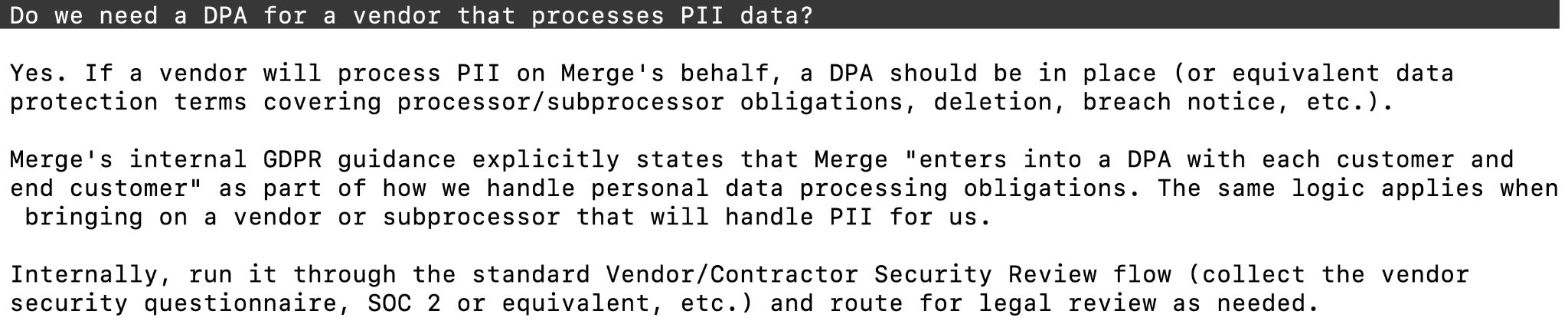
This use case also extends to a Jarvis agent we've built in Slack.
Mergies can DM it from Slack’s Agents tab, or ask questions publicly in #proj-jarvis-ai.
It’s designed to answer questions on what’s approved, how to perform specific tasks safely with one of our AI tools, and even writes back to Notion.

Pulling runbook and playbook context during active work
When a support ticket arrives or an incident is active, the relevant playbook or runbook exists in Notion. Finding it mid-incident or mid-ticket costs time and attention we don't have to spare in those moments.
Fortunately, the connector lets our customer-facing team retrieve the relevant runbook steps and prior context in Claude Code within seconds.
For example, if one of our CSMs gets an urgent ticket like: “Seeing repeated 429s from the provider and the dashboard shows ‘retrying’ for 30+ minutes.”
The CSM can open Claude Code and ask: “Find our runbook for ‘initial sync stuck / repeated 429s’ and summarize the exact steps and what info I should collect before escalating.”
In seconds, Claude pulls the relevant runbook in Notion, and then returns a checklist of tasks and a templated response to immediately send the customer.
Keeping the knowledge base current as a byproduct of work
Our Notion pages can easily and quickly fall out of date; updating them requires a deliberate context switch in the middle of real work.
To help our team make updates in Notion while their insights are fresh, they can turn “in-the-moment” work outputs (like a resolved support ticket or a decision in Slack) into fast, low-friction updates in the relevant Notion pages via Claude Code.
For instance, if one of our customer success managers resolves a tricky issue in Zendesk and realizes the playbook in Notion is missing the key workaround they used, they can ask Claude Code to add the fix to the playbook. This helps our CSMs address the issue quickly (with the new workaround) if it ever recurs.

How to start using our Notion connector
To set up the connector for your team, just follow these steps:
1. Open Settings and click on SCIM in the Agent Handler dashboard. You can then configure default access for newly-provisioned employees, and generate a SCIM token.
2. In your IDP (e.g., Okta), assign employees to the Agent Handler SCIM application.
3. Push the Groups you'll use for tool access, such as your existing "Sales" group.
4. Under SCIM in Agent Handler, you should see Group mappings. Configure each group's Dashboard role (admin or member) and Tool access assignments (here's where you can make sure that the Notion connector and the relevant Notion tools are made available).
5. Ask employees to connect their MCP-compatible clients (e.g., Claude Code) by pasting this into it: https://ah-api.merge.dev/mcp
6. On first connection, a Magic Link for Notion will appear to complete the authentication flow.

7. Once auth is successful, the employee will see a consent screen showing the tools their Group has been granted. At the same time, the AI assistant will get a scoped token.
Start giving your employees secure access to Notion by creating a free Agent Handler account!
Jon Gitlin
.png)
.png)


But Merge isn’t just a Unified
API product. Merge is an integration platform to also manage customer integrations. gradient text
But Merge isn’t just a Unified
API product. Merge is an integration platform to also manage customer integrations. gradient text
But Merge isn’t just a Unified
API product. Merge is an integration platform to also manage customer integrations. gradient text
But Merge isn’t just a Unified
API product. Merge is an integration platform to also manage customer integrations. gradient text