

Table of contents

.png)
How to connect Trello with Claude Code (4 steps)



Jon Gitlin
Agents that need to create cards, move items, or surface overdue tasks in Trello have to navigate OAuth, manage board-specific permissions, and maintain credentials for every connected workspace.
To help your developers read board state, manage cards, and automate task workflows more easily from their terminal, we'll show you how to connect Trello with Merge Agent Handler's Trello MCP server.
How it works
Merge Agent Handler connects Claude Code to the Trello API through a single CLI setup.
You install the Merge CLI, authenticate once with your Merge Agent Handler account, and register the connection with one command.
Merge handles Trello's OAuth token storage and refresh, so you never manage API keys or worry about token expiration across workspaces.
Here's the command that registers the connection:
Related: The steps for integrating a Trello MCP with Codex
Prerequisites
Before getting started, you'll need the following:
- A Merge Agent Handler account
- Claude Code installed (run
claude --versionto confirm) - pipx installed (run
pipx --versionto confirm, or install viapip install pipx) - A Trello account with access to the boards you want to connect
If you want to connect Merge Agent Handler's Trello MCP with internal or customer-facing agentic products, you can follow the steps in our docs.
1. Install the Merge CLI
Install with pipx: pipx install merge-api

Then confirm the installation: merge --version
Related: How to use a Trello MCP in Cursor
2. Configure the CLI and log in
Run merge login to connect the CLI to your Merge account: merge login
This starts an authenticated session so the CLI can make requests on your behalf.
3. Add Agent Handler to Claude Code
Register the Agent Handler MCP server with Claude Code:
Or manually:
Open Claude Code and run: /mcp
agent-handler should appear under Local MCPs with a connected status.

4. Authenticate Trello
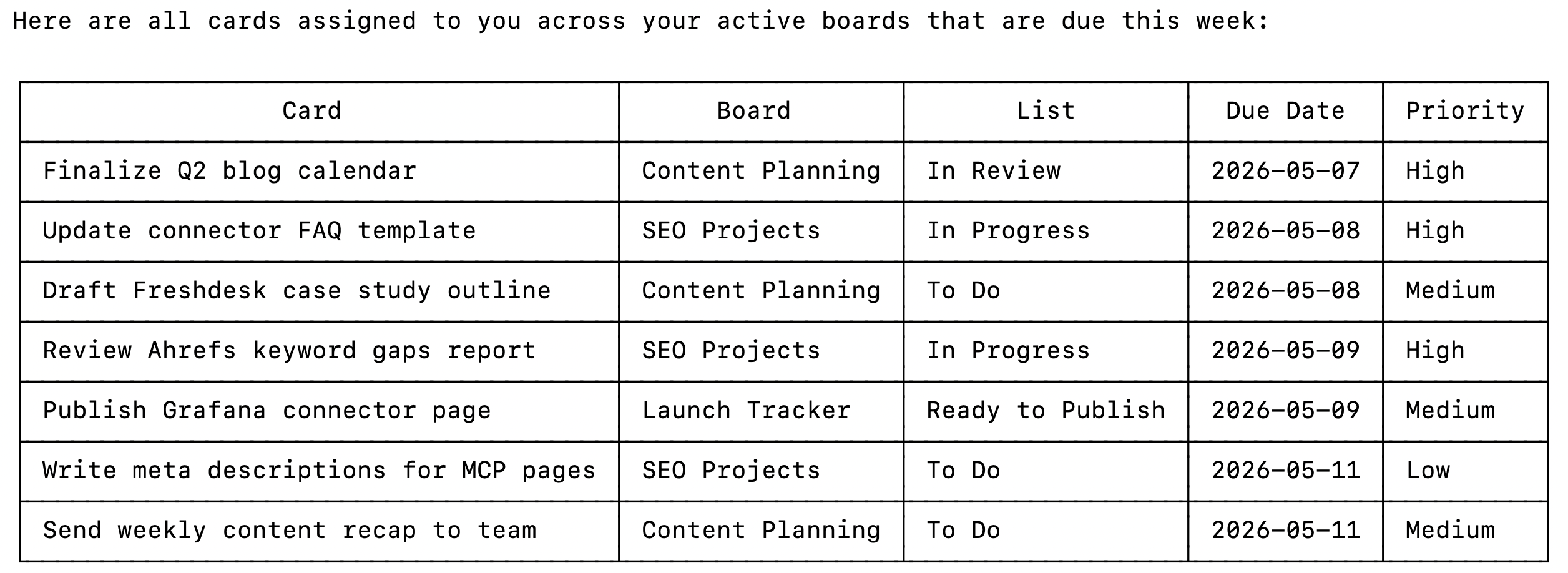
Open Claude Code and test the connection with a prompt like: "Show me all cards assigned to me across my active boards that are due this week."
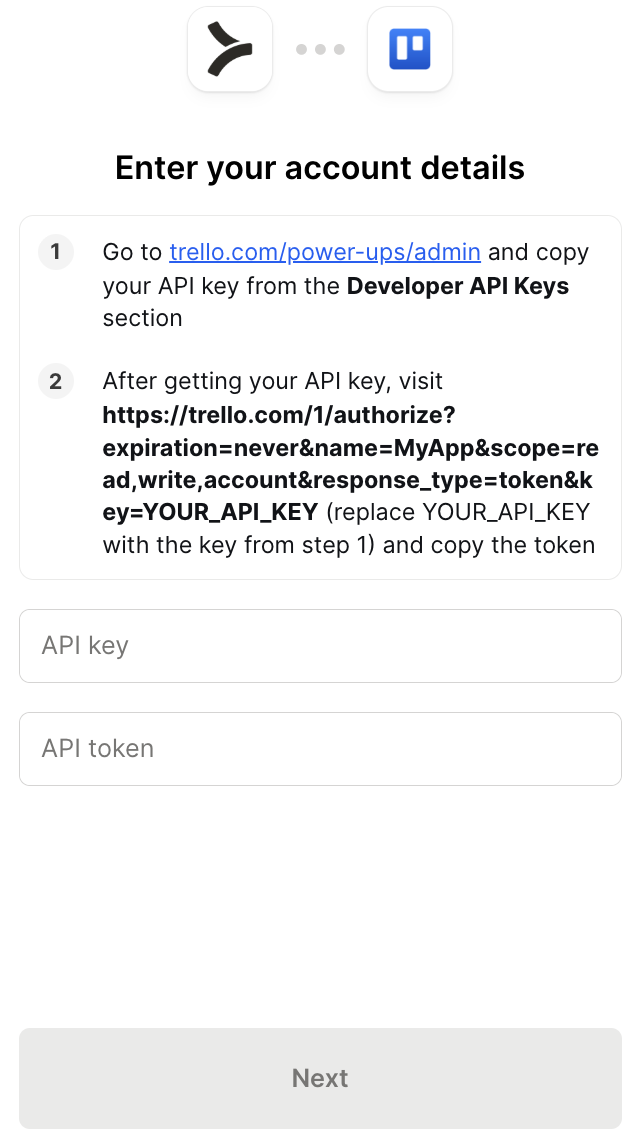
A Magic Link will appear on first use to complete connector authentication.
Once authenticated, you should see an output like the following:
{{this-blog-only-cta}}
Trello MCP FAQ
In case you have more questions on setting up and using the Trello MCP in Claude Code, we've addressed several more commonly-asked questions below.
What can you do once the Trello MCP is connected to Claude Code?
With Trello connected, Claude Code can:
- List boards and cards: retrieve all boards a user has access to, including their lists and cards, with filters for due date, label, or assigned member
- Create and update cards: add new cards to any list with a title, description, due date, and label, or update existing card fields when triggered by an external event
- Move cards between lists: transition cards from one stage to another, enabling agents to automate status updates when conditions are met in another system
- Add comments and attachments: post comments on cards and attach files or URLs, useful for agents that need to log activity or link related resources to a task
- Manage checklists: create checklists, add items, and mark items complete, allowing agents to track multi-step task completion within a single card
- Search across boards: run keyword searches across cards, members, and boards to locate relevant tasks without knowing their exact location
Why use Merge Agent Handler vs. a self-hosted Trello MCP server?
You can build directly on Trello's REST API. Atlassian's documentation is thorough, OAuth is well-supported, and for a single workspace with one user the setup is manageable. Several community MCP servers have already been built on top of the Trello API if you want a faster starting point.
The problem is workspace and user scale. Trello OAuth tokens are scoped to individual user accounts. If your agent needs to read or write cards across multiple workspaces or on behalf of multiple users, each requires a separate authorization flow, a separate token pair, and its own refresh cycle. A community MCP server handles none of that for you; you still own the credential storage and the token refresh logic.
Atlassian doesn't offer an official Trello MCP server, so there's no supported path beyond Merge or a community build. Community implementations vary in maintenance quality and have no audit logging, DLP controls, or enterprise support.
Merge Agent Handler handles multi-user OAuth across Trello workspaces and manages token refresh centrally. You can also scope which Trello tools a given agent can access: a card creation agent, for example, ca use create_card and get_board_lists but not delete_board or remove_board_member. And every tool call is logged with the timestamp, tool name, and inputs.
Why connect Trello to Claude Code?
Trello is where task state lives for teams that prefer a visual, board-based workflow. Developers who need agents to interact with that state—creating cards from upstream events, updating card status based on external triggers, or surfacing overdue items across boards—currently have to wire up a Trello integration from scratch each time a new workflow needs it.
With the Trello MCP connected, Claude Code can query board state, manage cards, and update task metadata without leaving the terminal.
This matters most when Trello is one node in a larger automated workflow: a card gets created when a new support ticket is filed, a checklist item is checked when a deployment succeeds, or a weekly summary is generated from cards that moved to Done in the last seven days.
Jon Gitlin
.png)

.png)

Connect Claude Code to thousands of tools with Merge Agent Handler
Use Merge Agent Handler’s 150+ connectors (including Trello) to power reliable, secure, and powerful agents.


But Merge isn’t just a Unified
API product. Merge is an integration platform to also manage customer integrations. gradient text
But Merge isn’t just a Unified
API product. Merge is an integration platform to also manage customer integrations. gradient text
But Merge isn’t just a Unified
API product. Merge is an integration platform to also manage customer integrations. gradient text
But Merge isn’t just a Unified
API product. Merge is an integration platform to also manage customer integrations. gradient text