

Table of contents
.avif)
.avif)
How to connect to the GitHub MCP with Claude Code (4 steps)



Jon Gitlin
By using Merge Agent Handler's GitHub connector with Claude Code, your agents can create and manage issues, search across repositories, add comments, update workflows and more directly from the terminal.
This guide walks through the set up.
How it works
Merge Agent Handler acts as the layer between Claude Code and GitHub's API. You install the Merge CLI, log in once, and register the connection with a single terminal command. Agent Handler stores your GitHub OAuth credentials and handles token refresh so none of that lives in your local environment.
Here's the command that registers the connection:
Related: A guide to integrating a GitHub MCP with Codex
Prerequisites
Before getting started, you'll need the following:
- A Merge Agent Handler account
- Claude Code installed (run
claude --versionto confirm) - pipx installed (run
pipx --versionto confirm, or install viapip install pipx) - A GitHub account with appropriate repository permissions
If you want to connect Merge Agent Handler's GitHub MCP with internal or customer-facing agentic products, you can follow the steps in our docs.
1. Install the Merge CLI
Install with pipx: pipx install merge-api

Confirm the install completed: merge --version
Related: How to use a GitHub MCP in Cursor
2. Configure the CLI and log in
Start with the interactive configuration: merge configure
This prompts you for your Merge API key and sets your default workspace preferences, linking the CLI to your Merge Agent Handler account.
Then authenticate: merge login
Once you log in, the CLI can make authorized API requests on your behalf.
3. Add Agent Handler to Claude Code
To add Agent Handler to Claude Code, run:
Or register manually with:
Verify the connection registered. Open Claude Code and run: /mcp
agent-handler should appear under Local MCPs with a connected status.

Related: How to use the Google Drive MCP in Claude Code
4. Authenticate GitHub
Open a Claude Code session and test it with: "Search open issues in the backend repo labeled 'bug' and assign them to me."
The first time you use a GitHub tool, a Magic Link will appear to authenticate the connector.

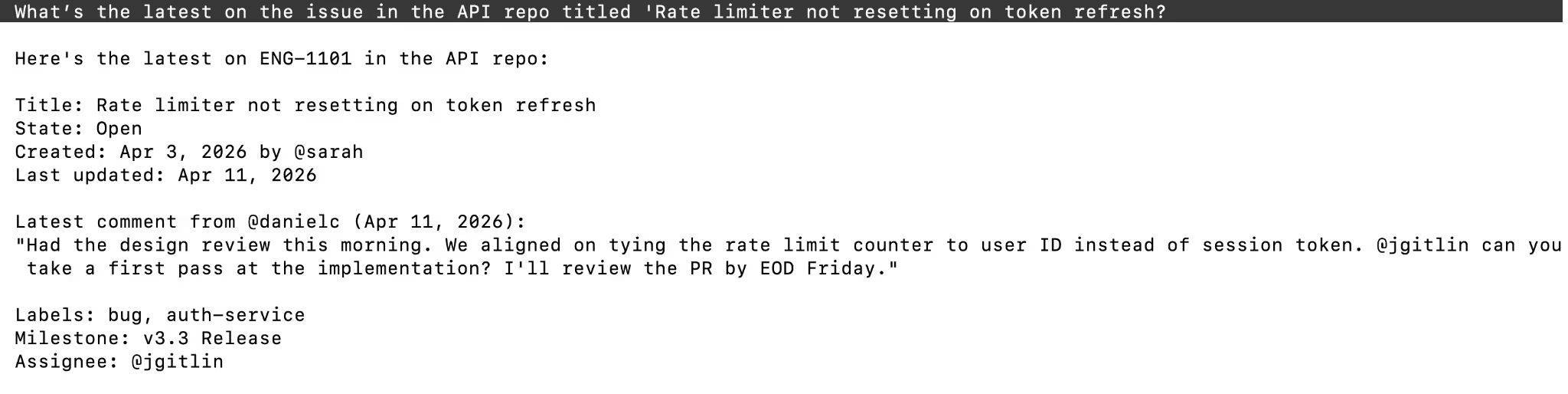
You should then see an output like the following:
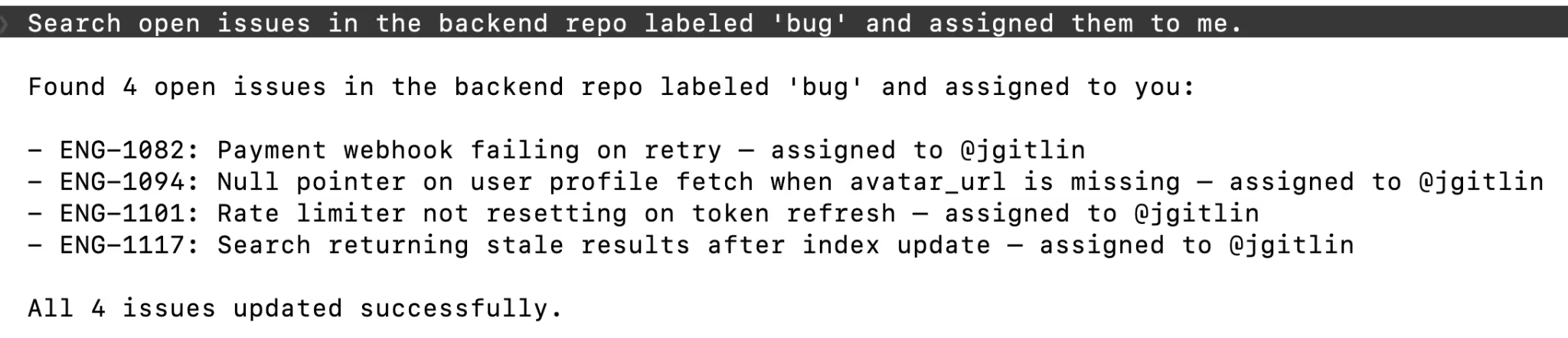
Or get updates from GitHub: What’s the latest on the issue in the API repo titled 'Rate limiter not resetting on token refresh?"
{{this-blog-only-cta}}
GitHub MCP FAQ
In case you have more questions about connecting GitHub to Claude Code or using it in the terminal, we've answered a few more below.
What can agents do with a GitHub MCP server?
- Risk and policy enforcement: Automatically require the right approvals/checks for sensitive changes (auth/billing/infra), and enforce PR hygiene (linked ticket, changelog, labels, signed commits, etc.)
- CI/build failure triage: Summarize failures, identify likely culprit commits/owners, and route fixes fast with smart alerts instead of noisy pings
- Release readiness and release notes automation: Roll up merged PRs into ship-ready checklists and customer-friendly changelog/release note drafts, then publish updates to Slack/Notion
- Issue SLA and escalation management: Track aging/stale issues (bugs, security, escalations), auto-retriage, and escalate based on priority/time-in-state with clear owner asks
- Incident response coordination: When severity spikes, auto-create the incident workflow (channel, roles, timeline), and keep status updates synced from GitHub activity
Why use Merge Agent Handler's GitHub MCP server?
Merge Agent Handler's GitHub connector includes enterprise-grade security controls, data loss prevention, and real-time observability over every tool call. You can scope exactly which repositories your agent can access and set custom guardrails to control what it can read or write.
Why connect GitHub MCP to Claude Code?
GitHub is where engineering work is tracked, and Claude Code is where engineers already are. Connecting the two means your agents can surface relevant issues, log new bugs, update existing tickets as part of your coding workflows, and more without switching tabs or losing context.
Jon Gitlin
.png)
.png)

Connect your agents to thousands of tools in minutes
Use Merge Agent Handler’s 150+ connectors (including Google Drive) to power reliable, secure, and powerful agents.


But Merge isn’t just a Unified
API product. Merge is an integration platform to also manage customer integrations. gradient text
But Merge isn’t just a Unified
API product. Merge is an integration platform to also manage customer integrations. gradient text
But Merge isn’t just a Unified
API product. Merge is an integration platform to also manage customer integrations. gradient text
But Merge isn’t just a Unified
API product. Merge is an integration platform to also manage customer integrations. gradient text