

Table of contents
.png)

Employee agents: overview, use cases, and implementation steps



Jon Gitlin
As you help employees leverage AI, you'll face a fundamental tension: giving agents enough access to be useful while keeping that access narrow enough to be safe.
Employees need agents that can not only read their applications but also act in them. But broad agent access introduces real risk. Misconfigured permissions, for example, can expose sensitive business and user data.
We'll walk through how you can strike the right balance. But first, let's cover how employee agents work and how different team members can use them.
What is an employee agent?
It’s a type of agent that enables your employees to automate specific tasks or even end-to-end workflows.
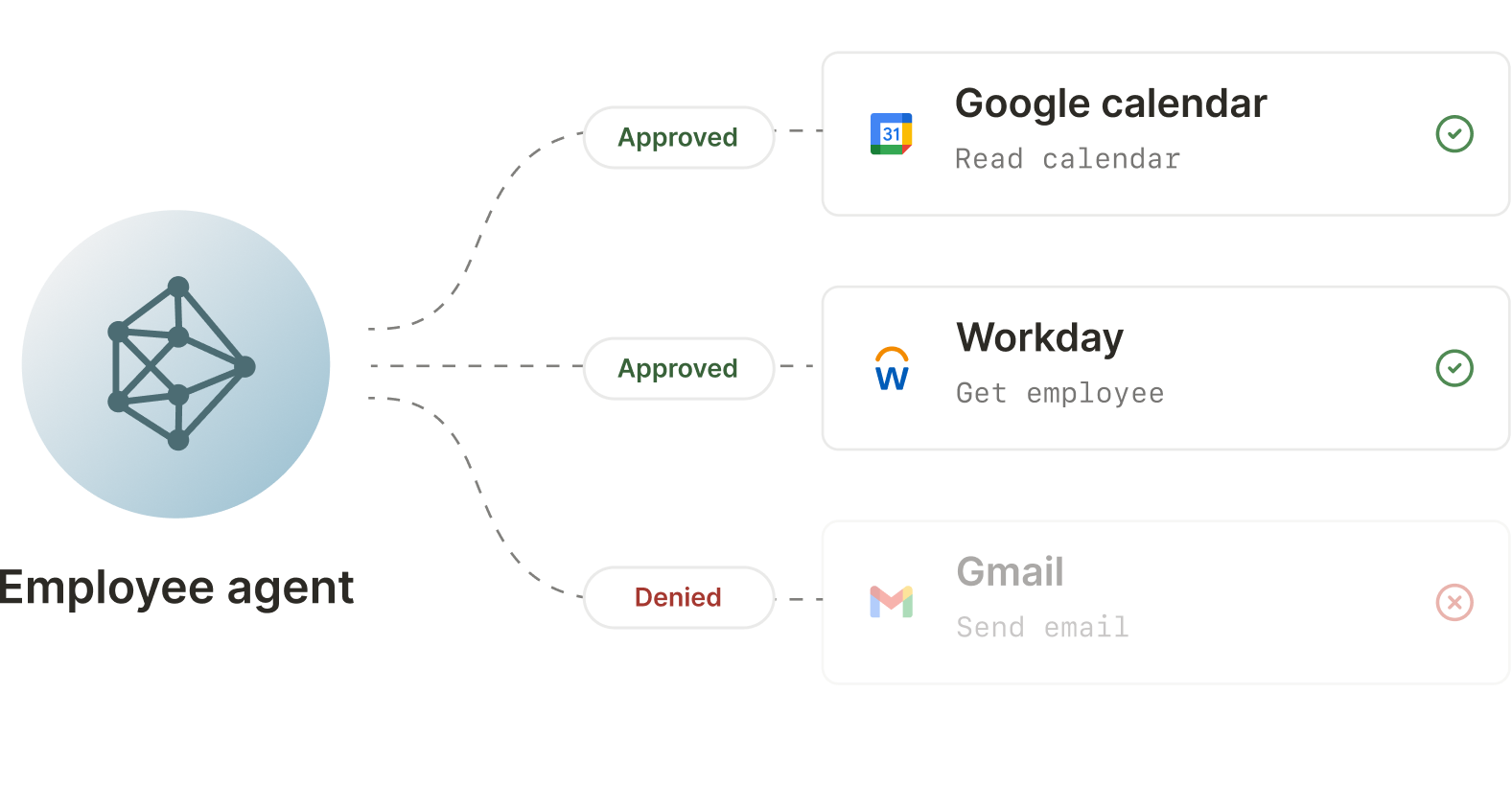
Unlike other types of agents, such as those in-product, employee agents operate across the systems your team already works in. This means their permissions need to map closely to the roles and responsibilities of the people using them.
Related: How to implement SCIM for AI
Common ways to use employee agents
Here are just a few ways your teams can start using employee agents.
Keep your CRM up to date without chasing reps
To help your sales reps update opportunity records on time, you can connect your agent to Gong, Salesforce, and Slack.
You can then build the following agentic workflow:

1. Once a call with a prospect ends, your agent fetches the call transcript.
2. Using the call transcript, your agent decides what fields need to be updated in the opportunity and makes those updates.
3. Your agent notifies the sales rep that the opportunity has been updated and even provides context on what fields were updated and why.
Note: This workflow handles sensitive customer and revenue data. You’ll need to ensure that the agent’s actions are tied to a specific employee identity, permissions are least-privilege, sensitive fields can be blocked/redacted, and every read/write is logged for auditability.
Book internal meetings with ease
Your employees likely spend more time than they want on scheduling meetings with colleagues.
You can build an employee agent that automates this process by connecting your agent to Gmail and Slack.
Here’s how it can work:

1. An employee can ask your agent in Slack to schedule a particular meeting. They’ll need to include details like the individuals who need to be invited (including their emails), the meeting name, and the appropriate dates and times for scheduling it.
2. Your agent finds a time that works for everyone and schedules the meeting on the employees’ behalf.
3. Your agent notifies the employee within the same Slack thread that the meeting is scheduled. This notification can include a link to the calendar invite and details to join the meeting.
Note: Scheduling touches private communications and calendars. Confirm the agent only accesses the requesting employee’s account, limits actions to creating invites for approved attendees, avoids leaking attendee emails or meeting details in Slack, and logs every send/invite for auditability.
Automate expense submissions
Expense submissions often require chasing receipts, categorizing spend, and copying details into finance systems.
You can build an employee agent that speeds this up and frees up your team by connecting your agent to Gmail, Slack, and Expensify, and implementing the following workflow:

1. An employee asks in Slack, “File these expenses from last week,” or forwards receipts to a designated inbox.
2. The agent pulls the receipt details, extracts merchant/amount/date, and drafts categorized expense entries with the right memo and project/customer tags. The agent then submits (or queues) the report.
3. The employee in Slack gets notified that the submission is successful. They’ll also get a summary of what was submitted and potentially get alerted if there’s a potential issue (e.g., a missing receipt).
Note: Expenses include financial and sometimes personal data. You’ll need to make sure the agent only accesses the requesting employee’s receipts, enforces policy checks before submission, redacts sensitive details in Slack, and logs every draft/submission and any edits for auditability.
Related: A guide to using AI audit logs
How to implement employee agents
To build enterprise-grade employee agents, you’ll need to implement:
- SCIM-based provisioning to automatically onboard and offboard employees and sync their roles and group memberships as your team changes, without manual admin work
- Identity-bound authentication so every tool connection is tied to an individual employee, least-privilege access controls (so employees and agents only get the tools and scopes they actually need), and central policy enforcement (so sensitive data can be blocked or redacted before it ever reaches a third-party system)
- User-level audit logs so IT and security teams can review exactly what happened—who initiated an action, what data was accessed, what was changed, and when—for compliance, debugging, and incident response
You can build all of this in-house but it’s typically a multi-quarter engineering effort that requires ongoing maintenance as your tool stack evolves and new security requirements emerge.
Stitching together identity, auth, permissions, and logging across many SaaS systems is also easy to get wrong, and small gaps (e.g., over-broad scopes) can create outsized security and compliance risk.
To help your engineers focus on other core projects and build secure agentic integrations, you can use Merge for Workforce instead.
Here’s how it works:
1. Connect your identity provider (SCIM). Sync your employee directory from Okta, Azure AD, or any SCIM-compatible IdP so employees are automatically provisioned (and deprovisioned) based on existing roles and group membership.
2. Define access and security policies centrally. Configure role-based permissions (which systems and tools each team can use), plus policy guardrails that can block or redact sensitive data before it reaches downstream systems.
For example, here’s how you can give your sales reps read-only access for Salesforce (the video also shows how to complete step 1):
3. Let employees authenticate their tools with a simple, user-scoped flow. Employees connect their AI agents using a guided authentication experience, receiving scoped access tied to their individual identity—no shared credentials.
4. Run agentic workflows across the connected applications. Employee agents can now safely take actions across the systems your teams already use (e.g., Salesforce, Slack, Jira, GitHub, Workday), without you building and maintaining bespoke integrations.
5. Get user-level audit logging for every tool call. Every action is logged with the employee identity, the tool used, and the result, allowing your IT and security teams to have the visibility needed for compliance, debugging, and incident response.
{{this-blog-only-cta}}
Jon Gitlin
.png)

Ready to support enterprise-grade employee agents?
Start connecting your agents with any of your employees’ applications today by creating a free Merge for Workforce account.


But Merge isn’t just a Unified
API product. Merge is an integration platform to also manage customer integrations. gradient text
But Merge isn’t just a Unified
API product. Merge is an integration platform to also manage customer integrations. gradient text
But Merge isn’t just a Unified
API product. Merge is an integration platform to also manage customer integrations. gradient text
But Merge isn’t just a Unified
API product. Merge is an integration platform to also manage customer integrations. gradient text