

Table of contents
.png)

How to use SCIM for AI



Jon Gitlin
With AI tools now touching core business systems, SCIM has become more important than ever.
To that end, we’ll break down how SCIM can work effectively with AI. And we’ll go deeper on the benefits of a successful implementation.
But first, let’s align on how SCIM works in the context of internal AI adoption.
SCIM for AI overview
SCIM is the standard way to provision and deprovision employee access at scale. It allows the right people to get the right tools on time and for access to be revoked automatically when roles change or someone leaves.
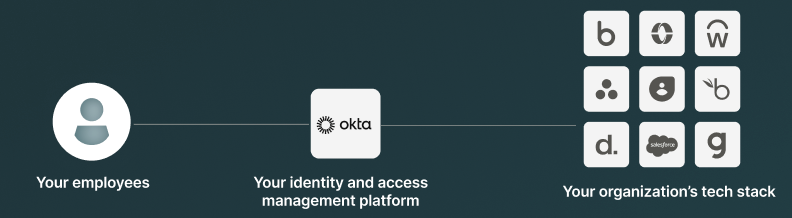
With AI introduced, SCIM’s role gets extended to employees’ AI access.
SCIM now not only determines which applications and access levels an employee receives over time but also how the AI they use can access those applications.
This requires an additional platform—an agentic integration solution like Merge for Workforce—that can access your IAM solution to directly handle provisioning and deprovisioning.
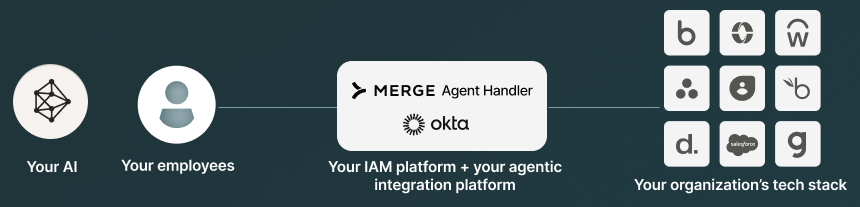
Here’s how it can work (we’ll use Merge for Workforce and Okta as our examples):
1. Under settings in Merge, you’d hover to the provisioning tab and set up your provisioning with your IAM provider. From there, you can generate your bearer token.
2. Within your IAM platform, you can add SCIM 2.0.
3. Configure an API integration by adding your API/bearer token and the base URL from Merge. You can test your API credentials and then save.
4. Toggle to Push Groups, find the particular group you want to provision access to (e.g., Sales) and hit save.
5. Go back to Merge. This group should now appear under Provisioning. You can go on to edit their access, which includes selecting the specific tools and/or Tool Packs (a pre-confifured bundle of connectors and tools) the group can use.
Related: A guide to building employee agents
Examples of using SCIM for AI
SCIM’s use cases for AI vary by department and even subteam. Here’s just a snapshot of how it can look for individual functions:
Sales
- Salesforce so AI can update opportunities and log activities
- Google Calendar or Outlook for auto-scheduling, and Gmail or Outlook email for auto-drafting and sending follow-ups
- Gong or Chorus to enable the AI to pull snippets and deal context
- Google Drive or Microsoft 365 to enable the AI to work on proposals in approved folders
Engineering
- GitHub so the AI can create, review, and submit PRs, reviews, and issues
- Jira or Linear to help the AI execute on tickets end-to-end
- Notion or Confluence so the AI can write and maintain design docs and runbooks
- Datadog, Sentry, and PagerDuty to help the AI with triage and incident response
Customer Support
- Zendesk, Intercom, or ServiceNow to allow the AI to read and update tickets
- Notion or Confluence to help the AI reference runbooks and document internal notes
- Slack so the AI can perform customer and incident coordination
- Datadog or Sentry to enable the AI to troubleshoot (although you may only want to grant read-only access)
Finance
- NetSuite, QuickBooks, Sage Intacct to empower the AI to perform accounting workflows
- Stripe for automating billing/subscription visibility (with tightly limited write permissions such as refunds only for an approved subgroup)
- Ramp/Brex/Expensify for streamlining spend reviews and approvals
Related: Tips for using AI audit logs
Benefits of using SCIM for AI
There’s a wide range of reasons to implement SCIM for your internal AI rollout. Here are just a few:
- Automated offboarding: When someone leaves the company or changes roles, their AI access to connected systems is removed automatically, reducing the risk of lingering access
- Least-privilege by default: Each employee only gets the minimum set of tools/actions they need, rather than broad access or “everyone gets everything.” This helps prevent data leaks and other types of harmful actions triggered by AI
- Better auditability and accountability: Tie AI activity back to an individual employee identity (and their role at the time), which improves investigations, compliance, and internal reviews
- Faster enterprise rollout: Provision and manage AI access through the same identity workflows you already use, which accelerates onboarding, reduces ongoing access-management work, and helps employees perform at their best
{{this-blog-only-cta}}
Jon Gitlin
.png)
.png)


Implement SCIM in minutes with Merge for Workforce
Merge for Workforce lets you securely connect AI assistants (like Claude, ChatGPT, and Cursor) to hundreds of company systems with IT-grade controls like SCIM.


But Merge isn’t just a Unified
API product. Merge is an integration platform to also manage customer integrations. gradient text
But Merge isn’t just a Unified
API product. Merge is an integration platform to also manage customer integrations. gradient text
But Merge isn’t just a Unified
API product. Merge is an integration platform to also manage customer integrations. gradient text
But Merge isn’t just a Unified
API product. Merge is an integration platform to also manage customer integrations. gradient text