

Table of contents
.avif)
.png)
Agentic integrations: overview, benefits, and top platforms



Jon Gitlin
As you develop agents, you’ll inevitably need to connect them to 3rd-party software.
Otherwise, they can’t support key business workflows, let alone access and add data to applications.
To help you integrate your agents successfully, we’ll break down how agentic integrations work and 3rd-party platforms that can help you build secure agentic integrations at scale.
What are agentic integrations?
They’re integrations between your AI agents and data sources, whether that’s SaaS applications, databases, or files.

Key components of agentic integrations
Every agentic integration includes the following:
Integration methods
This can include:
- Tools from Model Context Protocol (MCP) servers: this option is often best when your agent needs to make decisions on-the-fly, such as deciding whether to escalate a support ticket or who to include in an email thread
- Direct API integrations: you’ll typically prioritize this when your AI agents need to pull data from a vector database to retrieve relevant context for an answer. For example, if you’re building enterprise search functionality and need to address a wide range of employer admin questions, you can integrate directly with file storage systems' API endpoints and sync company policy documents
- Agent-to-agent (A2A) Protocol: this is essential when you’re building an agentic workflow that requires multiple agents, such as one of your internal agents and a customer’s
Related: How to decide between direct APIs and MCP servers
Use cases
The specific use cases you want to support will influence the types of integrations you need to build.
Here are just some examples:
- Internal helpdesk agent: you’ll need to connect your internal ticketing system (e.g., Jira), chat platform (e.g., Slack), and CRM (e.g., Salesforce) to help agents create, share, and update tickets

- Voice AI agent for customer support: Say you offer a voice agent that creates support tickets from phone conversations. To do this, the agent can integrate with the customers’ CRMs (e.g., Salesforce) to identify the caller and pull account context, along with customers’ ticketing platforms to create and update tickets
- FP&A agent: Imagine you offer an FP&A product and built an agent to help users update and refine their financial reports. Your agent can integrate with customers’ accounting systems to analyze patterns in account classifications and, among other things, make helpful and timely mapping suggestions

Observability
Given agents’ non-deterministic nature, you’ll need to monitor their integrations and make sure they're only accessing and sharing the data in ways you want. To do this, you’ll need to use:
- Logs: which provide transparency on the tool calls and/or API requests your agents make, when they make them, the user or system that triggered them, the response, etc.
- Rules and alerts: you can implement custom rules on how each of your agents can access and share data and establish alerts (e.g., Slack notifications to a certain channel) if a rule is violated
- Audit trails: you can see how colleagues modify your agentic integrations to help prevent issues and diagnose the root cause of any more easily
Related: The top AI agent stats in 2026
Benefits of agentic integrations
Implemented effectively, agentic integrations offer:
- Competitive advantage: supporting highly-specialized and robust customer-facing agents can help you provide a more differentiated product experience
- Higher employee productivity: if your agents are internally-focused, they can help your employees save time, avoid tedious, manual tasks and ultimately dedicate more time and energy to strategic, impactful work
- Cost savings: By enabling agents to take on more work, you can reduce future hiring. For example, if an agent can handle ~50% of the tasks a support rep typically covers, then—all else equal—you could reduce planned support headcount by roughly half
- Scalability: Agentic integrations can support thousands of employees or customers without proportional increases in cost or headcount
Agentic integration platforms
To help you integrate your agents quickly, securely, and at scale, you can use one of the following leading agentic integration solutions:
Merge
Merge offers thousands of enterprise-grade API and MCP-based connectors to help you support a wide range of agentic use cases.
Top features
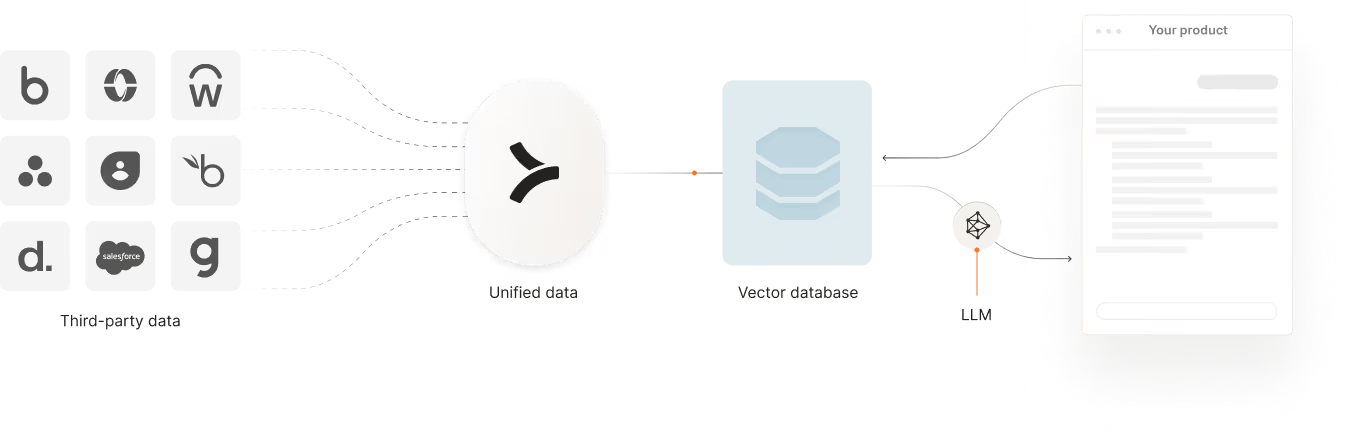
- Direct, customer-facing API integrations: Merge Unified lets you add hundreds of API-based integrations to your product through a single, unified API
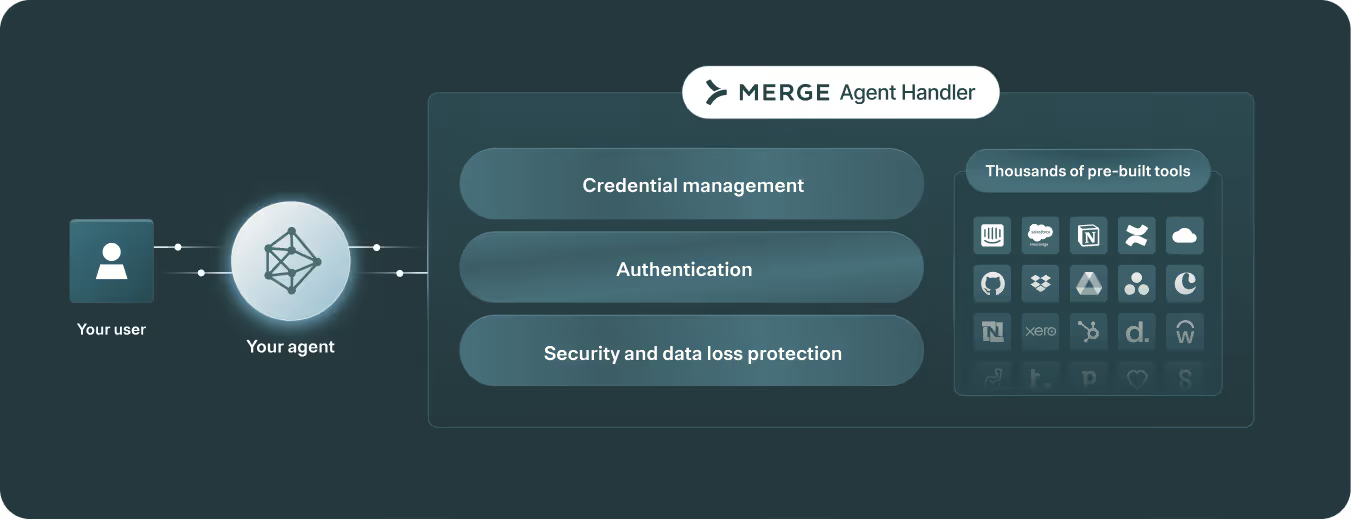
- Integrations with MCP tools: Merge Agent Handler empowers your internal or customer-facing AI agents with secure access to thousands of third-party tools
- End-to-end integration support: Merge handles the entire integration lifecycle for both products, from authentication and security to monitoring and maintenance
Pros
- Broad use case support: lets you use direct API integrations when you need to sync data, and connect to MCP tools when you need to support more dynamic, real-time agentic use cases
- Enterprise-grade security: Merge offers fully-searchable logs, automated issue detection, audit trails, and countless other features to help you monitor and manage every agentic integration
- Customer proof points: Merge’s integrations power agents across a wide range of industries, including performance management, FP&A, IT service management, and even frontier LLM providers like Mistral AI
{{this-blog-only-cta}}
Composio
Composio helps you connect AI agents to third-party tools via hundreds of MCP servers.
Top features
- Offers Rube, an MCP server that lets you connect your agents to 500+ 3rd-party apps
- Provides “Recipes”, or pre-built agentic workflows, for different teams. Teams can use them as is or build on top of them
- Provides OAuth and credential management across its MCP servers
Pros
- Breadth of support: you can access hundreds of MCP connectors across software categories, all but ensuring that you meet your agents’ integration needs
- Developer-friendly integration path: offers SDKs (Python and TypeScript) and framework-specific provider adapters to help developers integrate Composio with their applications and agent frameworks
- Governance controls: this includes features like audit logs and RBAC
Cons
- Security/governance features gated: for example, audit logs and RBAC isn’t available on lower tier plans
- Complex pricing model: Composio uses multiple confusing variables, like tool calls, premium tool calls, and connected accounts). This which can make costs harder to predict
- Complex UX: the platform is more engineering-heavy to implement and operate, making it less accessible to non-technical users
Related: Composio's top competitors in 2026
Workato
Workato offers a range of integration and automation solutions, including Workato Enterprise MCP for connecting your agents.
Top features
- Workato Enterprise MCP comes with several pre-built MCP servers to help you build agentic integrations quickly
- Workato’s bread and butter product is its integration platform as a service (iPaaS), which lets you build internal integrations and workflow automations across SaaS apps and on-prem systems
- Workato also offers an embedded iPaaS to help you integrate your product with customers’ SaaS applications
Pros
- Comprehensive product suite: if your integration needs extend beyond agents (e.g., you need to support internal integrations between your SaaS apps), Workato can be your all-in-one solution
- Broad category coverage for MCP servers: Workato offers MCP servers for spreadsheet apps (e.g., Google Sheets), ticketing systems (e.g., Jira), chat platforms (e.g., Slack), and more. This can help you connect and deploy cutting-edge agents quickly
- Strong financial footing: Workato has raised hundreds of millions of dollars, has thousands of customers, and has established a strong reputation since its founding in 2013. As a result, you likely won’t need to worry about the company going out of business any time soon
Related: A guide to Workato alternatives
Cons
- Limited MCP Server Support: while Workato supports several categories of MCP servers, the depth of that support is limited. As of today, it offers just over a dozen pre-built MCP servers
- Resources spread thin: Workato’s wide product offerings—its iPaaS, embedded iPaaS, API management tool, agent “Genies”, Enterprise MCP, etc.—will make it hard for them to consolidate resources for their agentic integrations and improve them at the pace you likely need
- Obscure pricing model: Workato doesn’t provide any details on their pricing plans online. You have to schedule time with their team, which can lead to wasted time if the pricing model doesn’t make sense for your use cases
{{this-blog-only-cta}}
Jon Gitlin
.png)
.png)

Ready to scale your agentic integrations?
Learn how Merge can help by scheduling a demo with one of our integration experts.


But Merge isn’t just a Unified
API product. Merge is an integration platform to also manage customer integrations. gradient text
But Merge isn’t just a Unified
API product. Merge is an integration platform to also manage customer integrations. gradient text
But Merge isn’t just a Unified
API product. Merge is an integration platform to also manage customer integrations. gradient text
But Merge isn’t just a Unified
API product. Merge is an integration platform to also manage customer integrations. gradient text