

.png)

Context engineering: from individual prompts to company-wide context
.png)

Melinda Gutermuth
AI models have trained us to write better prompts. Give clear instructions with enough detail and nuance, and the model should produce exactly the response you’re looking for. But a model can only work with the information it has. If that information is stale, missing, or contradictory, or if the model lacks the right tools, even a well-crafted prompt won’t stop it from producing a confidently wrong answer.
That’s why the focus is shifting from optimizing prompts to managing the information that’s available to the AI model when it runs. This practice is known as context engineering, and it becomes even more important as AI takes on longer, multi-step work.
When one person manages context in one AI tool, context engineering is a craft. But what happens when the entire company needs it? At that scale, context engineering needs to be shared infrastructure that follows employees into whatever AI tool they use.
This article covers what context engineering is, why AI fails without it, how it works in practice, and what changes when it scales across a workforce.
What is context engineering?
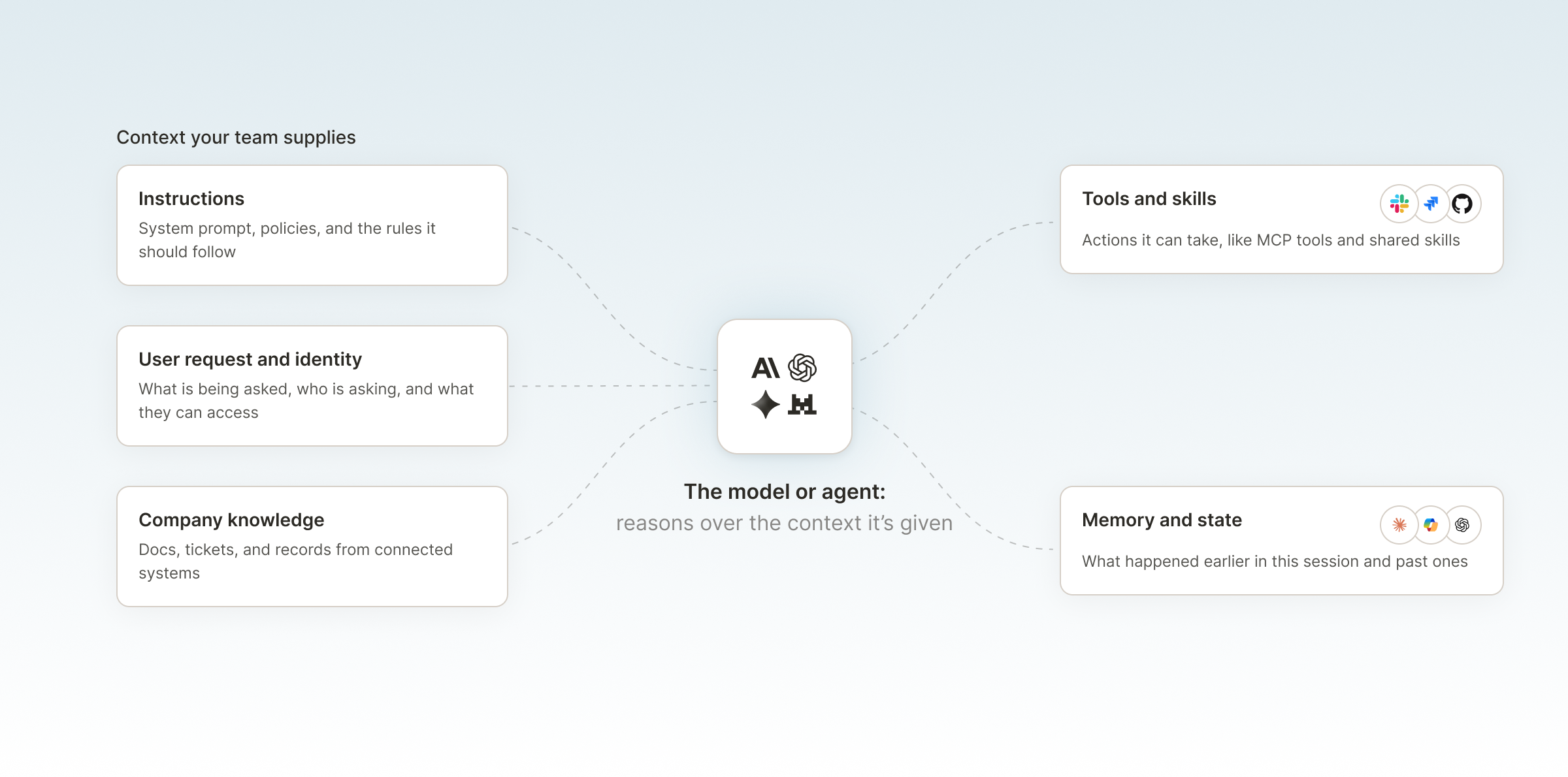
Context engineering is the practice of designing and maintaining the information available to an AI model, including instructions, the user’s request, company knowledge, tools, and memory and state, so it has what it needs to complete a task effectively.
You might think of it like onboarding a new engineer to a project. You explain the goal, point them to relevant tickets and docs, give them access to the repositories and systems they’ll need (and only those), and catch them up on work the team has already done. Context engineering provides the same thing for an AI model, with one major difference: the model can only work from the context made available to it when it runs, so the surrounding system has to surface the relevant information and working state as the task progresses.
Prompt engineering focuses on designing the instructions that are given to a model. Context engineering manages the broader set of information the model sees, including those instructions. Anthropic’s Applied AI team describes context engineering as the natural progression of prompt engineering: writing a prompt is a discrete task, while curating context is ongoing.
The context window is the model’s available working space, the amount of information it can take in at once. Context engineering determines what should occupy that space at each stage of a task, along with which tools and actions are available when the model needs them.
The building blocks of context engineering
Most of what a model sees on a given call comes from five inputs that teams can control.
Instructions and system prompts
System prompts and task instructions define the model’s role, the task, its constraints and priorities, and the expected output. Prompt design continues to be important in context engineering, but it’s only part of the equation. If instructions are vague or contradictory, they can undermine everything else in the context.
The user’s request and identity
The request itself provides context, and it matters who’s asking. The user’s identity, role, and permissions determine which company information the system should make available for the request. A support engineer, a finance analyst, and a contractor might ask the same question, but should get different answers because of differences in their roles and access.
Company knowledge
A model needs documents, tickets, and records so it can work from company facts instead of relying only on its training data. Models can access this company knowledge when it’s needed using techniques such as retrieval-augmented generation (RAG).
RAG and context engineering are not interchangeable. RAG is one way to supply the model with information, but context engineering decides what information a task needs in the first place. Retrieval is only useful if the underlying information is current, relevant, and correctly scoped to the requester.
Tools and skills
Context engineering also covers which tools and actions the AI can use. In terms of AI, a skill is a reusable package of instructions, and sometimes scripts, that enables the AI to handle a specific task, such as triaging a bug report or drafting a meeting summary.
For an AI model to handle these tasks, it needs access to the tools those tasks depend on. One common protocol for connecting AI clients to external tools and data is Model Context Protocol (MCP), though many AI platforms also support tool calling natively through their own APIs.
Granting the model access to more tools isn’t automatically better for the task. Every tool definition takes up context, and when tools overlap or have vague descriptions, it’s harder for the model to choose which one is the best fit.
Memory and state
Multi-step work requires continuity. The model needs a record of what’s been tried and what came back, along with an understanding of where the task currently stands. Conversation history, previous actions, and task state can preserve that continuity when they’re passed back to the model as context.
The goal is to prioritize the most useful history without carrying forward information that the next step doesn’t need.
Why AI fails without good context
AI models producing confidently wrong output is a well-known problem. What’s easier to miss is that even in these cases, the model is often behaving as expected with the information it received. Most context failures fit into three categories:
- Too much context
Adding more information can introduce noise and make it more difficult for the model to prioritize what matters. Anthropic describes models as having a limited “attention budget” that every added token draws on. Citing needle-in-a-haystack benchmarking, Anthropic notes that as the number of tokens in the context window grows, a model’s ability to recall information accurately from that context can decline, a pattern known as context rot. Anthropic describes this as a gradual decline rather than a hard cutoff and observes it across models. A common culprit is pasting in every possibly relevant document “just in case.” - Too little context
A model can’t reliably account for company-specific facts it isn’t aware of. It won’t know about a customer’s open escalation unless that information reaches the context. Data silos are a common cause of this failure. When relevant information is divided across a ticketing system, a file store, a CRM, and a code repository, the model sees only what the user pasted in or what its tools can reach. - The wrong context
Context is present, but it’s stale or wrongly scoped. Stale context might be a policy document that was accurate when it was first exported, but the policy has changed and the copy hasn’t. Wrongly scoped context includes data that the requester shouldn’t have access to, or information meant for a different team or task.
In addition to generating wrong responses, each of these failures also has financial consequences. The model spends tokens processing irrelevant input, users retry when answers are wrong, and agents make extra tool calls looking for information they should have had at the start.
It’s easy to fall into the trap of supplying as much context as possible, but what actually improves results is ensuring the model has the right context for the task.
How context engineering works in practice
The steps below turn the principle of providing the right context into a repeatable process. Together, they address the three failures described above:
- Identify and retrieve what the task needs to prevent too little context
- Retrieve current information and apply permissions to prevent the wrong context
- Structure and refine to prevent too much context
To illustrate the process, this section follows one example step by step: an engineer asks an AI coding tool to look into a bug a customer reported through support.
Step 1: Define the task and outcome
Start with what the AI needs to accomplish, and be specific. “Look at this bug” is a different task from “find the root cause of the bug in this ticket and propose a fix with a test.” The first prompt leaves the outcome up to the model, while the second prompt requests a diagnosis and a proposed fix.
Step 2: Identify the context it needs
Decide which instructions, company knowledge, tools, and task history are necessary for the AI to complete the task. For the bug investigation, this might include the task instructions, the support ticket with steps to reproduce the issue, access to the relevant code repository, and the ability to run tests.
At this stage, it’s just as important to identify what the AI model doesn’t need. In this case, the model likely doesn’t need the product roadmap or every previous ticket from the customer.
Step 3: Apply identity and permissions
Establish who is making the request and what they’re authorized to access. Identity establishes the requester, and their permissions determine which resources can be made available to the model.
Here, the engineer can see the ticket and the repository. If they aren’t authorized to view the customer’s billing details, the system shouldn’t send those details to the model, even if those details are attached to the same customer account.
Step 4: Retrieve dynamic context within those permissions
Retrieve current information from the relevant source, limited to what the requester can access, rather than hardcoding it into the prompt.
In the bug investigation, the AI reads the latest version of the ticket, including comments added earlier that morning, and pulls only the files related to the reported behavior that the engineer can access. As the investigation continues, the test output and log lines become new context that evolves with the task.
Step 5: Structure the context
Separate the instructions, retrieved knowledge, tool definitions, and the user’s request so that the model can tell them apart and knows what takes priority. In this example, the engineer’s coding standards shouldn’t blur together with text the customer wrote in the ticket. The standards are instructions to follow, while the ticket is information to analyze.
Step 6: Evaluate and refine
Test whether the context improves task completion and reliability. Here’s where you can eliminate some noise: remove or revise any inputs that don’t improve the results. If the AI continues to focus on an unrelated module or fails to use one of the tools it was given, cut that file or tool from the context.
Throughout the process, context was added as the task needed it, instead of frontloaded into the model at the start.
Now, suppose the engineer wants to continue the investigation in a different tool, such as moving from Claude Code to ChatGPT. Without shared infrastructure for carrying context across tools, most of that setup doesn’t come along. The engineer has to reconstruct ticket access, the repository connection, the instructions, and the permission boundaries by hand.
The problem with context engineering at work
The tool-switching problem is manageable for one engineer on a single task, but context engineering as a per-person craft doesn’t scale across a workforce.
When employees independently connect AI tools to company information, three issues arise:
- Duplication
Each person sets up the same context in each tool, and that context stays stuck in the place it was set up. Switching tools means starting over, and the repeated setup adds to AI spend. The company pays for this groundwork each time. - Inconsistency
Copied and exported information goes stale at different rates in different places. Two employees asking an AI model the same question can get different answers because they’re working from different versions of the same document, or a different set of documents. - Lack of control
Access to company systems becomes uneven. Some employees connect AI tools to systems they rely on, sometimes with more access than they should have, while others don’t connect them at all. IT has no central way to manage company context in the AI tools employees use. Without one, they can’t apply consistent access rules or see how company information reaches those tools.
At company scale, context engineering becomes an infrastructure and governance problem rather than a prompting habit.
Context engineering across a whole workforce
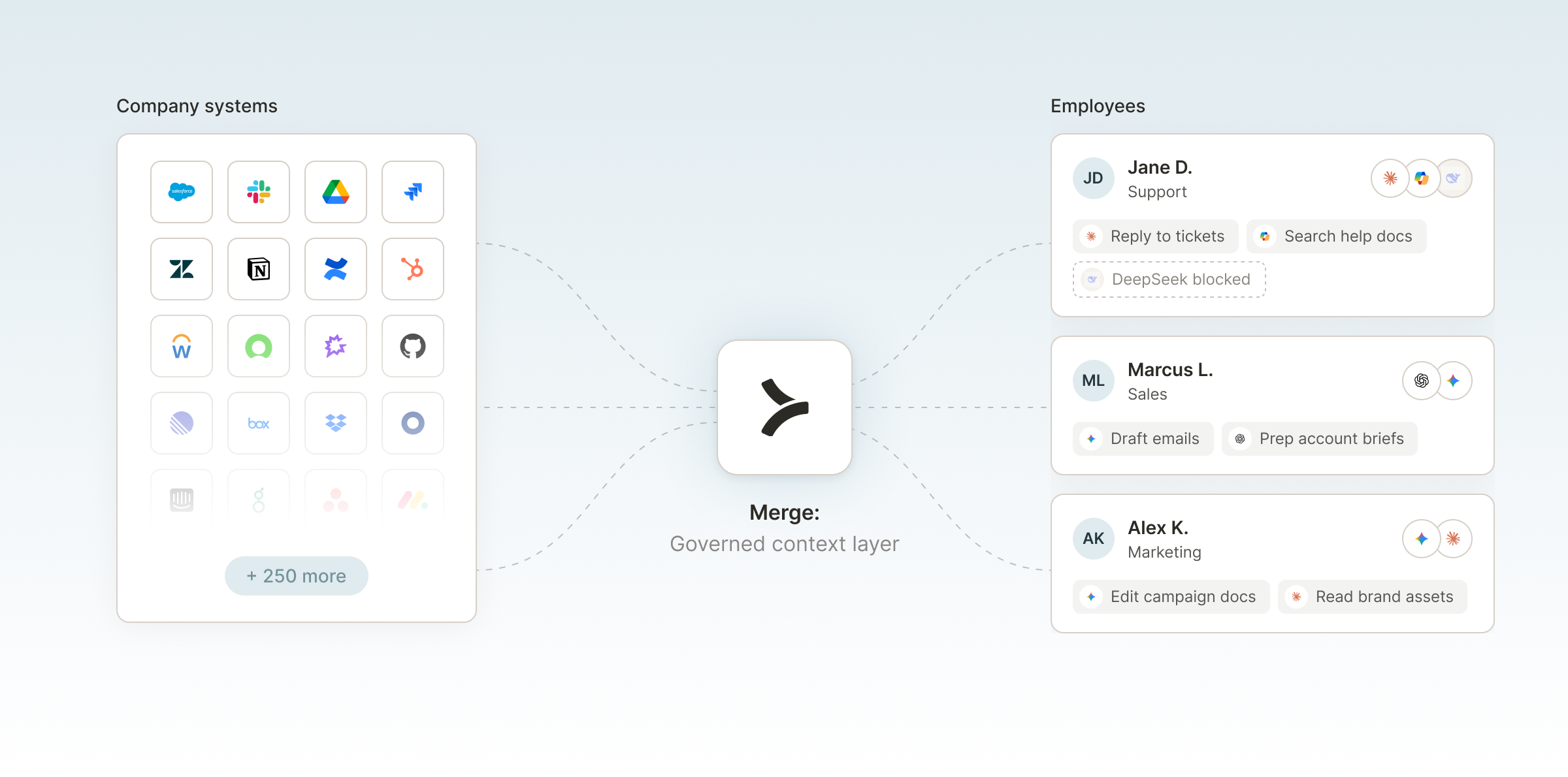
One scalable approach is to stop recreating company context inside each AI tool. Instead, companies need a shared, governed context layer that employees’ AI tools can draw from.
What does a good solution look like? One that maps directly to the three problems described above:
- Answers duplication. Context is set up once, and the same governed context supports different AI tools.
- Answers inconsistency. Company context comes from maintained systems of record, so everyone works from the same source information.
- Answers lack of control. Employees receive context appropriate to their identity and permissions. IT controls which company systems, models, connectors, and skills employees can use. Activity and spend that run through the governed layer are visible and attributable.
With a shared context layer, IT and AI enablement teams own the foundation: which systems are connected, how permissions are applied, and which models, tools, and shared skills are approved. Individual teams still own instructions and skills for their own tasks because they know their domains best.
This is the core of enterprise context engineering: company context should go with employees, not make employees go to it. People continue to work with the AI tools that fit their workflow, and the context arrives there, scoped to them.
How Merge for Workforce operationalizes context engineering
Merge for Workforce gives employees AI access to approved connectors, company context, skills, and models while giving IT visibility and control.
Employees keep using the AI tools they already work in, such as Claude, ChatGPT, Cursor, Copilot, and Claude Code, while IT governs what sits underneath: which company data the AI can draw from, which tools and skills it can use, what permissions apply, and how much it can spend. IT sets that up once, and it stays in place when employees switch tools.
Merge believes that much of what companies spend on AI goes into rebuilding context that the company already has. Merge for Workforce turns that context into a shared, governed layer instead of a per-person setup task. Its capabilities map to the building blocks of context covered earlier, and the problems defined above:
- The Universal Context Layer supplies company knowledge, addressing duplication and inconsistency
- Governed connectors and skills supply the tools and skills, further reducing duplication
- Model routing, cost controls, and governance answer the lack of control
Merge describes the context layer as the “knowing” half of AI at work and the connectors and skills as the “doing” half. Together, they determine what company information the AI can work from and which approved actions it can take.
Universal Context Layer
The Universal Context Layer syncs data from a company’s systems of record and turns it into company context for employees’ AI tools. These sources include file storage, ticketing, and human resources information systems (HRIS) and more.
Because context comes from the systems where the information is maintained, employees aren’t relying on exports that drift out of date, and they aren’t each rebuilding the same context in every tool.
Requests operate under the employee’s own identity and permissions, so the context a tool receives reflects what that person is allowed to access.
In practice: Going back to the bug investigation example, the Universal Context Layer would sync data like the customer’s support ticket. When the engineer moves from one AI tool to another, the same governed ticket context remains available to them instead of having to be set up again.
Governed connectors and skills
The MCP Gateway distributes Merge-maintained connectors, approved public MCP servers, and a shared skills library to groups of employees. IT teams decide which connectors and skills are assigned to each group so that employees can find them already available in the AI tools they use.
In practice: In the bug investigation, the AI model’s access to a code repository is handled through a governed connector. The team’s standard debugging procedure can also be published once and used as a shared skill.
Related: Govern and control employee AI with Merge for Workforce
Model routing and cost controls
Poor context management leads to wasted tokens on irrelevant input, retries, and repeated setup. With model routing and cost controls, IT teams have a way to cap and attribute that spend.
IT teams can:
- Define approved models by team
- Enforce budgets and spending caps at the gateway
- Attribute spend to a person, team, and model
This makes AI costs and usage more transparent to IT teams. For more on routing, see multi-model routing.
Governance and visibility
Merge for Workforce also gives IT the governance and observability to run a shared context layer across a workforce:
- System for Cross-domain Identity Management (SCIM) provisioning through Okta or Entra, so access follows existing roles and groups
- Data loss prevention (DLP) rules that block or redact sensitive data in tool calls
- Audit trails that record activity, exportable to security information and event management (SIEM) systems
- Desktop client deployed through mobile device management (MDM) to configure employee machines and block unapproved models and MCP servers
This provides a governed layer underneath every AI tool employees use. Employees keep the tools they prefer, while IT applies the same data access, permissions, tools, and spend controls across all of them, and maintains visibility into how company context is being used. For a broader look at the category, see our guide to AI governance platforms.
See how Merge for Workforce brings governed company context to the AI tools employees already use. Book a demo.
FAQs
Here are a few more questions that come up as teams put context engineering into practice.
What is the difference between prompt engineering and context engineering?
Prompt engineering focuses on the instructions you give to a model, like wording, structure, examples, and output format. Context engineering manages everything the model sees on a given call, including those instructions plus retrieved knowledge, available tools, the user’s identity, and task history. For example, prompt engineering refines how a model is told to summarize a ticket, while context engineering decides which ticket it sees, whether it’s current, and whether the requester can see it.
Is context engineering the same as RAG?
No. Retrieval-augmented generation (RAG) is a technique for retrieving external information and adding it to a model’s context. Context engineering is the broader practice that decides what a task needs in the first place, including instructions, tools, permissions, and memory. RAG is often one part of a context engineering approach, but a RAG system can still end up retrieving stale documents or information that the user shouldn’t see. Context engineering accounts for those problems.
Do employees have to switch AI tools to get company context?
No. You can set up company context once, from the systems where it’s maintained, and make it available in the AI tools employees already use, under their own permissions. That’s the core idea behind treating context as shared infrastructure rather than a per-tool setup. Merge for Workforce, for example, works with tools such as Claude, ChatGPT, Cursor, Copilot, and Claude Code, while IT configures the context and access for them.
Who owns context engineering in an enterprise?
At the enterprise level, ownership splits. IT and AI enablement teams manage the shared context infrastructure, including which systems connect, how permissions apply, which models and tools receive approval, and how spend is tracked. Individual teams maintain ownership of the instructions and skills related to their specific tasks, since they are the experts in their own workflows. The shared layer gives every team the same reliable foundation to build on.
How do you stop company context from going stale?
Synchronize context from the systems that maintain the information instead of copying or exporting it into each AI tool. An exported document starts going out of date immediately, and the copy that gets pasted into an AI project may never be updated. When context syncs from the source, such as the ticketing system or HRIS, the updates that are made there flow to the AI. It also leaves one source to maintain instead of dozens of copies.

Melinda Gutermuth
.png)


But Merge isn’t just a Unified
API product. Merge is an integration platform to also manage customer integrations. gradient text
But Merge isn’t just a Unified
API product. Merge is an integration platform to also manage customer integrations. gradient text
But Merge isn’t just a Unified
API product. Merge is an integration platform to also manage customer integrations. gradient text
But Merge isn’t just a Unified
API product. Merge is an integration platform to also manage customer integrations. gradient text