


.avif)
Govern and control employee AI with Merge for Workforce



Gil Feig
Employees want to connect Claude, ChatGPT, and Cursor to every single tool they use: Salesforce, NetSuite, Workday, Slack, and more.
IT hasn’t been able to say yes. They have no visibility or control over the data flowing through them, and no record of what data was accessed.
Merge for Workforce changes that. For the first time, your organization has one place to provision AI access, enforce policy, and let employees safely connect AI to every tool they need.
How Merge for Workforce governs employee AI access
Merge Agent Handler provides a governed, observable layer for AI agent tool calls: credential and permission management, DLP scanning, audit trails, and hundreds of maintained connectors across enterprise systems.
Employees can now use Agent Handler to connect Claude, ChatGPT, Cursor, Copilot, and more to any of the third-party systems they work in. IT gets a single place to govern all of those connections, so permissions stay consistent as employees swap between AI tools, and policies are already in place when new ones emerge.
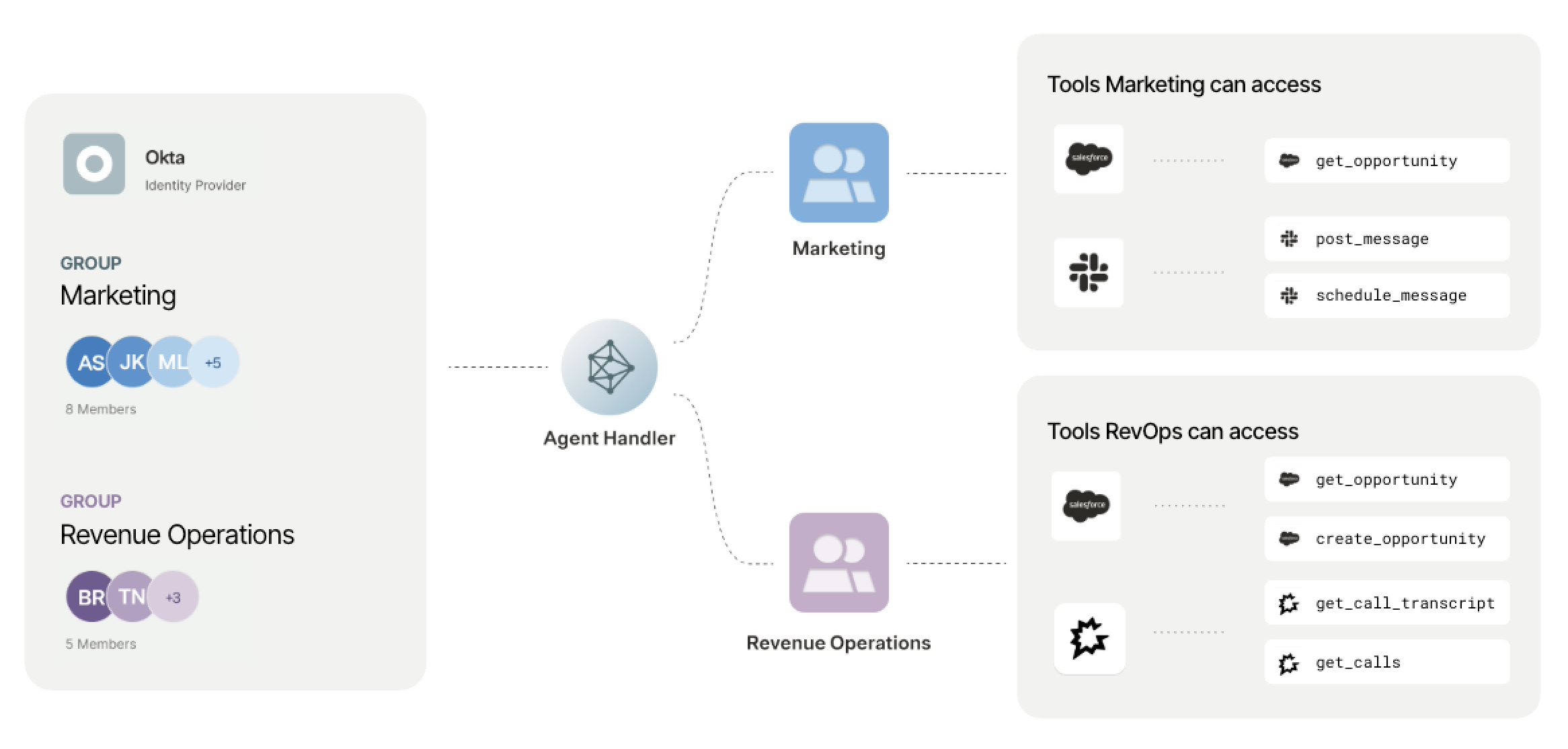
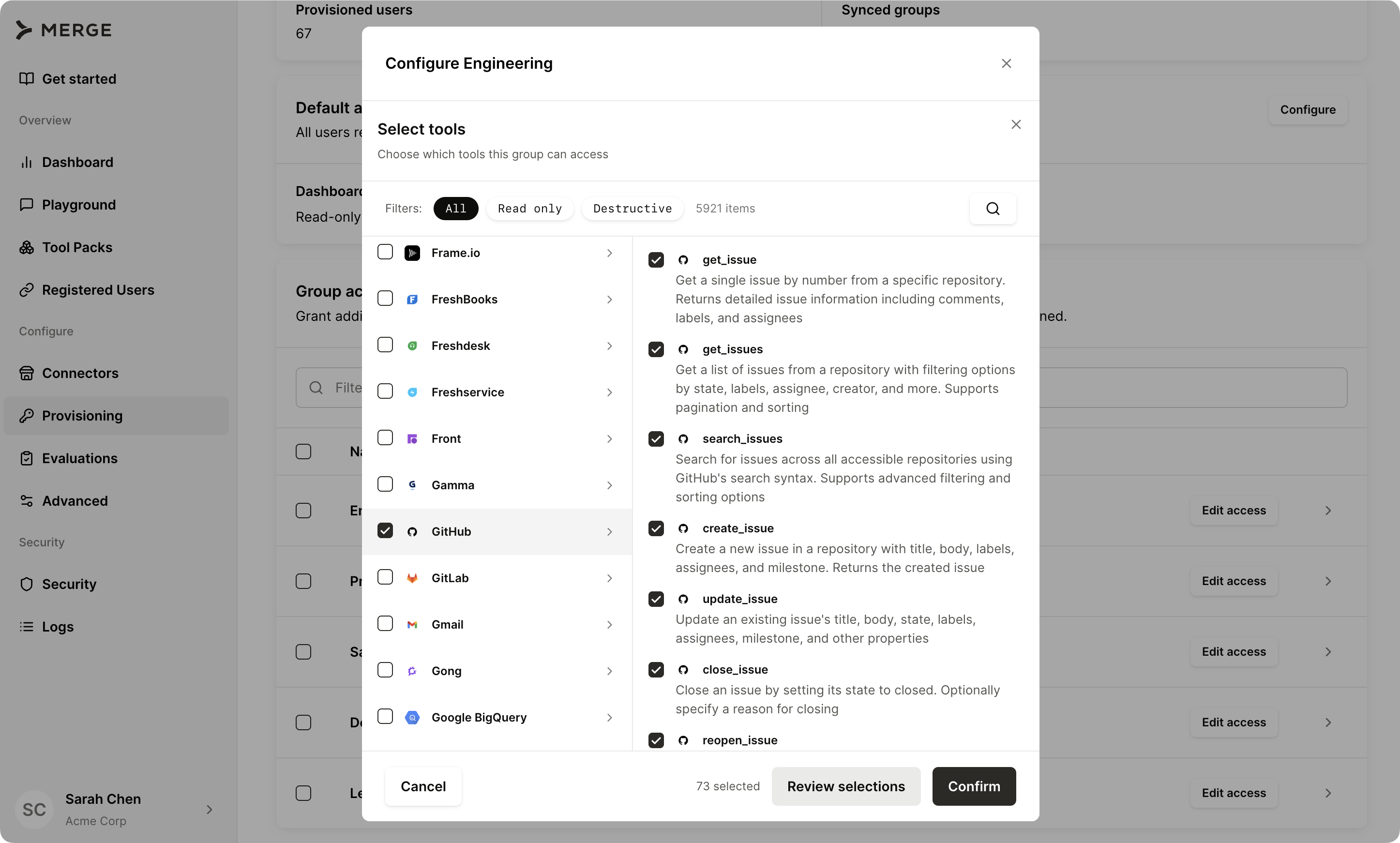
We’ve also added the ability to provision AI access. Merge can now import employees from your identity provider via SCIM, so IT can define exactly which tools employees can access by role or group. A finance analyst can connect AI to Looker or NetSuite; a sales rep gets Salesforce and Gong.
Every employee’s AI operates within the boundaries IT sets for their group, and those boundaries update automatically when roles change.
Setting up Merge for AI governance
Using Merge in this way involves two phases: an IT configuration step that happens once, and a context and governance layer that runs continuously across every employee AI session.
Here’s how to get started:
1. Connect your identity provider. Merge integrates with any SCIM-compatible identity provider, including Okta and Azure AD. Once connected, Merge syncs your employee directory automatically. Employees are provisioned based on their existing group memberships and role assignments. No manual configuration per user required.
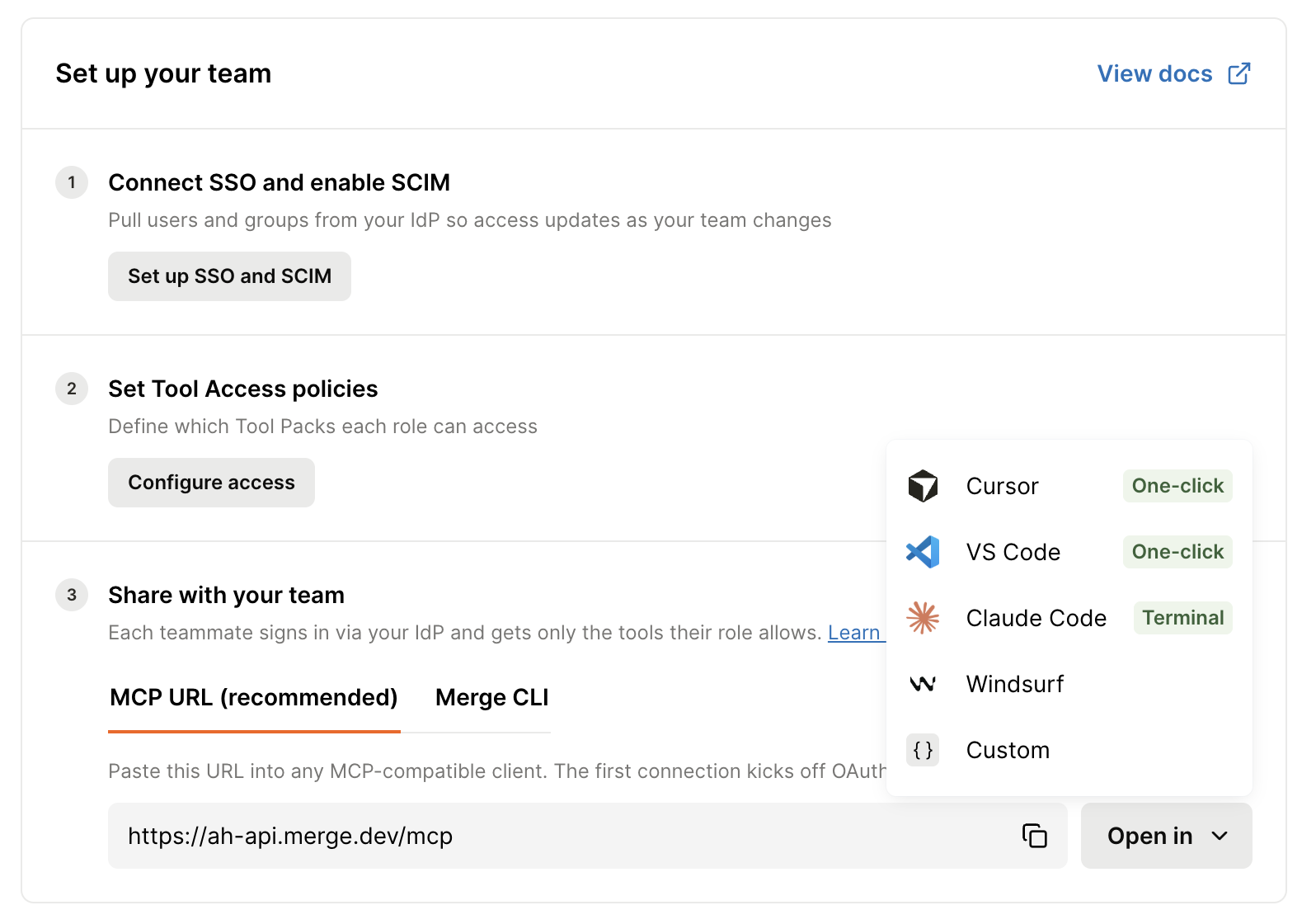
2. Configure access and data policies. IT defines which AI connections employees in each role and group are authorized to make, and which data types should be scanned, blocked, or redacted on every tool call. Policies are set once and applied automatically across all employee AI sessions.
3. Have employees connect their AI tools. Employees authenticate their AI tools (Claude, ChatGPT, Copilot, or any MCP-compatible AI) through Merge. Each employee gets individual credentials tied to their identity. No shared service accounts or connections that persist beyond their tenure.
Now when an employee's AI makes a tool call to a third-party system, Merge inspects it before data reaches the model. It checks whether the connection is within the employee's authorized scope, scans the response against your configured security rules, and logs the full interaction: identity, arguments, downstream API call, and outcome, to a searchable audit trail.
.png)
Related: A guide to using SCIM for AI agents
Merge for Workforce in action
Merge for Workforce is imperative for any IT team that wants to securely govern AI at scale.
Give every employee a governed path to connecting AI tools
A sales manager wants to connect Claude to Salesforce, Gmail, and their calendar to prep for calls. Without a governed path, they connect directly using personal credentials: IT has no record of the connection and no way to manage it if they change roles or leave.
With Merge, the sales manager follows an IT-approved setup flow and gets individual credentials tied to their identity. IT has provisioned the employee with the ability to connect AI with Salesforce, Gmail, and Calendar automatically based on their role in Okta.
Prevent sensitive data from reaching the wrong audience
A finance manager asks their AI assistant to pull the latest draft financials from Google Drive and share them on Slack. Merge scans the outbound payload before the post executes.
The file contains unreleased revenue figures matching security rules in Merge for financial data, so the post is blocked. The manager gets a policy notification instead of a confirmation, and the draft financials stay in Google Drive.
Investigate AI data access in minutes, not weeks
Your security team flags an anomaly: an employee’s AI made an unusually high volume of calls to your HR system over two days. Legal wants to know what was accessed before close of business.
With Merge, your IT team filters the audit trail by employee, connector, and time range. Every tool call from that window is there: what arguments were passed, what data was returned, and what the model received.
Related: How to use employee agents
Get started for free
Getting started with Agent Handler is free. You can create an account, explore connectors, and test tool calls at no cost.
When you’re ready to extend it to your employees, connect your identity provider and start governing AI access across your organization. See our pricing page for plans and details on seat-based pricing.
To learn more about Merge for Workforce, you can visit our docs. And if you’re ready to start using it, create your account today.
Gil Feig
.png)


But Merge isn’t just a Unified
API product. Merge is an integration platform to also manage customer integrations. gradient text
But Merge isn’t just a Unified
API product. Merge is an integration platform to also manage customer integrations. gradient text
But Merge isn’t just a Unified
API product. Merge is an integration platform to also manage customer integrations. gradient text
But Merge isn’t just a Unified
API product. Merge is an integration platform to also manage customer integrations. gradient text