



What is a company brain? How it gives enterprise AI company context


Melinda Gutermuth
Employees already use Claude, ChatGPT, Copilot, Cursor, and other AI tools to get work done. But those tools don’t know how your company works, leaving employees to either supply that context manually or work without it.
That’s what a “company brain” is meant to address: making an organization’s institutional knowledge accessible to both people and AI tools. What it looks like in practice depends on the kinds of company knowledge it connects with and the ways employees access it.
A company brain can give employees a central place to access company knowledge, but it doesn’t necessarily make the same knowledge available to AI tools. For a workforce, an effective company brain delivers governed company context and capabilities directly into the AI tools employees already use, as well as the ones they adopt next.
Key takeaways
A company brain brings company knowledge into AI workflows, but its scope, architecture, and governance can vary:
- A company brain makes an organization’s institutional knowledge available to people and AI tools, giving the AI company-specific context.
- Company brains can connect knowledge across documents, tickets, and conversations, as well as structured business data.
- Employee AI needs company context to produce relevant results and governance to manage access, security, and costs across tools.
- The destination model gives employees a dedicated place for company knowledge, while the goes-with model brings that knowledge into the AI tools they already use.
- A workforce company brain combines company context, governed connectors and skills, approved models, identity and permissions, and centralized control and visibility.
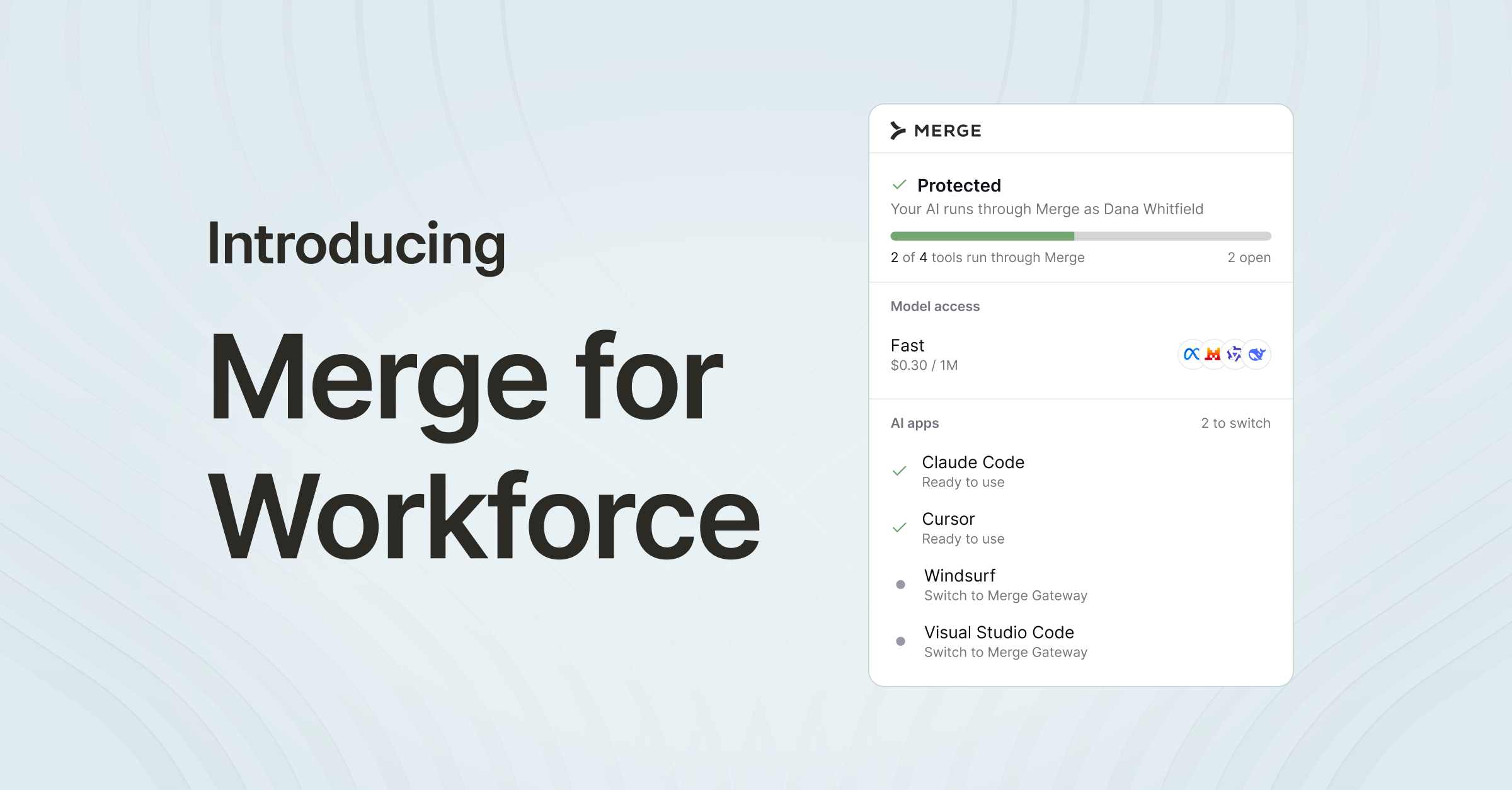
- Merge for Workforce delivers governed company context and capabilities through employees’ existing AI tools, allowing IT to manage access and policies centrally without requiring another AI client.
What is a company brain?
A company brain is a shared layer of an organization’s institutional knowledge and connections that people and AI tools can draw on, so AI can work with company-specific context instead of relying on generic model knowledge or guessing.
“Company brain” is an emerging category term without a standardized technical definition. Different vendors use it for different knowledge domains and implementations. The concept is generally separated into two categories:
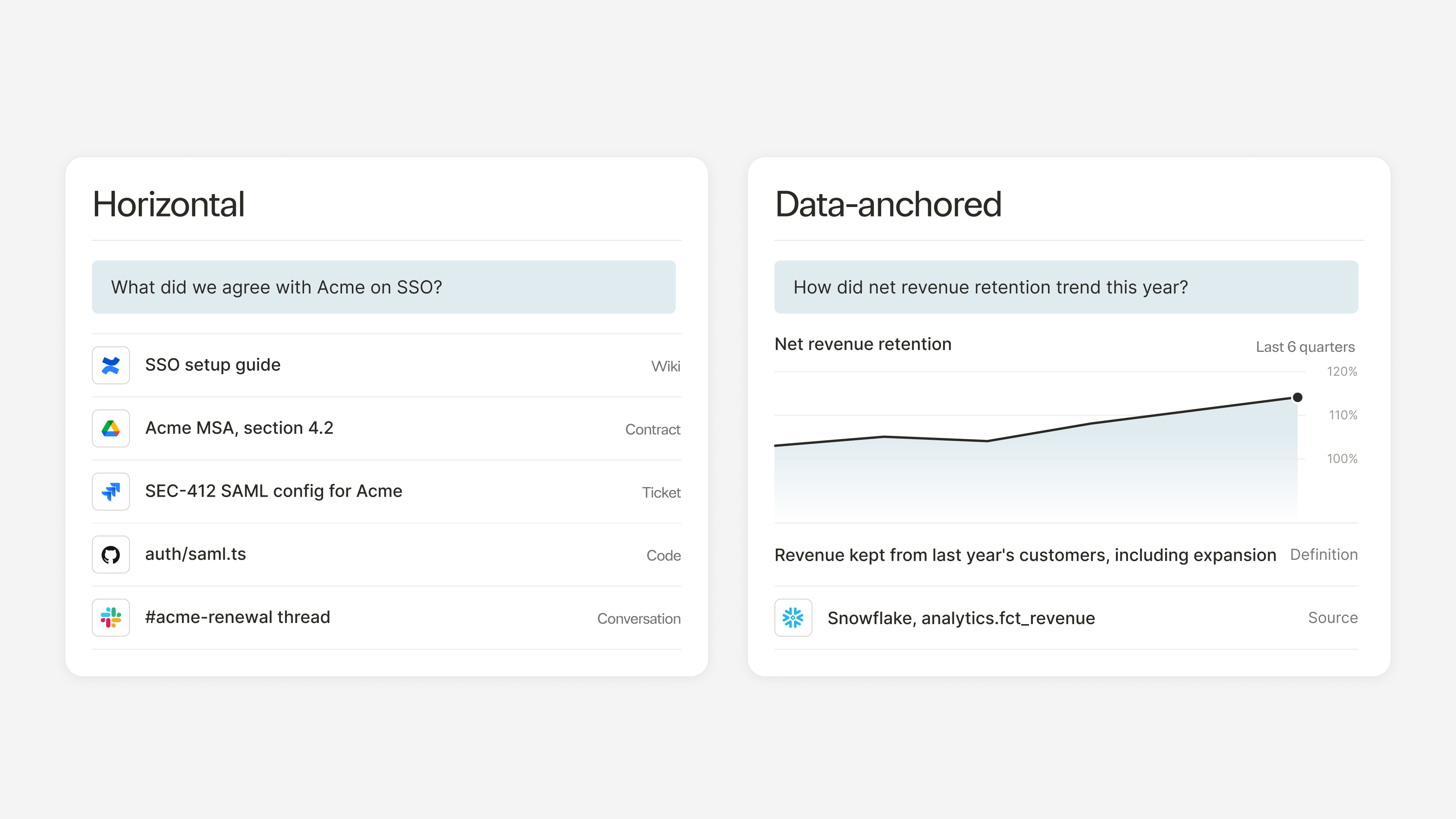
- Horizontal: General enterprise knowledge across wikis, documents, tickets, contracts, code, conversations, and other systems. Glean helped popularize this approach by connecting company knowledge across applications and making it searchable through a single enterprise AI platform.
- Data-anchored: Structured business data from sources such as data warehouses, including metrics, dashboards, and business definitions that help AI interpret and analyze company performance.
These scopes can coexist within an organization. Regardless of what knowledge a company brain covers, employees increasingly work across multiple AI tools. This means access is just as crucial as the knowledge itself, particularly when IT needs to govern how company context is used across those tools.
How a company brain differs from a knowledge base, enterprise search, and an AI assistant
Knowledge bases, enterprise search platforms, and AI assistants all help employees work with information, but they serve different purposes. The main distinction is how employees interact with each system and how that information becomes available to AI.
Why employee AI needs a company brain
As employees adopt more AI tools, organizations face two related challenges: those tools lack the company-specific context needed to produce relevant results, while IT must manage increasingly fragmented controls over access, data handling, and usage.
AI lacks company-specific context
A general-purpose AI model understands revenue recognition, but it doesn’t know which definition your finance team uses. It can draft a customer reply, but without access to that customer’s ticket history, it lacks the information needed to make the response relevant. And while it can suggest a process for handling vendor exceptions, that advice may have little to do with your company’s actual policies or the people responsible for them.
Employees are left finding and supplying that information themselves, often repeatedly and across different tools. The context available to AI then depends on who's using it, what they know to include, and which tool they're working in.
IT needs consistent governance across tools
IT also faces the challenge of establishing consistent oversight across a growing number of AI tools. Each new tool introduces another set of decisions about identity, permissions, model access, data handling, and auditing. Managing those controls separately makes it harder to see how AI is being used across the organization, enforce consistent policies, or attribute spending to particular teams and models.
Restricting unapproved tools can help manage risk, but employees still need useful, authorized ways to work with company information. Making the governed path the easiest and most useful option encourages adoption without leaving teams to configure their own connections and controls.
Two models: the brain employees go to vs. the brain that goes with them
How employees access company knowledge is as important as what knowledge a company brain connects. The destination model and the goes-with model offer different experiences for employees and different considerations for IT, and organizations may find value in combining both.
The destination model
Employees access company knowledge through a dedicated enterprise AI platform that combines search, answers, and agent capabilities. This creates a centralized experience where employees can find information and complete work using connected company context.
Glean illustrates the destination model through its dedicated enterprise AI experience, which combines search, an AI assistant, and agents built on company knowledge. Its platform also supports MCP integrations that can surface company context in other AI tools. Organizations evaluating a dedicated experience still need to consider how it fits alongside the AI tools employees already use.
The goes-with model
In the goes-with model, employees access company context, approved connectors, skills, and models through the AI tools they already use. IT manages those capabilities and their associated policies, reducing the need to maintain separate configurations and integrations for each tool. As employees adopt additional supported AI clients, the same governed resources can be made available without rebuilding every underlying connection.
Glean is a company brain employees go to. Merge is the company brain that goes with them.
What a company brain for the workforce contains
Beyond providing company context to AI tools, a workforce company brain needs connections, permissions, and controls to make that context useful and governable.
Company context
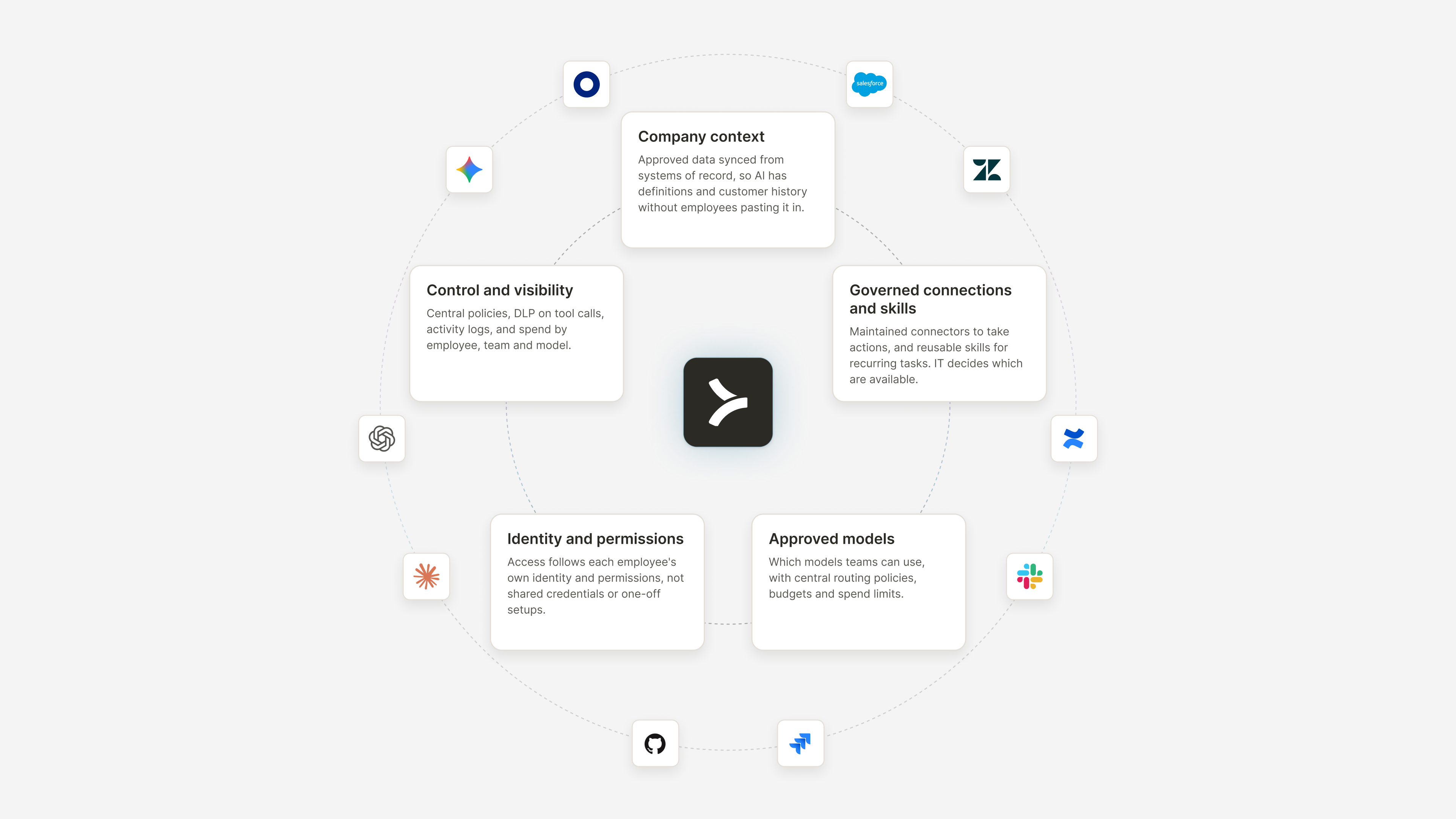
Approved company data is synced from systems of record and made available to employees’ AI tools. This gives AI access to relevant internal definitions, customer history, and other company-specific information without requiring employees to find and supply it manually.
Governed connections and skills
Company context gives AI information to work with. Maintained connectors provide approved ways to access company systems and take actions, while reusable skills define how to perform recurring tasks. IT governs which capabilities are available to employees through centrally managed permissions and policies.
Approved models
IT needs control over which AI models teams can use, with centralized routing policies, budgets, and spend limits.
Identity and permissions
Access to company context and connected systems should reflect each employee’s identity and permissions, rather than relying on shared credentials or ad hoc configurations. This means governing both who can use an AI capability and which underlying resources they can access.
Control and visibility
Centralized policies, data loss prevention (DLP) controls on tool calls, activity logs, and spend attribution help IT govern AI use across the workforce. These capabilities allow organizations to enforce data-handling rules, audit activity, and understand how AI costs are distributed across employees, teams, and models.
In practice: An employee preparing for a customer meeting might ask their AI assistant to retrieve account details, recent support tickets, and documentation about an ongoing issue, then prepare a meeting brief. If the appropriate connector is available and the employee has permission, the assistant could also update the customer record in the CRM. IT manages the connections and access policies that make these steps possible.
How Merge for Workforce delivers a company brain that goes with employees
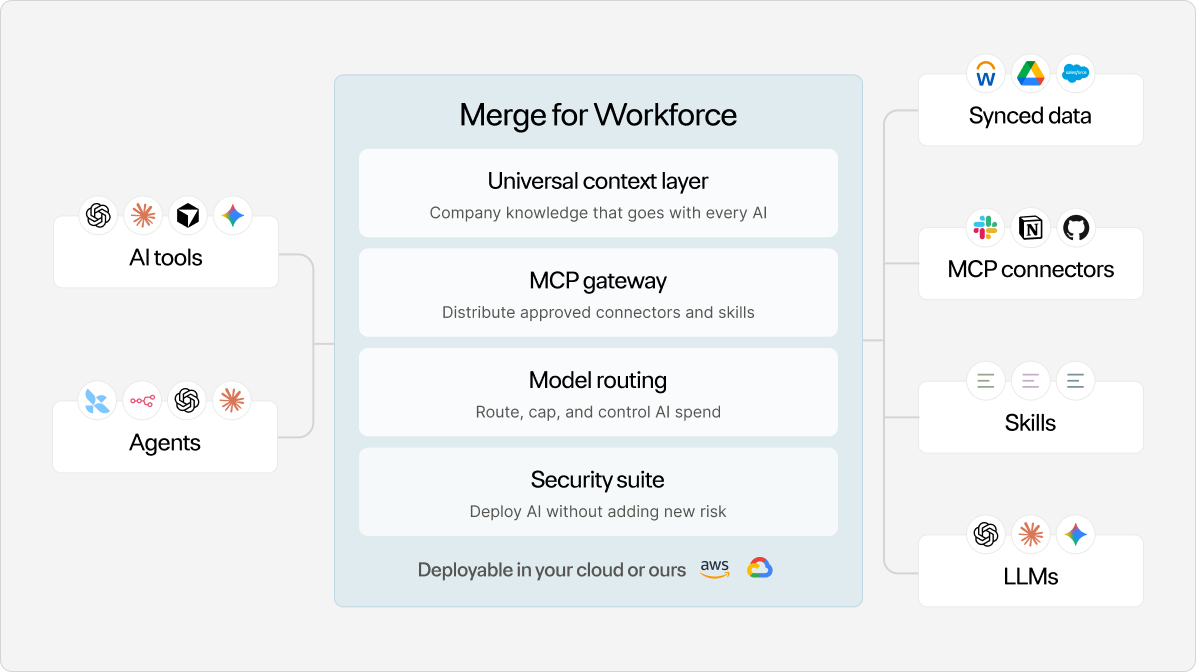
Merge for Workforce gives employees AI access to approved connectors, company context, skills, and models while giving IT visibility and control.
IT configures Merge centrally, allowing employees to access approved capabilities through their existing AI tools under their own identities and permissions. This makes the governed route easier to adopt without requiring employees to manage separate connections.
Company context across AI tools
Merge’s Universal Context Layer syncs approved company data from systems of record and supplies it as context for supported employee AI applications. At launch, supported sources include file storage, ticketing, and HRIS systems.
Centrally managed connectors and skills
The MCP Gateway distributes Merge-maintained connectors, approved public MCP servers, and shared skills to employees by group. IT can manage which capabilities each group receives without relying on employees to configure their own connections. Organizations don't need to adopt MCP separately to use Merge for Workforce.
Model access and spending controls
IT can set approved models by team, enforce budgets and spend caps, and attribute usage costs to individual employees, teams, and models.
Employee provisioning and access
Merge supports SCIM provisioning through Okta and Microsoft Entra, allowing IT to manage employee accounts and group membership. Access to approved capabilities can be managed through those groups.
Visibility and governance across tools
Merge provides data loss prevention (DLP) controls that can block or redact sensitive data on tool calls, audit trails with security information and event management (SIEM) export, and spend attribution by employee, team, and model. An MDM-deployed desktop client configures employee machines and blocks unapproved models and MCP servers.
Merge maintains a SOC 2 Type II report and ISO 27001 certification, with compliance measures supporting HIPAA and GDPR requirements. Netflix and Unily are among the companies using Merge to provide company-wide employee context.
See how Merge for Workforce brings governed company context to the AI tools employees already use. Book a demo.
FAQs
Can a company brain work with AI tools employees already use, like Claude, ChatGPT, and Copilot?
Yes. In the goes-with model, company context and approved capabilities are available through supported AI tools rather than a separate interface. IT manages the underlying connections and policies centrally, so employees don't need to configure independent integrations for each tool. Because IT manages company context centrally, it can extend that context to newly adopted, supported AI tools without rebuilding the underlying source connections.
Is a company brain the same as RAG?
No. Retrieval-augmented generation (RAG) supplies an AI model with relevant information from external sources when generating a response. A company brain is a broader context and connectivity layer that may use RAG alongside identity and permissions, connectors, skills, approved models, and governance controls. RAG is one possible mechanism within a company brain, not an alternative to the entire architecture.
Does a company brain require MCP?
No. Model Context Protocol (MCP) is a standard for connecting AI applications to external tools and data sources. A company brain can use MCP to make approved capabilities available across AI tools, but MCP isn't required. Other integration methods can serve the same purpose.
How does a company brain keep company context governed when employees use AI?
A workforce company brain can enforce policies based on employee identity and permissions rather than relying on shared credentials. For example, an employee asking AI about a customer account should only be able to retrieve records they’re authorized to access. Data loss prevention controls can inspect or block sensitive information during supported tool calls, while audit logs and spend attribution give IT visibility into usage. Enterprises should verify how permissions from underlying systems are enforced, since provisioning an employee doesn’t automatically determine which connected resources they can access.
Who sets up and manages a company brain: IT or individual teams?
In the goes-with model, IT manages approved data sources, connectors, models, and access policies, while employees use those capabilities inside their existing AI tools. Teams don’t need to maintain independent connections to every company system. IT still needs to verify compatibility with each supported AI client, since integration methods and available capabilities can differ between tools.
What should enterprises look for in a company brain?
Enterprises should consider whether a company brain supports the AI tools employees use, respects existing data permissions, and provides reliable, current company context. IT should evaluate governance controls, auditing, spend visibility, and the effort required to deploy and maintain integrations. Enterprises should also examine where data-handling policies are enforced and how employee access changes when roles or permissions change.

Melinda Gutermuth



But Merge isn’t just a Unified
API product. Merge is an integration platform to also manage customer integrations. gradient text
But Merge isn’t just a Unified
API product. Merge is an integration platform to also manage customer integrations. gradient text
But Merge isn’t just a Unified
API product. Merge is an integration platform to also manage customer integrations. gradient text
But Merge isn’t just a Unified
API product. Merge is an integration platform to also manage customer integrations. gradient text