

Table of contents
.avif)
.png)
How to connect a ServiceNow MCP with Claude Code (4 steps)



Jon Gitlin
Developers building on-call automations, change approval agents, or internal IT tooling need live ServiceNow data, whether that's active P1s, pending change requests, open problem records, CMDB relationships, and more.
Getting that data today means navigating ServiceNow's table API, configuring OAuth against your specific instance URL, and maintaining that setup as your instance changes.
To help your developers query and update ServiceNow records directly from the terminal, we'll show you how to connect ServiceNow with Merge Agent Handler's ServiceNow MCP server.
How it works
Merge Agent Handler connects Claude Code to the ServiceNow API through a single CLI setup.
You install the Merge CLI, authenticate once, and register the connection with one command. Agent Handler handles your instance-specific OAuth credentials so you don't store ServiceNow tokens locally or manage the instance URL configuration yourself.
Here's the command that registers the connection:
Related: The steps for connecting a ServiceNow MCP with Codex
Prerequisites
Before getting started, you'll need the following:
- A Merge Agent Handler account
- Claude Code installed (run
claude --versionto confirm) - pipx installed (run
pipx --versionto confirm, or install viapip install pipx) - A ServiceNow instance with API access enabled
If you want to connect Merge Agent Handler's ServiceNow MCP with internal or customer-facing agentic products, you can follow the steps in our docs.
1. Install the Merge CLI
Install with pipx: pipx install merge-api

Verify your installation: merge --version
Related: A guide to connecting a ServiceNow MCP to Cursor
2. Configure the CLI and log in
Run merge login to authenticate your session and link the CLI to your Merge Agent Handler account: merge login
This authenticates your session so the CLI can make authorized requests on your behalf.
3. Add Agent Handler to Claude Code
Register the Agent Handler MCP server with Claude Code:
Or manually:
Verify the connection registered. Open Claude Code and run: /mcp. agent-handler should appear under Local MCPs with a connected status.

4. Authenticate ServiceNow
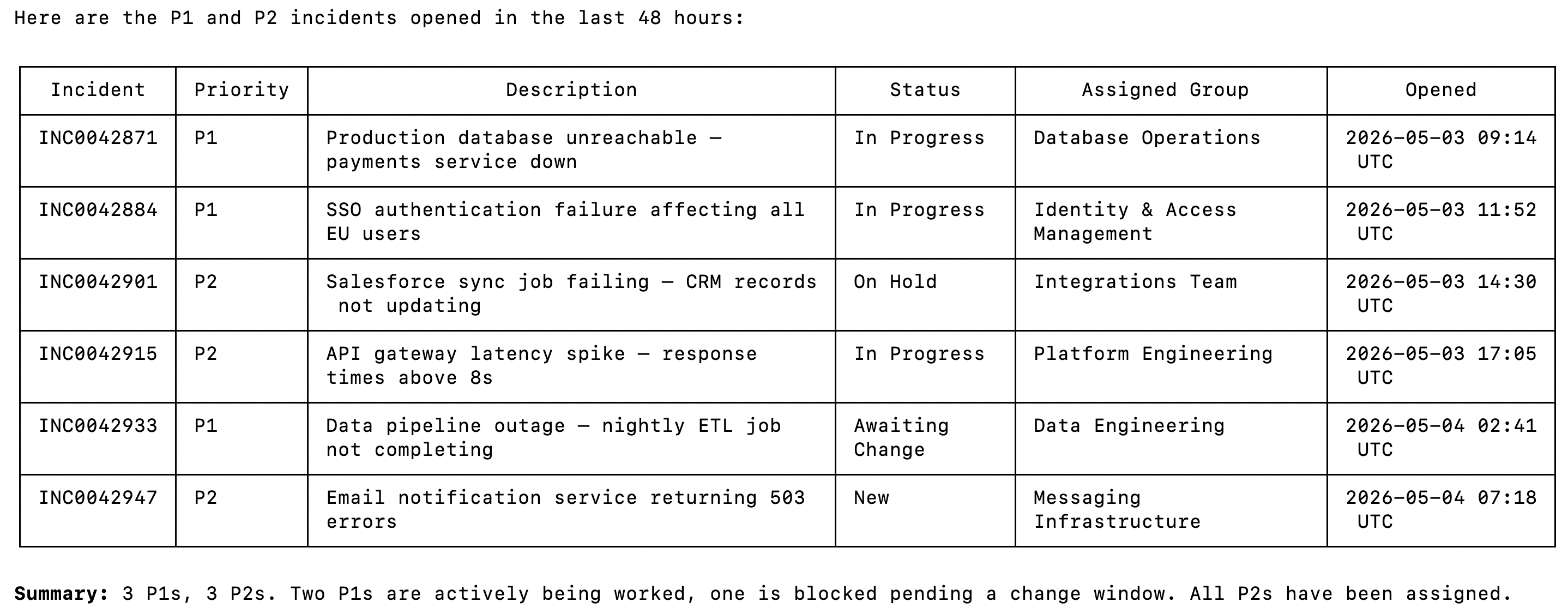
Open Claude Code and test the connection with a prompt like: "List all P1 and P2 incidents opened in the last 48 hours and show me the current status and assigned group for each one."
A Magic Link will appear on first use to complete connector authentication.
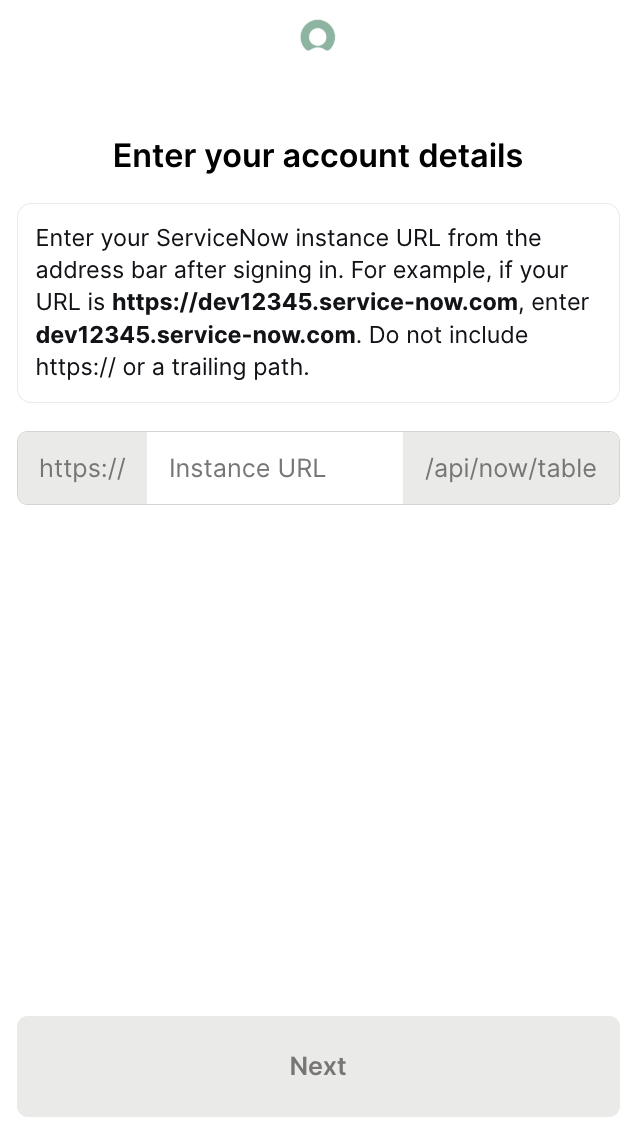
Once authenticated, you should see an output like the following:
{{this-blog-only-cta}}
ServiceNow MCP FAQ
In case you have more questions on setting up and using the ServiceNow MCP in Claude Code, we've addressed several more commonly-asked questions below.
What can you do once the ServiceNow MCP is connected to Claude Code?
With ServiceNow connected, Claude Code can:
- Query incidents: retrieve active incidents filtered by priority, state, category, or assigned group without opening the ServiceNow UI or running a custom report
- Read change requests: surface pending and approved changes with their schedule, risk level, and approver details, useful for an agent validating whether a deploy window is clear
- Access problem records: pull open problems and their linked incidents to give agents the full context behind a recurring issue
- Create and update records: log new incidents, transition ticket state, or add work notes directly from the terminal if write tools are enabled
- Search the knowledge base: find KB articles relevant to an active incident, useful when an agent needs to surface runbooks or past resolutions automatically
- List CMDB configuration items: retrieve infrastructure records and their relationships, useful for agents that need to understand blast radius before a change
Why use Merge Agent Handler vs. a self-hosted ServiceNow MCP server?
You can build a self-hosted MCP server that calls the ServiceNow table API directly. For a solo developer with an existing instance and clear scope, the setup is manageable: configure OAuth credentials, write tool schemas against the tables you need, and wire it to Claude Code.
ServiceNow's API surface is large. The table API gives you access to hundreds of tables, but the field names and relationships across incidents, changes, problems, and CMDB items are non-trivial to map correctly. A self-hosted setup also means you're responsible for token refresh, instance-specific URL configuration, and keeping your tool schemas current as your ServiceNow configuration evolves.
At team scale, the credential problem compounds. Each developer managing their own OAuth app against the instance means multiple integration users to maintain, no central control over which tables or operations each agent can touch, and no audit trail of what was queried or written. If credentials are rotated or the OAuth app is modified, every developer's local setup breaks at the same time.
Merge Agent Handler adds a control layer at the tool level.
You define exactly which ServiceNow operations get exposed, so a read-only incident reporting agent never gets access to write tools. Each tool call is also logged with the tool name, inputs, and response metadata. For teams running agents against production ITSM data, that's a materially different operational posture than a locally stored OAuth token pointed at a live instance.
Why connect ServiceNow to Claude Code?
ServiceNow holds the operational record of what's happening in production: which systems have active incidents, which changes are scheduled, which problems are still open. Developers building anything that touches IT operations need that data, and right now getting it means a browser, a custom report, or a one-off REST call.
With the ServiceNow MCP connected, Claude Code can retrieve incident records, surface change schedules, and query CMDB data without a context switch.
This matters most when ServiceNow data is an input to a larger workflow: checking incident state before paging an on-call engineer, pulling the change request record before triggering a deploy, or generating a weekly incident summary from the last 7 days of P1 tickets.
Jon Gitlin
.png)

.png)

Connect Claude Code to thousands of tools with Merge Agent Handler
Use Merge Agent Handler’s 150+ connectors (including ServiceNow) to power reliable, secure, and powerful agents.


But Merge isn’t just a Unified
API product. Merge is an integration platform to also manage customer integrations. gradient text
But Merge isn’t just a Unified
API product. Merge is an integration platform to also manage customer integrations. gradient text
But Merge isn’t just a Unified
API product. Merge is an integration platform to also manage customer integrations. gradient text
But Merge isn’t just a Unified
API product. Merge is an integration platform to also manage customer integrations. gradient text