

.avif)

How to connect Salesforce MCP with Claude Code (4 steps)



Jon Gitlin
Developers building RevOps automations, sales tooling, or AI-assisted workflows constantly need to reference Salesforce data, whether it's checking opportunity stages, pulling contact histories, or reading account firmographics. But each lookup means leaving the terminal and opening a browser.
To help your developers query and update Salesforce records directly from their coding session, we'll show you how to connect Salesforce with Merge Agent Handler's Salesforce MCP server.
How it works
Merge Agent Handler sits between Claude Code and Salesforce's API. You install the Merge CLI, authenticate once, and register the connection with a single command. Agent Handler manages your Salesforce OAuth credentials and routes every API call so you don't store tokens locally or handle credential state yourself.
Here's the command that registers the connection:
Related: How to integrate a Salesforce MCP with Codex
Prerequisites
Before getting started, you'll need the following:
- A Merge Agent Handler account
- Claude Code installed (run
claude --versionto confirm) - pipx installed (run
pipx --versionto confirm, or install viapip install pipx) - A Salesforce account with API access enabled
If you want to connect Merge Agent Handler's Salesforce MCP with internal or customer-facing agentic products, you can follow the steps in our docs.
1. Install the Merge CLI
Install with pipx: pipx install merge-api

Verify your installation: merge --version
2. Configure the CLI and log in
Run merge login to authenticate your session and link the CLI to your Merge Agent Handler account: merge login
This authenticates your session so the CLI can make authorized requests on your behalf.
3. Add Agent Handler to Claude Code
Run the following to register the Agent Handler MCP server with Claude Code:
Or, if you prefer to register manually:
Verify the connection registered. Open Claude Code and run: /mcp
agent-handler should appear under Local MCPs with a connected status.

Related: How to use a Salesforce MCP in Cursor
4. Authenticate Salesforce
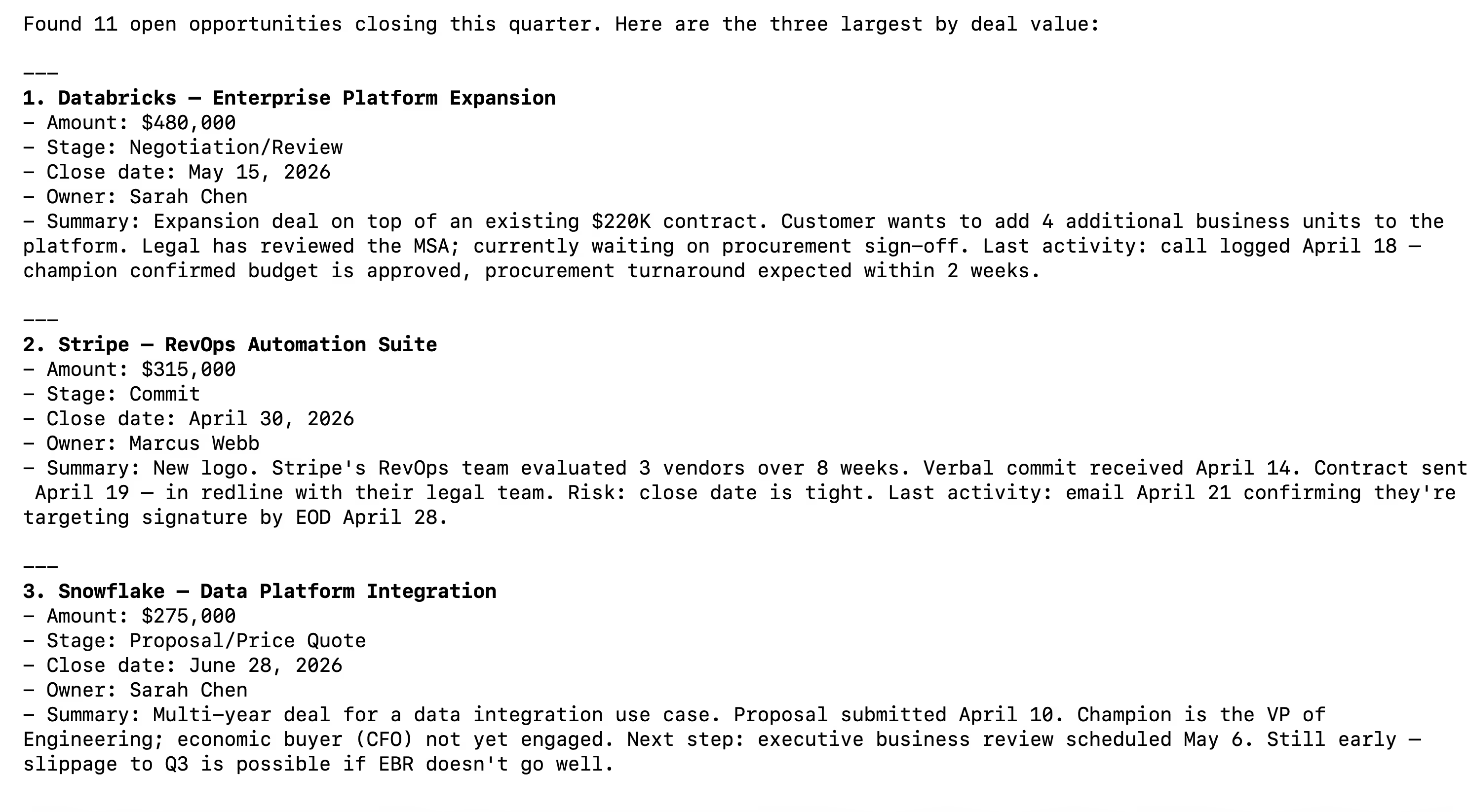
Open a Claude Code session and run a test query like: "List my open opportunities closing this quarter and summarize the three largest by deal value."
The first time you invoke a Salesforce tool, a Magic Link will appear to complete connector authentication.
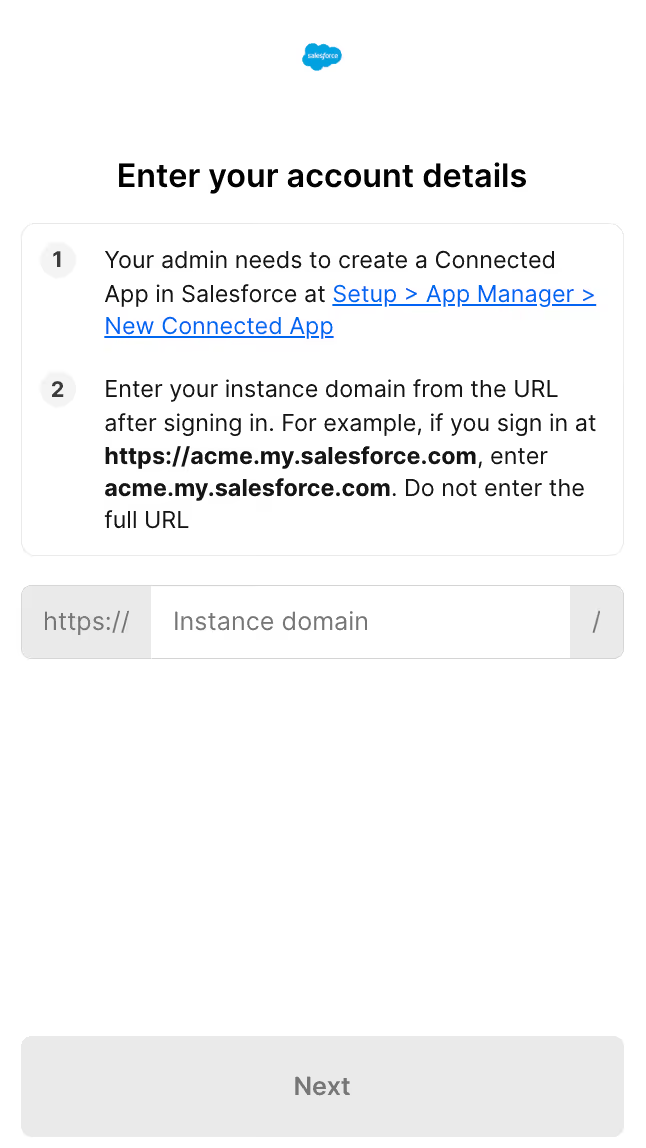
Once authenticated, you should see an output like the following:
{{this-blog-only-cta}}
Salesforce MCP FAQ
In case you have more questions on setting up and using the Salesforce MCP in Claude Code, we've addressed several more commonly-asked questions below.
What can you do once the Salesforce MCP is connected to Claude Code?
With Salesforce connected, Claude Code can:
- Search and retrieve opportunities: pull deals by stage, owner, close date, or amount without opening a browser or writing a SOQL query by hand
- Look up accounts and contacts: fetch full account records, contact details, and relationship hierarchies from within a coding session
- Read activity history: surface calls, emails, and meeting logs against any record to understand what's happened on an account before acting
- Create and update records: log a new lead, move an opportunity to a new stage, or update account fields directly from the terminal
- List pipeline by rep or team: aggregate open deals by owner or segment to give agents the context they need for automation logic
- Cross-reference CRM data: combine Salesforce records with other connected tools, pulling account data alongside Jira tickets or Slack threads in a single agent session
Why use Merge Agent Handler vs. a self-hosted Salesforce MCP server?
You can build a self-hosted MCP server that calls Salesforce's API directly. For a solo developer working against a single Salesforce sandbox, that's a manageable starting point. You create a Connected App, handle the OAuth flow, write tool schemas against the objects you need, and wire it to Claude Code.
The friction compounds quickly at the team level.
Salesforce's OAuth setup requires administrator access to create and configure a Connected App, and every developer who needs agent access ends up with their own token to manage. There's no central place to enforce which objects or fields an agent is allowed to read or write, no audit trail of what the agent queried, and no clean process for revoking access when someone leaves.
Salesforce's API surface is also unusually broad. Covering Opportunities, Accounts, Contacts, Leads, Cases, Tasks, and Activities with correct field mappings, pagination, and error handling is extremely difficult to build and maintain as Salesforce releases API updates.
Merge Agent Handler is a managed MCP layer. It centralizes authentication, scopes access per Tool Pack and Registered User so each agent only touches the objects and fields you explicitly allow, and logs every tool call. For teams building agents against production Salesforce data, Merge removes the per-developer credential problem and the maintenance burden of keeping the connector current.
Why connect Salesforce to Claude Code?
Salesforce holds the data that drives revenue decisions: who owns which account, where each deal stands, what activity has happened on a customer relationship, etc. Developers building agents that need to act on any of that have to reach Salesforce, and right now that typically means a browser, an API client, or a one-off script.
With the Salesforce MCP connected, Claude Code can query opportunities, update records, and surface account context without a context switch.
This matters most when the agent is part of a larger workflow: reading a Salesforce opportunity to decide which Slack message to send, pulling account history before drafting an email, or checking deal stage before triggering a downstream action. The terminal becomes the single place where CRM data and code execution meet, and agents can use both in one session.
Jon Gitlin



Connect your agents to thousands of tools in minutes
Use Merge Agent Handler’s 150+ connectors (including Salesforce) to power reliable, secure, and powerful agents.


But Merge isn’t just a Unified
API product. Merge is an integration platform to also manage customer integrations. gradient text
But Merge isn’t just a Unified
API product. Merge is an integration platform to also manage customer integrations. gradient text
But Merge isn’t just a Unified
API product. Merge is an integration platform to also manage customer integrations. gradient text
But Merge isn’t just a Unified
API product. Merge is an integration platform to also manage customer integrations. gradient text