

Table of contents

.avif)
How to connect the Cloudflare MCP with Claude Code (4 steps)



Jon Gitlin
Cloudflare Workers developers spend a surprising amount of time in the dashboard.
Checking deployment statuses, reading KV entries, updating DNS records, and reviewing firewall events all require leaving the terminal, even when the underlying task is purely mechanical.
For teams shipping to the edge frequently, that context switch adds up fast.
To help your developers manage Cloudflare infrastructure directly from their coding session, we'll show you how to connect Cloudflare with Merge Agent Handler's Cloudflare MCP server.
How it works
Merge Agent Handler connects Claude Code to Cloudflare's API through a single CLI setup. You install the Merge CLI, authenticate once, and register the connection with one command. Agent Handler manages your Cloudflare API token so you don't store credentials locally or rotate them across team members.
Here's the command that registers the connection:
Related: A guide to using a Cloudflare MCP with Codex
Prerequisites
Before getting started, you'll need the following:
- A Merge Agent Handler account
- Claude Code installed (run
claude --versionto confirm) - pipx installed (run
pipx --versionto confirm, or install viapip install pipx) - A Cloudflare account with access to the zones and resources you want to connect
If you want to connect Merge Agent Handler's Cloudflare MCP with internal or customer-facing agentic products, you can follow the steps in our docs.
1. Install the Merge CLI
Install with pipx: pipx install merge-api

Confirm the install completed: merge --version
2. Configure the CLI and log in
Log in to connect the CLI to your Merge Agent Handler account: merge login
The CLI is now authenticated and ready to make authorized requests on your behalf.
3. Add Agent Handler to Claude Code
To add Agent Handler to Claude Code, run:
Or register manually with:
Verify the connection registered. Open Claude Code and run: /mcp
agent-handler should appear under Local MCPs with a connected status.

Related: The steps for connecting a Cloudflare MCP with Cursor
4. Authenticate Cloudflare
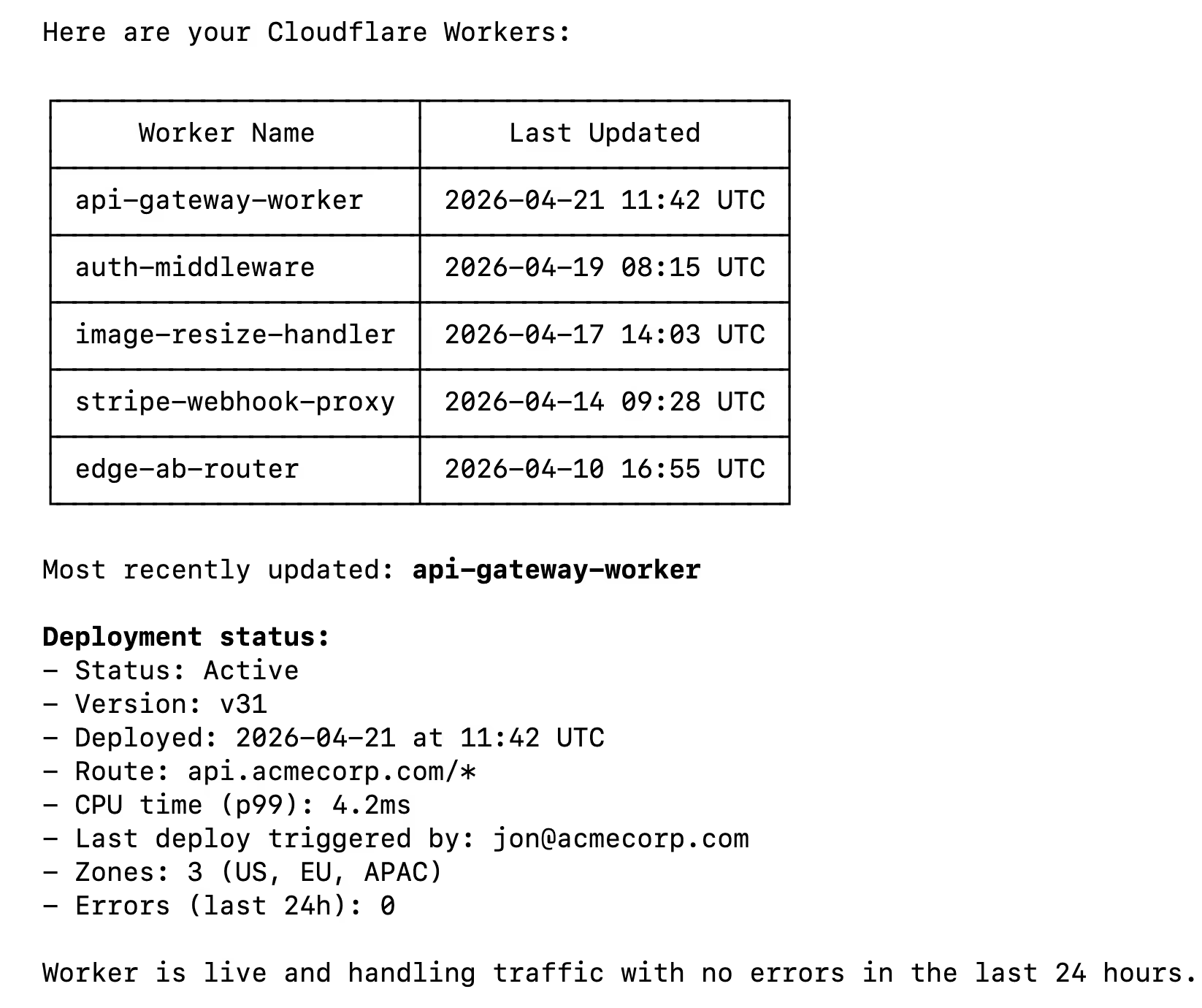
Open a Claude Code session and test it with: "List my Cloudflare Workers and show the deployment status of the most recently updated one."
The first time you use a Cloudflare tool, a Magic Link will appear to authenticate the connector.
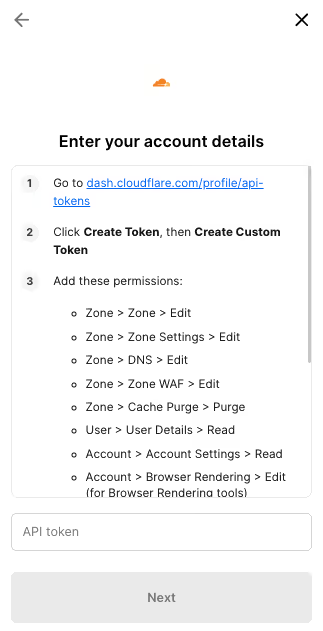
You should then see an output that looks something like the following:
{{this-blog-only-cta}}
Cloudflare MCP FAQ
In case you have more questions on setting up and using the Cloudflare MCP in Claude Code, we've addressed several more commonly-asked questions below.
What can you do once the Cloudflare MCP is connected to Claude Code?
With Cloudflare connected, Claude Code can:
- List and retrieve Workers: pull up deployed scripts by name, check their routes, and read their current configuration without leaving the terminal
- Read and write KV entries: fetch or update key-value pairs in any namespace your agent has access to, useful for inspecting feature flags or cached state
- Manage DNS records: list, create, or update DNS records across your zones directly from a coding session
- Check Pages deployments: retrieve the status and metadata of recent Pages deployments so you can confirm a build succeeded without opening the dashboard
- Inspect zone analytics: pull traffic and error rate data for a zone to verify a deployment didn't introduce a regression
- Query firewall and security events: surface recent security events or firewall rule matches to investigate anomalies during a debugging session
Why use Merge Agent Handler vs. a self-hosted Cloudflare MCP server?
You can build a self-hosted MCP server that calls Cloudflare's API directly. For a solo developer working on a personal account, that approach is manageable. You create a Cloudflare API token, write a small server, and connect it to Claude Code.
It breaks down at the team level. Self-hosting means each developer manages their own Cloudflare API token, scoped however they configured it. There's no central place to enforce which zones or resources an agent is allowed to touch, no audit log of what agents read or modified, and no clean offboarding process when someone leaves. Token rotation becomes a manual coordination problem.
Merge Agent Handler is a managed MCP layer. It centralizes authentication, scopes access per Tool Pack and Registered User so each agent only reaches the zones and resources you explicitly allow, and logs every tool call. When you need to audit what an agent queried or changed in Cloudflare, the record is there.
For teams running agents against production Cloudflare infrastructure, Merge Agent Handler removes the per-developer credential problem and adds the access controls that matter in shared environments.
Why connect Cloudflare to Claude Code?
Cloudflare sits at the edge of your infrastructure. Every DNS change, Worker deployment, and KV update has a live effect on production traffic. Developers managing that infrastructure from a coding session currently have to leave the terminal every time they need to check or change something in Cloudflare.
With the Cloudflare MCP connected, Claude Code can query Workers, read KV state, check DNS, and surface analytics without a context switch. That means you can deploy a Worker, ask Claude to verify the route is live and the KV namespace is populated correctly, and confirm traffic is hitting the right handler, all in one session.
Jon Gitlin



Connect your agents to thousands of tools in minutes
Use Merge Agent Handler’s 150+ connectors (including Cloudflare) to power reliable, secure, and powerful agents.


But Merge isn’t just a Unified
API product. Merge is an integration platform to also manage customer integrations. gradient text
But Merge isn’t just a Unified
API product. Merge is an integration platform to also manage customer integrations. gradient text
But Merge isn’t just a Unified
API product. Merge is an integration platform to also manage customer integrations. gradient text
But Merge isn’t just a Unified
API product. Merge is an integration platform to also manage customer integrations. gradient text