

.avif)

How to connect to the Airtable MCP with Claude Code (4 steps)



Jon Gitlin
Airtable has become the structured data layer for many non-engineering teams: product roadmaps, content calendars, launch checklists, customer research.
Developers who need to build agents around that data spend too much time writing one-off API calls or exporting CSVs, when what they actually need is a live connection from their coding session directly into the base.
To help your developers read, search, and update Airtable records directly from their coding sessions, we'll show you how to connect Airtable with Merge Agent Handler's Airtable MCP server.
How it works
Merge Agent Handler sits between Claude Code and Airtable's API. You install the Merge CLI, authenticate once, and register the connection with a single command. Agent Handler handles OAuth token storage and API calls to Airtable so you don't manage credentials locally or handle token refresh yourself.
Here's the command that registers the connection:
Related: A guide to using an Airtable MCP in Codex
Prerequisites
Before getting started, you'll need the following:
- A Merge Agent Handler account
- Claude Code installed (run
claude --versionto confirm) - pipx installed (run
pipx --versionto confirm, or install viapip install pipx) - An Airtable account with access to the bases you want to connect
If you want to connect Merge Agent Handler's Airtable MCP with internal or customer-facing agentic products, you can follow the steps in our docs.
1. Install the Merge CLI
Install with pipx: pipx install merge-api

Verify your installation: merge --version
2. Configure the CLI and log in
This links the CLI to your Merge account and authenticates your session: merge login
Once logged in, the CLI is ready to make authorized requests on your behalf.
3. Add Agent Handler to Claude Code
The simplest way to register Agent Handler with Claude Code:
Alternatively, register manually:
Verify the connection registered. Open Claude Code and run: /mcp
agent-handler should appear under Local MCPs with a connected status.

Related: The steps for connecting an Airtable MCP with Cursor
4. Authenticate Airtable
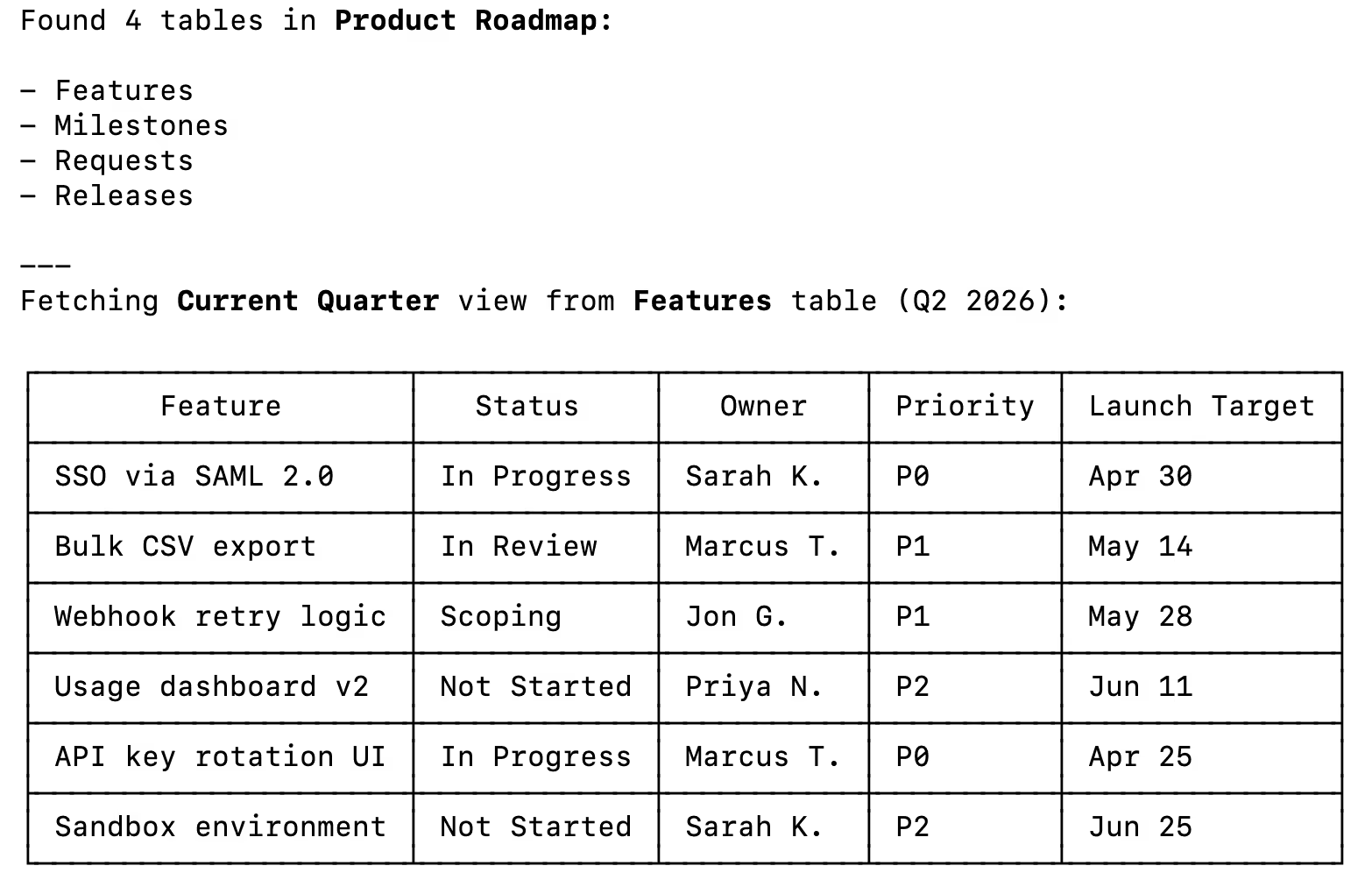
To confirm the connection is working, open a Claude Code session and try: "List all tables in my product roadmap Airtable base and show me the records in the current quarter view."
On first use, a Magic Link will appear to finish connector authentication.

You should then see an output that looks something as follows:
{{this-blog-only-cta}}
Airtable MCP FAQ
In case you have more questions on setting up and using the Airtable MCP in Claude Code, we've addressed several more commonly-asked questions below.
What can you do once the Airtable MCP is connected to Claude Code?
With Airtable connected, Claude Code can:
- Search and retrieve records: pull up rows from any table by field value, view, or filter criteria without leaving the terminal
- List tables and bases: surface the schema and available views for any base your agent has access to
- Read record detail: fetch full field values for any record, including linked records, attachments, and formula outputs
- Create new records: add rows to any table directly from Claude Code if write tools are enabled
- Update existing records: modify field values on existing rows to reflect new status, decisions, or data
- Cross-reference bases: retrieve records across multiple tables in a single session to support more complex agent workflows
Why use Merge Agent Handler vs. a self-hosted Airtable MCP server?
You can build a self-hosted MCP server that calls Airtable's API directly. For a solo developer connecting to their own workspace, that approach is manageable.
It breaks down at the team level. Self-hosting means each developer manages their own Airtable personal access token, you have no central visibility into what agents are reading or writing across your bases, and you're responsible for maintaining the server as Airtable's API evolves. Token rotation when someone offboards is a manual process with no audit trail.
Merge Agent Handler is a managed MCP layer. It centralizes authentication, scopes access per Tool Pack and Registered User so each agent only touches the bases you explicitly allow, and logs every tool call. When you need to audit what an agent queried or modified in Airtable, the record is there.
For teams building agents that read or write production Airtable data, Merge Agent Handler removes the per-developer credential problem and adds the access controls that matter in shared environments.
Why connect Airtable to Claude Code?
Airtable is where structured business data lives outside engineering systems. Claude Code is where developers build the agents that need it. The gap between them forces a workaround: exporting CSVs, writing one-off API scripts, or re-scraping data whenever the base changes.
With the Airtable MCP connected, Claude Code can query that data directly. You can build an agent that pulls feature specs from a roadmap base, reads acceptance criteria, and uses them as context for writing code, all in one session. Engineers stop being blocked by data that lives in the wrong tool. The work and the data are finally in the same place.
Jon Gitlin



Connect your agents to thousands of tools in minutes
Use Merge Agent Handler’s 150+ connectors (including Airtable) to power reliable, secure, and powerful agents.


But Merge isn’t just a Unified
API product. Merge is an integration platform to also manage customer integrations. gradient text
But Merge isn’t just a Unified
API product. Merge is an integration platform to also manage customer integrations. gradient text
But Merge isn’t just a Unified
API product. Merge is an integration platform to also manage customer integrations. gradient text
But Merge isn’t just a Unified
API product. Merge is an integration platform to also manage customer integrations. gradient text