

Table of contents
.png)

TrueFoundry vs LiteLLM: when to choose one over the other



Jon Gitlin
As you scale AI features across LLM providers, you'll likely need a way to route requests, control costs, and keep production traffic reliable without hand-rolling separate SDKs and billing setups for every model.
That's where TrueFoundry and LiteLLM can help.
We'll help you compare the two LLM routing solutions by breaking down each platform's strengths and weaknesses, and then give you clear rules of thumb for choosing between them.
TrueFoundry overview
TrueFoundry is an enterprise AI gateway and agentic deployment platform. It's built for teams that need production governance, not just model access.
Beyond routing, it covers agent orchestration, prompt management, and model training and fine-tuning under one platform. It can also deploy across your own cloud, on-premises, or air-gapped infrastructure.

Strengths
- Deep infrastructure control: Self-host TrueFoundry in your own VPC, on-premises, or an air-gapped environment
- Broader platform: Agent deployment, model training and fine-tuning, and prompt management all live alongside routing, so you don't need separate software for those
- Enterprise-grade governance out of the box: Get role-based access control, per-user and per-service rate limits, and configurable guardrails, with custom Python rules available for anything those don't cover
- Support for self-hosted open-source models: Route to open-source models through vLLM, SGLang, KServe, or Triton, not just hosted providers like OpenAI and Anthropic
Weaknesses
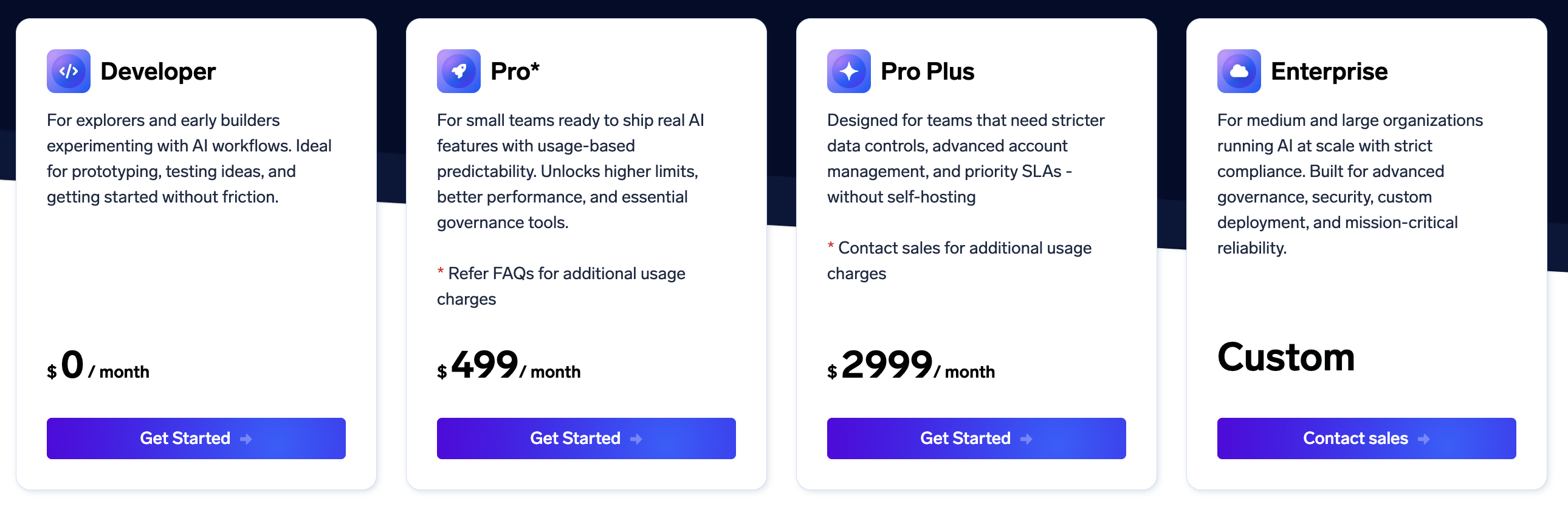
- A steep pricing jump: Production-grade governance like stricter data controls sits behind the Pro Plus tier at $2,999/month, a big jump from the $499/month Pro plan
- Routing runs on rules, not benchmarks: Decisions are based on latency, weighted load balancing, and geo rules, and there's no built-in way to route based on your own quality or evaluation benchmarks
- No customer-level cost attribution: Dashboards break spend down by model, team, or geography, not by end customer, so you don't get built-in per-customer billing data if you're reselling AI usage
- More to configure before you see value: RBAC, quotas, guardrails, and deployment topology all need setup up front
Related: The top alternatives to TrueFoundry
LiteLLM overview
LiteLLM is an open-source proxy and SDK that gives you one OpenAI-compatible API in front of over 140 providers and 1,800 models.
You run it yourself, whether that's a Docker container, a Kubernetes cluster, or a fully air-gapped environment, which keeps every request inside your own network boundary. And because the core is MIT-licensed, you can inspect, extend, or fork the routing logic instead of working within a vendor's fixed feature set.
Strengths
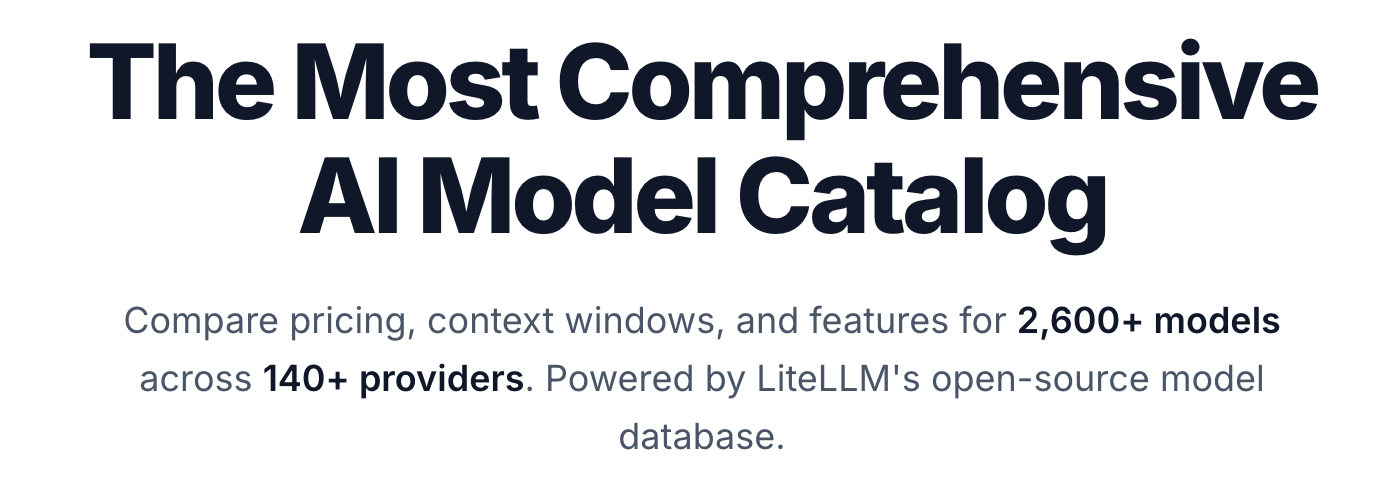
- Broad multi-provider coverage through one API: Over 140 providers and 2,600 models route through the same OpenAI-compatible interface, so your application code doesn't change when you swap a backend
- Full self-hosting and air-gapped deployment: The open-source core is MIT-licensed and deploys via Docker, Kubernetes, or your own cloud, so sensitive traffic never has to leave your network
- Built-in reliability controls: Retries and fallbacks across configured deployments keep requests moving through provider outages or slowdowns
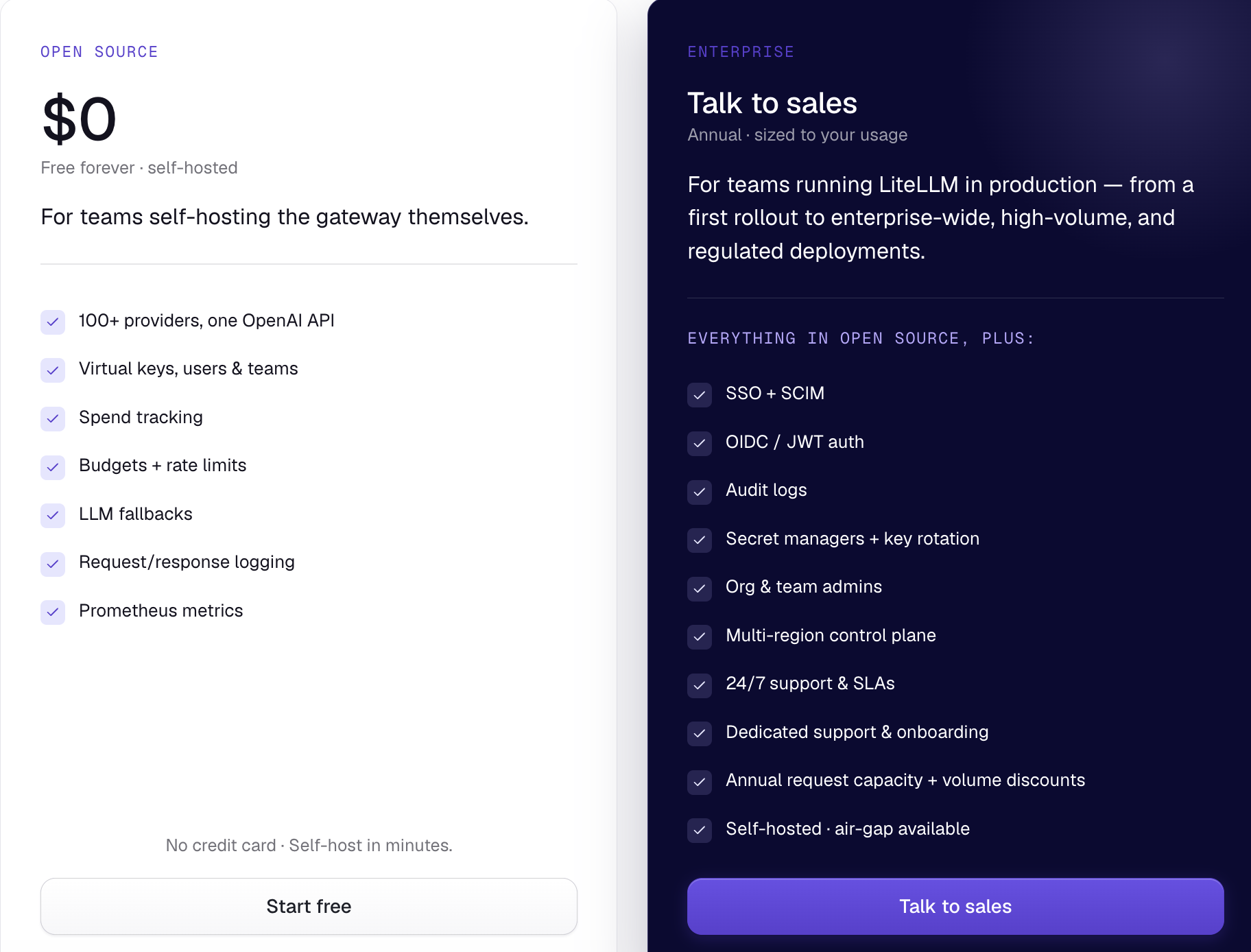
- Platform-team primitives in the free tier: Virtual keys, per-key and per-team spend tracking, budgets, and rate limits ship without an enterprise license
Weaknesses
- You own the operational burden: Deploying, scaling, and monitoring the gateway falls on your team, and an outage takes every AI feature behind it down with it
- Enterprise governance is a separate, custom-priced tier: SSO, SCIM, full audit logging, and multi-region control require the Enterprise plan, and even that plan's own page doesn't call out data loss prevention (DLP) as a feature
- No unified billing across providers: LiteLLM tracks and caps spend, but you still pay every LLM provider separately instead of getting one consolidated invoice
- Limited visibility on pricing model: LiteLLM's only paid plan ("Enterprise") doesn't include any details on the actual pricing model. You can just find details on the security features, deployment, and support that's included
Related: The best alternative solutions to LiteLLM
LiteLLM vs TrueFoundry
Given each platform's pros and cons, it can be hard to choose one over the other.
Here are a few rules of thumb make the decision easier.
- When to use TrueFoundry: You want enterprise governance built in without assembling it yourself. TrueFoundry ships RBAC, guardrails, and rate limits out of the box, where LiteLLM only gets you there through its Enterprise tier plus your own configuration work
- When to use LiteLLM: You want self-hosting without paying for it. LiteLLM's open-source core includes spend tracking, budgets, and rate limits for free, while TrueFoundry gates comparable governance features behind its paid Pro and Pro Plus tiers
Introducing Merge Gateway: the best alternative to TrueFoundry and LiteLLM
Merge Gateway is a unified API and control plane that routes, governs, and monitors LLM usage across every major provider from a single endpoint.
Merge Gateway offers:
- A fully managed control plane with none of the setup tax: You don't have to run the gateway yourself like LiteLLM requires, or configure RBAC, quotas, and guardrails from scratch before you see value like TrueFoundry does
- Built-in enterprise security with no separate paid tier required: DLP-style controls and policy-aware compliance checks ship by default, rather than sitting behind LiteLLM's custom-priced Enterprise plan, which doesn't list DLP as a feature, or TrueFoundry's higher-cost tiers

- Per-customer and per-feature cost attribution: Merge Gateway tracks spend down to the customer, project, team, or feature, while TrueFoundry's dashboards only break spend down by model, team, or geography, with no per-customer or per-feature view

- Unified billing across every provider: Every model routes through one invoice and one system of record for spend, instead of the separate provider bills LiteLLM leaves you to reconcile
{{this-blog-only-cta}}
Jon Gitlin




Don't settle for TrueFoundry or LiteLLM.
Get started with Merge Gateway for free and get unified billing, per-customer cost attribution, and built-in security from day one.


But Merge isn’t just a Unified
API product. Merge is an integration platform to also manage customer integrations. gradient text
But Merge isn’t just a Unified
API product. Merge is an integration platform to also manage customer integrations. gradient text
But Merge isn’t just a Unified
API product. Merge is an integration platform to also manage customer integrations. gradient text
But Merge isn’t just a Unified
API product. Merge is an integration platform to also manage customer integrations. gradient text