

Table of contents

How to build marketing agents with Claude and Merge


Tim Bourcier
Most of what fills a marketer's day isn't marketing.
It's the retrieval around it. Finding the post worth replying to. Checking whether anyone here has spoken to this person before. Pulling last week's sends into a shape you can argue with. Those answers sit in eight different tools, so getting them means eight tabs and a doc you assemble by hand, every week, in the same order.
Claude can do that retrieval, as long as it can reach the tools your work lives in. This covers what Merge Agent Handler reaches, how to connect it, and how to scope an agent so its output is worth reading.
How it works
Merge Agent Handler sits between Claude and the APIs behind your marketing tools.
You install the Merge CLI, authenticate once, and register the connection with a single command:
pipx install merge-apimerge loginmerge setup claude-code
The first time an agent calls a tool, a Magic Link appears to authenticate that connector. Merge manages the credentials and handles each vendor's rate limits on your behalf, so you don't register an OAuth app per tool, store client secrets locally, or write token refresh logic.
Related: The connectors your agents can actually reach
Prerequisites
Before getting started, you'll need the following:
- A Merge Agent Handler account
- Claude Code installed (run claude --version to confirm)
- pipx installed (run pipx --version to confirm, or install via pip install pipx)
- One context document your agents can read, covering your audience, your topics, your tone, two examples of your own writing, and the things you never say
If you want to connect Merge Agent Handler with internal or customer-facing agentic products, you can follow the steps in our docs.
What a marketing team can reach
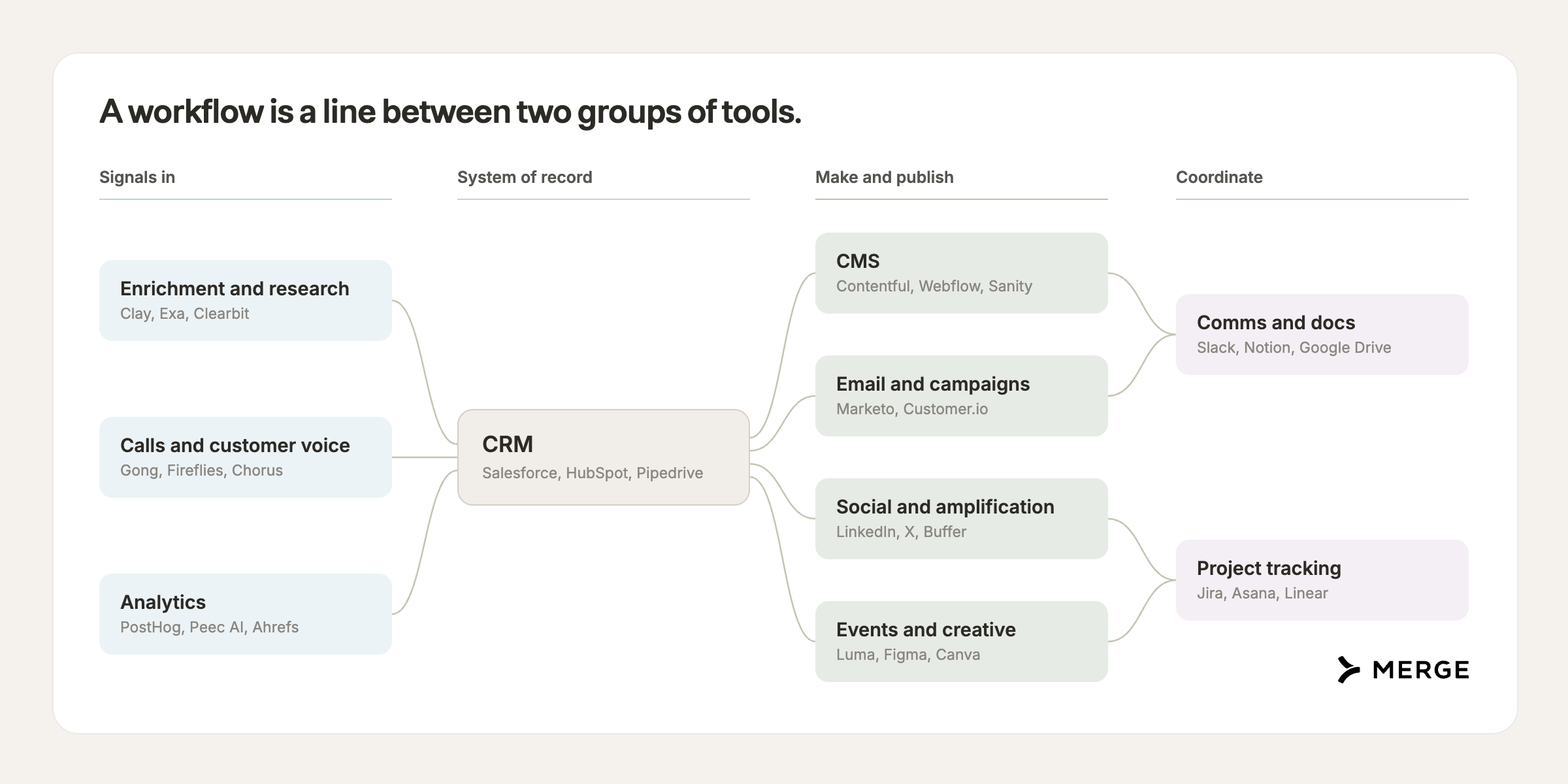
Agent Handler covers hundreds of connectors, and gives Claude authenticated access to the systems a GTM team already runs. The relevant ones group like this:
- CRM: Salesforce, HubSpot, Pipedrive, Attio, Dynamics 365 Sales, Zoho CRM
- Enrichment and research: Apollo, Clay, ZoomInfo, Crustdata, LinkedIn, Exa, Firecrawl
- Email and campaigns: HubSpot, Klaviyo, SendGrid, ActiveCampaign, Bitly for link tracking
- CMS: Webflow, WordPress, Contentful, Sanity, Wix, ReadMe for developer docs
- Calls and customer voice: Gong, Fireflies, Granola, Plaud, Intercom, Pylon, Zendesk
- Analytics: PostHog, Amplitude, Pendo, Statsig, Looker, Metabase, Hex, Peec AI, Ahrefs
- Comms and docs: Slack, Gmail, Outlook, Notion, Confluence, Guru, Google Docs and Sheets
- Social and amplification: LinkedIn, X, TikTok, YouTube, plus Ordinal for coordinating what your team posts and Sprout Social for scheduling
- Events and creative: Luma and Goldcast for registrations, Canva, Gamma, and Figma for the assets, Straker when something needs translating
- Project tracking: Asana, Monday.com, ClickUp, Calendly
Pick any two of those groups and there's a workflow between them you currently do by hand.
Related: Agent connectors: what you need to know
How to scope an agent
Once Claude can reach your tools, the question stops being technical. It becomes a scoping
question, and four decisions carry most of the outcome.
Give it one job, small enough to describe in a paragraph. An agent that finds interesting
posts is useful. An agent that "handles marketing" produces work you have to redo. The narrower
the job, the more specific the instructions can be, and specificity is the whole game. A useful
test: if you cannot say what the agent returns in one sentence, it is two agents.
Give it only the tools that job needs. A research agent with send access will eventually send
something. Scoping connectors per agent removes most of your risk before you write a single
instruction, and it makes the output better too, because the model is not choosing between twelve
tools on every call.
Decide what it can do alone. Write it down explicitly. Reading, sorting, drafting, and staging
are usually safe. Sending, publishing, and writing to the CRM usually are not. The rule of thumb:
anything you cannot take back belongs on your side of the line, and anything a customer would see
counts double.
Give it your context, not just your prompt. One document covering your audience, your topics,
your tone, two examples of your own writing, and the things you never say. Every agent reads it
first. This is the difference between five agents with one voice and five agents with five, and it
is the step people skip because it feels like preparation rather than building.
Five agents a marketing team can build
Each of these is one job, scoped to a few connectors. Together they cover the work around
marketing rather than the marketing itself.
1. A scout. Reads Exa, LinkedIn, and X, and returns ten things worth your attention today, ranked,
with one line on why each one matters. The ranking rule does more than the search: working demos
over announcements, original research over commentary on original research, a clear explanation of
something hard over a hot take. It writes nothing and touches nothing. Its only output is a list
with links, which makes it the safest agent to build first and the one most likely to survive.
2. A producer. Takes that list and returns a content plan in Notion: format, hook, outline, and
the one example that makes the idea concrete. It should also say when the answer is "do not cover
this," which is most of the time. It plans, you write. An outline you can argue with beats a draft
you have to rewrite.
3. A researcher. Profiles a person before you contact them, using Apollo, Clay, and LinkedIn, and
prints the source next to every field. Where two sources disagree on headcount it shows both rather
than averaging them. Unknown stays unknown, because an invented job title costs you the meeting and
you find out live.
4. An outreach assistant. Drafts the message through Gmail and books the call through your
calendar. Under 100 words, naming the specific thing the person made. It drafts, you send, and that
line belongs in the instructions twice.
5. A lead. Reads the other four and posts one brief to Slack each morning: the best three finds,
the strongest content idea, who is researched and ready, what is waiting on you, and the single
thing to do first. Anything needing a decision goes at the top, phrased as a yes or no. This is the
agent that turns four separate outputs into something you can act on in five minutes.

Other jobs that run on the same setup
Once the connection exists, the next agent costs an afternoon. To find candidates, name a question you answer by hand each week and the two systems the answer lives in.
- Weekly campaign readout. HubSpot or Klaviyo, PostHog, Slack. Sends measured against your trailing median.
- Customer voice themes. Gong, Pylon, Notion. What prospects said, grouped, with quotes.
- AI answer visibility. Peec, Slack. Whether assistants recommend you, and which pages they cite.
- Competitor watch. Exa, Firecrawl, Slack. What changed on their site and in their content.
- Pipeline movement. Salesforce, Gong, Slack. Which deals moved, and what was said on the last call.
None of these need code. They need a clear job, two or three connectors, and a decision about what the agent may do without asking.
Where to start
Build one agent, run it for a week, then build the next. A week is long enough to see whether you still open its output on day five.
Start with the scout. It is read-only, so nothing it does can hurt you, and it is the one whose value is obvious immediately: either the list is worth reading on Monday or it is not. If it works, the producer is the natural second, because it consumes the scout's output and needs no new connectors beyond a docs tool.
Then apply the honest test to everything you add. Cut any agent whose output you check more carefully than you would have done the work yourself. That test fails more often than the demos suggest, and passing it is the only thing that matters. The scout usually passes. A "write the post for me" agent usually does not, which is why there is not one in this list.
Do not ask an agent to be creative. Ask it to make sure your creativity gets spent on the work that needs it.
Related: A RevOps guide to AI transformation
Marketing agents FAQ
What can you do once Merge Agent Handler is connected to Claude Code?
Claude can read and act across the tools you already run: search and enrich people and companies, read and write your CRM, draft and stage content in your CMS, build campaigns, pull analytics, and post to Slack. Authentication happens once per connector through a Magic Link, so adding the fifth tool costs about as much effort as the first.
Which marketing jobs should you not give an agent?
Anything you cannot take back, and anything where the output is the creative work itself.
Sending, publishing, and writing to the CRM belong behind a human, because the failure mode is public and permanent. The second category is subtler: an agent that drafts your posts produces work you rewrite, and rewriting a mediocre draft is slower than writing from an outline. Give it the research, the sorting, and the first structure. Keep the sentences.
Can I use Merge Agent Handler with my employees?
Yes. Merge for Workforce helps companies provision, secure, and govern how employees connect AI to the tools they work in.
It routes each request to a model that fits the task, which Merge measured at up to half the token bill. IT provisions access through SCIM with Okta or Microsoft Entra ID, DLP scanning runs on every tool call, and each call is logged against an employee identity, so you can see what an agent read, what it sent, and when.
Tim Bourcier





But Merge isn’t just a Unified
API product. Merge is an integration platform to also manage customer integrations. gradient text
But Merge isn’t just a Unified
API product. Merge is an integration platform to also manage customer integrations. gradient text
But Merge isn’t just a Unified
API product. Merge is an integration platform to also manage customer integrations. gradient text
But Merge isn’t just a Unified
API product. Merge is an integration platform to also manage customer integrations. gradient text