

Table of contents
.avif)
A RevOps guide to AI transformation


Alex Kean
Revenue operations teams need to be on the front lines of AI adoption.
We’re most fluent in lead and customer workflows; we know what’s working and what isn’t based on everything we’re tracking; and we have the best understanding of the go-to-market tech stack.
When you put this all together, we’re uniquely positioned to build AI-driven automations that improve key metrics in GTM and for the team at large.
But as you probably know already, using AI effectively is easier said than done.
Me and my team have learned through a lot of trial and error, and I think we have enough wins under our belt to share the steps we’ve taken to build AI successfully.
Collect pain points from your 'customers'
To get started, we ran the standard RevOps playbook that’s crucial regardless of the solution—knowing our internal stakeholders (our 'customers') and their workflows exceptionally well.
We meet with all of our role types at least twice a year to understand where they spend their time and what parts of the roles may be most in need of improved process or tooling. And we make sure to meet with everyone! AEs, SDRs, CSMs, SAs, SEs, FDEs, SMs, PMMs, Leadership, etc. Odds are if one team feels slowed down, so do the others.
Regardless of who you’re speaking to, you’ll need to drill down on your customers’ biggest pain points; after all, when it comes to adopting our solutions, painkillers>vitamins.
In other words, our internal stakeholders are always going to use a solution that saves them hours of time or unveils data they couldn’t get, over something that looks nice to have.
In practice, ask questions that elicit pain, like:
- What manual tasks take up the most hours in your week?
- What data or insights do you wish you had but can't easily get?
- What slows you down the most?
And listen for quantifiable feedback like ‘It would give me back an hour a day if we could…’ instead of ‘What if we also did…’
A friend of mine recently showed me The Revenue Leadership Podcast where the owner.com VP RevOps describes the monthly practice of ride-alongs. He explains once monthly sitting behind a BDR for a full day and gathering context on their workflow and processes. While this is both (a) funny to picture, and (b) may not be practical for everyone, this is the level of context I think operators should aspire to match during these interviews, and we use it as a guide at Merge.
Stack rank your opportunities
Once you’ve got a strong understanding of what’s slowing your teams down, form a stack rank of pain x strategic alignment to develop and prioritize your roadmap.
For example, one of our key strategic pillars at Merge in 2025 was identifying and increasing the volume of repeatable enterprise use cases, so we prioritized projects with clear outcomes that fed this pillar (as a basic example, flagging with next steps where an account had stalled on adoption).
Here’s just a snapshot of how our stack rank looks:
Once you’ve ranked projects by pain and strategic alignment, the priority stack rank should be clear and goals can be set.
Define the goal for each opportunity
Putting goals on paper is an important step to measure progress, request resourcing, and communicate expectations to the impacted teams and leadership.
Irregardless of industry, sector, or product there’s ultimately three types of internal AI initiatives today:
- Increase productivity: How can we make everyone more productive or more quickly surface information? Think solutions like coding copilots and enterprise search tooling
- Automate repetitive tasks: How can we automate large, repetitive blocks of work for specific roles? This might be automated outbound or automated ticket resolution
- Make better decisions: how can we use AI to transform large and / or disparate datasets into enhanced business outcomes? This might be tightening the product feedback and product roadmap loop
Which of these does each project best fit in? Once you know, you can define specific outcomes.
For example, increased productivity might be measured in decreased internal queries or tickets (because team members are able to better self-serve); automation is straightforward in that you can measure number of tasks successfully completed with less human intervention; and decision making might be increased ROI eval on decisions before/after AI is introduced.
Evaluate your tool stack
At this stage you can match problems to AI solutions (or non-AI solutions, if it doesn’t call for it!).
Lay out your full tool stack on paper. Identify use cases that are handled well and highlight gaps in legacy tools. In practice, this involves identifying your best tools for particular use case buckets.
Some examples:
- Enrichment & targeting (e.g., Clay)
- Workflow orchestration (e.g., n8n)
- Tool access & permissions (e.g., Merge Agent Handler)
- Knowledge & retrieval (e.g., Gemini Gems)
We like to run the final step here as a team brainstorm. We’ll ask ourselves questions like:
- What’s a possible build for each problem statement and the systems flow across the tools?
- What are the pros and cons of different solutions and do we need to add a new tool to achieve our goal?
This conversation should help your team reevaluate your tool stack and bubble up gaps.

Putting it all together
Here are a few specific ways we’ve followed this process:
Launching product launch signals
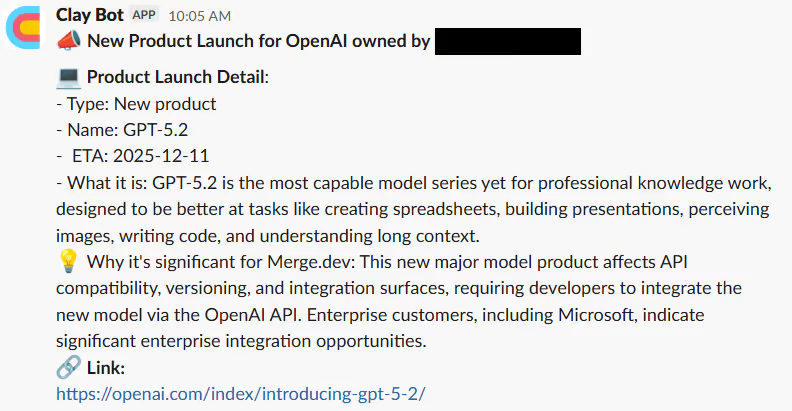
We discovered through our interviews with SDRs that they were spending a ton of time researching good excuses and topical content to reach out to a prospect. This was preventing them from reaching out to leads quickly and to as many as they wanted.
This led us to brainstorm a solution that’d increase their productivity (in the form of increasing their volume of outreach messages while also increasing response rates), and after reviewing potential solutions with our tool stack, we landed on the following:
Using Clay, we surface relevant product launches across our top target account base. We anchor to major launches relevant to products we offer. And we then send these insights to assigned SDRs via Slack with a pitch on why Merge is relevant today.
Drafting meeting follow ups and next steps
Despite having out-of-the-box AI summaries available in our current stack, all of our go-to-market teams were still spending time coming up with Merge relevant next steps from customer and prospect calls. This was becoming a headache for our AEs and CSMs and it took them away from all of the other important things they need to do.
With the goal of automating this repetitive process, we built our own meeting follow-up automation using Gong webhooks and n8n. Essentially, when a call finishes, a chain of agents summarizes the transcript, brings in other relevant account data, and drafts a follow-up email + next steps. The AE will receive it in Slack and can send it in a few clicks.

Gathering voice of the customer intelligence on Merge Agent Handler
We launched a new product (Merge Agent Handler) just a few months ago, and our product and go-to-market teams needed a streamlined and organized way to summarize all of the feedback they were collecting.
To gather product feedback that’d lead to better product decisions, we pulled all discovery call transcripts related to our latest product into Clay and organized it by product feedback, use cases, and account types.
This then lands in an auto-updating Google Sheet and gets used as the knowledge base for a Gemini Gem.
As we iterate on the product and summarize recent feedback cuts by customer types, we use this chat interface to help our product and GTM leadership team stay informed.

Guiding principles for building with AI
I’ll leave you with a few learnings that began as hard lessons and evolved into principles we live by. Hopefully they help as you and your team navigate your own AI journey.
1. Simpler is better. With AI simpler is better, meaning while it may be tempting to build a complex Cadillac of chained agentic workflows the problem may be more easily solved with a simple automated AI report that tags humans to action a process from there.
2. Build fast, deprecate faster. Building with AI is exciting in there’s 1,000 ways to solve a problem and new ones surface daily. Know the first solution isn’t going to be the last one, and be quick to deprecate solutions that didn’t hit the mark or no longer perform well. It may be tough to kill our darlings, but it’s helpful knowing each build is a learning repetition even if it never makes it to production.
3. Security is the first stakeholder. Make sure to bring along your security team to save yourself the time of scoping unapproved solutions and collaborating on what’s possible / where boundaries are. They are ultimately playing goalkeeper for the most important team on the field - your customer!
{{this-blog-only-cta}}
Alex Kean
.png)

.png)

Want to join a cutting-edge GTM team?
We’re hiring across roles and departments! Check out our careers page and start applying to any position in minutes.


But Merge isn’t just a Unified
API product. Merge is an integration platform to also manage customer integrations. gradient text
But Merge isn’t just a Unified
API product. Merge is an integration platform to also manage customer integrations. gradient text
But Merge isn’t just a Unified
API product. Merge is an integration platform to also manage customer integrations. gradient text
But Merge isn’t just a Unified
API product. Merge is an integration platform to also manage customer integrations. gradient text