

Table of contents
Just for you
No items found.
How Merge's sales team automated its monthly overage review with Claude and Agent Handler



Charlie Lynch
Usage on an account jumps. The rep notices, reaches out to propose a bigger commit, and finds out from the customer that this exact kind of usage was already negotiated into a separate arrangement. It was in the original order form the whole time.
That was the most frustrating part of post-sale account management at Merge, according to Charlie Lynch, who leads our enterprise and commercial sales teams. "One of the most frustrating parts was a lack of context," he says. "Something that we could have seen by reading over the original order form, or finding the fine print in some of the negotiations we did."
Most Merge reps carry new business and their existing book at the same time. Keeping track of contracts, usage, and what was promised in which thread was a monthly task nobody wanted. The team turned it into one that mostly runs itself.
How it works
The setup has three pieces:
- Merge Agent Handler, connected to Claude, gives it access to the systems where account context lives: Salesforce, the CSM platform, and Slack.
- A Claude artifact acts as the hub. It shows every customer's contracted linked accounts, the growth trend, the CSM on the account, whether the customer is over capacity, and whether an upsell is likely at renewal. Any rep can open a chat with it and ask about an account.
- A monthly routine points at that artifact, so nobody has to remember to prompt it.
The reason this works as a connected setup rather than an export is that the context that matters is scattered. The commit is in Salesforce, the health picture is in the CSM tool, and the side agreement is in a Slack thread from eight months ago. A report built from any one of those reproduces the mistake the team was trying to stop making.
1. Read usage against the contract
A usage chart shows that a customer is over its commit, but not whether going over is a problem.
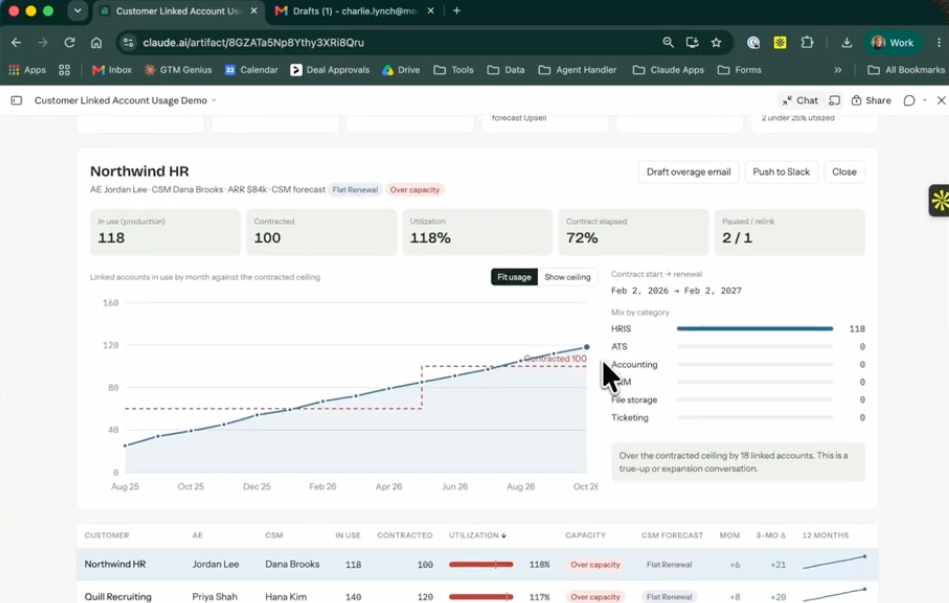
The agent reads usage alongside what the customer actually agreed to: the contracted number of linked accounts, the agreed unit prices, and the context from Salesforce and Slack around how the deal was negotiated. That is the step that would have caught the separate arrangement before the rep sent the email.
2. Recommend, then let the team decide
For each account, the hub shows a suggestion: over capacity or not, reach out or don't, upsell expected at renewal or not.
From there a rep can push the account to Slack. "What that enables us to do is communicate with the rest of the team and with reps themselves," Lynch says. The team sees what the agent saw, including whether it thinks outreach is worth it, and decides together.
3. Draft the email with the math already done
Once the team agrees an account is worth an upsell conversation, a draft lands in the rep's inbox.
It's pre-filled with the contact's name and the overage details, and it runs the calculation against the unit prices in the customer's contract. "This is where Agent Handler is really helpful," Lynch says, "connecting the sort of brain and context that we have around this data with the tools that we actually use to go and reach out to people."
The rep reviews the draft and sends it. The agent never sends anything on its own.
4. Run it on a schedule so nothing slips
Once a month, a routine runs against the artifact and alerts the owner of every account that is over capacity and needs action. Reps don't have to prompt it themselves, and an account can't go unreviewed because someone had a heavy month of new business.
Lynch calls it a fail-safe. Because the agent keeps reading Slack and the other connected systems between runs, its suggestions reflect the latest conversations about each account.
What changed
Before, the process ran to roughly 10 to 15 steps. It's now three or four, and two or three of those are automated.
The bigger change is where reps spend their attention. "I want reps to be able to focus on their deals and crucial moments within sales processes with key clients," Lynch says. "The team across the board is experiencing less thrash and getting time back."
Where the rep still owns the call
The agent can tell you an account is over its commit, what the contract says the overage costs, and what was said about it in Slack. It can't tell you whether this is the right month to have that conversation, given everything else happening on the account.
FAQ
What does the agent need access to?
Salesforce for contract and account data, the CSM platform for health and ownership, and Slack for the context that never makes it into a record. Agent Handler handles the connections, and each one is authenticated on first use.
Does the agent send emails or change records on its own?
No. It drafts the email into the rep's inbox and posts to Slack when a rep asks it to. A person reviews and sends.
Can other teams at my company set this up?
Yes. Merge for Workforce helps companies provision, secure, and govern how employees connect AI tools like Claude to systems like Salesforce and Slack. Every request runs under the employee's own permissions.
This post is part of How Merge Uses Merge, a series on how our own teams use the products we build.
Charlie Lynch




But Merge isn’t just a Unified
API product. Merge is an integration platform to also manage customer integrations. gradient text
But Merge isn’t just a Unified
API product. Merge is an integration platform to also manage customer integrations. gradient text
But Merge isn’t just a Unified
API product. Merge is an integration platform to also manage customer integrations. gradient text
But Merge isn’t just a Unified
API product. Merge is an integration platform to also manage customer integrations. gradient text