We use cookies to improve your experience on our site. By clicking “Accept”, you are agreeing to the collection and use of data as described in our Privacy Policy.
We use cookies to improve your experience on our site. By using our site, you are agreeing to the collection and use of data as described in our Privacy Policy.
How to connect a Zoom MCP with Claude Code (4 steps)
Jon Gitlin
Senior Content Marketing Manager
at Merge
When developers want to build agents that surface meeting data, whether that's finding what was discussed about a feature last week, pulling action items from a standup recording, or linking a transcript to an open incident, they have to hit the Zoom API directly.
That means handling OAuth credentials, managing token refresh, and keeping everything working as Zoom's scopes change.
To help your developers access meeting recordings, transcripts, and participant data without managing Zoom credentials themselves and within their terminal, we'll show you how to connect Zoom with Merge Agent Handler's Zoom MCP server.
How it works
Merge Agent Handler sits between Claude Code and the Zoom API.
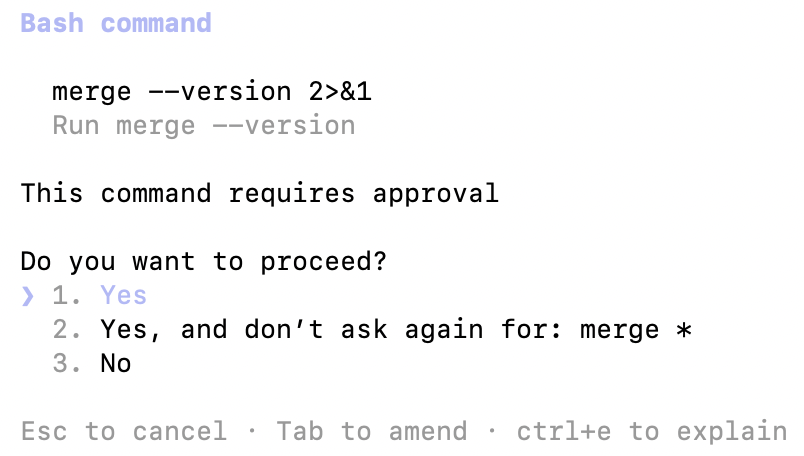
You install the Merge CLI, authenticate once with your Merge Agent Handler account, and register the connection with a single command. Agent Handler manages OAuth credentials and API calls to Zoom.
When you use a Zoom tool for the first time inside a Claude Code session, a Magic Link appears to authenticate that connector. You don't store Zoom credentials locally or manage token refresh yourself.
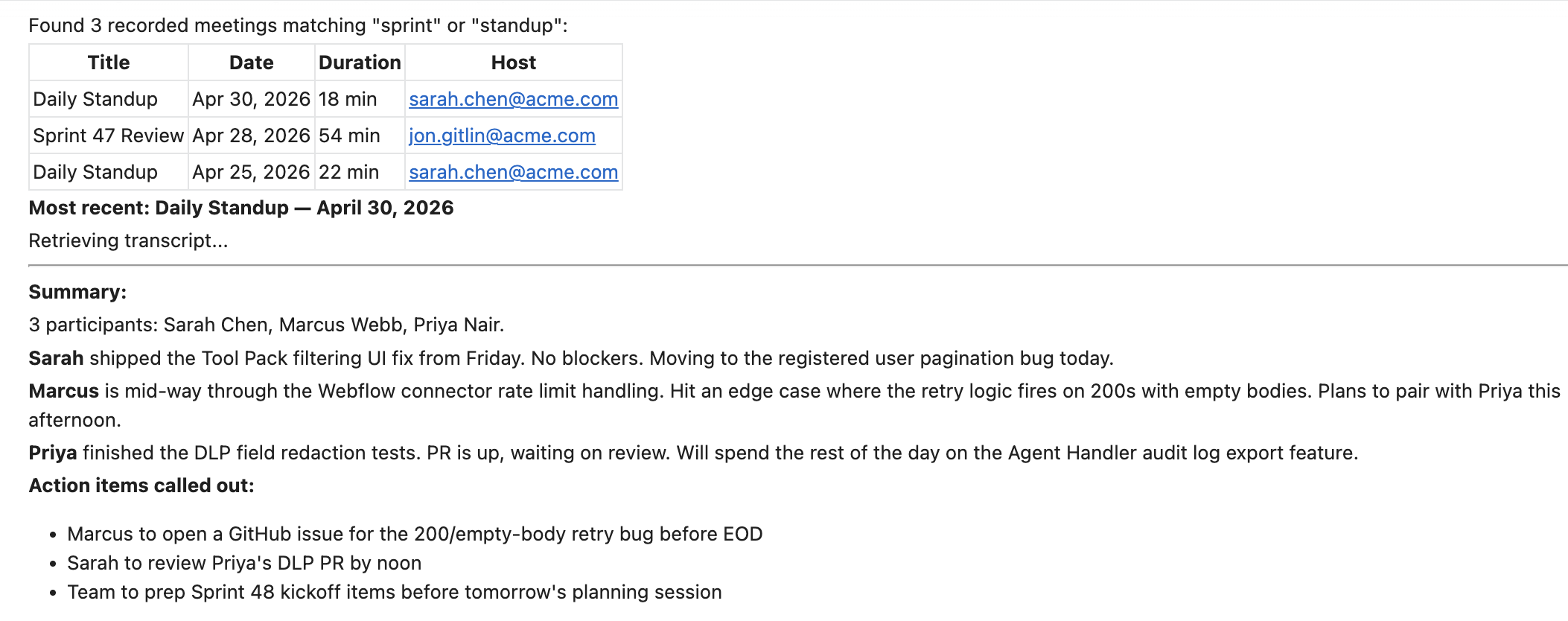
Open a Claude Code session and run a test query like: "Find all recorded meetings from the last 7 days where the title includes 'sprint' or 'standup', then summarize the transcript of the most recent one."
The first time you invoke a Zoom tool, a Magic Link will appear to complete connector authentication.
Once authenticated, you should see an output like the following:
{{this-blog-only-cta}}
Zoom MCP FAQ
In case you have more questions on setting up and using the Zoom MCP in Claude Code, we've addressed several more commonly-asked questions below.
What can you do once the Zoom MCP is connected to Claude Code?
With Zoom connected, Claude Code can:
List meetings: retrieve upcoming and past meetings for the authenticated account, including title, time, host, and participant count
Read meeting details: pull full metadata for a specific meeting by ID, useful before querying its recording or transcript
Access cloud recordings: list and retrieve recordings tied to a meeting, including video, audio, and transcript file references
Get transcripts: retrieve the plain-text or VTT transcript from a recorded meeting so an agent can summarize, search, or extract action items
List participants: surface who attended a specific meeting, including join and leave times
Create meetings: schedule a new Zoom meeting with specified settings directly from the terminal, useful when an agent needs to set up a sync based on an external trigger like a new incident or a pull request review
Why use Merge Agent Handler vs. a self-hosted Zoom MCP server?
You can build a self-hosted MCP server that calls the Zoom API directly. For a solo developer accessing recordings from their own account, the setup is manageable: create a Zoom OAuth app, configure scopes, store the token, and wire the tool schemas to Claude Code.
The problems start at team scale.
Zoom OAuth tokens are tied to individual accounts, and the credentials needed to access recordings from shared workspaces often carry permissions well beyond what a read-only agent should have. A self-hosted setup offers no tool-level controls: if the agent has access to list_recordings, it also has access to anything else in scope for that token. There is no built-in way to create a read-only agent that cannot schedule or delete meetings.
Managing tokens across multiple developers adds more friction. Each developer either shares credentials (a security problem) or runs their own OAuth setup (a maintenance problem). There is no central audit trail showing which agent accessed which recording when, and no easy way to revoke a specific agent's access without affecting others.
Merge Agent Handler adds a control layer at the tool level.
You configure exactly which Zoom tools each Tool Pack exposes, so a transcript-reading agent never gets access to delete_recording or create_meeting. Each Registered User has isolated credentials. And every tool call is logged with the tool name, inputs, and response metadata.
Why connect Zoom to Claude Code?
Zoom is where a significant portion of technical decision-making happens: architecture discussions, sprint reviews, incident debriefs, customer calls. That information lives in recordings and transcripts that are difficult to query and nearly impossible to integrate with the tools developers actually work in.
Connecting Zoom via MCP gives Claude Code direct access to that context.
A developer can ask Claude Code to find the last engineering all-hands recording, extract every action item mentioned by name, and cross-reference them against open GitHub issues. An agent can monitor for new recordings tagged with a specific topic and automatically generate a summary to post in Slack. On-call engineers can retrieve the most recent incident review transcript and surface what was committed to before the next review.
Jon Gitlin
Senior Content Marketing Manager
@Merge
Jon Gitlin is the Managing Editor of Merge's blog. He has several years of experience in the integration and automation space; before Merge, he worked at Workato, an integration platform as a service (iPaaS) solution, where he also managed the company's blog. In his free time he loves to watch soccer matches, go on long runs in parks, and explore local restaurants.
Read more
Introducing the Universal Context Layer: a company brain that works with every AI tool and agent
Product
Instantly cut token spend in half: introducing Merge for Workforce


.png)
.png)






.png)

.png)


