

Table of contents

.avif)
User onboarding automation: examples, benefits, and tools



Jon Gitlin
To ensure clients benefit from your platform as soon as possible, you’ll need to offer HRIS integrations that allow your customers to add the right set of users with ease and provide them with the right set of permissions.
We’ll break down how you can streamline user onboarding by highlighting how several organizations—Ramp, BILL, and Electric—have automated their respective user onboarding process.
But first, let’s align on the definition of user onboarding automation.
What is user onboarding automation?
It’s the process of adding users to your product without human intervention. This includes adding specific fields associated with users, like full names, and, based on the rules a customer sets, giving each user a specific role in your platform.
Related: What is automated user provisioning?
User onboarding automation examples
To help make our definition more tangible, let’s break down a few real-world examples.
BILL
The leading financial operations platform for SMBs offers HRIS integrations for BILL Spend & Expense.
Using these integrations, an admin user can easily see which employees have recently been added to their HRIS and decide whether to add them as a user in BILL Spend & Expense—all with a few clicks.
To help their larger customers add users more easily, BILL even allows you to create specific groups via filters, whether that’s certain roles, departments, office locations, etc. and then add the users that belong to that group.

Ramp
The financial operations platform also uses HRIS integrations to help customers detect new employees and provide the chance for customers’ admins to add these employees to Ramp with ease.
More specifically, through an integrated HRIS, Ramp can detect email addresses or phone numbers that are not in their application. Any time this happens, an admin gets notified and has the ability to add the user associated with that email address or phone number within seconds.

Related: How to automate user provisioning and deprovisioning
Electric
The IT management software for SMBs uses HRIS integrations to not only help customers add users but also initiate additional user onboarding steps, which vary depending on how long the employee has been at the company.
For instance, once a customer sets up an HRIS integration, non-new-hires are added automatically to Electric—along with specific fields, like their job title, employment date, and work email. They then receive an email that includes instructions for downloading Electric’s desktop application.
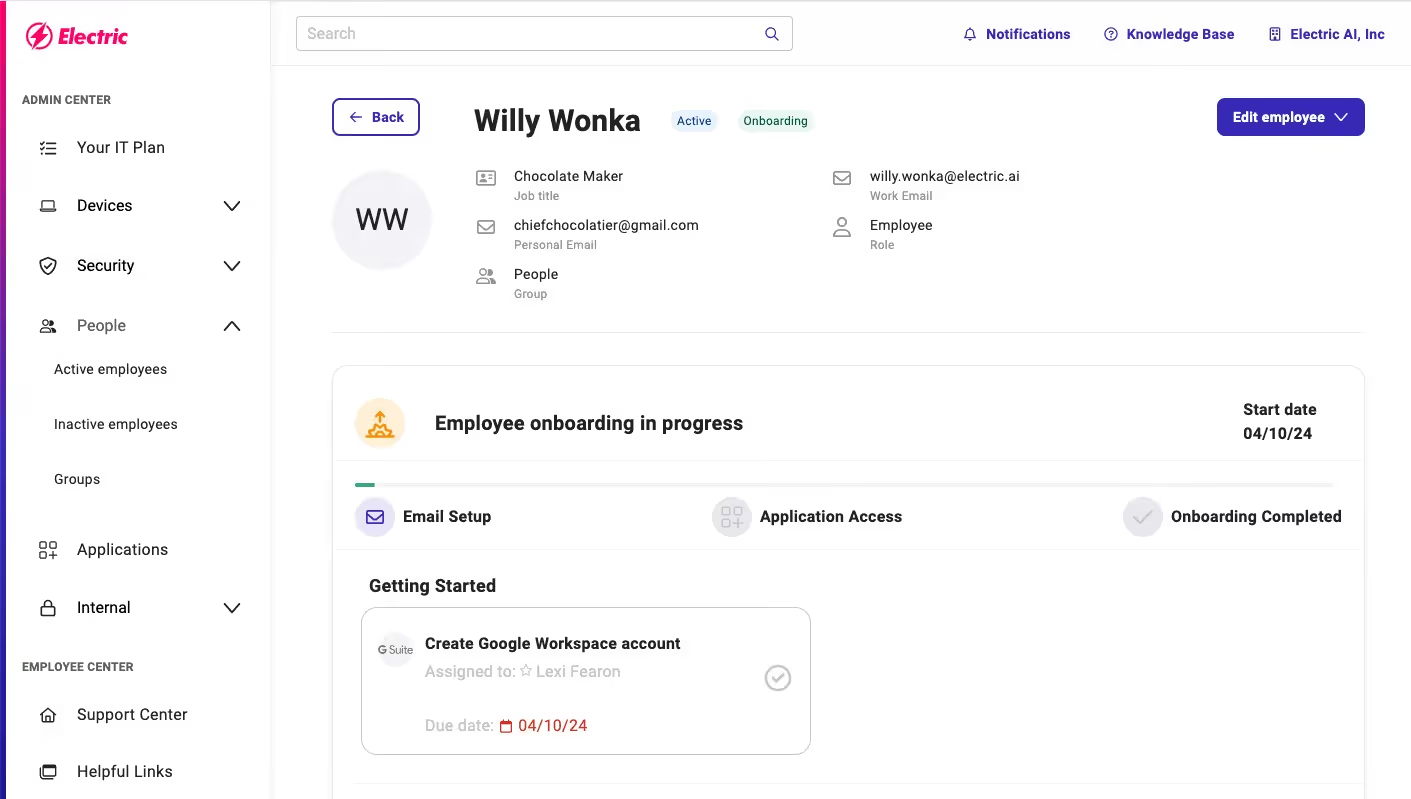
However, if the user is a new hire (as determined by their start date in the integrated HRIS), their profile would not only get created in Electric but an admin would also go on to select if they’re working remotely, the group they belong to (which determines the applications they should access and the devices they should use), and so on.
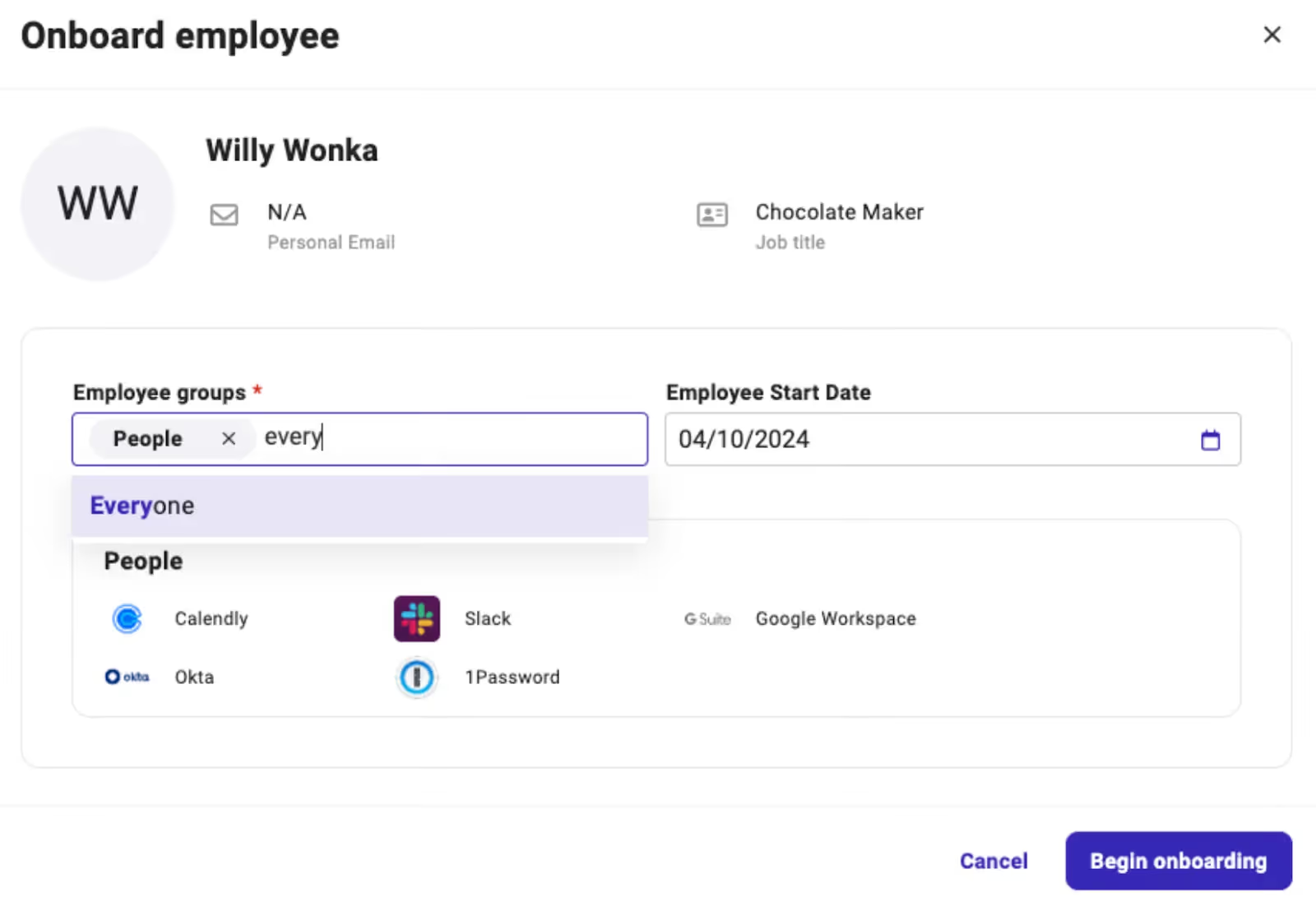
The admin can then go on to ship equipment to the new hire and ensure that they’re provisioned with the appropriate set of applications, along with the right permission levels, by the beginning of the new hire's first day.
Benefits of automating user onboarding
Here are a few of the top benefits for streamlining the user onboarding process.
Faster time to value
By enabling users to get added to your platform sooner, they can realize value from using it more quickly. In the case of Ramp, for example, users can begin using their corporate card(s) within their first few days—instead of waiting weeks, if not months, and having to constantly remind their colleagues to give them access.
This accelerated time to adoption should translate to higher customer satisfaction and, eventually, retention.
Provides time savings for customers
Forcing customers to add users to your product manually can be incredibly time consuming and tedious, especially if they have to add hundreds or thousands of employees to your product over time.
Automating this process will, as a result, give customers’ admins countless time back. These employees can reallocate this time towards the tasks they’re more likely to enjoy and that are more impactful to the business—leading them to also be happier with their employers.
To make this benefit more tangible, Anish Ravipati, a Senior Software Engineer at Ramp, explains the impact of automating user onboarding (along with updating employee information automatically) for Ramp:
“Having customers manually issue cards and update roles and privileges for each employee is incredibly laborious and not the best use of their time, especially when they have hundreds or thousands of employees. By automating most of this work on a customer’s behalf, we’re able to help them save several hours per week.
Related: Benefits of HR integrations
Prevents security risks
Tasking customers with adding users manually can also lead to human errors that breed significant security risks.
An admin user can, for example, add the wrong user to an application or give a user the wrong set of permissions. In either case, a user may be able to access sensitive information (e.g., employees' personally identifiable information), which not only leaves your customers vulnerable to violating data privacy regulations and measures (e.g., GDPR) but also creates an opportunity for the user to leverage the data in harmful ways.
Tools to automate user onboarding
To help you build HRIS integrations that enable you to onboard users automatically, you’ll likely choose between a unified API and an embedded iPaaS solution.
An embedded iPaaS solution lets you build one customer-facing integration at a time via a low-code/no-code UI.

While an embedded iPaaS can save you time when compared to building integrations in-house, or natively, it requires technical expertise to learn and it forces you to build one integration at a time. Taken together, building integrations through the platform can be time and resource consuming and ultimately difficult to scale.
A unified API solution, on the other hand, lets you add a whole category of integrations through a single integration build, enabling you to add dozens, if not hundreds, of integrations within weeks.

Moreover, using Merge, the leading unified API solution, you can:
- Add more than 200 integrations across software categories—from HRIS to accounting to ticketing to ATS
- Manage integrations with ease via Merge’s intuitive observability tooling. It includes fully-searchable logs, automated issue detection capabilities, and a high-level dashboard to analyze your integrations' performance
- Access and sync custom fields through advanced features like Field Mapping and Authenticated Passthrough Request
Learn more about Merge by scheduling a demo with one of our integration experts.
Jon Gitlin





But Merge isn’t just a Unified
API product. Merge is an integration platform to also manage customer integrations. gradient text
But Merge isn’t just a Unified
API product. Merge is an integration platform to also manage customer integrations. gradient text
But Merge isn’t just a Unified
API product. Merge is an integration platform to also manage customer integrations. gradient text
But Merge isn’t just a Unified
API product. Merge is an integration platform to also manage customer integrations. gradient text