

.avif)
How to connect to the Supabase MCP with Claude Code (4 steps)



Jon Gitlin
Developers building on Supabase spend a significant amount of time context-switching: checking table schemas in the dashboard, running queries to debug data issues, verifying auth configurations, then switching back to the terminal to write the next line of code.
To help developers query and manage their Supabase projects without leaving the terminal, we’ll show you how to connect Supabase with Merge Agent Handler’s Supabase MCP server.
How it works
Merge Agent Handler sits between Claude Code and Supabase's API. You install the Merge CLI, authenticate once, and register the connection with a single command. Agent Handler handles credential storage and API calls to Supabase so you don't manage Supabase credentials locally or embed them into your codebase.
Here's the command that registers the connection:
Related: A guide to using a Supabase MCP with Cursor
Prerequisites
Before getting started, you'll need the following:
- A Merge Agent Handler account
- Claude Code installed (run
claude --versionto confirm) - pipx installed (run
pipx --versionto confirm, or install viapip install pipx) - A Supabase account with access to the project you want to connect
If you want to connect Merge Agent Handler's Supabase MCP with internal or customer-facing agentic products, you can follow the steps in our docs.
1. Install the Merge CLI
Install with pipx: pipx install merge-api

Verify your installation: merge --version
2. Configure the CLI and log in
Run merge login to connect the CLI to your Merge account: merge login
This starts an authenticated session so the CLI can make requests on your behalf.
3. Add Agent Handler to Claude Code
The simplest way to register Agent Handler with Claude Code:
Alternatively, register manually:
Verify the connection registered. Open Claude Code and run: /mcp
agent-handler should appear under Local MCPs with a connected status.

Related: Steps for connecting a Supabase MCP with Codex
4. Authenticate Supabase
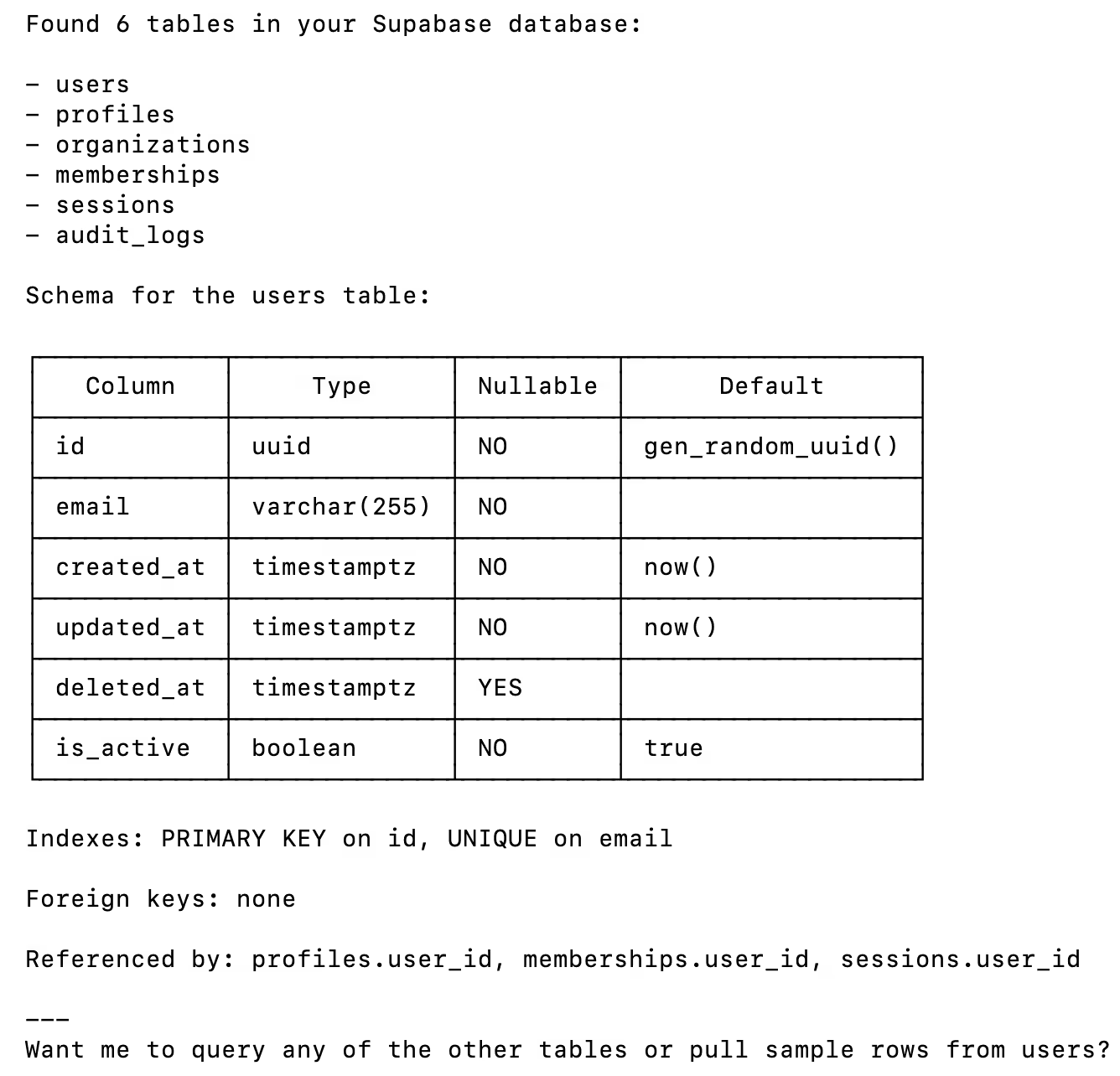
To confirm the connection is working, open a Claude Code session and try: "List all tables in my Supabase database and show me the schema for the users table."
On first use, a Magic Link will appear to finish connector authentication.

You should then see an output like the following:
{{this-blog-only-cta}}
Supabase MCP FAQ
In case you have more questions on setting up and using the Supabase MCP in Claude Code, we’ve addressed several more commonly-asked questions below.
What can you do once the Supabase MCP is connected to Claude Code?
With Supabase connected, Claude Code can:
- List and inspect tables: retrieve the full schema for any table in your database, including column types, indexes, and constraints
- Query rows: run read queries against your Supabase tables and return results Claude can reason over directly in the terminal
- Check auth configuration: inspect your project’s authentication settings, enabled providers, and user records without opening the dashboard
- Browse storage buckets: list files and folders in Supabase Storage to verify upload state or locate assets
- Read Edge Function logs: surface recent invocations and errors from your deployed Supabase Edge Functions
Why use Merge Agent Handler vs. a self-hosted Supabase MCP server?
You can run a self-hosted MCP server that connects directly to Supabase. For a solo project with a single environment, that works fine.
It breaks down when you need to scale. Self-hosting means managing Supabase credentials locally, handling credential rotation, and maintaining the server as Supabase’s API changes. For teams where multiple developers need access to the same project, you end up coordinating credentials out-of-band, which creates security surface and operational overhead that compounds over time.
Merge Agent Handler is a managed MCP layer. It centralizes authentication, scopes access at the Tool Pack and Registered User level so each developer or agent gets exactly the permissions they need, and adds observability over every tool call. When you need to audit what an agent queried or modified, the logs are there.
For anything beyond a one-off prototype, Merge Agent Handler removes the infrastructure burden so you can focus on the agent logic rather than the plumbing.
Why connect Supabase to Claude Code?
Supabase is where your application data lives. Claude Code is where you write the code that works with it. Keeping them disconnected means constant context-switching: check the schema in the dashboard, copy it somewhere, reason about it in your editor, then switch back to test. That loop is slow.
With the Supabase MCP connected, Claude Code can inspect table schemas, run queries, and check auth configurations directly in the terminal. That means fewer browser tabs, fewer copy-paste cycles, and a tighter feedback loop when you’re debugging data issues or evolving a schema.
Jon Gitlin
-p-3200.png)
.png)


Connect your agents to thousands of tools in minutes
Use Merge Agent Handler’s 150+ connectors (including Supabase) to power reliable, secure, and powerful agents.


But Merge isn’t just a Unified
API product. Merge is an integration platform to also manage customer integrations. gradient text
But Merge isn’t just a Unified
API product. Merge is an integration platform to also manage customer integrations. gradient text
But Merge isn’t just a Unified
API product. Merge is an integration platform to also manage customer integrations. gradient text
But Merge isn’t just a Unified
API product. Merge is an integration platform to also manage customer integrations. gradient text