

Table of contents

.png)
How to connect a Snowflake MCP with Codex (4 steps)



Jon Gitlin
When you ask Codex to write an ETL transformation or a JSON flattening function, you usually paste a rough description of the table into the task.
That description can get column names slightly wrong, omit the nullability of a field, and guess at what a VARIANT column actually holds.
The real schema lives in Snowflake, not in the paragraph you wrote. So Codex generates a transformation against a column that doesn't exist, a parser that assumes the wrong nesting, or validation logic that misses half the enum values production actually contains.
To give Codex direct access to Snowflake as it works through your coding tasks, we'll show you how to connect Snowflake with Merge Agent Handler's Snowflake MCP server.
How it works
Merge Agent Handler connects Codex to the Snowflake API through the Merge CLI. You install the CLI, authenticate once, and run a single setup command from your project root.
That command writes a Merge CLI section to your project's AGENTS.md file, which tells Codex when to call merge search-tools and merge execute-tool to reach Snowflake.
Once connected, Merge handles credential storage and key rotation on your behalf, so you never put a Snowflake key pair or warehouse password in your repo.
Related: How to use the Snowflake MCP in Claude Code
Prerequisites
Before getting started, you'll need the following:
- A Merge Agent Handler account
- Codex access (available via the OpenAI platform)
- pipx installed (run
pipx --versionto confirm, or install viapip install pipx) - A Snowflake account with a user that has read access to the databases your tasks need
If you want to connect Merge Agent Handler's Snowflake MCP with internal or customer-facing agentic products, you can follow the steps in our docs.
1. Install the Merge CLI
Install the Merge CLI with pipx: pipx install merge-api
Verify the install: merge --version
2. Log in to Merge
Run this to authenticate the CLI against your Merge Agent Handler account:
merge login
This links the CLI to your Merge account and stores your session credentials locally.
3. Add Agent Handler to Codex
From the root of the project where you want Codex to reach Snowflake, run:
This writes a Merge CLI section to your project's AGENTS.md file so Codex knows to use the CLI when a task needs Snowflake data. The command is idempotent, safe to re-run if you need to reset the configuration.
Commit the updated AGENTS.md so the configuration travels with the repo.
Related: A guide to integrating the Snowflake MCP with Cursor
4. Authenticate Snowflake
Create a Codex task that needs live Snowflake data. This can be something like: "Read the schema and a sample of rows from the ORDERS table and write a dbt model that aggregates daily revenue by region."
The first time Codex invokes a Snowflake tool, a Magic Link will appear to complete connector authentication.
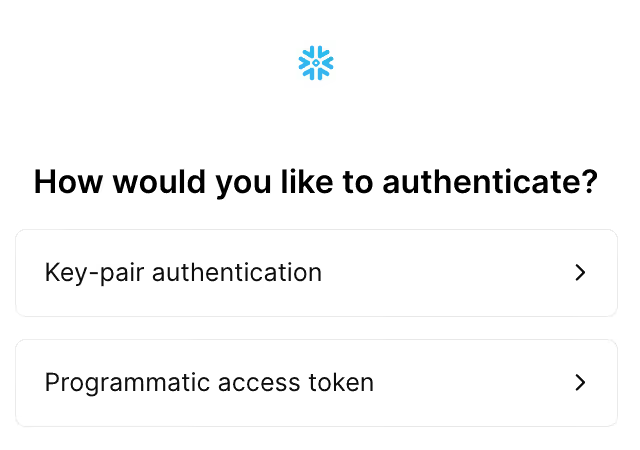
Once authenticated, Codex can reach your Snowflake account through Merge for every later task in this project.
{{this-blog-only-cta}}
Snowflake MCP FAQ
In case you have more questions on setting up and using the Snowflake MCP with Codex, we've addressed several more commonly-asked questions below.
What can you do once the Snowflake MCP is connected to Codex?
With Snowflake connected, Codex can:
- Read a table's real schema before scaffolding an ETL transformation: pull the actual column names, types, and nullability so the transformation code it writes targets columns that exist rather than ones inferred from a task description
- Pull sample VARIANT rows before generating a JSON flattening function: fetch a real semi-structured row so the flattening logic it writes matches the actual nesting and key names instead of an assumed structure
- Query distinct values before generating data-validation logic: read the real set of values in a status or category column so the validation rules and mappings it writes cover everything production actually contains
- Read row counts and distributions before generating pagination or partitioning logic: pull real volume and skew so the batch sizes and partition keys it codes into a pipeline hold up against actual data
- Read a view definition before generating a downstream materialization: fetch the SQL behind a view so the model it writes on top of it accounts for the joins and filters already baked in
Why use Merge Agent Handler vs. a self-hosted Snowflake MCP server?
You can build your own MCP server against Snowflake. For a single developer pointing at one warehouse, it's a reasonable afternoon: create a user, manage a key pair, and write tool schemas for the queries your tasks run.
It gets harder once more than one person uses it or tasks run in CI.
Each user needs scoped credentials, key rotation, and a warehouse role that limits what they can touch, and you need a way to keep a runaway query from a Codex task off your production warehouse. Without central control, a single broad grant gives an agent more reach than anyone intended.
A self-hosted server doesn't solve that. You still own credential management and role scoping, and now you maintain the server too. Snowflake doesn't ship an official MCP server, so community builds come with no guarantees on coverage or upkeep.
Merge Agent Handler handles credential storage and rotation, and lets you scope exactly which Snowflake operations a Codex task can call. Every call is also logged with identity, timestamp, and the query that ran.
Why connect Snowflake to Codex?
Snowflake holds the schemas, semi-structured columns, view definitions, and real value distributions that pipeline and analytics code has to match exactly.
Codex tasks that write transformations, parsers, dbt models, or validation logic need that ground truth to produce code that compiles and runs.
The alternative is describing the schema in the prompt, and those descriptions are always a little wrong. A misremembered column name, an omitted nullable field, or an out-of-date enum set is enough to make Codex generate code that fails against the real warehouse.
Connecting Snowflake lets Codex read the schema and sample the data when a task needs it. The column types before an ETL job, the VARIANT shape before a flattening function, the distinct values before validation logic: Codex works from the warehouse itself, not a stale description of it.
Can I use Merge's Snowflake MCP with my employees?
Yes, Merge for Workforce is built to help organizations provision, secure, and govern how employees connect AI tools like Codex to data systems like Snowflake.
Common patterns include:
- Provisioning and access control via SCIM with identity providers like Okta and Microsoft Entra ID, so IT can manage which databases and schemas an employee's agent can reach by role or team
- DLP and policy enforcement on tool calls, so admins can block queries that would return PII or regulated data before the results reach a Codex task's context
- User-level audit logging so security and data teams can review which tables were queried and which data was read, by which employee identity, and when
Taken together, employees can use the Snowflake MCP to generate transformations against real schemas, write parsers grounded in actual column structure, and build validation logic from production values, and more, while IT keeps centralized control over which databases and operations each agent can reach.
Jon Gitlin



Connect Codex to thousands of tools with Merge Agent Handler
Use Merge Agent Handler’s 150+ connectors (including Snowflake) to power reliable, secure, and powerful agents.


But Merge isn’t just a Unified
API product. Merge is an integration platform to also manage customer integrations. gradient text
But Merge isn’t just a Unified
API product. Merge is an integration platform to also manage customer integrations. gradient text
But Merge isn’t just a Unified
API product. Merge is an integration platform to also manage customer integrations. gradient text
But Merge isn’t just a Unified
API product. Merge is an integration platform to also manage customer integrations. gradient text