We use cookies to improve your experience on our site. By clicking “Accept”, you are agreeing to the collection and use of data as described in our Privacy Policy.
We use cookies to improve your experience on our site. By using our site, you are agreeing to the collection and use of data as described in our Privacy Policy.
How to connect a Freshdesk MCP with Claude Code (4 steps)
Jon Gitlin
Senior Content Marketing Manager
at Merge
Developers building support automations need live Freshdesk data: open tickets, SLA breach risk, customer contact history, conversation threads, and more.
Getting that data today means authenticating against the Freshdesk REST API, managing API keys per environment, and writing one-off scripts every time a new workflow needs a different slice of ticket data.
To help your developers query and update support tickets directly from the terminal, we'll show you how to connect Freshdesk with Merge Agent Handler's Freshdesk MCP server.
How it works
Merge Agent Handler connects Claude Code to the Freshdesk API through a single CLI setup.
You install the Merge CLI, authenticate once with your Merge Agent Handler account, and register the connection with one command. Agent Handler manages your Freshdesk credentials so you never store API keys locally or handle token rotation yourself.
Here's the command that registers the connection:
merge setup claude-code
Prerequisites
Before getting started, you'll need the following:
Log in to connect the CLI to your Merge Agent Handler account: merge login
The CLI is now authenticated and ready to make authorized requests on your behalf.
3. Add Agent Handler to Claude Code
The simplest way to register Agent Handler with Claude Code:
merge setup claude-code
Alternatively, register manually:
claude mcp add
--transport http agent-handler https://ah-api.merge.dev/mcp
Verify the connection registered. Open Claude Code and run: /mcp. agent-handler should appear under Local MCPs with a connected status.
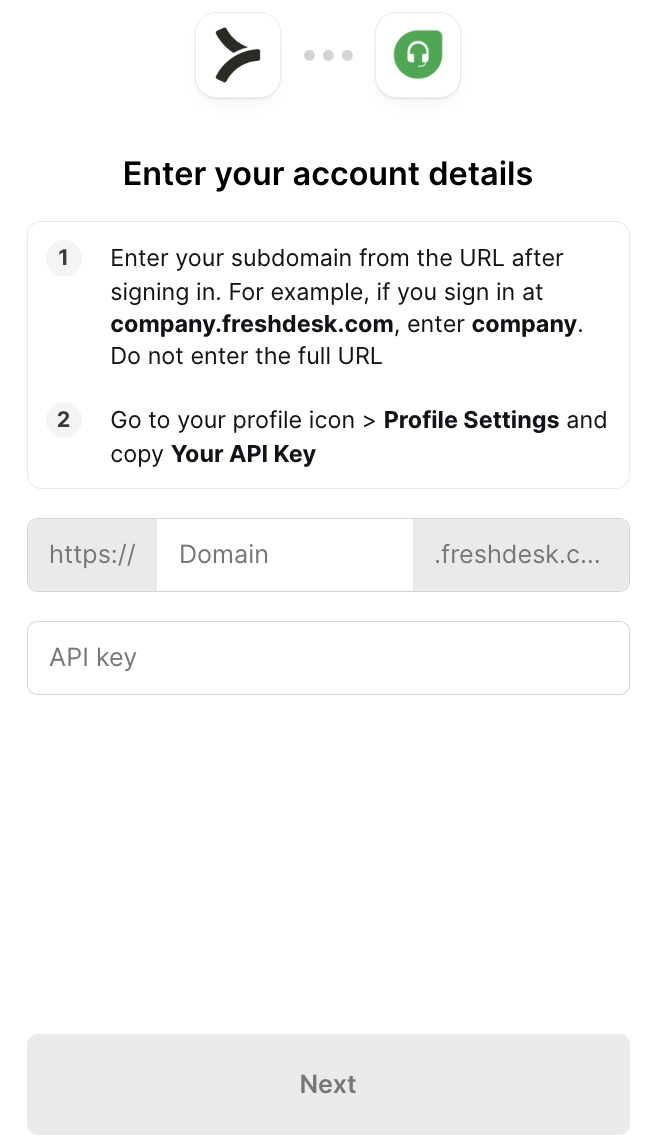
4. Authenticate Freshdesk
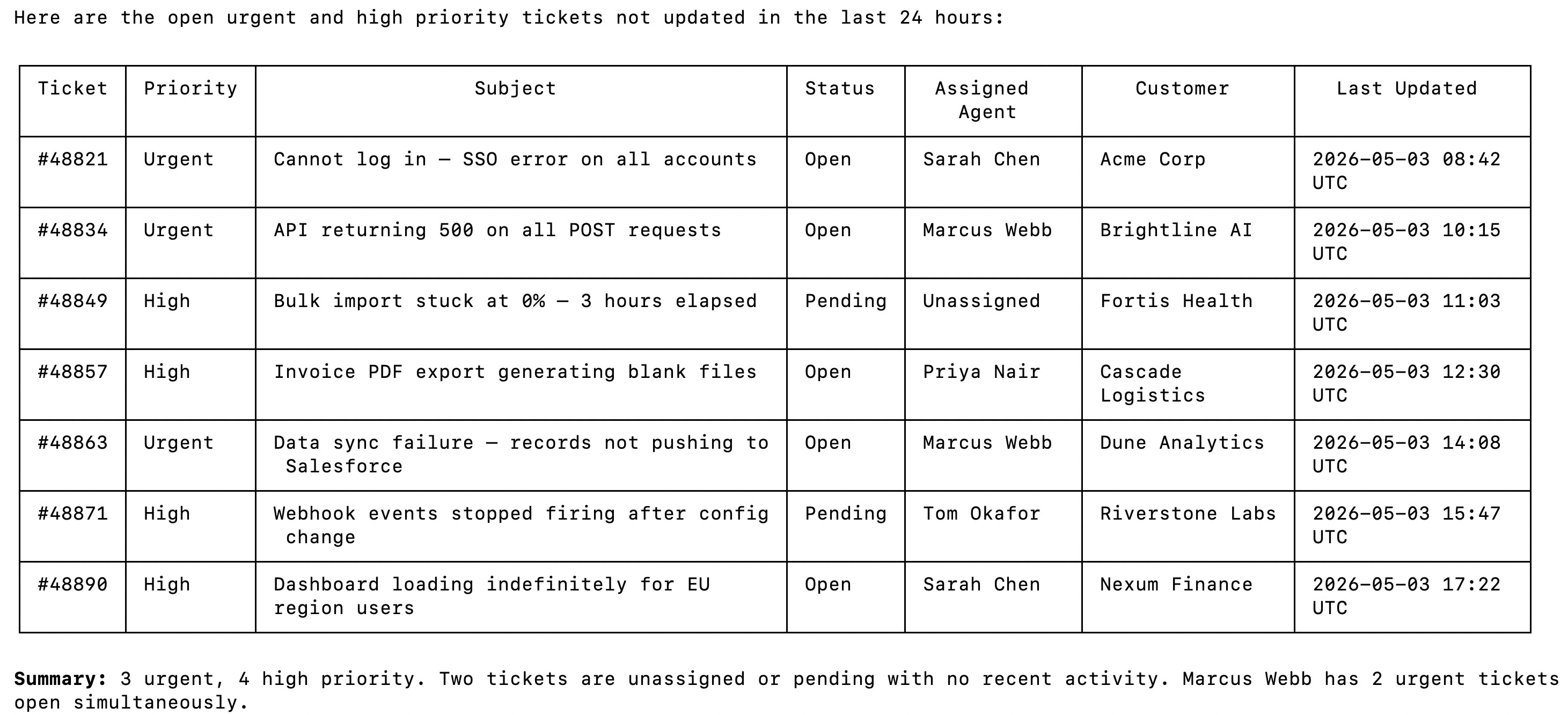
To confirm the connection is working, open a Claude Code session and try: "List all open tickets with urgent or high priority that haven't been updated in the last 24 hours. Show the status, assigned agent, and customer name for each one."
On first use, a Magic Link will appear to finish connector authentication.
You should then see an output like the following:
{{this-blog-only-cta}}
Freshdesk MCP FAQ
In case you have more questions on setting up and using the Freshdesk MCP in Claude Code, we've addressed several more commonly-asked questions below.
What can you do once the Freshdesk MCP is connected to Claude Code?
With Freshdesk connected, Claude Code can:
Query and filter tickets: retrieve open, pending, or resolved tickets filtered by priority, status, group, or agent without opening the Freshdesk UI or exporting a report
Read conversation threads: pull the full comment history on a ticket to give an agent the context it needs before drafting a reply or escalation note
Look up contacts and companies: surface customer contact records and company details linked to a ticket, useful when an agent needs to apply custom SLA rules or route by account tier
Create and update tickets: log new support requests, change ticket status, reassign to a different agent or group, and add notes directly from the terminal if write tools are enabled
Check SLA compliance: identify tickets approaching or past their response and resolution deadlines, useful for agents that need to triage by urgency before a breach occurs
Search the knowledge base: retrieve help articles relevant to an active ticket, useful when an agent needs to surface a resolution path or draft a response grounded in existing documentation
Why use Merge Agent Handler vs. a self-hosted Freshdesk MCP server?
You can build a self-hosted MCP server that calls the Freshdesk API directly. For a solo developer with a single Freshdesk account and a narrow set of tools, the setup is manageable: generate an API key, write tool schemas for the endpoints you need, and wire them to Claude Code.
The problem is maintenance and scale. Freshdesk's API surface covers tickets, contacts, companies, agents, groups, conversations, and SLA policies. A self-hosted setup means you own the schema for every tool you expose, and you're responsible for keeping those schemas current as your Freshdesk configuration changes. API key rotation, subdomain-specific endpoint management, and schema drift are all yours to handle.
At team scale, the credential problem compounds.
Each developer managing a separate API key means no central control over which Freshdesk operations each agent can perform, no audit trail of what was queried or written, and no way to scope a read-only triage agent away from write operations. If a key is rotated or an account is deprovisioned, every local setup that depends on it breaks silently.
Merge Agent Handler adds a control layer at the tool level.
You can define exactly which Freshdesk operations get exposed to an agent so it can be built for ticket triage and never gets access to bulk deletion or contact export. And every tool call can be logged with the tool name, inputs, and response metadata.
Why connect Freshdesk to Claude Code?
Freshdesk holds the operational record of what your customers are experiencing: which issues are open, which tickets are breaching SLA, which customers are escalating, etc. Developers building support automations need that data as an input to larger workflows, and right now getting it requires a browser, a custom report, or a one-off REST call.
With the Freshdesk MCP connected, Claude Code can retrieve ticket queues, surface customer context, and check SLA status without a context switch.
This matters most when Freshdesk data drives a downstream action: routing a high-priority ticket before a breach, generating a daily summary of unresolved issues by product area, or drafting a reply grounded in the customer's full conversation history. The terminal becomes the place where support data and code execution meet, and agents that need both can get both in one session.
Jon Gitlin
Senior Content Marketing Manager
@Merge
Jon Gitlin is the Managing Editor of Merge's blog. He has several years of experience in the integration and automation space; before Merge, he worked at Workato, an integration platform as a service (iPaaS) solution, where he also managed the company's blog. In his free time he loves to watch soccer matches, go on long runs in parks, and explore local restaurants.
Read more
Introducing the Universal Context Layer: a company brain that works with every AI tool and agent
Product
Instantly cut token spend in half: introducing Merge for Workforce


.avif)
.avif)





.png)

.png)


