


.png)
How our product designer uses AI to move at engineering speed


Dikssha Dinesh
I joined Merge a few months ago with traditional product design instincts: do explorations, present versions, and hand off work to engineering.
Merge builds products in weeks and features in days, so it quickly became clear that that wouldn’t work here.
That's when I moved into Claude Code and stopped thinking about design and engineering as separate phases.
Inside our product design process
We’ve skipped prototypes entirely and go straight to production code.
Here's how the process works:
1. Engineers build the backend, and Claude generates the first-pass frontend
Once the backend is complete, Claude renders every endpoint as a UI. This is functional but visually rough, with mismatched components and confusing copy.
It looks like AI designed it, because it did. But that rough draft shows me exactly what the backend can do before I touch anything.
For example, here’s what Claude created for Agent Handler’s Tool Pack selector (which lets users pick the connectors and tools they want to access):
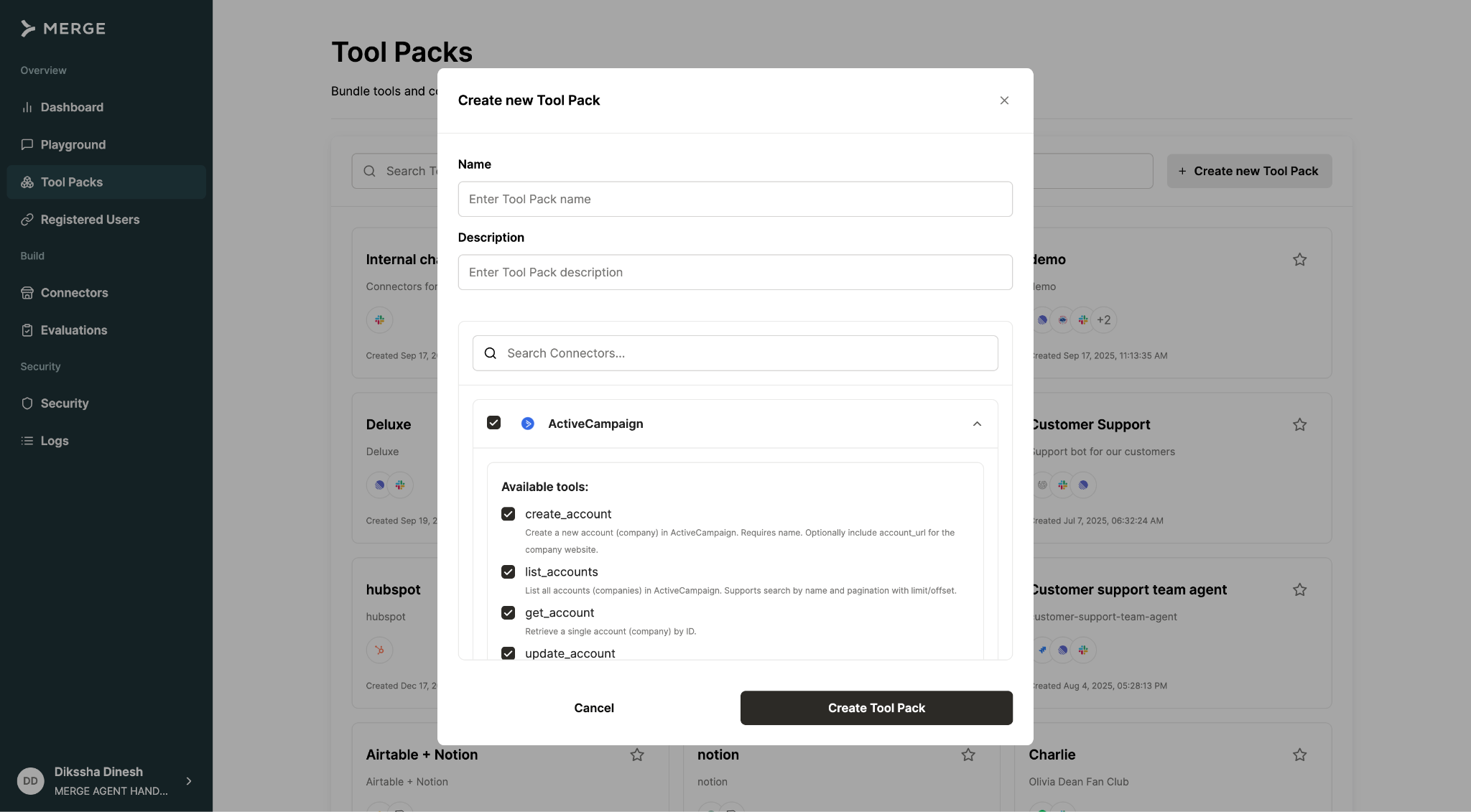
It's a good start, but the layout is hard to scan. There are also no bulk actions and filters, and you have to constantly scroll to select the tools you want.
2. I pull the branch and rebuild the UX on top of the working functionality
Starting from Claude's draft is much faster than starting from a blank Figma file.
Working within engineering’s constraints, my job is to make something a user would actually want to use.
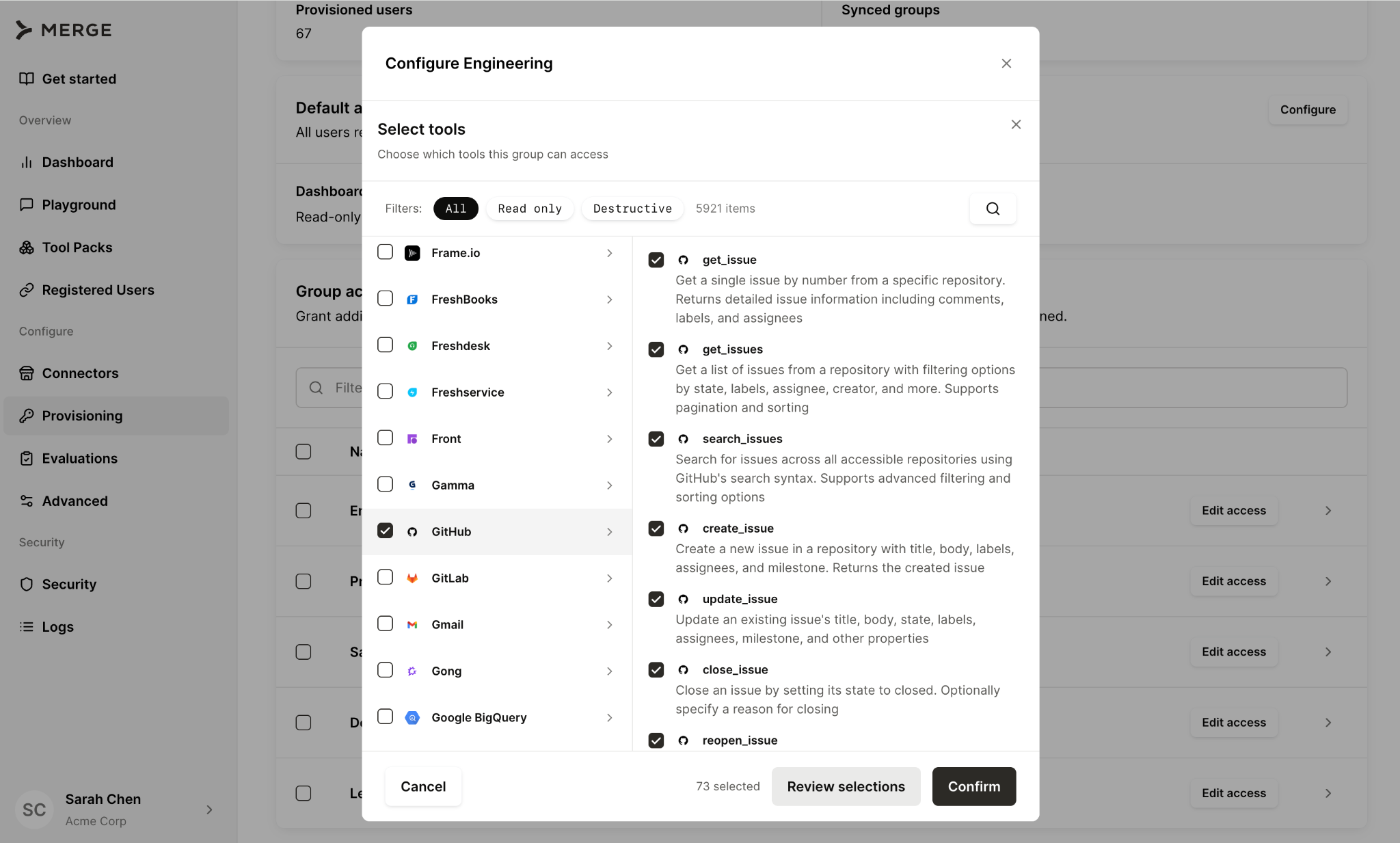
For example, for our Tool Pack selector, I made the component compact and easy to scan. Connectors and tools also have bulk actions, added filters and the ability to review selections before confirming. Taken together, users can add tools and connectors faster.
3. Everyone reviews in code, and the feature ships
Once I've rebuilt the UX, it goes through the same code review process as any other change. Engineers review my work; I review theirs.
That loop closes fast because we're all working in the same environment, on the same branch.
How your team can design products with Claude
This process isn’t unique to Merge. Any product designer can implement this with their engineers.
Here are some rules of thumb to help you implement a similar workflow:
Codify your design system as Claude's instruction set
A design system only helps Claude if it’s easy to reference.
So document your components, name them consistently, and learn the exact vocabulary that gets precise results. Saying "use the typehead from the design system," for example, lands differently than "add a selection."
Teach engineers the vocabulary Claude responds to
Engineers are also prompting Claude during the first-pass frontend build.
The more precisely they can describe what they want—component names, spacing terms, specific interaction patterns, etc.—the closer their rough draft gets to something usable. A first pass that's 60% of the way there is faster to rebuild than one that's 20%.
Don't limit design work to the product
Getting fluent in Claude Code opened up other workflows. For example, I’ve helped marketing automate design generations for product and feature announcements across our social channels.
Your skills with AI transfer further than you'd expect once you stop thinking of design and code as separate domains.
Skip explorations for standard patterns
Creating seven versions of a standard form is rarely a good use of time.
Save exploration for genuinely ambiguous problems: onboarding flows, novel interaction models, and anything else without an obvious right answer.
For selection, deletion, and form-filling, ship something and iterate.
Final thoughts
Most organizations aren't structured to give designers commit access and get out of the way. It requires leadership that trusts the designer's judgment without a Figma review gate.
For teams where that trust exists, the upside is massive.
Design quality improves because the designer has full product context. Engineering velocity improves because there's no handoff bottleneck. And the gap between "what we designed" and "what shipped" disappears entirely.
{{this-blog-only-cta}}
Dikssha Dinesh


Merge is hiring!
We’re aggressively growing our engineering and design teams. See our open roles and apply to any today.


But Merge isn’t just a Unified
API product. Merge is an integration platform to also manage customer integrations. gradient text
But Merge isn’t just a Unified
API product. Merge is an integration platform to also manage customer integrations. gradient text
But Merge isn’t just a Unified
API product. Merge is an integration platform to also manage customer integrations. gradient text
But Merge isn’t just a Unified
API product. Merge is an integration platform to also manage customer integrations. gradient text