

Table of contents
.png)
.png)
How to connect an Oracle HCM MCP with Claude Code (4 steps)



Jon Gitlin
Developers building HR automations, headcount reporting, or people analytics tools that need live access to people data need to navigate Oracle HCM's API.
This includes setting up Oracle's Identity Cloud Service, tenant-specific domain URLs that vary per customer deployment, and OAuth credential management that's specific to each Oracle Cloud instance.
To help your developers query employee records, pull org data, and surface workforce information from the terminal with ease, we'll show you how to connect Oracle HCM with Merge Agent Handler's Oracle HCM MCP server.
How it works
Merge Agent Handler connects Claude Code to the Oracle HCM API through a single CLI setup.
You install the Merge CLI, authenticate once with your Merge Agent Handler account, and register the connection with one command.
Merge handles Oracle's per-tenant OAuth credentials and domain URL resolution on your behalf, so you never configure Oracle Identity Cloud Service manually or manage instance-specific endpoints across environments.
Here's the command that registers the connection:
Related: How to use an Oracle HCM MCP in Codex
Prerequisites
Before getting started, you'll need the following:
- A Merge Agent Handler account
- Claude Code installed (run
claude --versionto confirm) - pipx installed (run
pipx --versionto confirm, or install viapip install pipx) - An Oracle HCM account with API access (requires an Oracle Cloud administrator to enable REST API access and provide your instance's base URL and OAuth credentials)
If you want to connect Merge Agent Handler's Oracle HCM MCP with internal or customer-facing agentic products, you can follow the steps in our docs.
1. Install the Merge CLI
Install with pipx: pipx install merge-api

Then confirm the installation: merge --version
2. Log in to Merge
Run merge login to authenticate the CLI with your Merge Agent Handler account: merge login
This authenticates your session so the CLI can make authorized requests on your behalf going forward.
3. Add Agent Handler to Claude Code
The simplest way to register Agent Handler with Claude Code:
Or register manually:
Open Claude Code and run: /mcp
agent-handler should appear under Local MCPs with a connected status.

Related: The steps for connecting an Oracle HCM MCP with Cursor
4. Authenticate Oracle HCM
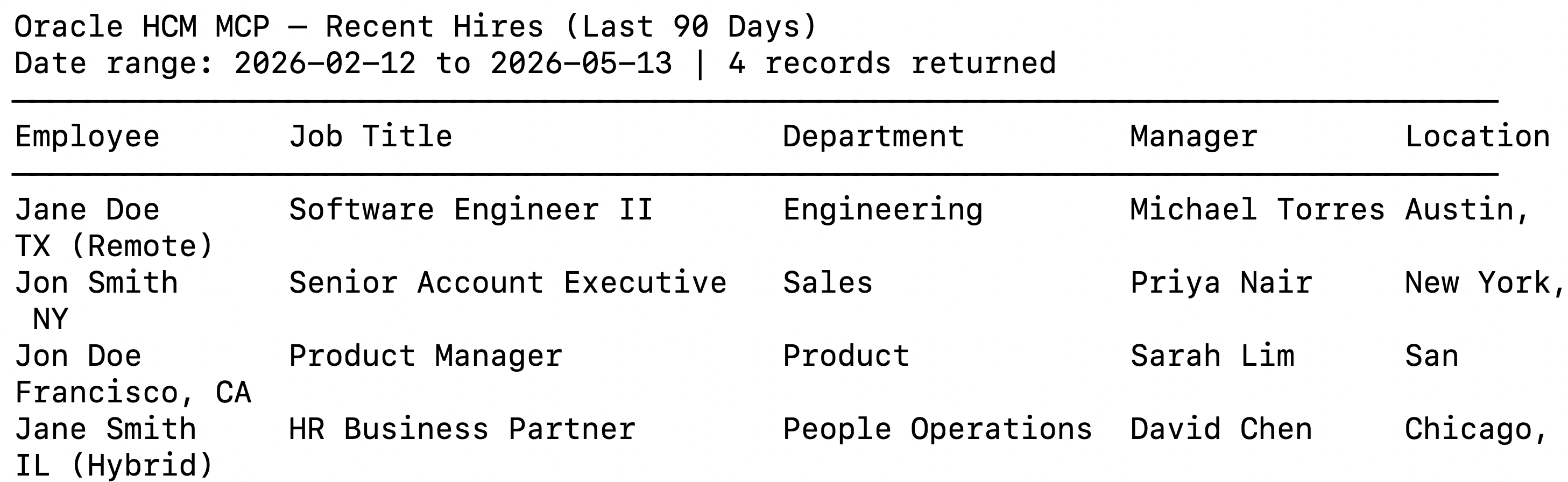
Open a Claude Code session and try: "List all employees hired in the last 90 days, including their job title, department, manager, and work location."
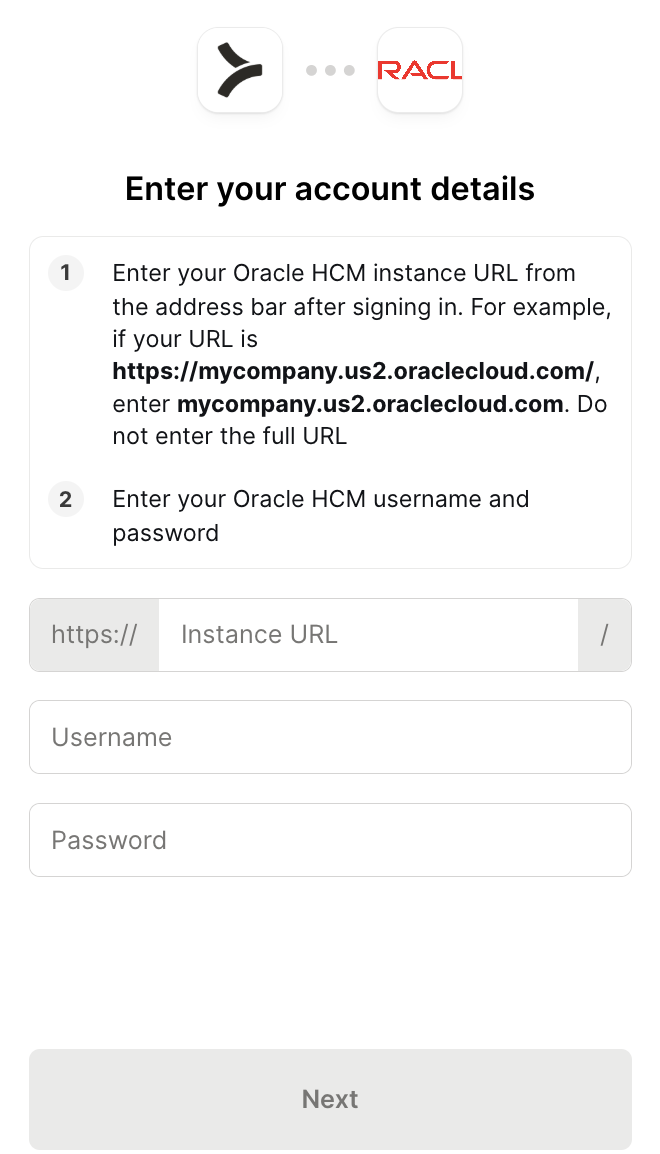
The first time you invoke an Oracle HCM tool, a Magic Link will appear to complete connector authentication.
You should then see an output like the following:
{{this-blog-only-cta}}
Oracle HCM MCP FAQ
In case you have more questions on setting up and using the Oracle HCM MCP in Claude Code, we've addressed several more commonly-asked questions below.
What can you do once the Oracle HCM MCP is connected to Claude Code?
With Oracle HCM connected, Claude Code can:
- Query employee records: retrieve employee profiles including job title, department, manager, location, grade, and employment status across the full org or scoped to a specific business unit or legal entity
- Pull org and position data: retrieve the current org hierarchy, reporting relationships, position headcount, and vacant positions, giving agents the workforce context they need before generating summaries or triggering downstream actions
- Access job and grade data: pull job definitions, job families, and grade structures, useful for agents building compensation analysis tools or validating that a proposed change aligns with the org's job architecture
- Retrieve employment history and lifecycle events: read hire dates, termination records, transfers, and job changes with effective dates for a given employee or across a population
- Surface talent and performance data: query goal records, performance ratings, and talent review outcomes, enabling agents that need to surface readiness data or flag employees at flight risk before a planning cycle
- List open requisitions: retrieve active job requisitions and their approval status, giving recruiting agents a live view of the hiring pipeline without a manual export from Oracle Recruiting Cloud
Why use Merge Agent Handler vs. building directly on the Oracle HCM API?
You can build directly on Oracle HCM's REST API. Oracle provides thorough REST API documentation, and for a single-instance prototype the setup is workable: obtain OAuth credentials from your Oracle Cloud administrator, configure the token endpoint for your IDCS domain, and start making requests against your instance's base URL.
The friction compounds immediately at enterprise scale.
Oracle HCM is a multi-tenant platform where each customer deployment has its own domain URL, its own IDCS instance, and its own OAuth application configuration. A self-hosted MCP server that supports more than one Oracle HCM customer requires managing separate credential sets, separate token endpoints, and separate base URLs for each. There's no single global Oracle HCM API endpoint; every request needs to be routed to the correct instance.
Oracle also doesn't offer an official HCM MCP server. Options beyond Merge are community-built with no enterprise support guarantees and none of the access controls that teams need when working with sensitive workforce data.
Merge Agent Handler, on the other hand, handles per-instance credential storage, IDCS OAuth flows, and token refresh for every connected Oracle HCM deployment.
In addition, you can scope which Oracle HCM tools a given agent can reach: a headcount reporting agent, for example, can get read access to employee and position data but not payroll or talent review data unless those are explicitly included. And every tool call is logged with the timestamp, tool name, and inputs.
Why connect Oracle HCM to Claude Code?
Developers building on top of Oracle HCM data currently have to request exports, write scheduled API jobs against Oracle's REST layer, or stand up dedicated integrations each time a new workflow needs access to a different part of the system.
With the Oracle HCM MCP connected, Claude Code can query live workforce data without leaving the terminal.
This matters most when the data needs to inform a real decision on a short timeline: pulling a headcount snapshot for a reorg that's happening this week, identifying every open req in a business unit ahead of a hiring review, or flagging employees in a specific grade whose compensation falls below the midpoint before a comp cycle opens.
Jon Gitlin
.png)
.png)


Connect Claude Code to thousands of tools with Merge Agent Handler
Use Merge Agent Handler’s 150+ connectors (including Oracle HCM) to power reliable, secure, and powerful agents.


But Merge isn’t just a Unified
API product. Merge is an integration platform to also manage customer integrations. gradient text
But Merge isn’t just a Unified
API product. Merge is an integration platform to also manage customer integrations. gradient text
But Merge isn’t just a Unified
API product. Merge is an integration platform to also manage customer integrations. gradient text
But Merge isn’t just a Unified
API product. Merge is an integration platform to also manage customer integrations. gradient text