

Table of contents

.png)
How to connect a OneNote MCP with Codex (4 steps)



Jon Gitlin
Developers capture requirements specs, data model definitions, and acceptance criteria in OneNote notebooks.
When they create a Codex task to implement those requirements, they describe the work from memory instead of using what's in the actual spec page (e.g., the exact field names).
Codex generates code against the developer's description, so when that description says "build a parser for the payment object," Codex infers what the model looks like. The page in OneNote might define different field names, require nullable handling the developer didn't mention, or specify enumeration values that didn't make it into the task.
To give Codex direct access to OneNote as it works through your coding tasks, we'll show you how to connect OneNote with Merge Agent Handler's OneNote MCP server.
How it works
Merge Agent Handler connects Codex to the OneNote API through the Merge CLI. You install the CLI, authenticate once, and run a single setup command from your project root.
That command writes a Merge CLI section to your project's AGENTS.md file, which tells Codex when to call merge search-tools and merge execute-tool to reach OneNote.
Once connected, Merge handles Microsoft Graph's OAuth token lifecycle and Azure AD authorization on your behalf, so no tenant credentials live in your repo.
Related: How to use the OneNote MCP in Claude Code
Prerequisites
Before getting started, you'll need the following:
- A Merge Agent Handler account
- Codex access (available via the OpenAI platform)
- pipx installed (run
pipx --versionto confirm, or install viapip install pipx) - A Microsoft 365 account with OneNote access (personal Microsoft accounts and work/school accounts on Business or Enterprise plans both work)
If you want to connect Merge Agent Handler's OneNote MCP with internal or customer-facing agentic products, you can follow the steps in our docs.
1. Install the Merge CLI
Install with pipx: pipx install merge-api
Verify your installation: merge --version
2. Log in to Merge
Authenticate the CLI with your Merge Agent Handler account: merge login
This authenticates your session and links the CLI to your Merge account.
3. Add Agent Handler to Codex
From the root of the project where you want Codex to have access to Merge tools, run:
This writes a Merge CLI section to your project's AGENTS.md file so Codex knows to use the CLI when a task requires OneNote data. The command is idempotent, safe to re-run if you need to reset the configuration.
Commit the updated AGENTS.md so the configuration travels with the repo.
Related: A guide to integrating the OneNote MCP with Cursor
4. Authenticate OneNote
Create a Codex task that requires live OneNote data, something like: "Find the payment data model spec in my OneNote planning notebook and scaffold a Python dataclass, including validators for every nullable and enumerated field defined in the page."
The first time Codex invokes a OneNote tool, a Magic Link will appear to complete connector authentication.
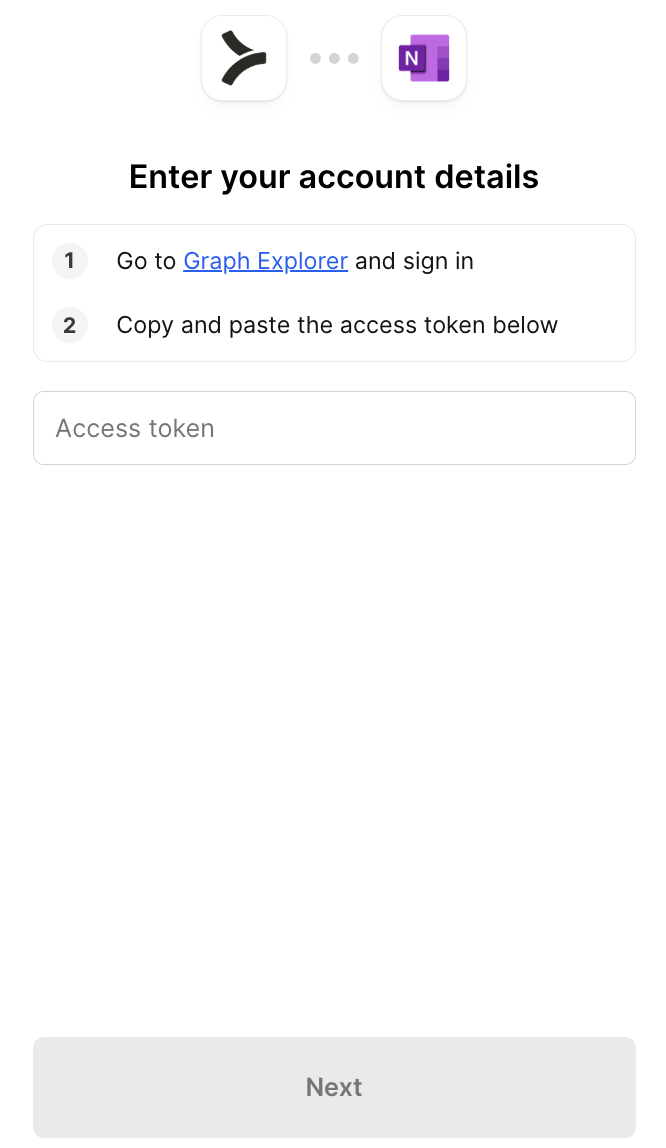
Once authenticated, Codex has access to your OneNote notebooks through Merge for all subsequent tasks in this project.
{{this-blog-only-cta}}
OneNote MCP FAQ
In case you have more questions on setting up and using the OneNote MCP with Codex, we've addressed several more commonly-asked questions below.
What can you do once the OneNote MCP is connected to Codex?
With OneNote connected, Codex can:
- Read a data model spec page before generating a dataclass or schema: pull the notebook page that defines field names, types, and nullability rules so generated code reflects the actual spec rather than what Codex infers from a brief task description
- Pull a requirements page before scaffolding a feature: retrieve the planning doc that defines what the feature should do, what it excludes, and what the acceptance criteria are, so generated scaffolding reflects the documented scope rather than an interpolation of a summary
- Read a test plan page before generating test cases: fetch the page that documents expected behaviors, boundary conditions, and edge cases so generated tests cover the verification requirements the team actually wrote down
- Retrieve an API contract from a design note before generating a client: pull the page that specifies endpoint shapes, response formats, and field constraints so the generated client code uses the correct names and handles the documented error conditions
- Pull a runbook before generating an automation script: read the operational procedure page that defines exact steps, parameters, and failure handling so the generated script aligns with how the process actually works
- Read an error taxonomy page before generating error handling code: retrieve the page that catalogs known error states and expected responses so generated handlers cover the actual conditions the system produces rather than ones Codex invented
Why use Merge Agent Handler vs. building directly on Microsoft Graph?
You can build a self-hosted MCP server directly on Microsoft Graph. OneNote's API is part of the Graph surface, the documentation is thorough, and for a single developer working against their own Microsoft account the initial setup is workable: register an app in Azure AD, configure the right scopes, and complete the OAuth flow.
The complexity compounds once more than one developer is involved. Each user goes through a tenant-specific auth flow, and managing per-user access tokens and refresh tokens adds state that has to live somewhere.
Teams on strict Azure AD tenants may require admin consent before any user can authorize the app, adding an approval step that breaks self-service onboarding for Codex workflows.
Merge Agent Handler handles the Microsoft Graph OAuth lifecycle centrally. Developers authenticate once through the Merge CLI rather than managing Azure AD tokens individually, and you can scope each agent's access to specific OneNote operations.
Every tool call Codex makes is logged with the agent identity, inputs, and timestamp. For teams where Codex tasks pull from shared notebooks that hold production specs or customer-facing documentation, that combination of managed auth and per-call audit logging matters.
Why connect OneNote to Codex?
OneNote is where teams capture the detailed context that shapes how code should be written: the data model from a sprint planning session, the API contract from a design review, the acceptance criteria written before a feature is built. None of that makes it into a Codex task description in full.
When the task description is the only source, Codex invents field names, guesses at nullability, assumes enum values, and fills in validation logic that may not match what the team specified. Those mismatches aren't obvious until a test fails or a schema mismatch surfaces in production.
Connecting OneNote gives Codex the ability to read the source page when a task depends on it. The dataclass it generates matches the actual model.
The tests it writes cover the edge cases the team documented. The script it produces reflects the operational steps the team defined.
Can I use Merge's OneNote MCP with my employees?
Yes, Merge for Workforce is built to help organizations provision, secure, and govern how employees connect AI tools like Codex to knowledge systems like OneNote.
Common patterns include:
- Provisioning and access control via SCIM with identity providers like Okta and Microsoft Entra ID, so IT can manage which employees can access which notebooks and sections by role or team
- DLP and policy enforcement on tool calls, so admins can block retrieval of confidential notebook content before it reaches the employee's agent session
- User-level audit logging so security and IT teams can review which pages were accessed and which content was retrieved, by which employee identity, and when
Taken together, employees can use the OneNote MCP to scaffold code from live spec pages, generate tests grounded in documented acceptance criteria, and produce scripts aligned with actual operational runbooks, while IT keeps centralized control over which notebooks and sections each employee's agent can reach.
Jon Gitlin


Connect Codex to thousands of tools with Merge Agent Handler
Use Merge Agent Handler’s 150+ connectors (including OneNote) to power reliable, secure, and powerful agents.


But Merge isn’t just a Unified
API product. Merge is an integration platform to also manage customer integrations. gradient text
But Merge isn’t just a Unified
API product. Merge is an integration platform to also manage customer integrations. gradient text
But Merge isn’t just a Unified
API product. Merge is an integration platform to also manage customer integrations. gradient text
But Merge isn’t just a Unified
API product. Merge is an integration platform to also manage customer integrations. gradient text