

Table of contents
.png)
.avif)
How to connect a OneNote MCP with Claude Code (4 steps)



Jon Gitlin
OneNote holds the meeting notes, architecture decisions, and project specs that teams build on, but getting an agent to read any of it means wiring up Azure AD app registration, tenant-specific OAuth scopes, and token refresh logic before a single tool can be invoked.
To help your developers list notebooks, retrieve page content, and surface note data from the terminal with ease, we'll show you how to connect OneNote with Merge Agent Handler's OneNote MCP server.
How it works
Merge Agent Handler connects Claude Code to the OneNote API through a single CLI setup.
You install the Merge CLI, authenticate once with your Merge Agent Handler account, and register the connection with one command.
Merge handles Microsoft Graph's OAuth token lifecycle on your behalf, including Azure AD authorization flows and token refresh, so you never store tenant credentials locally or rewire authentication when access tokens expire.
Here's the command that registers the connection:
Related: Steps for integrating a OneNote MCP with Codex
Prerequisites
Before getting started, you'll need the following:
- A Merge Agent Handler account
- Claude Code installed (run
claude --versionto confirm) - pipx installed (run
pipx --versionto confirm, or install viapip install pipx) - A Microsoft 365 account with OneNote access (personal Microsoft accounts and work/school accounts on Business or Enterprise plans both work)
If you want to connect Merge Agent Handler's OneNote MCP with internal or customer-facing agentic products, you can follow the steps in our docs.
1. Install the Merge CLI
Install with pipx: pipx install merge-api

Then confirm the installation: merge --version
Related: A guide to using the OneNote MCP in Cursor
2. Log in to Merge
Run merge login to authenticate the CLI with your Merge Agent Handler account.
This authenticates your session so the CLI can make authorized requests on your behalf going forward.
3. Add Agent Handler to Claude Code
The simplest way to register Agent Handler with Claude Code:
Or register manually:
Open Claude Code and run: /mcp
agent-handler should appear under Local MCPs with a connected status.

4. Authenticate OneNote
Open a Claude Code session and try: "List all notebooks in my OneNote account, show the sections inside each one, and summarize any pages with titles that suggest meeting notes or project planning."
The first time you invoke a OneNote tool, a Magic Link will appear to complete connector authentication.
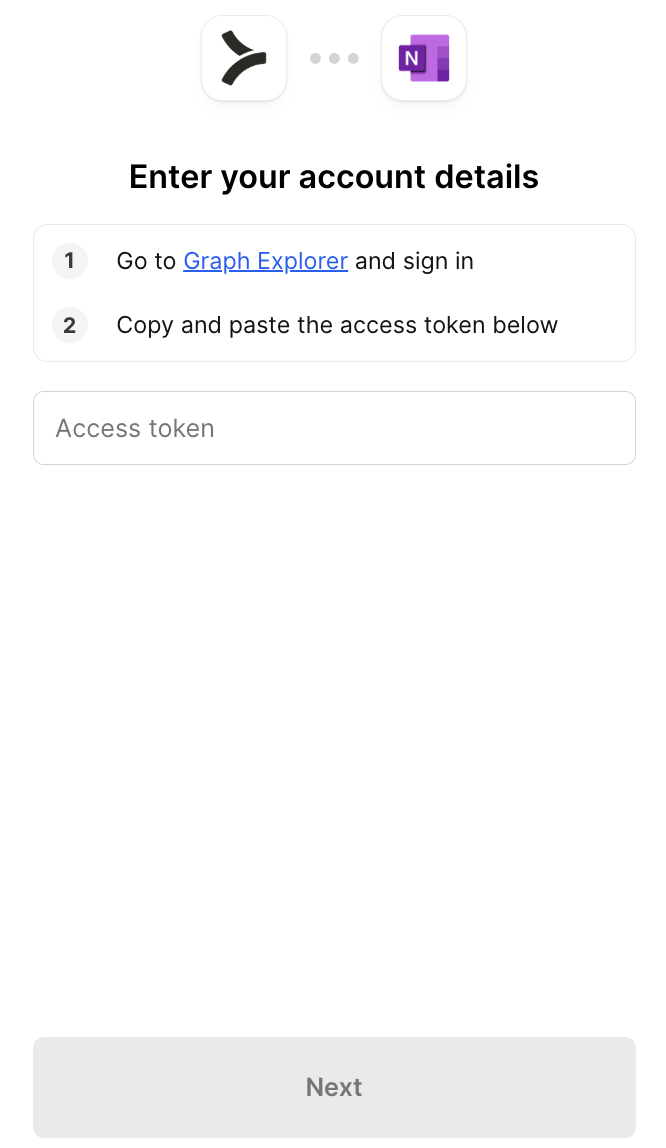
You should then see an output like the following:
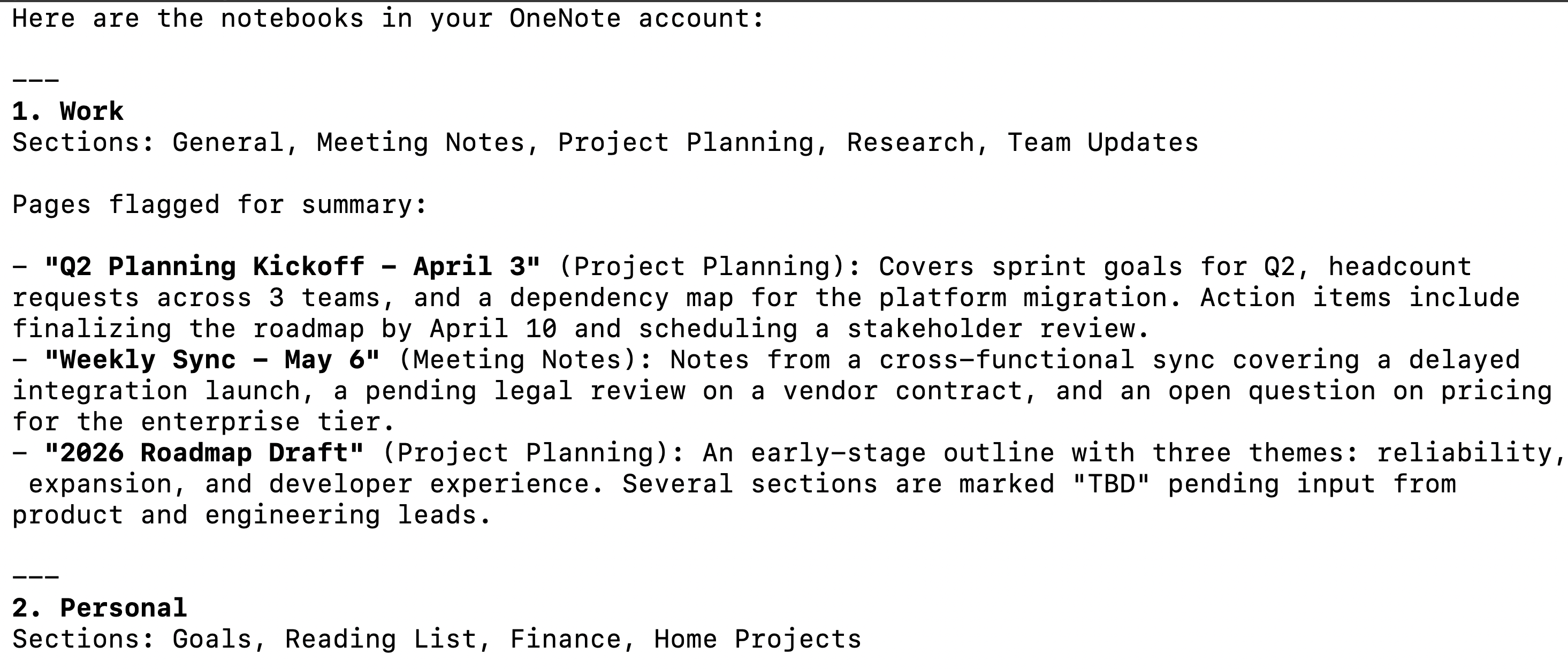
{{this-blog-only-cta}}
OneNote MCP FAQ
In case you have more questions on setting up and using the OneNote MCP in Claude Code, we've addressed several more commonly-asked questions below.
What can you do once the OneNote MCP is connected to Claude Code?
With OneNote connected, Claude Code can:
- List and browse notebooks: retrieve all notebooks accessible to the authenticated account, including their display names, creation dates, and last-modified timestamps, without opening the OneNote UI
- Navigate sections and section groups: retrieve the full hierarchy of sections within a notebook, including nested section groups, giving agents the ability to scope content retrieval to the relevant part of a large notebook
- Read page content: pull the full text content of any page, enabling agents to summarize meeting notes, extract action items, or cross-reference documentation without manual copy-paste
- Retrieve page metadata: access page titles, creation times, last-modified timestamps, and parent section information across a notebook or the full account
- Search pages by title: find pages matching a keyword or topic across all notebooks, useful for agents that need to locate relevant notes before generating a summary or taking a downstream action
- List recently modified pages: retrieve the pages changed most recently across all accessible notebooks, giving agents a quick path to surface what's been updated without scanning the full hierarchy
Why use Merge Agent Handler vs. building directly on Microsoft Graph?
You can build a self-hosted MCP server on top of Microsoft Graph. OneNote's API is part of the Graph surface, the endpoints are documented, and for a single developer working against their own Microsoft account the initial setup is workable: register an app in Azure AD, configure the right scopes, complete the OAuth flow, and start making requests.
The friction compounds the moment a second user or a second environment enters the picture.
Microsoft Graph uses Azure AD for authentication, which means each user goes through a tenant-specific auth flow with scopes that need to match what the app registration was configured to allow. A multi-user setup requires tracking access tokens and refresh tokens per user, handling Azure AD token lifetimes, and debugging auth failures that look different depending on whether the account is a personal Microsoft account or a work or school account on a specific tenant.
Microsoft also doesn't offer an official OneNote MCP server. And while community-built options exist, they carry no guarantees on coverage, maintenance, or enterprise support.
Merge Agent Handler addresses these gaps by handling per-user credential storage and token refresh. That lets each developer authenticate once through the Merge CLI rather than managing Microsoft Graph OAuth individually. You can also scope which OneNote tools a given agent can reach: a meeting notes summarizer, for example, can get read access to pages and sections but not the ability to create or delete content.
Agent Handler also logs every tool call with the timestamp, tool name, and inputs, giving teams an audit trail of which notebooks were accessed and when.
Why connect OneNote to Claude Code?
OneNote is where a lot of institutional knowledge actually lives: meeting notes from decisions that never made it into a ticket, architecture discussions captured during a sprint, research that informed a product direction. That content is useful for agents, but it's locked away from development workflows because accessing it programmatically has always required standing up a Microsoft Graph integration first.
With the OneNote MCP connected, Claude Code can read page content, list notebooks, and retrieve section structure without leaving the terminal.
This matters when note content needs to inform code or a downstream action: pulling the decisions from last quarter's architecture review before starting a refactor, extracting action items from a set of meeting notes to create tickets, or summarizing a notebook section ahead of a design review.
Jon Gitlin
.png)
.png)


Connect Claude Code to thousands of tools with Merge Agent Handler
Use Merge Agent Handler’s 150+ connectors (including OneNote) to power reliable, secure, and powerful agents.


But Merge isn’t just a Unified
API product. Merge is an integration platform to also manage customer integrations. gradient text
But Merge isn’t just a Unified
API product. Merge is an integration platform to also manage customer integrations. gradient text
But Merge isn’t just a Unified
API product. Merge is an integration platform to also manage customer integrations. gradient text
But Merge isn’t just a Unified
API product. Merge is an integration platform to also manage customer integrations. gradient text