


Use your existing credentials with Merge Agent handler

Matt Linehan
If your product already manages users’ OAuth tokens or API keys, you can now use those credentials directly with Merge Agent Handler.
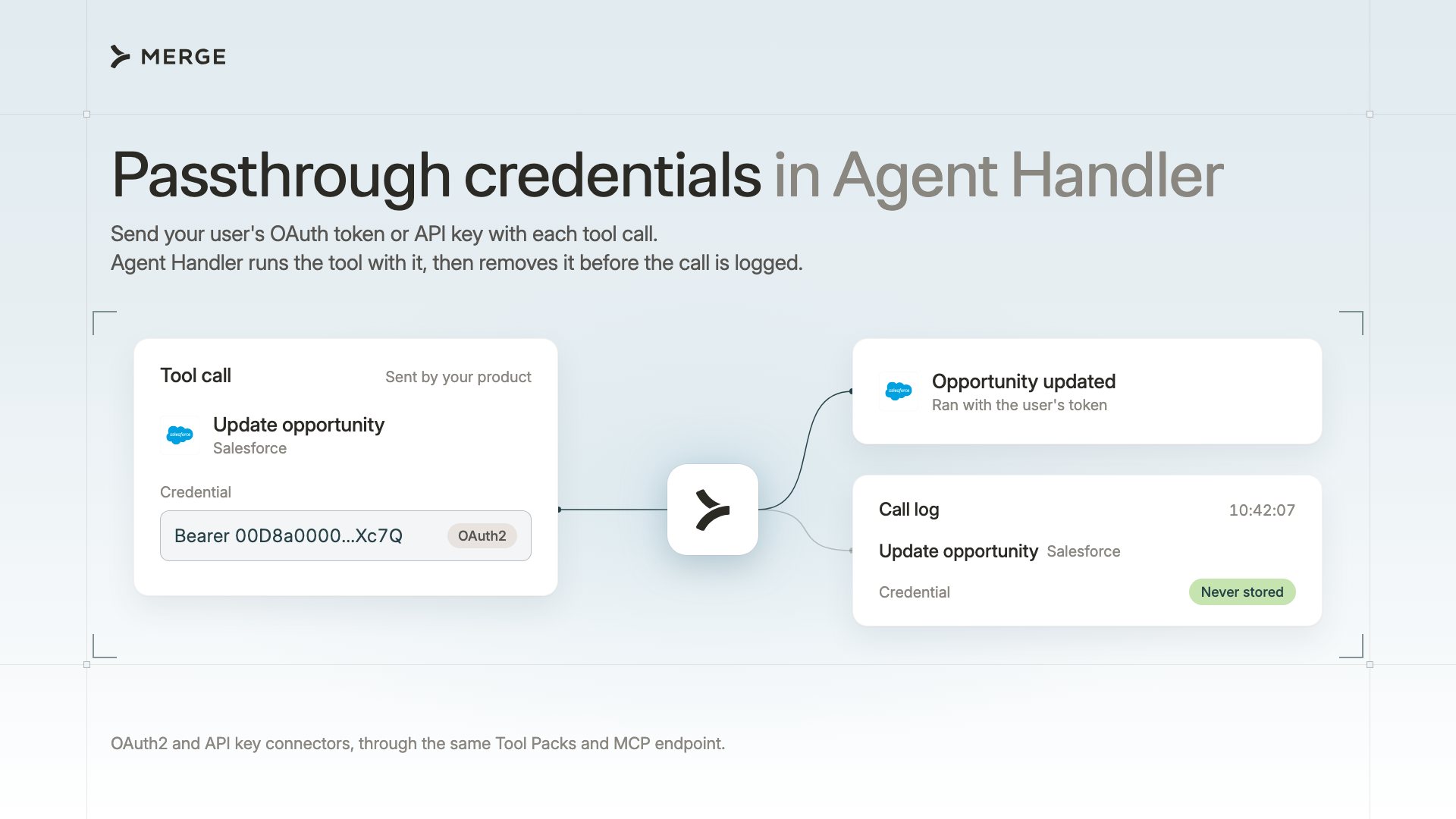
Passthrough credentials let you keep the authentication experience and credential management your team already built. Your product supplies the credential for each tool call, and Agent Handler uses it without storing it. This gives you more flexibility in how you handle authentication for agent tools.
Keep authentication and credential storage in your product
Rebuilding an authentication experience your team already operates adds work. You have to recreate connect screens, OAuth flows, token storage, refresh logic, and reconnection handling for the agent integration, then maintain both paths.
Some companies also require end-user credentials to remain in infrastructure they control. They may be comfortable using an external platform to execute tool calls without wanting that platform to store OAuth tokens or API keys.
Passthrough credentials address both needs without changing how your agent calls tools. Your product keeps its existing authentication flow, stores credentials, refreshes tokens, and handles reconnection. Your agent continues using the same Tool Packs and MCP endpoint for OAuth2 and API key connectors. Agent Handler receives the credential with each call, uses it for that request, removes it before logging, and never stores it.
Choose who manages credentials for your agent’s tool calls
Merge Link and passthrough provide two different ways to manage third-party credentials:
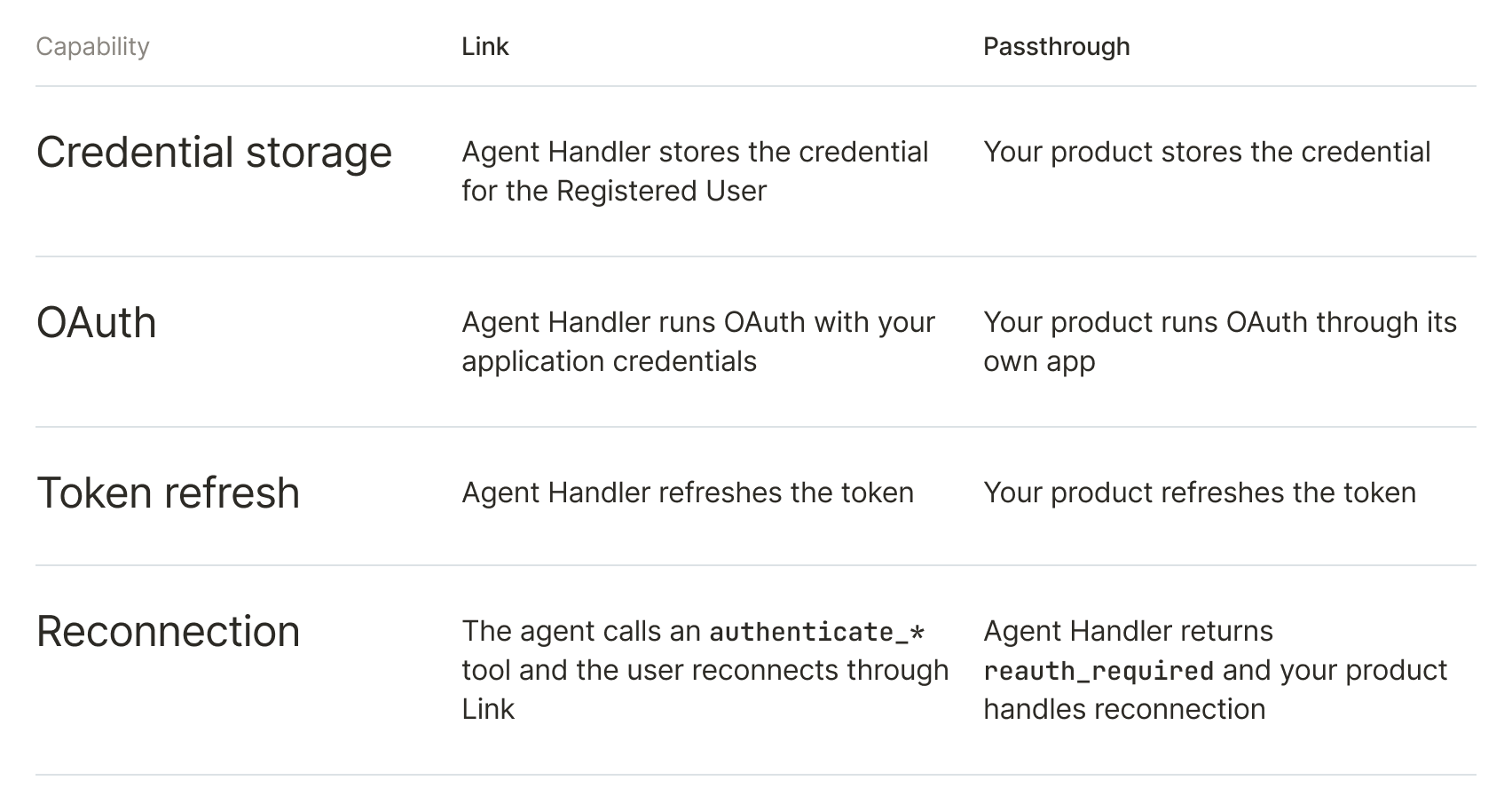
Use Merge Link when you want Agent Handler to manage connector authentication and credentials on your behalf. Use Passthrough when your product already has this infrastructure in place and you want to keep using it while Agent Handler provides tool execution, connectors, data loss prevention, and access controls.
Once passthrough is enabled for your organization, tools/list no longer returns authenticate_* tools. Sign-in and reconnection remain inside your product instead of moving into the agent's tool flow.
Pass credentials with each tool call
Add the X-Tool-Auth header when you open a Tool Pack MCP session. The header is a JSON object containing the authentication type and the fields required by the Connector.
For an OAuth2 Connector, it could look like this:
`{
  "auth_type": "OAuth2",
  "access_token": "eyJhbGciOi...",
  "subdomain": "acme"
}`
For a Connector that uses an API key or another secret, set auth_type to Secrets and include its required fields.
The Registered User in the MCP endpoint tells Agent Handler who the credential belongs to. Agent Handler checks that the required fields are present and uses the credential to run the tool. It removes the header before logging the request, so the credential never appears in your tool call logs.
The header applies to every tool call in the MCP session. Open a separate session for each Registered User, and start a new session after refreshing an OAuth token.
For the complete implementation flow, read the passthrough credentials documentation. It covers how to retrieve each Connector’s required credential fields and OAuth scopes, build the X-Tool-Auth header, and handle reauth_required responses.
Start using passthrough credentials
Passthrough credentials were built to give product builders more flexibility in how they handle authentication for agent tools. Contact your Merge account team to enable passthrough for your organization. If you aren’t already using Agent Handler to connect your agents to thousands of tools, get in touch for a demo or to learn more.
Matt Linehan



But Merge isn’t just a Unified
API product. Merge is an integration platform to also manage customer integrations. gradient text
But Merge isn’t just a Unified
API product. Merge is an integration platform to also manage customer integrations. gradient text
But Merge isn’t just a Unified
API product. Merge is an integration platform to also manage customer integrations. gradient text
But Merge isn’t just a Unified
API product. Merge is an integration platform to also manage customer integrations. gradient text