

Table of contents
.png)
.png)
How to connect a Cloudflare MCP to Cursor (4 steps)



Jon Gitlin
The moment you start building something that talks to Cloudflare's API, such as a deploy script, you need details that only live in the API's responses.
What fields does a DNS record object return, and which ones are writable? How does the KV key-listing endpoint paginate? What's the shape of the analytics response you're about to parse?
Without the MCP connection, answering those means leaving the editor, hitting Cloudflare's API separately, reading responses, and pasting them back into the session where the integration code is being written.
To help your developers inspect Cloudflare's API and query real resources without leaving Cursor, we'll show you how to connect Cloudflare with Merge Agent Handler's Cloudflare MCP server.
How it works
Merge Agent Handler connects Cursor to the Cloudflare API through the Merge CLI.
You install the CLI, authenticate once, and run a single setup command from your project root. That command writes a ## Merge CLI section to your project's .cursorrules file, which tells Cursor's agent when to call merge search-tools and merge execute-tool to reach Cloudflare.
Once connected, Merge manages your Cloudflare API token, so you never store credentials locally or rotate them by hand across the team.
Related: How to use the Cloudflare MCP in Claude Code
Prerequisites
Before getting started, you'll need the following:
- A Merge Agent Handler account
- Cursor installed
- pipx installed (run
pipx --versionto confirm, or install viapip install pipx) - A Cloudflare account with access to the zones and resources you want to query
If you want to connect Merge Agent Handler's Cloudflare MCP with internal or customer-facing agentic products, you can follow the steps in our docs.
1. Install the Merge CLI
Install the Merge CLI with pipx: pipx install merge-api
Verify your installation: merge --version
2. Log in to Merge
Authenticate the CLI with your Merge Agent Handler account: merge login
This links the CLI to your account so it can make authorized requests to Cloudflare on your behalf.
3. Connect the CLI to Cursor
Run the following from the root of the project where you want to use Merge tools:
This writes a ## Merge CLI section to .cursorrules so Cursor knows to use the CLI for third-party services. The command is idempotent, safe to re-run if you need to reset.
Related: Steps for integrating a Cloudflare MCP with Codex
4. Authenticate Cloudflare
Open a Cursor chat in your project and try a prompt such as:
Fetch the DNS records for my primary zone and show one full record object so I can see the type, content, ttl, and proxied fields before I write the record-sync function.
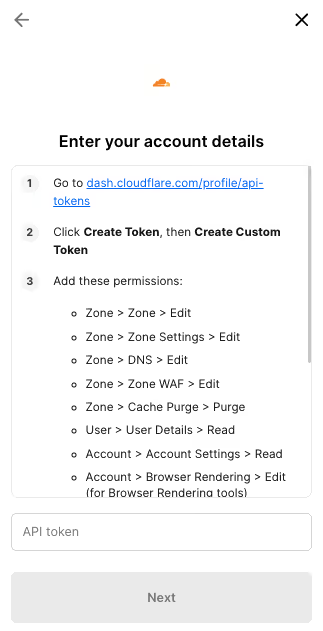
The first time you invoke a Cloudflare tool, a Magic Link will appear to complete connector authentication.
{{this-blog-only-cta}}
Cloudflare MCP FAQ
In case you have more questions on setting up and using the Cloudflare MCP in Cursor, we've addressed several more commonly-asked questions below.
What can you do once the Cloudflare MCP is connected to Cursor?
With Cloudflare connected, Cursor can:
- Inspect the DNS record object before writing record-management code: fetch a real record to see the exact
type,content,ttl, andproxiedfields, and which are writable, so the create/update calls you write match the API
- Resolve zone and record IDs before writing automation: pull the real zone ID and record IDs you need to hardcode or look up, instead of guessing identifiers while writing a migration script
- Check the KV key-listing pagination before writing a sync loop: fetch a real listing to see how the cursor-based pagination and
list_completeflag behave so your loop terminates correctly
- Inspect the response envelope before writing a parser: see Cloudflare's
{result, success, errors, result_info}wrapper on a real call so your deserialization and error handling match the actual shape
- Confirm the analytics response structure before writing a monitoring module: pull a real zone-analytics response to see the metrics and grouping fields before you write code that reads them
- Check a Worker's metadata and routes before writing deploy logic: fetch an existing Worker to see its route bindings and config shape so the deploy or update code you write targets the right fields
Why use Merge Agent Handler vs. a self-hosted Cloudflare MCP server?
You can build your own MCP server on top of Cloudflare's API. For a solo developer on a personal account, it's manageable: create a Cloudflare API token, write a small server, and point Cursor at it.
It breaks down at the team level.
Self-hosting means each developer manages their own Cloudflare API token, scoped however they set it up. There's no central place to control which zones or resources an agent can reach, no audit log of what agents read or changed, and token rotation becomes a manual coordination problem across the team.
Merge Agent Handler is a managed MCP layer. It centralizes authentication and lets you scope access so each agent only reaches the zones and operations you explicitly allow, and it logs every tool call. When you need to audit what an agent queried or modified in Cloudflare, the record is there.
For teams writing code against production Cloudflare infrastructure, that combination of scoped access and central logging is the foundation you want before agents start touching live zones.
Why connect Cloudflare to Cursor?
Cloudflare's API data, the DNS record shape, the KV listing contract, the analytics response, the result envelope, isn't something you can accurately reconstruct from documentation alone.
These are real-response details: proxied records behave differently than unproxied ones, KV listings paginate with an opaque cursor, and every call wraps its payload in a standard success/errors envelope.
Connecting Cloudflare to Cursor puts that discovery step inside the editor.
Can I use Merge's Cloudflare MCP with my employees?
Yes, Merge for Workforce is built to help engineering organizations provision, secure, and govern how employees connect AI tools like Cursor to operational tools like Cloudflare.
Common patterns include:
- Provisioning and access control via SCIM with identity providers like Okta and Microsoft Entra ID, so IT can manage which zones and resources an employee's agent can reach by role or team
- DLP and policy enforcement on tool calls, so admins can restrict which operations an employee's AI can run against production infrastructure before the call is made
- User-level audit logging so security and IT teams can review which Cloudflare resources were accessed or changed, by which employee identity, and when
The result is that employees can use the Cloudflare MCP to write DNS automation against real record shapes, build KV pipelines grounded in the actual pagination contract, and write deploy logic that targets real Worker config, and more, while IT keeps centralized control over which zones each agent can reach.
Jon Gitlin
.png)


Connect Cursor to thousands of tools with Merge Agent Handler
Use Merge Agent Handler’s 150+ connectors (including Cloudflare) to power reliable, secure, and powerful agents.


But Merge isn’t just a Unified
API product. Merge is an integration platform to also manage customer integrations. gradient text
But Merge isn’t just a Unified
API product. Merge is an integration platform to also manage customer integrations. gradient text
But Merge isn’t just a Unified
API product. Merge is an integration platform to also manage customer integrations. gradient text
But Merge isn’t just a Unified
API product. Merge is an integration platform to also manage customer integrations. gradient text