

Table of contents
.avif)
.avif)
AI agent vs MCP: how they differ and overlap



Jon Gitlin
As you look to leverage AI, you’ll need to understand the nuanced relationship between AI agents and the Model Context Protocol (MCP).
We’ll help by breaking down each and reviewing how they compare.
What is an AI agent?
An AI agent is a software-based system that performs tasks on behalf of users or employees autonomously. It operates based on programmed logic and can improve over time through additional data, user feedback, and learned behavior.
Its primary goal is to make employees or users more productive, whether that’s by saving them time or helping them uncover timely and actionable insights.
For example, Siit, which offers a modern IT service management platform, provides an AI agent that can perform IT tasks for employees at large.
The AI agent can, for instance, use SCIM directory and HRIS integrations to provision incoming employees with access to applications on behalf of hiring managers.
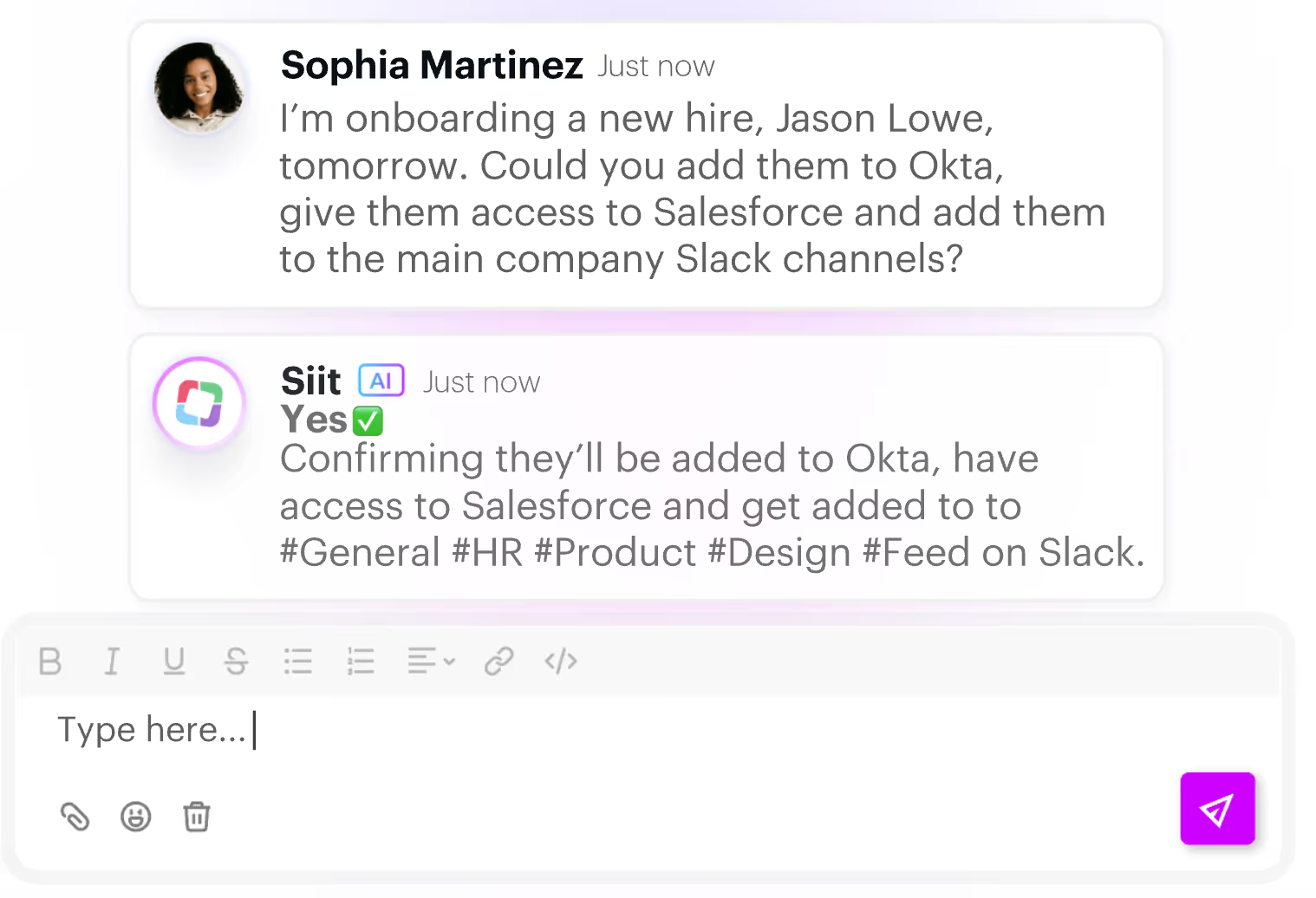
This example is just the tip of the iceberg. AI agents can manage and resolve repetitive customer issues, answer employees’ questions, create comprehensive sales proposals for go-to-market leaders, and more.
{{this-blog-only-cta}}
What is MCP?
MCP is a standardized protocol from Anthropic that lets AI agents access and interact with 3rd-party applications via tools.
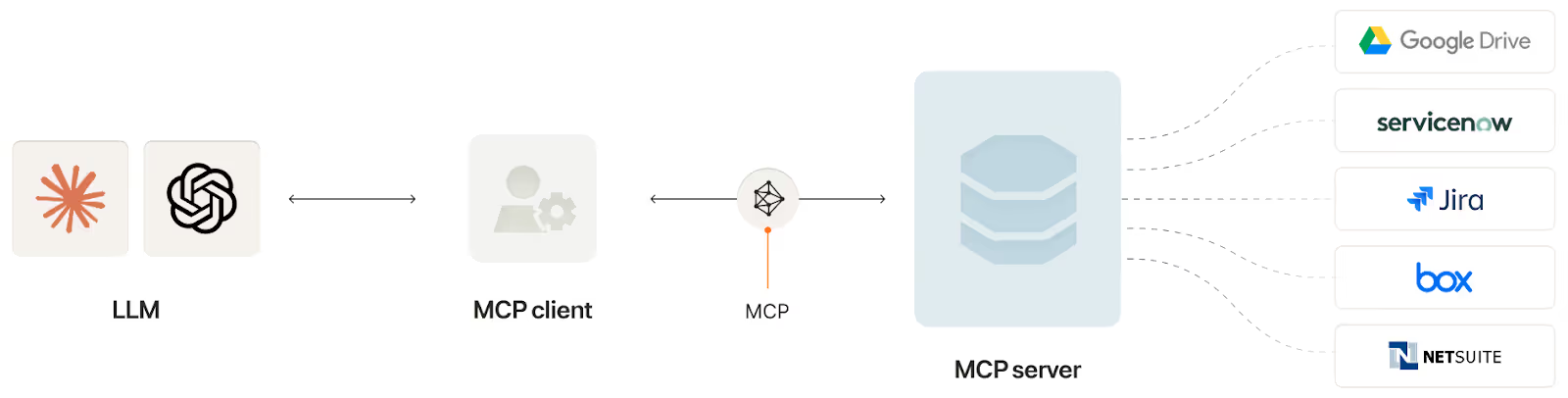
Through the protocol, an MCP server exposes tools—or prefined functions from a 3rd-party application—that correspond to API endpoints. For example, a “List projects” tool from a project management platform can be associated with that platform's <code class="blog_inline-code">GET /projects</code> endpoint.
An MCP client, which is often an AI agent, decides which tools to invoke from an MCP server based on the users’ inputs and the tools that are made available.
Since the protocol has gained significant traction, countless MCP servers have been made available.
For example, Merge offers an MCP server that lets AI agents access tools from hundreds of 3rd-party systems. And individual SaaS providers also offer their own MCP servers. GitHub, for instance, offers one that lets AI agents and assistants get information from and add information to specific repos and issues.
Based on this context on MCPs and AI agents, we’ll break down their direct relationship next.
https://www.merge.dev/blog/rag-vs-mcp?blog-related=image
MCP vs AI agents
MCP is simply a protocol that allows AI agents to access and interact with data from 3rd-party applications more easily. AI agents, on the other hand, are software-based systems that can perform countless tasks across datasets, applications, and teams.
MCP enhances AI agents’ capabilities by allowing them to invoke tools in real-time based on users’ prompts. But AI agents don’t directly impact MCP servers. The servers can only be developed and modified over time by the MCP providers.
Power your AI agents with enterprise-ready tools
Merge Agent Handler is the control plane for AI agents that need to take real actions in third‑party tools.
It can connect your agents to enterprise‑ready connectors via MCP, enforces guardrails, and gives you full visibility into every tool call.
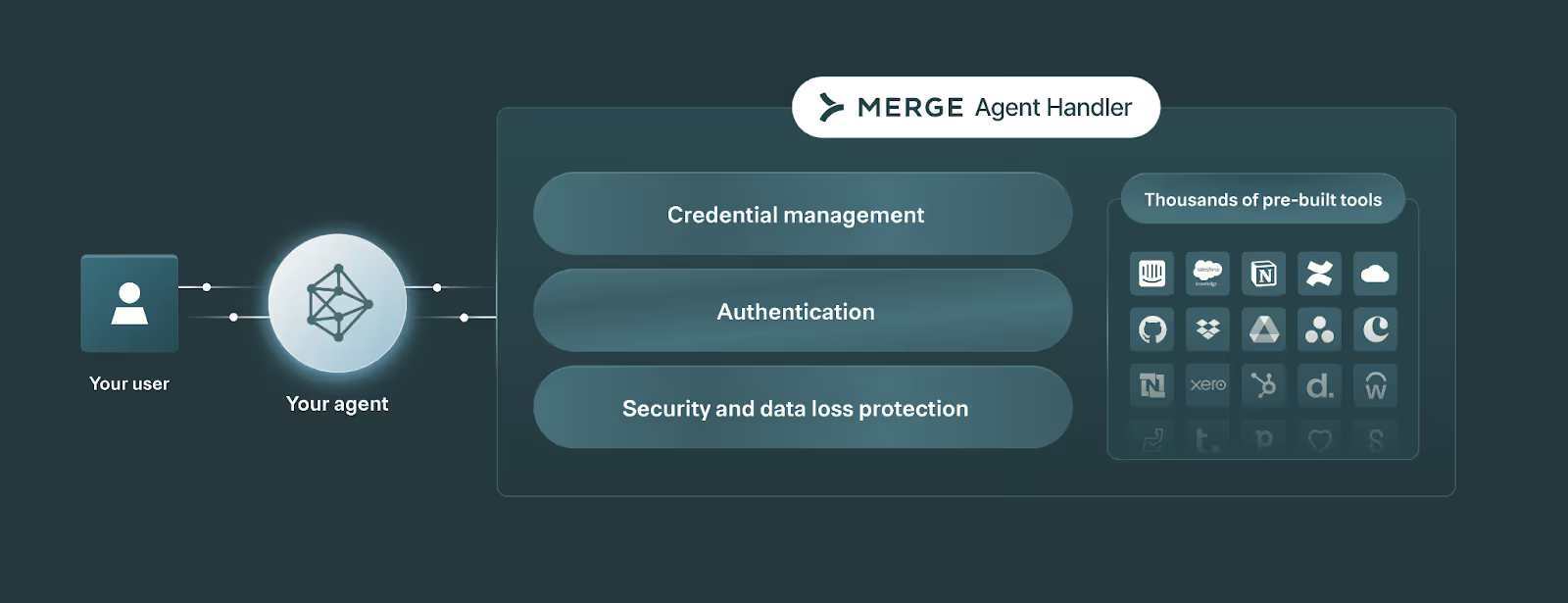
Start connecting your AI agents with more than a thousand tools for free by creating an account!
AI agent vs MCP FAQ
In case you have any more questions on MCP servers, AI agents, and their relationship, we answered several more questions below.
How do AI agents use MCP servers?
Here are the steps they generally take to use them:
1. A user or system submits an input to an agent. This could be a question (e.g., “Why did our employee costs increase last quarter?”) or a request (e.g., “create an invoice”).
2. The agent decides whether it needs to use tools, and which MCP server(s) to use. The agent looks at the MCP servers it has access to and reviews the tools each server exposes (tool names, descriptions, and input schemas). It then chooses the most relevant tool for the user’s request.
3. The agent extracts the right arguments from the input and formats a tool call. Once the tool is selected, the agent turns the user’s request into structured arguments that match the tool’s expected schema (e.g., <code class="blog_inline-code">customer_id</code> and <code class="blog_inline-code">start_date</code>).
4. The agent invokes the tool on the MCP server. The agent sends the tool name and arguments to the MCP server, which routes the request to the underlying system (like a SaaS API, internal service, database, or workflow).
5. The MCP server executes the request and returns a structured result. The result is typically machine-readable data (often JSON), plus any errors or status information (e.g., “permission denied,” “record not found,” or “rate limited”).
6. The agent uses the tool result to complete the task. The agent incorporates the returned data into its reasoning and produces the next step: answering the user, asking a clarifying question, updating a record, calling another tool, etc.
7. If needed, the agent repeats the loop until the goal is met. Many tasks require multiple tool calls (for example, “find the customer,” then “retrieve invoices,” then “summarize outstanding balance”), and the agent iterates until it can provide a final response.
How is authentication handled when agents invoke tools over MCP?
Agents authenticate once to the MCP server using a server-level credential. The MCP server then handles authentication and authorization for downstream systems, resolving the correct stored credentials per user or service context and enforcing least-privilege policies before executing each tool call.
What guardrails should I enforce for agent tool access via MCP?
Many of your guardrails will be specific to individual MCP connectors and agentic use cases.
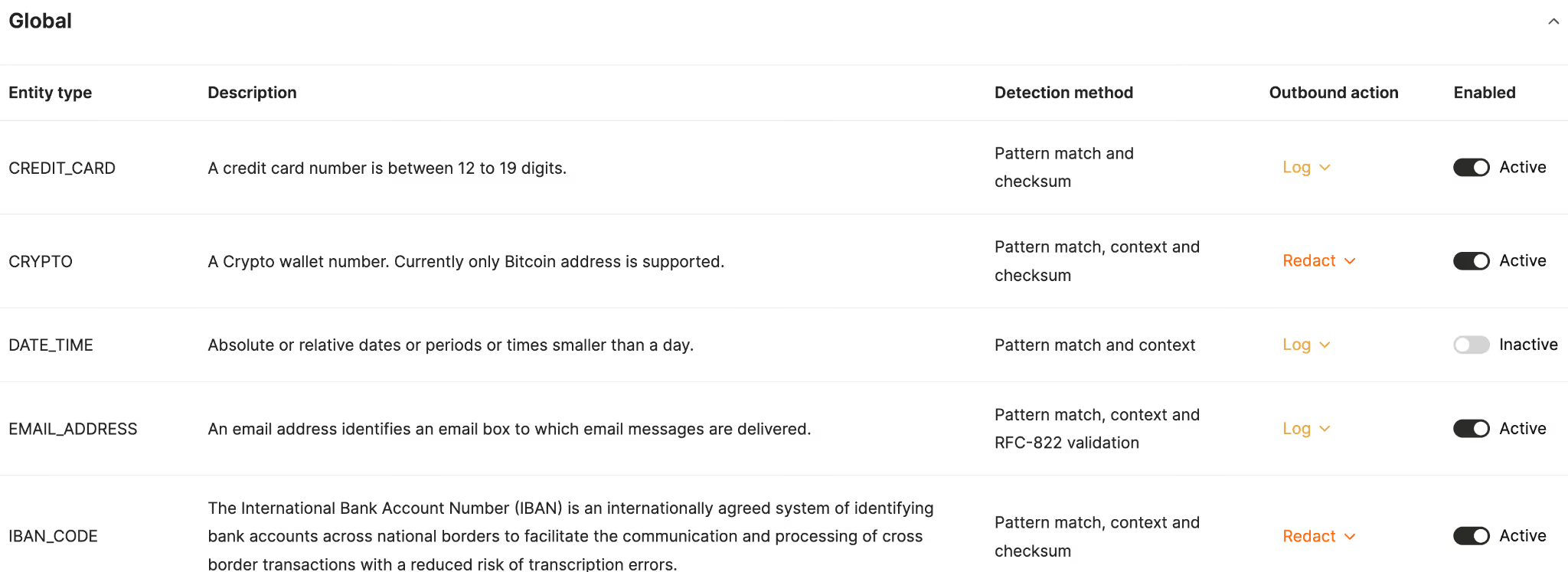
That said, you can set broadly applicable rules to execute data loss protection (DLP) successfully. This might include logging when your agents share a credit card number, redacting crypto wallet numbers when your agents share them externally, and so on.
How can I monitor, log, and audit AI agent tool calls made through MCP?
The easiest solution is to use a 3rd-party agent management solution.
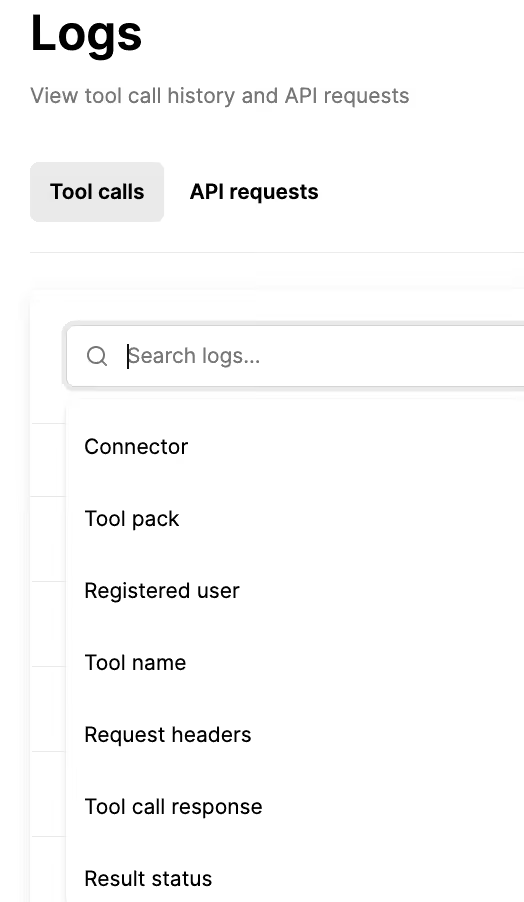
The solution can offer customizable tool-calling rules and the ability to track when any is violated. And it can provide fully-searchable logs with context like the tool that was invoked, by whom, when, whether it was successful, and more.
For example, Merge Agent Handler lets you filter logs by connector, tool, result status, and more to help you find individual logs, quickly.
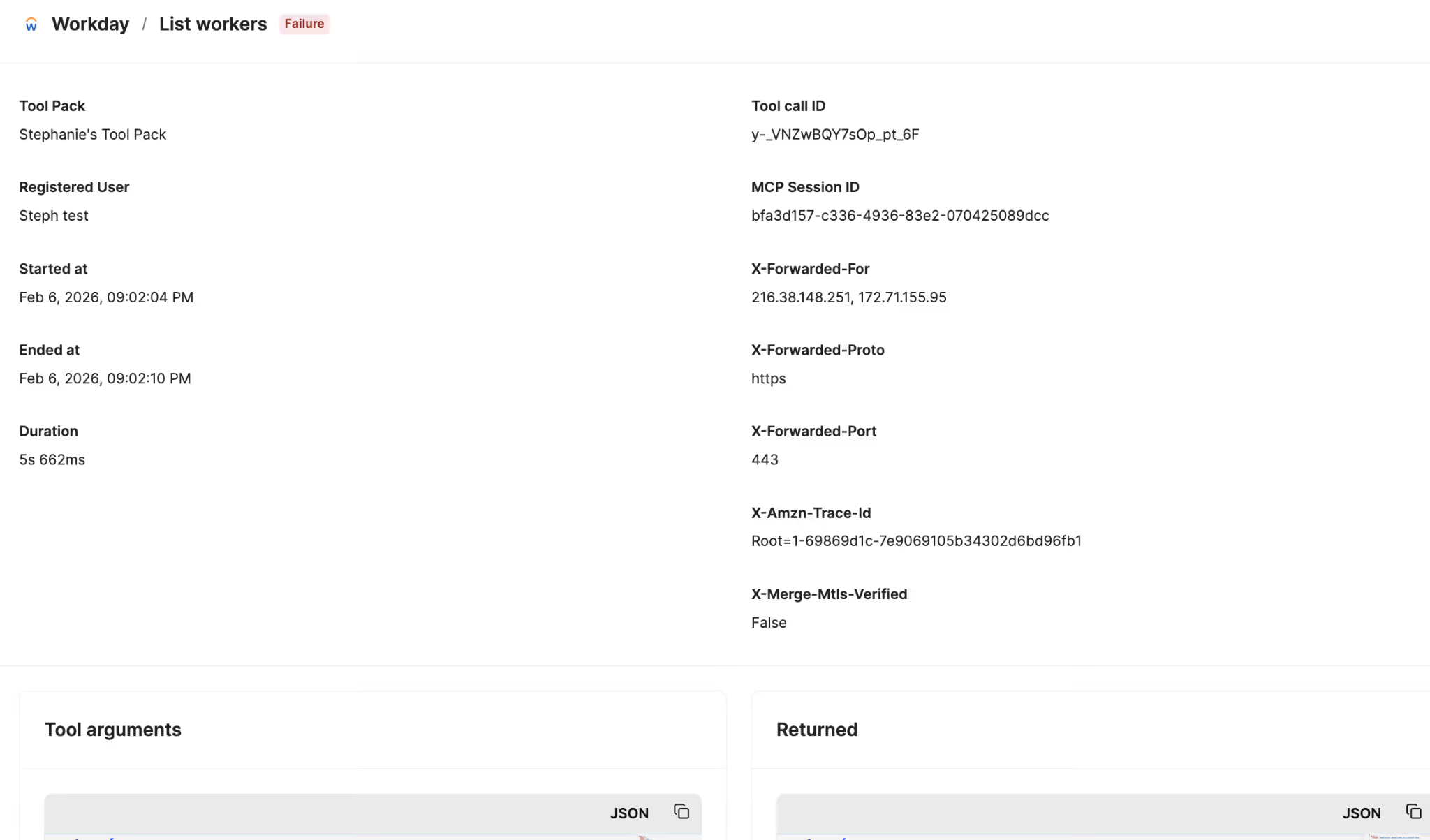
Individual logs in Merge Agent Handler include details like the users who invoked the tools, when the calls were initiated and when they ended, the tool arguments passed, the data returned, and more.
How do I evaluate and test an agent’s tool‑use behavior when using MCP?
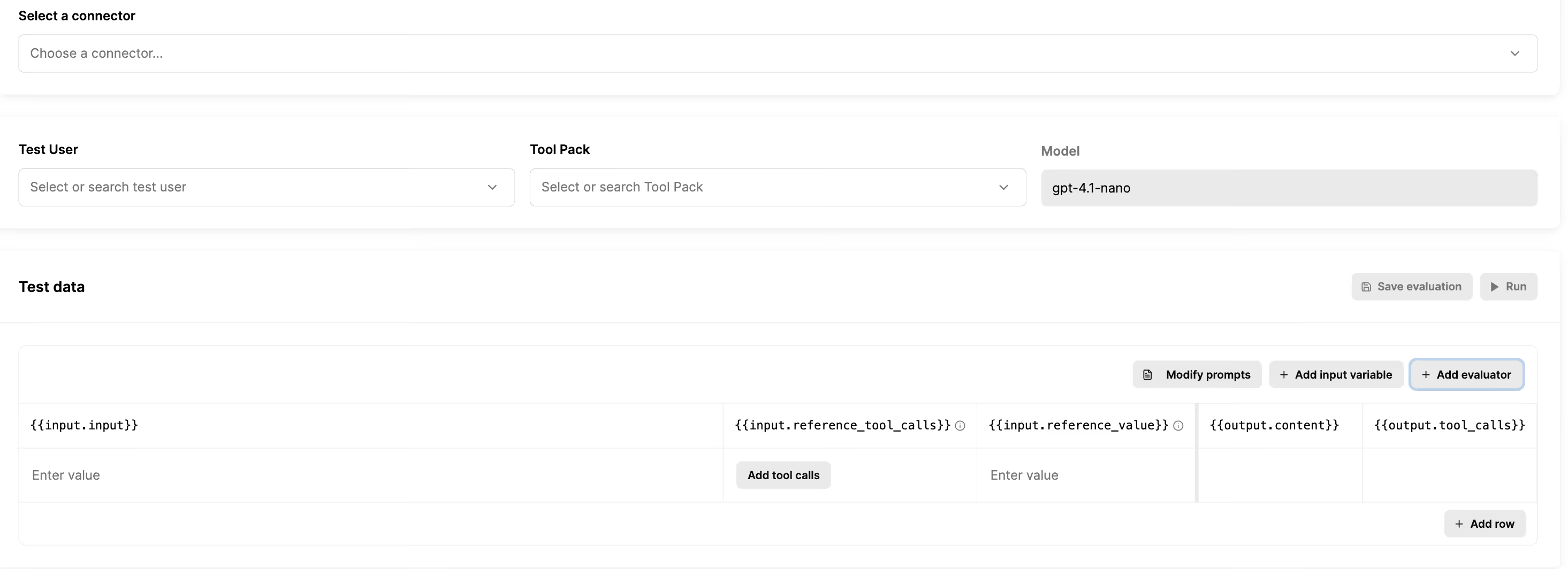
You should evaluate and test an agent’s tool calls before pushing the agent to production. When doing so, you should follow these steps:
1. Define success criteria: This includes correct tool choice, valid arguments, correct identity and permissions, and safe behavior.
2. Create a prompt suite: Test happy paths, edge cases, adversarial prompts, and requests that should be denied due to permissions.
3. Run against realistic setups: Match your production tool list and schemas, and mirror the identity contexts you expect (such as end-user credentials and shared or service credentials).
4. Review tool-call traces: Check the tool sequence, the exact arguments, retries and errors, and whether access boundaries were respected.
Jon Gitlin
.png)
.png)

Connect your AI agents to any tool with Merge Agent Handler
Merge Agent Handler lets you securely connect AI agents to third‑party tools via MCP, with governance, monitoring, and a built‑in evaluation suite.


But Merge isn’t just a Unified
API product. Merge is an integration platform to also manage customer integrations. gradient text
But Merge isn’t just a Unified
API product. Merge is an integration platform to also manage customer integrations. gradient text
But Merge isn’t just a Unified
API product. Merge is an integration platform to also manage customer integrations. gradient text
But Merge isn’t just a Unified
API product. Merge is an integration platform to also manage customer integrations. gradient text