

Table of contents
.png)
.png)
How to connect a UKG Pro MCP with Codex (4 steps)



Jon Gitlin
When you hand Codex a task to build a UKG Pro sync or a workforce reporting tool, you'd describe your UKG Pro setup in the prompt.
That description rarely matches the real account. Pay group codes, employment status values, and the structure of effective-dated job history records are details a summary skips.
So Codex writes a parser for an assumed employee shape, validation built on guessed status values, or a sync that mishandles how lifecycle events are dated. The source of truth lives in UKG Pro, not the few lines you wrote into the task.
To give Codex direct access to UKG Pro as it works through your coding tasks, we'll show you how to connect UKG Pro with Merge Agent Handler's UKG Pro MCP server.
How it works
Merge Agent Handler connects Codex to the UKG Pro API through the Merge CLI. You install the CLI, authenticate once, and run a single setup command from your project root.
That command writes a Merge CLI section to your project's AGENTS.md file, which tells Codex when to call merge search-tools and merge execute-tool to reach UKG Pro.
Once connected, Merge manages UKG Pro's OAuth credentials on your behalf, including token refresh and rotation, so no company-specific secret lives in your repo.
Related: How to use the UKG Pro MCP in Claude Code
Prerequisites
Before getting started, you'll need the following:
- A Merge Agent Handler account
- Codex access (available via the OpenAI platform)
- pipx installed (run
pipx --versionto confirm, or install viapip install pipx) - A UKG Pro account with API access enabled (requires a UKG Pro service account and API credentials from your UKG administrator)
If you want to connect Merge Agent Handler's UKG Pro MCP with internal or customer-facing agentic products, you can follow the steps in our docs.
1. Install the Merge CLI
Install the Merge CLI with pipx: pipx install merge-api
Verify the install: merge --version
2. Log in to Merge
Run the following to authenticate the CLI with your Merge Agent Handler account: merge login
This links the CLI to your Merge account and stores your session credentials locally.
3. Add Agent Handler to Codex
From the root of the project where you want Codex to reach UKG Pro, run:
This writes a Merge CLI section to your project's AGENTS.md file so Codex knows to use the CLI when a task needs UKG Pro data. The command is idempotent, safe to re-run if you need to reset the configuration.
Commit the updated AGENTS.md so the configuration travels with the repo.
Related: A guide to integrating the UKG Pro MCP with Cursor
4. Authenticate UKG Pro
Create a Codex task that needs live UKG Pro data, for example: "Read the employee record schema and the job history structure, then scaffold a sync that maps UKG Pro employee fields and lifecycle events into our internal HR data warehouse schema."
The first time Codex invokes a UKG Pro tool, a Magic Link will appear to complete connector authentication.
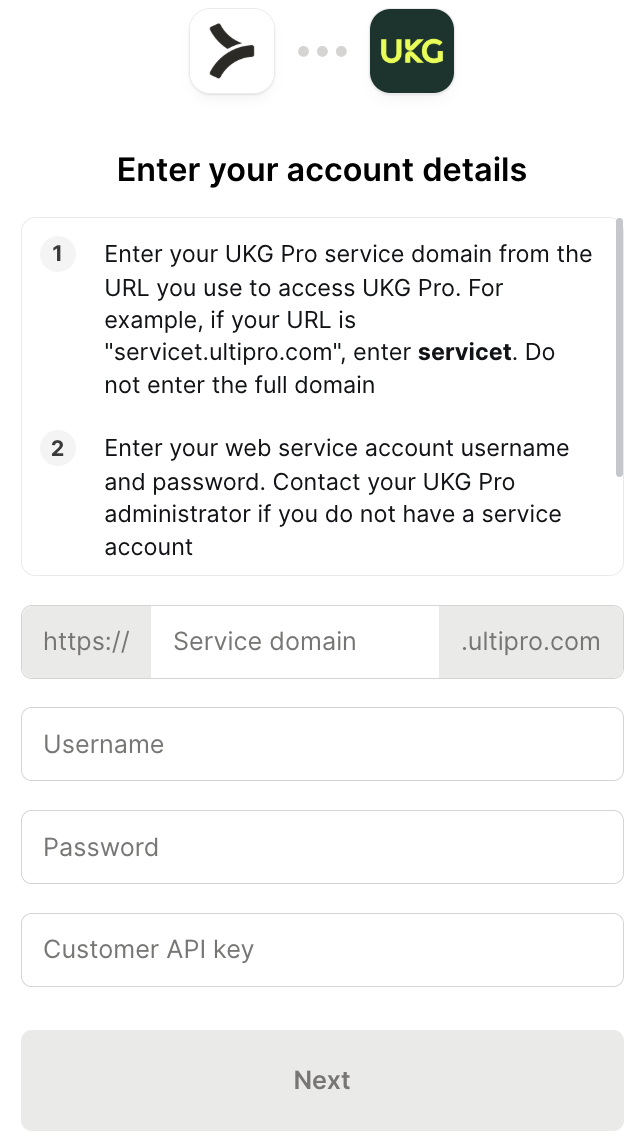
Once authenticated, Codex can reach your UKG Pro account through Merge for every later task in this project.
{{this-blog-only-cta}}
UKG Pro MCP FAQ
In case you have more questions on setting up and using the UKG Pro MCP with Codex, we've addressed several more commonly-asked questions below.
What can you do once the UKG Pro MCP is connected to Codex?
With UKG Pro connected, Codex can:
- Read the real employee schema before scaffolding a sync: pull a real employee record so the sync it generates uses UKG Pro's actual field names and value formats instead of an assumed shape
- Pull job history before generating lifecycle event logic: fetch a real job history record so the code it writes correctly handles effective-dated transfers, promotions, and compensation changes
- Read pay group and status values before generating validation: fetch the valid pay group, employment status, and job code values so the validation and type definitions it produces match UKG Pro's real values
- Pull a benefits enrollment record before generating enrollment logic: fetch a real enrollment so the automation it writes matches how coverage tiers and elections are structured
- Read requisition data before scaffolding a recruiting integration: pull open job requisitions so the pipeline code it generates reflects the real requisition and approval structure
Why use Merge Agent Handler vs. a self-hosted UKG Pro MCP server?
You can build a self-hosted MCP server on UKG Pro's API. For one company and one use case, it's workable: request a service account, generate API credentials, and start making calls.
It gets harder once tasks run across more than one UKG Pro account or more than one HR system. Each set of credentials carries that company's full access, with no way to scope which operations a Codex task can call.
And a UKG Pro-specific server only ever solves UKG Pro. The moment a task needs Workday or another HRIS instead, you're building and authenticating another integration.
UKG Pro also holds compensation history and benefits data, and a self-hosted setup has no field-level control or audit log to keep that data out of a task's context.
Merge Agent Handler handles UKG Pro authentication centrally and exposes the same tools across HR systems through one connection. You can scope exactly which UKG Pro operations a Codex task can call, and block sensitive fields before they reach the task.
Every call is logged with identity, timestamp, and inputs. For an agent working with workforce data, scoped access plus full audit logging is the foundation you want in place first.
Why connect UKG Pro to Codex?
UKG Pro holds the pay group codes, employment status values, and effective-dated job history that workforce automation code has to match exactly.
Codex tasks that build syncs, reporting tools, or onboarding automations need that ground truth to produce code that works against the real account.
The alternative is describing your UKG Pro setup in the prompt, and those descriptions are always incomplete. An assumed field shape, a guessed status value, or a missed lifecycle event structure is enough to make Codex generate code that breaks on real data.
Connecting UKG Pro lets Codex read the actual structure when a task needs it.
Can I use Merge's UKG Pro MCP with my employees?
Yes, Merge for Workforce is built to help organizations provision, secure, and govern how employees connect AI tools like Codex to systems like UKG Pro.
Common patterns include:
- Provisioning and access control via SCIM with identity providers like Okta and Microsoft Entra ID, so IT can manage which employee data an agent can reach by role or team
- DLP and policy enforcement on tool calls, so admins can block queries that would return compensation or benefits data before results reach a Codex task's context
- User-level audit logging so security and IT teams can review which workforce records were accessed, by which employee identity, and when
Taken together, employees can use the UKG Pro MCP to scaffold syncs against real employee data, generate validation tied to actual status values, and build automations grounded in real job history, while IT keeps centralized control over which workforce data each agent can reach.
Jon Gitlin
.png)


Connect Codex to thousands of tools with Merge Agent Handler
Use Merge Agent Handler’s 160+ connectors (including UKG Pro) to power reliable, secure, and powerful agents.


But Merge isn’t just a Unified
API product. Merge is an integration platform to also manage customer integrations. gradient text
But Merge isn’t just a Unified
API product. Merge is an integration platform to also manage customer integrations. gradient text
But Merge isn’t just a Unified
API product. Merge is an integration platform to also manage customer integrations. gradient text
But Merge isn’t just a Unified
API product. Merge is an integration platform to also manage customer integrations. gradient text