

Table of contents
.png)
.png)
How to connect a HiBob MCP with Codex (4 steps)



Jon Gitlin
When you hand Codex a task to build a people ops sync or an onboarding automation, you usually describe your HiBob setup in the prompt.
That description rarely matches the real account. The actual field structure, the custom fields, the named lists behind enum values, and the time-off policies are details a summary skips.
So Codex generates a parser for an assumed employee shape, a mapping that uses field labels instead of the real IDs, or validation that misses the actual enum values. The source of truth lives in HiBob, not in the few lines you wrote into the task.
To give Codex direct access to HiBob as it works through your coding tasks, we'll show you how to connect HiBob with Merge Agent Handler's HiBob MCP server.
How it works
Merge Agent Handler connects Codex to the HiBob API through the Merge CLI. You install the CLI, authenticate once, and run a single setup command from your project root.
That command writes a Merge CLI section to your project's AGENTS.md file, which tells Codex when to call merge search-tools and merge execute-tool to reach HiBob.
Once connected, Merge stores and manages your HiBob credentials, so you never embed API keys in your repo or rotate them by hand.
Related: How to use the HiBob MCP in Claude Code
Prerequisites
Before getting started, you'll need the following:
- A Merge Agent Handler account
- Codex access (available via the OpenAI platform)
- pipx installed (run
pipx --versionto confirm, or install viapip install pipx) - A HiBob account with API access enabled (Service User credentials required for API key generation)
If you want to connect Merge Agent Handler's HiBob MCP with internal or customer-facing agentic products, you can follow the steps in our docs.
1. Install the Merge CLI
Install the Merge CLI with pipx: pipx install merge-api
Verify the install: merge --version
2. Log in to Merge
Run the following to authenticate the CLI with your Merge Agent Handler account: merge login
This links the CLI to your Merge account and stores your session credentials locally.
3. Add Agent Handler to Codex
From the root of the project where you want Codex to reach HiBob, run:
This writes a Merge CLI section to your project's AGENTS.md file so Codex knows to use the CLI when a task needs HiBob data. The command is idempotent, safe to re-run if you need to reset the configuration.
Commit the updated AGENTS.md so the configuration travels with the repo.
Related: A guide to integrating the HiBob MCP with Cursor
4. Authenticate HiBob
Create a Codex task that needs live HiBob data, for example: "Read one employee record and the named lists for department and employment type, then scaffold a sync that maps HiBob fields to our internal schema and validates the enum values."
The first time Codex invokes a HiBob tool, a Magic Link will appear to complete connector authentication.
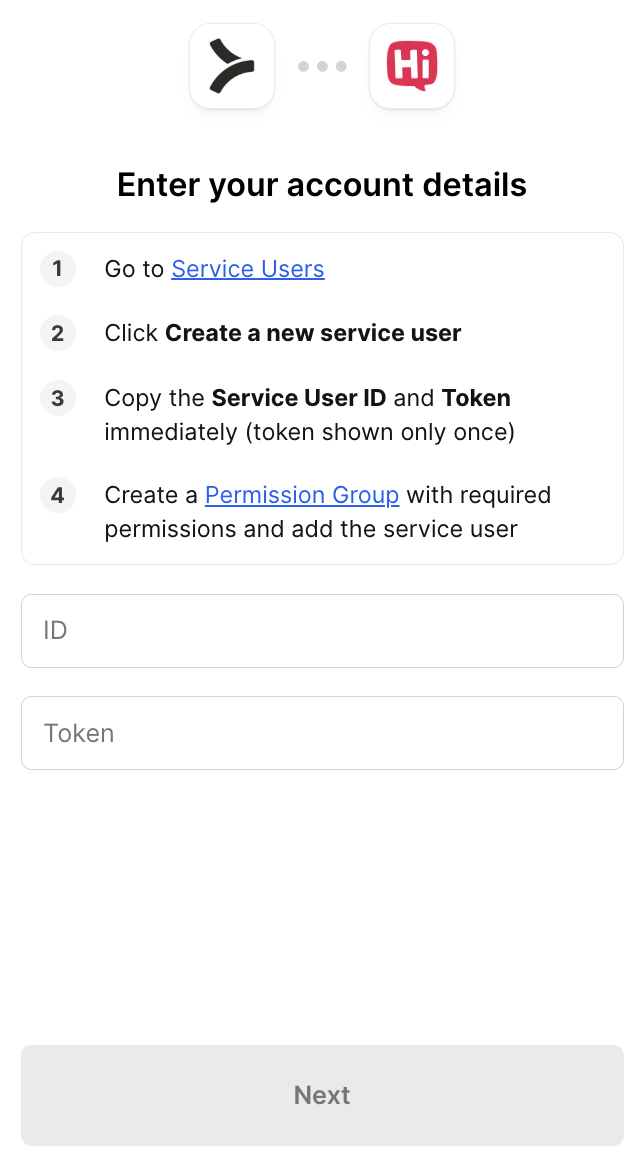
Once authenticated, Codex can reach your HiBob account through Merge for every later task in this project.
{{this-blog-only-cta}}
HiBob MCP FAQ
In case you have more questions on setting up and using the HiBob MCP with Codex, we've addressed several more commonly-asked questions below.
What can you do once the HiBob MCP is connected to Codex?
With HiBob connected, Codex can:
- Read the real field schema before scaffolding a sync: pull the employee object to see how fields nest under categories and which custom fields exist, so the sync it generates matches the actual structure
- Pull a real employee record before generating a parser: fetch one record so the parsing code it writes handles the real nesting and field IDs rather than an assumed flat shape
- Read named lists before generating type definitions: fetch the lists behind fields like department, site, and employment type so the enums and validation it generates use HiBob's real values
- Pull a time-off request and policy before generating absence code: fetch real examples so the handling it writes matches the policy types, date ranges, and statuses HiBob returns
- Read a report's output before generating ingestion code: fetch a generated report so the parser it writes matches the real columns and format
Why use Merge Agent Handler vs. HiBob's official MCP server?
You can connect to HiBob directly, either through HiBob's own MCP server or your own integration on its API.
For one developer on one account, it's workable: generate Service User credentials, authenticate, and start making calls.
It gets harder once tasks run across more than one user or more than one HR system.
Each connected token carries that account's full access, with no way to scope which operations a Codex task can call, and a HiBob-specific server only ever solves HiBob.
The moment a task needs Workday or BambooHR instead, you're building and authenticating another integration. With no central audit log, there's also no record of what a task read or changed in employee data.
Merge Agent Handler handles HiBob authentication centrally and exposes the same tools across HR systems through one connection. You can scope exactly which HiBob operations a Codex task can call, and every call is logged with identity, timestamp, and inputs.
For an agent working with employee data, scoped access plus full audit logging is the foundation you want in place first.
Why connect HiBob to Codex?
HiBob holds the employee field structure, named lists, and time-off data that people ops code has to match exactly.
Codex tasks that build syncs, mappings, or onboarding automations need that ground truth to produce code that works against the real account.
The alternative is describing your HiBob setup in the prompt, and those descriptions are always incomplete. An assumed field shape, a label used instead of a field ID, or a missing enum value is enough to make Codex generate code that breaks on real data.
Connecting HiBob lets Codex read the actual structure when a task needs it. The real record before a parser, the real field IDs before a mapping, the real named lists before validation: Codex works from the account itself, not a paraphrase of it.
Can I use Merge's HiBob MCP with my employees?
Yes, Merge for Workforce is built to help organizations provision, secure, and govern how employees connect AI tools like Codex to systems like HiBob.
Common patterns include:
- Provisioning and access control via SCIM with identity providers like Okta and Microsoft Entra ID, so IT can manage which employee data an agent can reach by role or team
- DLP and policy enforcement on tool calls, so admins can block queries that would return sensitive personal data before results reach a Codex task's context
- User-level audit logging so security and IT teams can review which employee records were accessed, by which employee identity, and when
Taken together, employees can use the HiBob MCP to scaffold syncs against the real field structure, generate mappings grounded in actual field IDs, and build validation tied to real named-list values, and more, while IT keeps centralized control over which employee data each agent can reach.
Jon Gitlin
.png)
.png)


Connect Codex to thousands of tools with Merge Agent Handler
Use Merge Agent Handler’s 150+ connectors (including HiBob) to power reliable, secure, and powerful agents.


But Merge isn’t just a Unified
API product. Merge is an integration platform to also manage customer integrations. gradient text
But Merge isn’t just a Unified
API product. Merge is an integration platform to also manage customer integrations. gradient text
But Merge isn’t just a Unified
API product. Merge is an integration platform to also manage customer integrations. gradient text
But Merge isn’t just a Unified
API product. Merge is an integration platform to also manage customer integrations. gradient text