

Table of contents


How to stop getting rate limited by APIs


.avif)
David Donnelly
Congratulations: you finally pushed your integration to prod. Everything should go fine, right? After all, pulling only 5 candidates from Greenhouse’s API worked like a charm.
Then the trouble starts – 429 Error: Rate Limit Exceeded.
Feels like you got caught red-handed. You got rate limited. Turns out pulling 50,000 candidates didn’t scale as well as you’d thought.
More importantly: if it’s this easy to get rate limited for one integration, how do you maintain your code base for integrations at scale? At Merge, our team has faced, and overcome, this exact challenge. In this article, we'll cover how the Merge engineering team approached implementing a robust rate limit tracker.
In this article, we’ll share recommendations on how to implement a robust rate limit tracker into your platform and methods for avoiding rate limits when building integrations.
If you're interested in learning more about what rate limiting is, why they exist, and the types of rate limiting you'll run into -- we have a detailed article on this here.
How to approach rate limit tracking for multiple API integrations
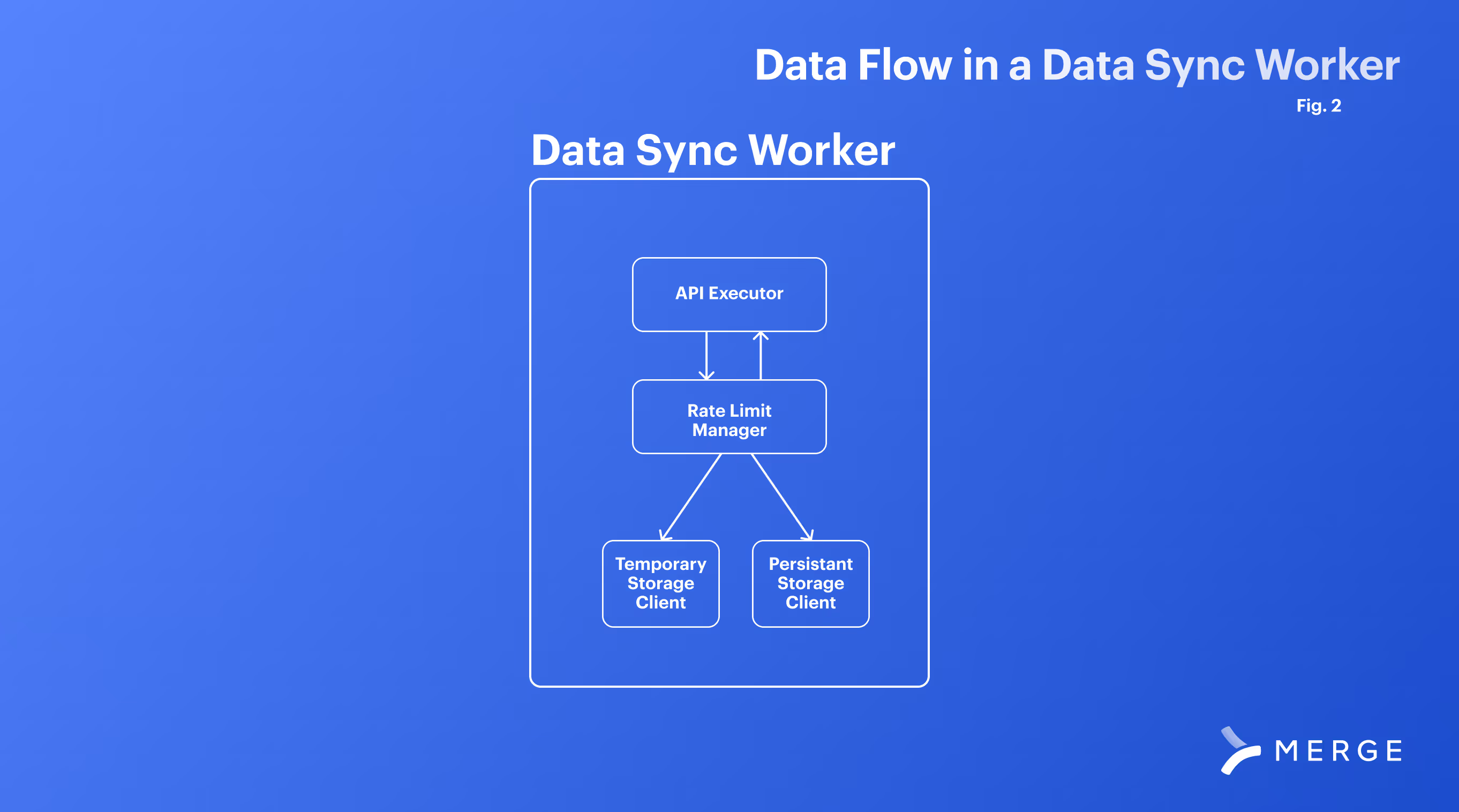
The fundamental unit of tracking rate limits is a “data sync worker” that manages syncing data for a given customer. As a component of this work, you should track where you are in relation to a given API’s rate limits through a “Rate Limit Manager”. The “Rate Limit Manager” can track the rate limit configuration of a given API as well as details on your customers’ specific rate limit.
You’ll also need to track the overall API requests by your system in a shared memory cache and be able to orchestrate these data sync workers as part of a distributed system.
Why are rate limits challenging for multiple API integrations?
Rate limits can be difficult to manage across multiple systems for a variety of reasons.
Varying rate limit policies across APIs
Different APIs often have their own unique rate limiting policies. These policies can vary in terms of request limits per time frame (like per second, minute, or day), the type of rate limiting algorithm used (such as leaky bucket or token bucket), and how they handle limit breaches. Implementing a system that can adapt to and manage these varying policies efficiently is complex, as it requires a deep understanding and dynamic handling of each API's specific rate limiting mechanism.
Scaling and synchronization challenges
When multiple APIs are integrated into a single system, especially in a distributed environment, ensuring that the rate limit tracking is accurate and up-to-date across all instances becomes a significant challenge. Synchronizing rate limit counters and managing concurrent requests across different servers or nodes to prevent rate limit breaches requires sophisticated coordination and real-time data sharing mechanisms, which can be difficult to implement effectively.
Handling dynamic and user-specific rate limits
Some APIs adjust their rate limits dynamically based on factors like server load or user-specific criteria (e.g., different limits for free versus premium users). This dynamism adds another layer of complexity, as the rate limiting system must be able to detect, interpret, and adjust to these changes in real-time. It should also be capable of handling rate limits on a per-user basis, which requires a more granular level of control and monitoring.
Defining a rate limit manager
The most basic function of a rate limit manager is the ability to programmatically define all the different rate limits you want to account for. It’s not uncommon for platforms to have more than one rate limit or even variations of different types. You’ll want to be able to define one or more rate limits per platform you’re integrating with.
We’ve also found that while the majority of rate limit tracking occurs at a platform-wide level, some APIs adjust rate limits for specific end-users. Therefore, our rate limit tracker stores two types of information: platform-specific details and end-user-specific details.
The definitions of platform-specific rate limit tracking we recommend using are:
- Rate Limit Type: The type of rate limit we’re defining
- Rate Limit Default Threshold: The default threshold of where to start slowing down requests or stopping them completely.
- Rate Limit Max Count: This is the number of “incidents” where rate-limiting starts should start kicking in. We say “incident” to accommodate the different rate limit types. For example, a request frequency rate limit of 10/s will have a max count value of 10.
- Rate Limit Time Period: The time range that the limit is defined over. Typically will be seconds, minutes, or days.
- Rate Limit Time Value: The amount of your time period that the expiration of a rate limit is set to. For example, a model count rate limit of 300 entities every 2 hours will have a time period of HOURS and a time value of 2. Using both period and value will let you configure pretty much any time range that will be defined for a rate limit
- Default Backoff Factor + Retry Count: Related to how to manage to lower your rate limit. We’ll discuss this in more detail in our “What To Do If a Rate Limit Threshold Has Been Reached” section.
Related: Everything you need to know about multiple API integration
Tracking end user-specific details
Rate limit configurations are great for defining what a rate limit looks like for an entire 3rd party API, and for the majority of APIs that you deal with this definition alone should suffice. But after working with so many different APIs and seeing many, many different rate limits Merge noticed a trending design choice: platforms will change the details of a rate limit for an end-user’s specific use of that API.
Two factors that influence this are:
- Changing the rate limit threshold based on customer pricing. For example, having a rate limit of 100 requests/second for enterprise users and 50/s of freemium customers
- A rolling rate limit that will adjust based on current server load (this limit is typically passed back via API response Headers)
Differences in rate limits per customer are often defined in either the docs of an API, or they’re returned via API headers so that a user can dynamically determine the rate limit they must abide by. In these cases, Merge tracks these details per end-user using the following definitions as a template of default values that are overridden when we start fetching data.
Our End-User Rate Limit Definition has the following attributes:
- Rate Limit Configuration: A reference back to the general definition of the rate limit (see above)
- End-User: A reference to the end-user the rate limit details
- Override Default Threshold: We thought it useful to also be able to throttle specific integrations per customer requests. Even if a rate limit is the same for all users, if one of our (or your) customers want to operate at a different threshold than the default, then we could easily configure that for them.
- Override Rate Limit Max Count: This covers our cases above where 3rd parties will change their rate limits depending on the customer. At Merge, this field can be either manually set or will dynamically populate itself if the rate limit offers details via headers.
Tracking API requests
Now let’s work through how you can best store information about how close you are to a given rate limit. You don’t want to call an API blind!
Regardless of whether you’re making API calls on a single server or a distributed system, the same general logic for choosing where to track a rate limit applies:
- Temporary storage is the quickest option to track how many calls have been made to a server. However, we lose this information if the process gets terminated (in error or the script finishes)
- Persistent storage with a database is slower. However, data is saved in case of interruption or sync completion and can be referenced later.
Which storage you use depends on the timeframe for the rate limit. For example:
- Integration with a Rate Limit of 10/s should use temporary storage. Why? Because of the faster expiration (seconds!), it would make sense to store this locally because of the speed at which your program can check it.
- Integration with a rate limit of 100 calls per day should use persistent storage. Why? The slower rate limit means that your process will need to know in hours, not seconds, whether it should try again. You don’t want to worry about losing this information, and you’re not calling this process many times a second — so store it in a persistent database.
The proper implementation of rate-limiting will utilize both methods. While performing syncs, it's likely best to use temporary storage while syncing along with periodic saves to persistent storage.
For robust applications, and to cover the 4 different types of rate limits, it is likely best to wrap all of your rate limit tracking into a manager. This manager can be accessed by your data engine and specifically called when your application:
- Makes an API Request
- Fetches a number of data elements via API
- Starts a new process or connection to a 3rd party
- Encounters a non-200 response from an API
Use this manager to implement your different storage access, and have a “check” method that will validate that you’re below thresholds before making an API call.

Related: How to manage API rate limits effectively
What to do when a rate limit threshold has been reached
Because of the nature of rate-limiting, the solution is only to wait until we are below the threshold. However, we do have agency over how long we wait until we are below the threshold.
Merge uses two main approaches when we approach a rate limit:
- Exponential backoff: Exponential backoff is a general technique of slowing down a constrained process until it reaches an appropriate speed. For us, we have our data sync sleep for a small period before re-checking temporary storage where we are within the rate limit. If we are still at the threshold, then we sleep again for an exponentially increased amount of time before another retry. At Merge, we tune backoffs specifically for each rate limit in the configuration mentioned above
- Save + Schedule: Sleeping a process is not always ideal in large applications because it wastes resources that could be used for other work. In the “save and schedule” method we commit our current rate limit status to persistent storage, log where we are in the data sync, and then schedule the task to pick up where it left off at a later time.
Which approach do I use when reaching rate limit thresholds?
The main factor in your decision is going to be the time frame of the limit. Sleeping a process is a waste of resources: if a rate limit is configured with a time period of several hours or a day, you’ll want to give those resources back to the machine and schedule a time later to try. But another consideration is that “starting from where I left off” will either not be possible for some 3rd Party APIs, or will be more computationally expensive than just sleeping for a few seconds and trying again.
Implementing rate limit tracking in a distributed system
When you’re making calls off of a simple application on your laptop or maybe even a single server, the two types of storage are pretty easy to work with:
- Store temporary information on rate limits in a local variable or globally defined hash set
- Store persistent data in a local DB or filesystem
For enterprise applications, you’ll likely have data syncs distributed amongst multiple servers or even entire clusters and data centers. Even for the same end-user, you could be running multiple syncs at once on different machines, but they all have to stay under one rate limit.
We want to keep the same 2-storage type approach, but change our technology implementation as follows:
- Store temporary information in a shared cache (Merge uses Redis, which has been extremely performant for us). This will give you fast read/write, but take special consideration of:
- Locking: You want rate limit tracking to be fast to avoid both unnecessarily slowing down of your data syncs, and also the slowing down of tracking itself. If tracking is out of step, then your current “rate limit status” will be out of date relative to the real 3rd party server.
- Race conditions that occur between multiple machines update the same rate limit status for the same user. At Merge, we use only increments and expirations when counting limits (queue + set methods).
- Store persistent information on your regular application database. While this data will be accessed far less frequently than the temporary storage, take special consideration not to “forget” about it and only use temporary storage. Make sure to have your data engine always check persistent storage for an active rate limit block before starting again because there is a chance your temporary storage has purged old data and you’re still under a rate limit threshold!
Using dynamic thresholds to manage rate limits
On top of this, one final feature that we’ve built on top of our tracking system is Dynamic Default Thresholds.
We previously mentioned that rate limit thresholds are dynamic in Merge because they can be changed per customer and end-user enabling granular control over how much work Merge does on behalf of our customers. The thresholds can also be configured to be even more dynamic by being adjusted based on anticipated data load.
One consideration for why you should care about rate limiting is because you are likely not the only user of an API. While we can set a threshold and track the work that we’re doing, there’s not a good way to know where we stand against a total rate limit — not including the headers or API endpoints that tell you your current rate limit count.
To compensate for this, we set relatively conservative thresholds for our rate limits. Of course, this lower threshold is going to slow down data syncs because the more we run into the threshold, the more often we will either have to back off or try again later.
What would an ideal solution to this be? If we could know beforehand how much data we’d need to fetch, then we can specifically tailor a threshold to:
- Perform the data sync our data-engine needs
- Leave room for other users of the same API
And? You guessed it — Merge has several techniques to estimate the amount of data we are about to start fetching and approximately how many requests it will take to do so. Before starting a sync we adjust the rate limit threshold (always respecting a customer-set limit) to either sync faster for higher data loads, or more conservatively for smaller ones.
Implementing this feature is difficult and likely the subject of a blog post in itself. After it's implemented, you just need to tune your rate limit management system for all of the different attributes listed above. Implementing such a system can be difficult, especially at scale, but is a vital part of any integration effort.
If you made it this far in the article then congrats! If you’re looking to implement such a system into your product, but either don’t have the time or resources to do so at scale, then consider Merge. We’ve already built out rate-limiting for our HRIS, payroll, ATS, CRM, ticketing, file storage, and Accounting systems, so schedule a demo.

David Donnelly





But Merge isn’t just a Unified
API product. Merge is an integration platform to also manage customer integrations. gradient text
But Merge isn’t just a Unified
API product. Merge is an integration platform to also manage customer integrations. gradient text
But Merge isn’t just a Unified
API product. Merge is an integration platform to also manage customer integrations. gradient text
But Merge isn’t just a Unified
API product. Merge is an integration platform to also manage customer integrations. gradient text