

Table of contents
Just for you
.avif)
How to run pipeline review with Claude and Merge

No items found.
By the time the pipeline review starts, three people have each built their own version of the numbers.
The first twenty minutes goes on reconciling them. Then someone asks why a deal has not moved in three weeks, and nobody in the room has listened to the last call. The meeting ends having established what changed, which was supposed to be the input.
Related: A RevOps guide to AI transformation
How it works
Merge Agent Handler sits between Claude and the APIs behind your CRM and your call recordings. Three commands:
pipx install merge-apimerge loginmerge setup claude-code
A Magic Link appears on the first tool call to authenticate each connector.
The reason this is worth connecting rather than exporting is cadence. A pipeline review happens every week, and anything that needs a person to pull two CSVs first will be skipped in the week it would have mattered most.
What you can connect
Agent Handler covers hundreds of connectors. A pipeline review needs three kinds of source:
- CRM: Salesforce or HubSpot, and Pipedrive, Attio, Dynamics 365 Sales, or Zoho CRM if that's where your deals live
- What was actually said: Gong, Fireflies, Granola, or Plaud
- Where the review lands: Slack before the meeting, Google Sheets for the working numbers, Looker, Metabase, or Hex for the version leadership sees
The CRM and the call tool together are what make this worth building. Either one alone reproduces a report you already have.
1. Give it your field names, not the standard ones
Your definition of a qualified opportunity is not the standard one. Nobody's is.
Write down the fields that actually define it at your company, custom ones included, and hand the agent that definition rather than letting it infer from field labels. A field called `Stage_Change_Discovery__c` means something specific in your org and nothing to an agent reading the schema cold. Twenty minutes once prevents every wrong number afterwards.
Write the definition down once: which stages count as pipeline, which record types are in scope,
what closed-lost actually means at your company, and which custom fields carry the real state.
A field named `Stage_Change_Discovery__c` means something precise in your org and nothing at all to an agent reading the schema cold. Twenty minutes on this prevents every wrong number afterwards. Skip it and the agent will produce a confident report against the wrong denominator, which is worse than no report.
Related: How to connect Salesforce MCP with Claude Code (5 steps)
2. Pull the movement, not the snapshot
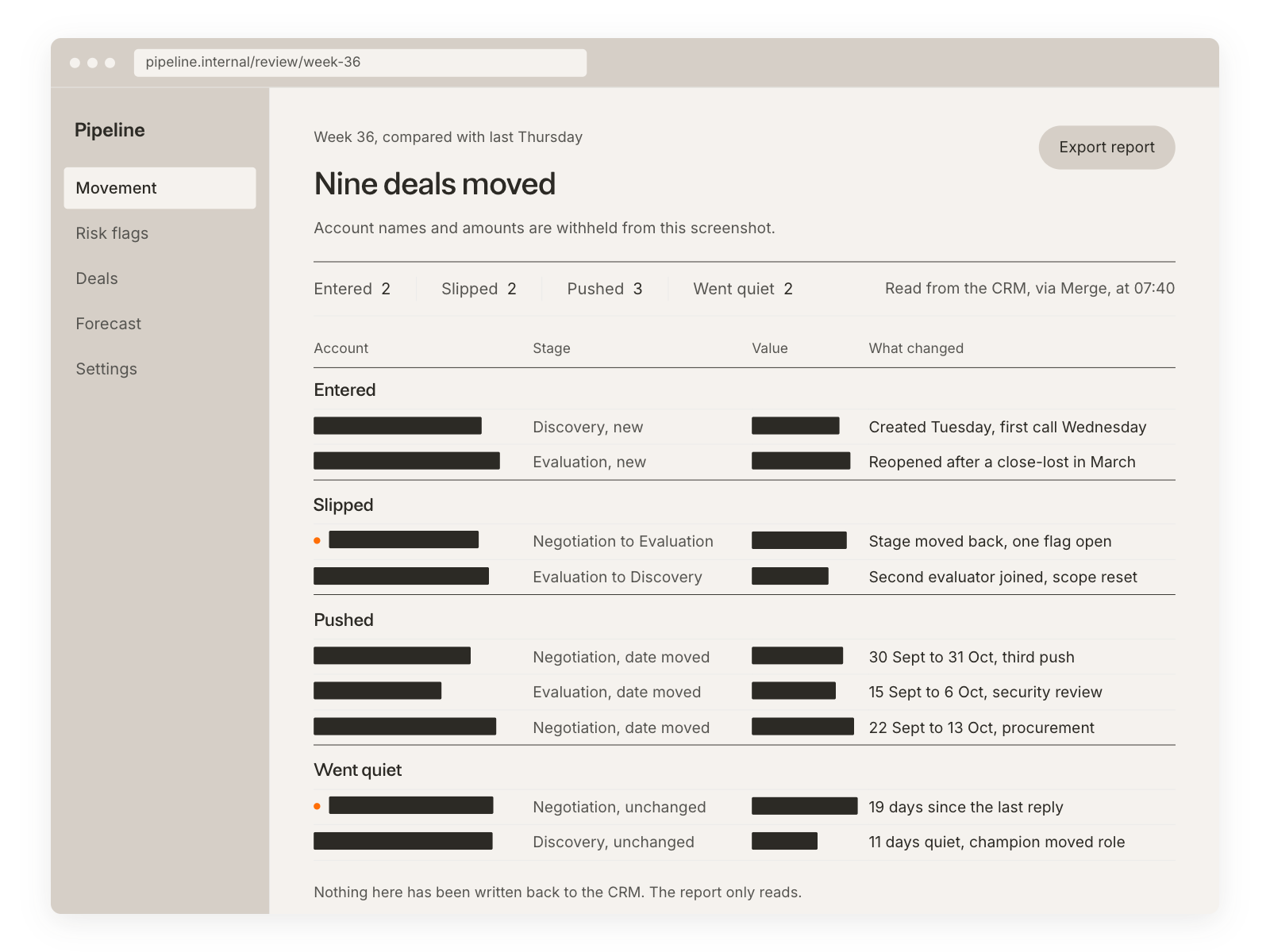
A snapshot says the pipeline is $4.2M. Movement says which deals entered, which slipped a stage, which pushed a close date, and which went quiet.
Report the week's changes first and the totals second. Stage history is where the story is, and it's the part a person rebuilding a deck by hand always skips, because assembling it manually is tedious enough to feel optional.
Five categories cover most of what a review needs: entered, advanced, slipped a stage, pushed a close date, and went quiet. Ask for counts and named deals for each, not a total. Totals hide the story. Pipeline flat at $4.2M can mean nothing happened, or it can mean four deals advanced while four others pushed a quarter, which is the same number and a completely different week.
3. Layer call evidence onto the stalled deals
For any deal that hasn't moved, the agent pulls the last call and finds what was said.
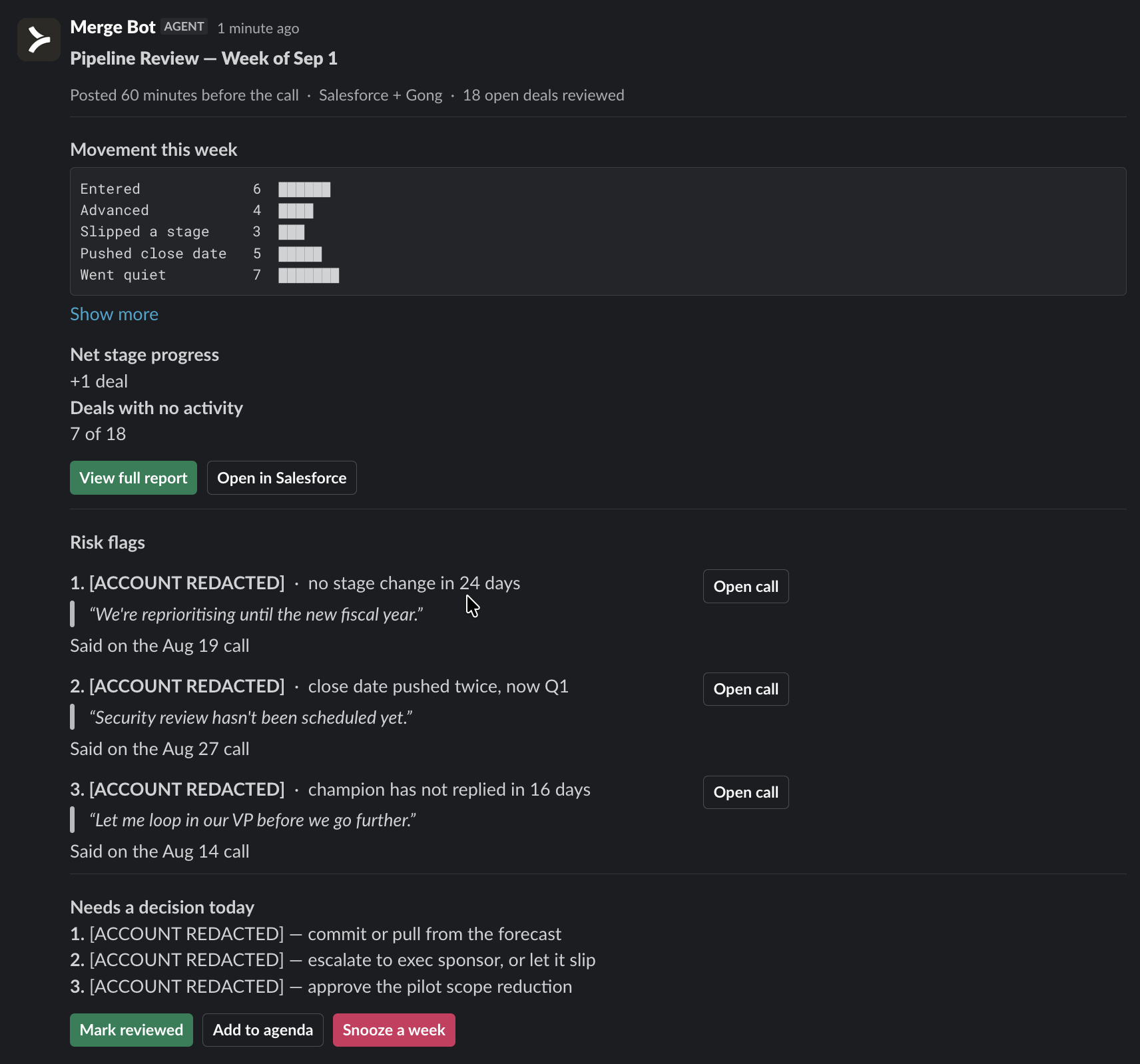
This is where the workflow earns its place. A deal with no stage change for three weeks is a data point. A deal with no stage change for three weeks where the buyer said "we're reprioritising until the new fiscal year" is a decision waiting to be made. Have the agent quote the line and link the call, so the rep can confirm or correct it in ten seconds rather than defending a number.
4. Post the review before the meeting
The agent posts an hour ahead: movement, the risk flags with their evidence, and the three deals that need a decision today.
Posting afterwards produces a record. Posting beforehand changes the meeting, because everyone arrives having read the same version of what changed. That single scheduling choice is most of the value. An hour ahead is the right window. Long enough that people read it, short enough that it is still current.
The change this produces is not the report itself. It is that the meeting starts at the decisions instead of arriving at them, because everyone has already read the same version of what happened.
5. Keep it read-only on the CRM
The agent never changes a stage, edits an amount, or moves a close date.
Forecast fields are the most politically loaded data in the company. An agent that adjusts one has broken something that takes months to rebuild, and the first person to notice will be the rep whose number changed without them. If a field looks wrong, the agent flags it and a person fixes it.
Forecast fields are the most politically loaded data in the company. An agent that adjusts one breaks something that takes months to rebuild, and the first person to notice is the rep whose number moved without them. If a field looks wrong, the agent flags it and a person fixes it. That is slower by a minute and saves an argument you cannot win.
Where the human still owns the call
The agent can tell you a deal went quiet and quote the reason given. It cannot tell you whether the champion will actually get budget, because that lives in a relationship rather than in a record.
So the output is evidence, ordered by how much it matters, with the reasoning visible. The judgment stays with the person who has been on the calls.
The agent can tell you a deal went quiet and quote the reason given on the last call. It cannot tell you whether the champion will actually get budget, whether the silence is a procurement queue or a lost deal nobody has admitted yet, or whether the person who said "reprioritising" was speaking for themselves or relaying someone else.
So the output is evidence, ordered by how much it matters, with the reasoning visible. The judgment stays with the person who has been on the calls.
Pipeline review agent FAQ
What can you do once your CRM and call recordings are connected to Claude Code?
Claude can report the week's stage movement using your own field definitions, find the deals that have gone quiet, pull the last call on each one and quote what the buyer actually said, and post the whole review to Slack before the meeting rather than minuting it afterwards.
What that removes is the two hours of assembly, and the first twenty minutes of the meeting.
Can I use Merge Agent Handler with my employees?
Yes. Merge for Workforce helps companies provision, secure, and govern how employees connect AI to systems like a CRM and a call archive, which between them hold most of what your customers have told you.
It routes each request to a model that fits the task, which Merge measured at up to half the token bill.
Related: Instantly cut token spend in half: introducing Merge for Workforce IT provisions access through SCIM with Okta or Microsoft Entra ID, and user-level audit logging covers every call, so security can review which opportunity records an agent read, under which identity, and when.
No items found.





But Merge isn’t just a Unified
API product. Merge is an integration platform to also manage customer integrations. gradient text
But Merge isn’t just a Unified
API product. Merge is an integration platform to also manage customer integrations. gradient text
But Merge isn’t just a Unified
API product. Merge is an integration platform to also manage customer integrations. gradient text
But Merge isn’t just a Unified
API product. Merge is an integration platform to also manage customer integrations. gradient text