

Table of contents
.avif)
How to build an AI SDR agent with Claude and Merge


Tim Bourcier
A rep can research a lead properly, or they can send forty emails this week. Most weeks the calendar picks, and it picks the forty.
Twenty minutes per lead is the honest number for doing it well: find the person, check whether anyone here has spoken to them, work out which of three enrichment tools has the headcount right, and find the thing they shipped that's worth mentioning. Almost all of that is retrieval, and retrieval is the part a rep should not be doing.
Related: Sales intelligence MCP servers: overview, examples, and use cases
How it works
Merge Agent Handler sits between Claude and the APIs behind your enrichment tools, your CRM, and your sequencer. Three commands:
pipx install merge-apimerge loginmerge setup claude-code
A Magic Link appears on the first tool call to authenticate each connector. That matters more here than in most workflows, because an SDR stack is where credential sprawl gets worst: four enrichment vendors, a CRM, a sequencer, and a calendar, each with its own key and its own renewal date.
What you can connect
Agent Handler covers hundreds of connectors. An outbound agent draws on four groups:
- Enrichment: Apollo, Clay, ZoomInfo, Crustdata
- Public signal: LinkedIn for role and recent posts, Exa and Firecrawl for funding, launches, and job postings
- CRM: Salesforce, HubSpot, Pipedrive, Attio, Dynamics 365 Sales, or Zoho CRM
- Touch and follow-up: Gmail or Outlook, Calendly for booking, Apollo or ActiveCampaign for the sequence, and Gong or Fireflies to check what was said last time you spoke
Split the work across three agents rather than one. Two read. One writes. That split does more for your data quality than any instruction you can write.
1. Build one profile from every source
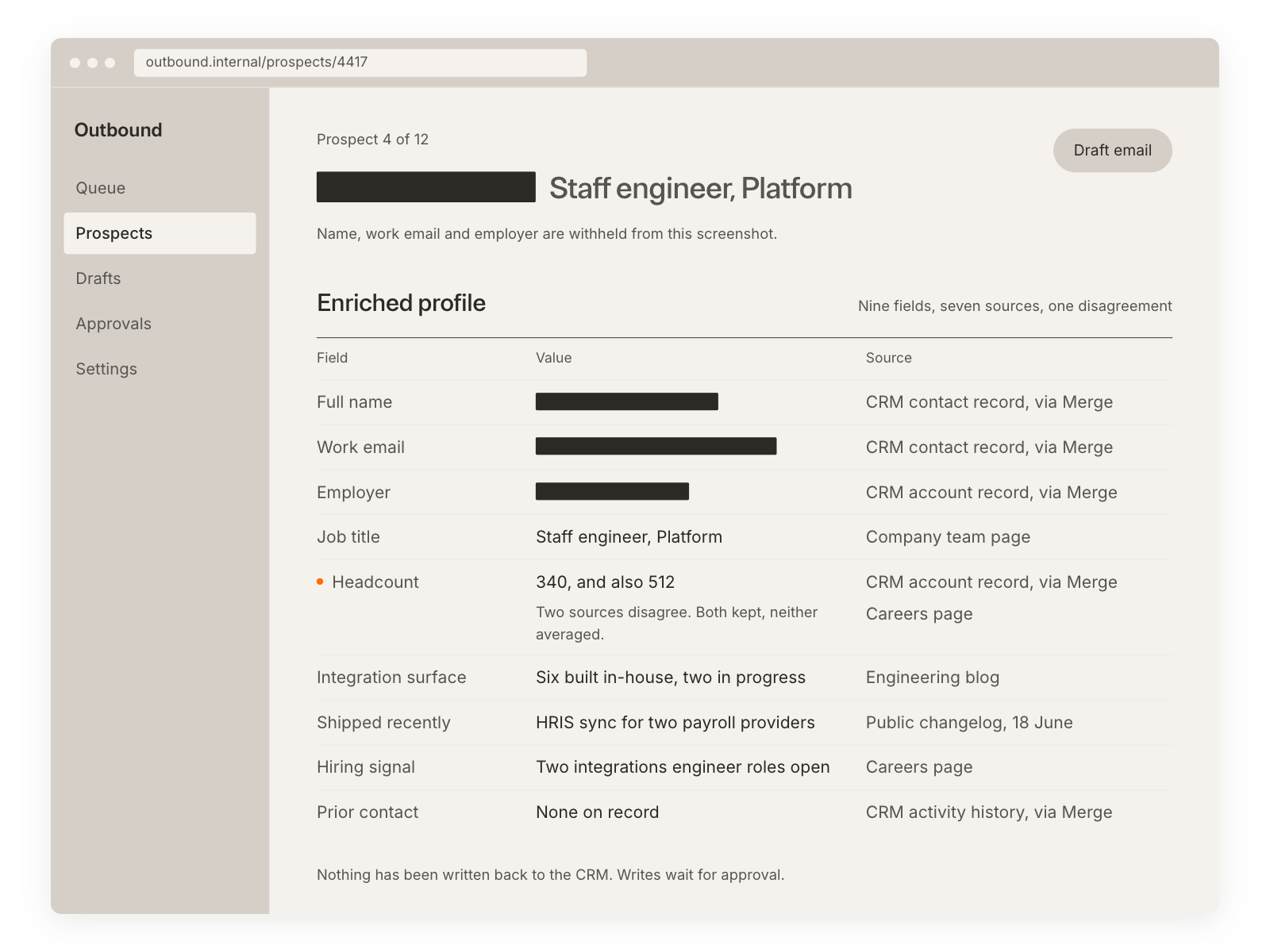
Give the researcher every enrichment source you pay for, then two rules that matter more than the tool list.
Label every field with its source. Headcount from ZoomInfo and headcount from Apollo disagree more often than they agree. Show both numbers rather than averaging them, and let the rep decide which to trust on the call. Averaging two guesses produces a third guess that looks like a fact.
Stop at the first confident match. Fanning out to four vendors for one lead burns credits and returns four versions of the same person. Order the sources by how much you trust them, take the first good answer, move on.
Unknown stays unknown. An invented job title costs you the meeting, and you find out about it live.
2. Keep the researcher read-only
This agent reads your CRM. It does not write to it.
Enforce that at the credential, not in the prompt. In Salesforce that means a profile with Read on Lead, Contact, Account and Opportunity and no Edit; in HubSpot, a private app with `crm.objects.contacts.read` and no write scope. Prompts express intent. Credentials express policy, and only one of the two survives a model that decides it is being helpful.
The failure this prevents is quiet rather than dramatic. A research agent with write access eventually updates a title, an employee count, or a lifecycle stage because a source it trusts disagrees with the record. Nobody notices for three weeks, and then a rep is arguing with a field nobody meant to change and cannot explain who changed it. Read-only means the worst case is a wrong sentence in a profile you are about to read, not a wrong value in the system the whole team runs on.
Related: How to connect Salesforce MCP with Claude Code (5 steps)
3. End the profile with a fit read
Every profile closes with a call: does this lead match, and why.
Two or three sentences, each pointing at a fact already in the profile above it. Something like: "Series B, 180 people, hiring three backend engineers with 'integrations' in the job description. They ship a public API and their changelog shows two connector launches this quarter. That is the shape of a team about to feel integration maintenance, so the pitch is engineering time, not coverage."
No score out of ten. A number invites the reader to skip the reasoning that produced it, and the reasoning is the only part worth having. It also creates false precision: an 8 and a 6 look meaningfully different when the underlying difference is one hiring signal. When the agent cannot ground the read in what it pulled, the honest output is "not enough signal."
That is a useful answer, because it tells the rep to spend their twenty minutes somewhere else rather than on a lead the data cannot support.
4. Draft the outreach, and let the rep send it
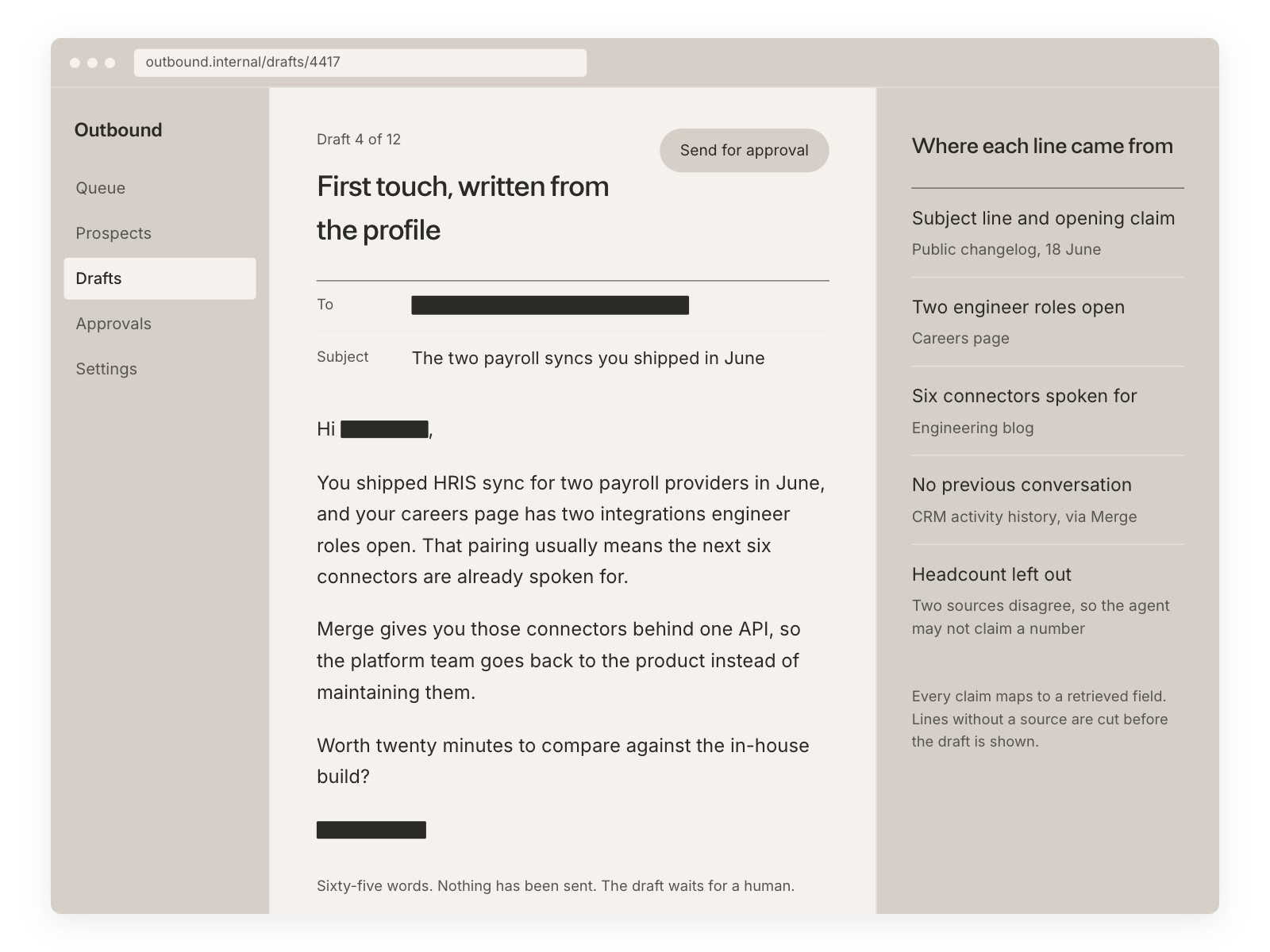
Under 100 words, in four moves: name the specific thing the person made, say who you are, say why you are writing to them rather than to anyone, and ask for one clear thing.
The first move is the one that carries the email, and it has to survive a specificity test. "Loved your post on integrations" could go to four thousand people. "Your writeup on the OAuth refresh bug you hit building the Notion connector" could go to one. If the opening line would still make sense with a different name at the top, it is not doing any work, and the agent should be told to rewrite it rather than soften it.
Cut every compliment that could apply to anyone. Readers spot that sentence faster than they spot a typo, and once they have spotted it the rest of the email is read as a template. The agent drafts, the rep sends. Write that twice in the instructions, because draft and send are adjacent calls in every email API, and adjacency is where agents drift.
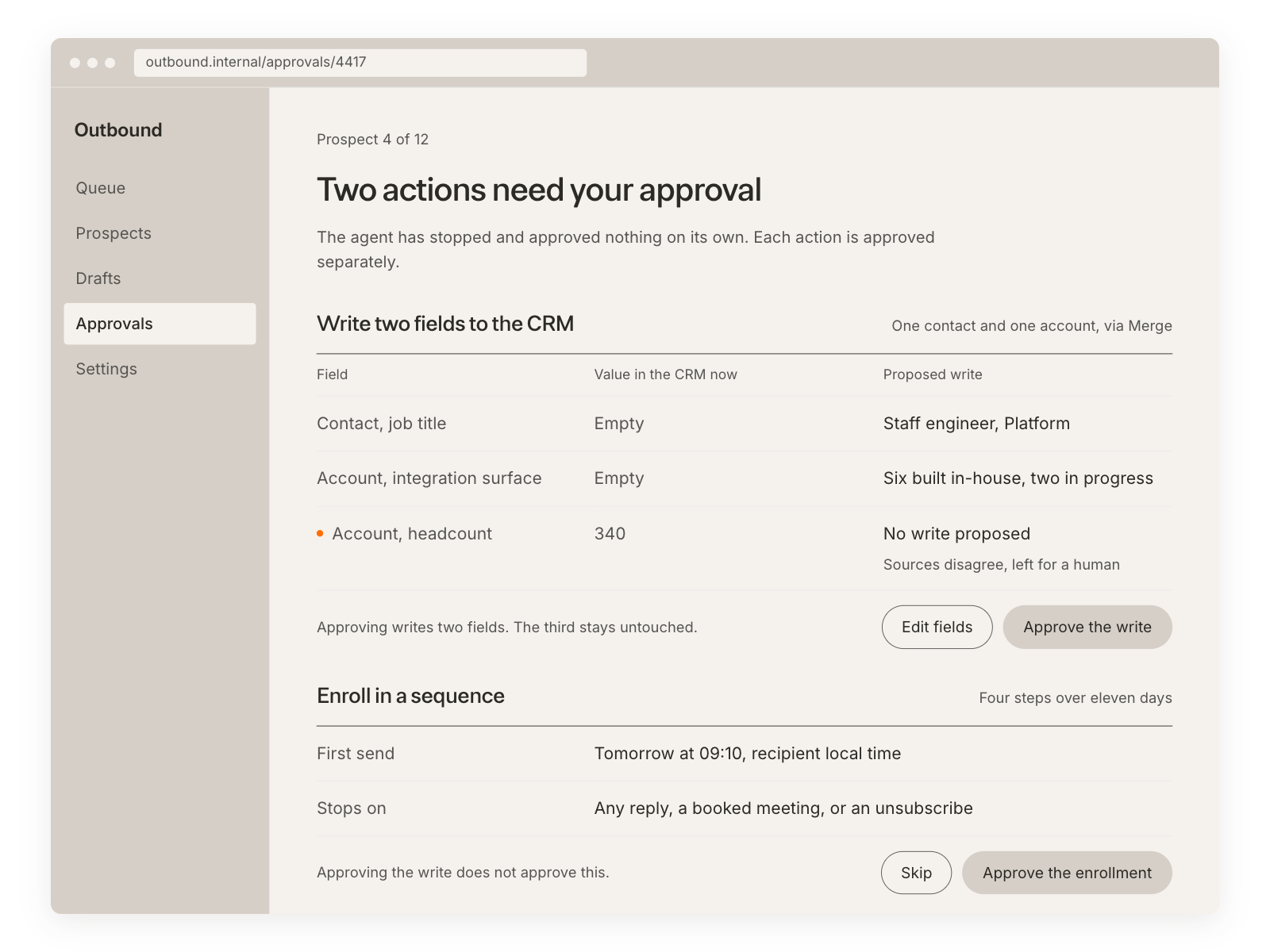
5. Put the CRM write and the enrollment behind approval
One agent gets write access, and it does two things: update the CRM record with what research found, and enroll the contact in a sequence. Decide up front which fields it may touch. Enrichment fields, yes: employee count, industry, technologies, the research summary. Anything a human owns, no: lifecycle stage, owner, next step, close date. That list is short and worth writing down, because the difference between a useful write-back and a support ticket is whether the agent edited a field somebody reports on.
Both actions need an explicit approval, per contact, in the same session. Not a standing rule, not a batch confirmation across forty leads. Batch approval is how the wrong list gets enrolled: the rep is approving the idea of enrolling, not these specific forty people, and the failure is visible to your prospects before it is visible to you. One contact, one confirmation, and the agent reports back what it wrote so the rep can see it landed where they expected.
What this actually saves
The rep still reads the profile, still decides, still owns what goes out. What disappears is the retrieval. Say a rep works forty leads a week at twenty minutes each: that is thirteen hours. Roughly fifteen of those twenty minutes are lookup, cross-checking, and copy-paste, which leaves about three hours of actual judgment. The agent does not make anyone faster at judgment. It removes the ten hours around it, and hands over forty profiles with a fit read and a draft attached.
The honest limit: this only pays off if the profiles are good enough that the rep stops double-checking them. That is why the source labels and the "not enough signal" answer matter more than they look. An agent whose output you verify from scratch has moved the work, not removed it.
Related: How to build marketing agents with Claude and Merge
AI SDR agent FAQ
What can you do once your SDR stack is connected to Claude Code?
Claude can build one profile from several enrichment sources with the origin printed next to each field, check whether the lead already exists in your CRM and who owns it, pull recent public signal on the company, draft a short first email that names real work, and then, on approval, write the research back and enroll the contact.
The part it removes is not the thinking. It's the four tabs, the duplicate lookups, and the copy-paste.
Can I use Merge Agent Handler with my employees?
Yes. Merge for Workforce helps companies provision, secure, and govern how employees connect AI to systems like a CRM holding every customer record you have.
It routes each request to a model that fits the task, which Merge measured at up to half the token bill.
Related: Instantly cut token spend in half: introducing Merge for Workforce IT provisions access through SCIM with Okta or Microsoft Entra ID, DLP scanning runs on every tool call, and each call is logged against an employee identity, so security can answer which records an agent read or changed and when.
Tim Bourcier





But Merge isn’t just a Unified
API product. Merge is an integration platform to also manage customer integrations. gradient text
But Merge isn’t just a Unified
API product. Merge is an integration platform to also manage customer integrations. gradient text
But Merge isn’t just a Unified
API product. Merge is an integration platform to also manage customer integrations. gradient text
But Merge isn’t just a Unified
API product. Merge is an integration platform to also manage customer integrations. gradient text