



How to connect a GitLab MCP with Claude Code (4 steps)



Jon Gitlin
Developers building AI agents or automations that need to read repository state, triage issues, or surface pipeline failures in GitLab have to manage personal access tokens, handle GitLab's project namespace model, and wire up webhooks before a single tool call can be made.
To help your developers read code, manage issues, query CI/CD statuses and more directly from the terminal, we'll show you how to connect GitLab with Merge Agent Handler's GitLab MCP server.
How it works
Merge Agent Handler connects Claude Code to the GitLab API through a single CLI setup.
You install the Merge CLI, authenticate once with your Merge Agent Handler account, and register the connection with one command.
Merge handles GitLab OAuth credentials and token rotation on your behalf, so you never store a personal access token locally or rotate credentials when they expire.
Here's the command that registers the connection:
Related: The steps for connecting a GitLab MCP with Codex
Prerequisites
Before getting started, you'll need the following:
- A Merge Agent Handler account
- Claude Code installed (run
claude --versionto confirm) - pipx installed (run
pipx --versionto confirm, or install viapip install pipx) - A GitLab account with access to the projects you want to connect (GitLab.com or self-managed)
If you want to connect Merge Agent Handler's GitLab MCP with internal or customer-facing agentic products, you can follow the steps in our docs.
1. Install the Merge CLI
Install with pipx: pipx install merge-api

Then verify: merge --version
Related: How to use a Gitlab MCP in Cursor
2. Configure the CLI and log in
Run merge login to authenticate your session and link the CLI to your Merge Agent Handler account: merge login
This authenticates your session so the CLI can make authorized requests on your behalf.
3. Add Agent Handler to Claude Code
To add Agent Handler to Claude Code, run:
Or register manually with:
Open Claude Code and run: /mcp
agent-handler should appear under Local MCPs with a connected status.

Related: How to use the GitHub MCP in Claude Code
4. Authenticate GitLab
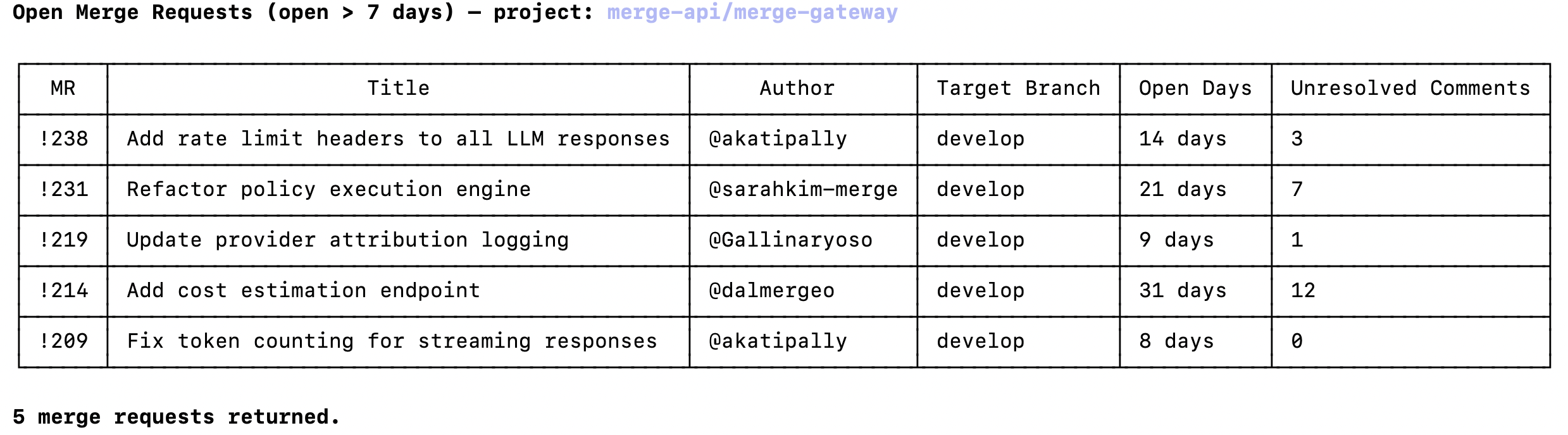
Open a Claude Code session and test it with: "List all open merge requests in my GitLab project that have been open for more than 7 days, including the author, target branch, and number of unresolved comments."
The first time you use a GitLab tool, a Magic Link will appear to authenticate the connector.

Once authenticated, you'll see an output like the following:
{{this-blog-only-cta}}
GitLab MCP FAQ
In case you have more questions on setting up and using the GitLab MCP in Claude Code, we've addressed several more commonly-asked questions below.
What can you do once the GitLab MCP is connected to Claude Code?
With GitLab connected, Claude Code can:
- Read repository files: retrieve file contents from any branch or commit in a connected project, useful for agents that need to inspect config files, changelogs, or source code before taking action
- List and filter issues: query open, closed, or labeled issues across a project or group, and create new ones when triggered by an external event
- Manage merge requests: list open MRs, read their diffs and comments, and check approval status, useful for triage agents that surface stale or blocked reviews
- Query CI/CD pipelines: retrieve the status of recent pipeline runs and individual job logs so agents can detect failures and route alerts to the right team
- Search code: run keyword searches across repository contents to locate where a function, config value, or error string appears in the codebase
- Read project metadata: retrieve project details, members, labels, and milestones to build context for planning or delivery reporting agents
Why use Merge Agent Handler vs. a self-hosted GitLab MCP server?
You can build a self-hosted MCP server on top of GitLab's REST or GraphQL API. For a developer with a single project and a personal access token, the setup is manageable. GitLab's API is well-documented, and scoping a token to specific permissions is straightforward at the individual level.
The problem is credential management at team scale.
GitLab personal access tokens are tied to individual accounts, carry expiration dates, and hold whatever permissions the owner's account has. A self-hosted MCP server that uses a shared service account token has broad access across your organization's projects with no per-agent controls and no central audit trail of what an agent read or modified.
GitLab does offer an official MCP server through GitLab Duo, but it requires an active GitLab Duo subscription per user. Teams that aren't already paying for Duo, or that want to expose GitLab data to agents outside GitLab's own tooling ecosystem, have to provision licenses before they can use it.
Merge Agent Handler handles GitLab authentication without tying it to individual user tokens, and adds tool-level scoping on top.
An agent that monitors CI/CD failures, for example, can use tools like pipelines_list and jobs_get_log. But the agent may be blocked from reaching repository_delete_file or merge_requests_merge unless those tools are explicitly included. Every tool call also is logged with the timestamp, tool name, and inputs.
Why connect GitLab to Claude Code?
GitLab contains the full operational record of an engineering team's work: code, issues, review history, and pipeline results. Developers who need to build on that data—to automate triage, surface delivery risks, or pull context into an AI-assisted workflow—currently have to retrieve it manually or write and maintain a dedicated API integration.
With the GitLab MCP connected, Claude Code can query repositories, surface open issues, and read pipeline results without leaving the terminal.
This matters most when GitLab state needs to feed a decision or trigger a downstream action: identifying which MR introduced a failing test, pulling the issue description for a ticket before starting work on a fix, or generating a weekly delivery summary from recently closed issues.
Jon Gitlin
.png)

.png)

Connect Claude Code to thousands of tools with Merge Agent Handler
Use Merge Agent Handler’s 150+ connectors (including GitLab) to power reliable, secure, and powerful agents.


But Merge isn’t just a Unified
API product. Merge is an integration platform to also manage customer integrations. gradient text
But Merge isn’t just a Unified
API product. Merge is an integration platform to also manage customer integrations. gradient text
But Merge isn’t just a Unified
API product. Merge is an integration platform to also manage customer integrations. gradient text
But Merge isn’t just a Unified
API product. Merge is an integration platform to also manage customer integrations. gradient text