

Table of contents
.png)
.png)
How to connect a ServiceNow MCP with Codex (4 steps)



Jon Gitlin
When developers create a Codex task to automate an operational process, they describe that process from memory. But the actual procedure—the runbook, the change plan, the resolution steps, etc.—lives in ServiceNow, not in what the developer wrote.
Codex generates code against the developer's summary, which means it misses the specific steps, edge cases, and conditional logic that the original record actually contains.
Connecting ServiceNow gives Codex direct access to the source. When a task requires a runbook before generating automation code, or a change request's implementation plan before scaffolding the corresponding script, Codex reads the record itself rather than whatever the developer remembered about it.
To give Codex direct access to ServiceNow as it works through your coding tasks, we'll show you how to connect ServiceNow with Merge Agent Handler's ServiceNow MCP server.
How it works
Merge Agent Handler connects Codex to the ServiceNow API through the Merge CLI. You install the CLI, authenticate once, and run a single setup command from your project root.
That command writes a Merge CLI section to your project's AGENTS.md file, which tells Codex when to call merge search-tools and merge execute-tool to reach ServiceNow.
Once connected, Merge handles credential storage and token rotation on your behalf, so you never embed ServiceNow credentials in your repo or manage them per developer.
Related: How to use the ServiceNow MCP in Claude Code
Prerequisites
Before getting started, you'll need the following:
- A Merge Agent Handler account
- Codex access (available via the OpenAI platform)
- pipx installed (run
pipx --versionto confirm, or install viapip install pipx) - A ServiceNow instance with the records you want Codex to read (incidents, change requests, knowledge base articles, CMDB items, or problem records)
If you want to connect Merge Agent Handler's ServiceNow MCP with internal or customer-facing agentic products, you can follow the steps in our docs.
1. Install the Merge CLI
Run the following to install the Merge CLI: pipx install merge-api
Verify your installation: merge --version
2. Log in to Merge
Authenticate the CLI with your Merge Agent Handler account: merge login
This links the CLI to your Merge account and stores your session credentials locally.
3. Add Agent Handler to Codex
From the root of the project where you want Codex to have access to ServiceNow, run:
This writes a Merge CLI section to your project's AGENTS.md file so Codex knows to use the CLI when a task requires ServiceNow data. The command is idempotent — safe to re-run if you need to reset the configuration.
Commit the updated AGENTS.md so the configuration travels with the repo.
Related: A guide to integrating the ServiceNow MCP with Cursor
4. Authenticate ServiceNow
Create a Codex task that requires live ServiceNow data.
This can be something like: "Read the runbook for the database failover procedure from ServiceNow's knowledge base and generate a Python automation script that executes each step in sequence, with error handling for each stage."
The first time Codex invokes a ServiceNow tool, a Magic Link will appear to complete connector authentication.
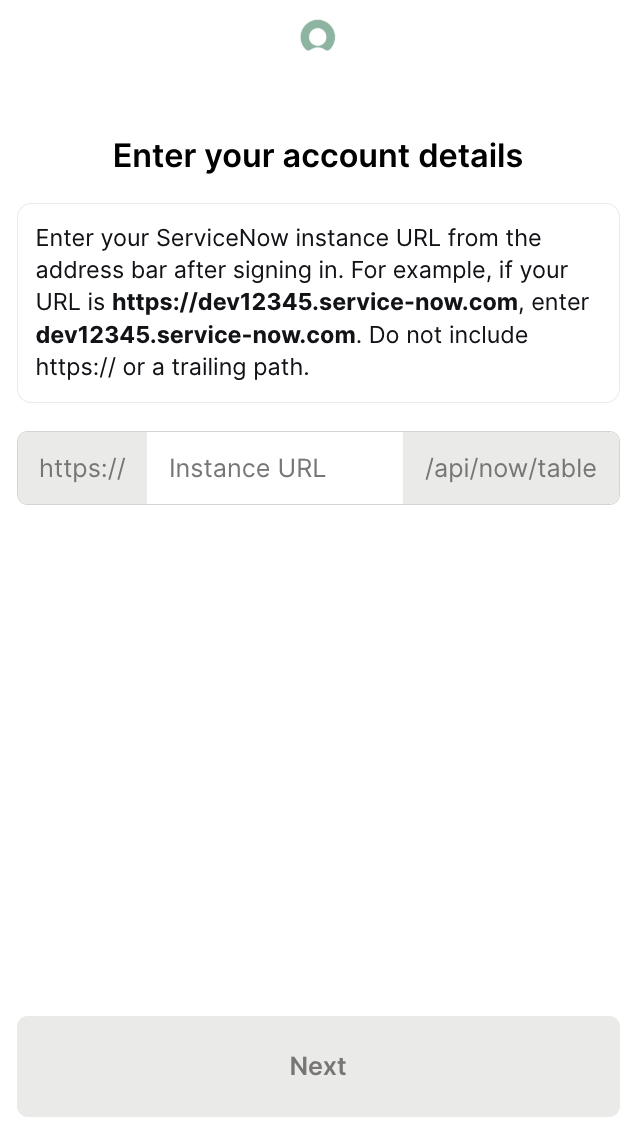
Once authenticated, Codex has access to your ServiceNow instance through Merge for all subsequent tasks in this project.
{{this-blog-only-cta}}
ServiceNow MCP FAQ
In case you have more questions on setting up and using the ServiceNow MCP with Codex, we've addressed several more commonly-asked questions below.
What can you do once the ServiceNow MCP is connected to Codex?
With ServiceNow connected, Codex can:
- Read a runbook before generating automation code: pull the actual procedure from a knowledge base article so the generated script reflects the real steps, conditional logic, and edge cases the runbook documents — not a developer's recollection of them
- Pull an incident's resolution steps before generating a post-incident review document: retrieve the resolution notes from a closed incident record and produce a structured post-mortem that references what actually happened, not a templated placeholder
- Read a change request's implementation plan before generating the corresponding automation script: pull the specific implementation steps, rollback criteria, and timing windows from the change record and use them to scaffold an automation that matches the approved plan exactly
- Check a problem record's details before generating a root cause analysis template: read the problem record's symptoms, affected systems, and workaround notes from ServiceNow and produce a root cause analysis scaffold grounded in the actual record data
- Read a CMDB configuration item's dependency map before generating infrastructure-as-code: pull the CI's upstream and downstream relationships from ServiceNow and use them to generate Terraform or Ansible code that reflects the real dependency graph, not an assumed one
Why use Merge Agent Handler vs. a self-hosted ServiceNow MCP server?
You can set up a ServiceNow MCP server yourself. That means configuring OAuth or basic auth against your ServiceNow instance, standing up an MCP process, and pointing Codex at it.
Where that breaks down is when the team grows. Each developer needs their own auth setup, or you share a service account with credentials that can't be attributed to a specific user and are painful to rotate.
There's also no per-user access control in a self-hosted setup. If the service account can read a change request, every Codex task using that integration can read any change request.
Merge Agent Handler handles credential storage and rotation for you, enforces per-user scoping so each developer authenticates with their own identity, and logs every tool call with full attribution.
For teams running Codex against production operational data, knowing which task reads which record and when is a meaningful audit capability to have.
Why connect ServiceNow to Codex?
ServiceNow holds the operational knowledge that should inform automation code: runbooks, change implementation plans, incident resolution steps, problem analyses, and CMDB dependency data. Codex doesn't have access to any of that unless a developer copies it into the task description first.
That copy step degrades the source material. Developers paraphrase steps, leave out conditionals, and forget edge cases. Codex generates code that's structurally close but wrong in the specifics that determine whether the automation actually works in production.
Connecting ServiceNow gives Codex the ability to pull the source records directly. A task to automate a failover procedure reads the actual runbook. A task to generate a post-incident review reads the actual resolution notes, and so on. This means the output reflects what the records say, not what the developer remembered about them.
Can I use Merge's ServiceNow MCP with my employees?
Yes, Merge for Workforce is built to help engineering organizations provision, secure, and govern how employees connect AI tools like Codex to operational systems like ServiceNow.
Common patterns include:
- Provisioning and access control via SCIM with identity providers like Okta and Microsoft Entra ID, so IT can manage which employees can read or act on ServiceNow records by role or team
- DLP and policy enforcement on tool calls, so admins can restrict which tables, record types, or fields a Codex task can reach before results enter the agent's context
- User-level audit logging so security and IT teams can review which records were accessed, which knowledge base articles were read, and which CMDB items were queried, by which employee identity, and when
In practice, employees can use the ServiceNow MCP to generate automation from runbooks, scaffold scripts from change plans, and build tooling grounded in live CMDB data, while IT keeps centralized control over which record types and tables each developer's agent can reach.
Jon Gitlin




Connect Codex to thousands of tools with Merge Agent Handler
Use Merge Agent Handler’s 150+ connectors (including ServiceNow) to power reliable, secure, and powerful agents.


But Merge isn’t just a Unified
API product. Merge is an integration platform to also manage customer integrations. gradient text
But Merge isn’t just a Unified
API product. Merge is an integration platform to also manage customer integrations. gradient text
But Merge isn’t just a Unified
API product. Merge is an integration platform to also manage customer integrations. gradient text
But Merge isn’t just a Unified
API product. Merge is an integration platform to also manage customer integrations. gradient text