



Workflow Automation vs. Unified API: What's best for your integrations strategy?



Jon Gitlin
Product integrations are complex, generally suck and… are completely necessary for your business. Until the past 5 years, however, your only option was to build each and every product integration yourself. But now there are many tools - including unified APIs and workflow automation platforms - that can help with the work of integrations.
That said — which tool is best for you? How do you handle all of the SaaS integrations your customers are asking for?
In this article, we’ll break down the three types of product integrations and help you determine which method best suits each approach.
Three Types of Product Integrations
Not all product integrations have the same requirements, so first let’s understand your integration scope.
Two key dimensions to understand about any integration project are what you’re integrating with and how many integrations you’ll need to maintain over time.
These considerations funnel into three types of use cases for integrations: internal integrations, one-off customer-facing integrations, and standardized customer-facing integrations.
Let’s walk through what each of these three use cases means.
Internal integrations:
Example: I want to connect my product to my company’s Salesforce CRM to update customer information.
Internal integrations are between your product and an internal system or one of your vendor’s systems. These integrations are sometimes built by a company’s software development team, but also may be implemented by other functions such as data analytics, revops, or operations teams. These integrations are highly specific to your company’s internal requirements.
One-off customer-facing integrations:
Example: I want to offer one of my customers the ability to connect their Salesforce CRM to our product for their specific, unique needs.
Bespoke integrations are often built and maintained by customers, an external systems integrator, or a vendor’s professional services and support team. Integrations are highly tailored to specific systems, data structures, and workflows determined by the customer.
These types of integrations are exceedingly rare and, in most cases, can almost always be standardized.
Standardized customer-facing integrations:
Example: I want to offer all of my customers the ability to connect their CRM of choice (Salesforce, Hubspot, Pipedrive, etc.) to access all of their customer information in my product.
Standardized integrations are built and maintained by your engineering team as part of your core product. They’re offered as part of a subscription or for an additional fee. Vendors often invest to standardize their most important or well used integrations so that they are easier to support and provide a superior end user experience.
Related: Unified API versus embedded iPaaS solutions
Approaches to Integrations: Unified API, Workflow Automation, and Do-It-Yourself
With so many different integration to support, multiple types of products have also emerged to support the API integration ecosystem. In addition to building integrations yourself, there are two primary types of product available: Unified APIs and Workflow Automation.
Unified API
In the past few years, Unified API platforms have emerged that make it easy to build integrations with entire categories of products. Unified APIs create a single, standardized interface that normalizes data into a common model for any category: from HR and payroll, ATS and recruiting, accounting, ticketing, or CRM.
The primary use case of Unified APIs is to integrate with many products of a similar type in a consistent and easy-to-maintain manner. Unified APIs include Plaid, Merge, Alpaca, and Kloudless.
Workflow Automation
Workflow automation tools, sometimes known as integration platform-as-a-service (iPaaS), have been around for a while (think Mulesoft and Boomi). The most recent tools (Workato, Zapier, Tray) blend a heavy mix of low-code workflow builders that are accessible to a broader range of developers and end users.
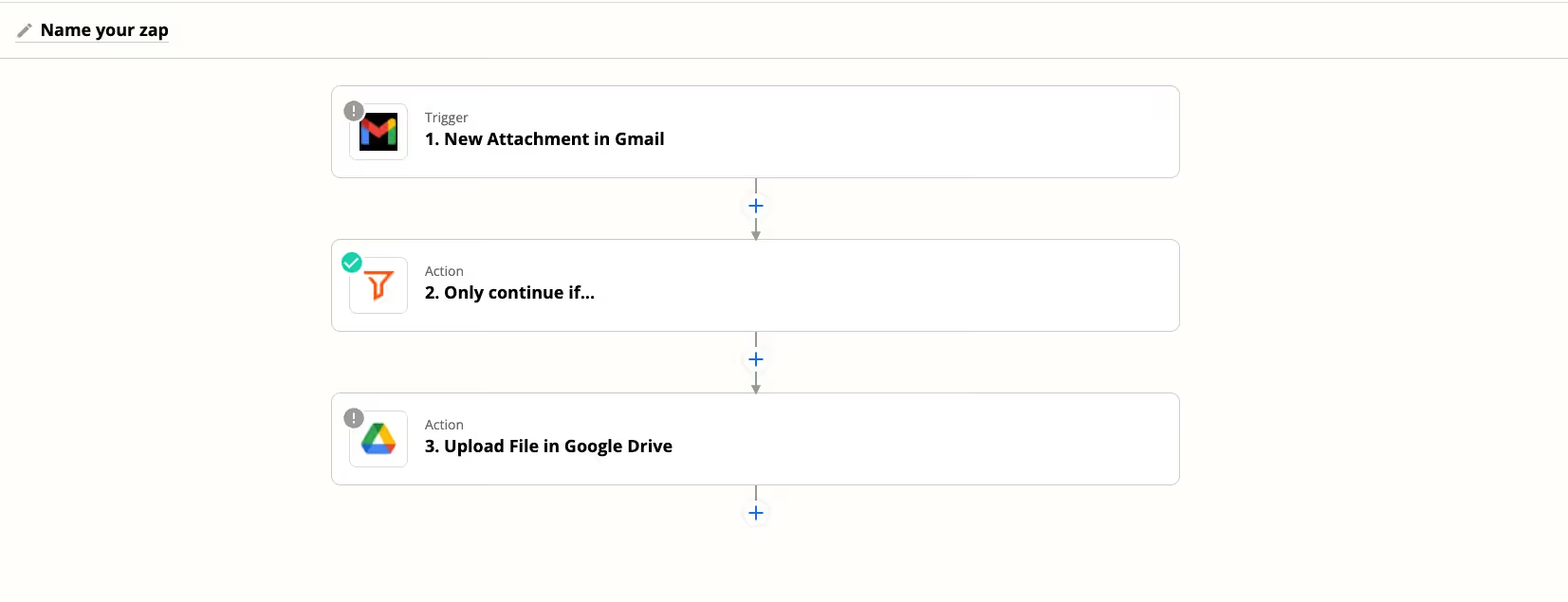
A screenshot from Zapier, which uses a UI to construct integration steps between different apps
The primary use case of workflow automation tools is to integrate into many different tools (say CRM, messaging, and your product) and tie these integration steps together in an event-driven workflow. Common use cases include data migration, HR automation, sales automation, and marketing automation. Workflow automation tools have expanded their capabilities over time to also include ‘embedded’ scenarios where an end customer of an application can customize their own integration flow within a product.
Do-It-Yourself
Rather than using an API integration tool, it’s always possible for a software development team to directly integrate via API. This approach allows for maximum customization and control, but often comes at the cost of heavy upfront effort and long-term maintenance.
Related: A guide to API aggregation
The Best Approach for Your Product Integrations
Let’s cut to the chase. You’ve identified your integration requirements. You’ve investigated various integration approaches. Which approach is best for which requirements?
Let’s take a look at a few key considerations and how the approaches stack up on each one. The biggest considerations you’ll face are:
Who’s building and maintaining this integration? Depending on the level of integration quality, control, performance, and security, you often are choosing between a software developer in your product engineering team and someone in another function (e.g. professional services, business analytics).
Where do you want to encode the integration logic? If you want to own the logic, version it, and provide strong support and warranties, you’ll likely want to keep the integration/workflow logic as part of your own code.
How much data transformation is required? For integrations where you want to read and write data from other tools, normalize it across similar integrations, and then mix it with data in your own product, factor in where and how data processing will take place.
How much do you want to control the UI/user experience? For integrations that are an important part of your product’s user experience, you’ll likely want to define the design, user flows, and resulting analytics.
Unified API - Best for standardized external integrations
Pros
- Normalized, unified data model: no transformations or complex/brittle workflows required
- Build once, support many end customers: each end customer uses the same integration code
- Developer friendly: Use your own auth scope, source and version control, CI/CD pipeline, logging and alerting platforms, and other tools and processes
- You control the backend code: Keep the integration and data management logic in your own code for better performance, security, and maintainability
Cons
- Overkill for one integration: If you only need to integrate one app of a given type, unified APIs are less of a time saver
Workflow Automation - Best for simple external integrations or internal use cases
Pros
- Low-code editor: Drag and drop workflow editor to mix and match data connectors and event triggers
- Prebuilt connectors: Utilize common workflows between apps to get started
- Allow customer or PS to build: Low code editors are ideal when outsourcing the integration work outside of a core engineering team
Cons
- Not developer friendly: Workflow APIs (e.g. create recipe) are error prone and structured as a single JSON object
- Looks can be deceiving: Embedded solutions use iframe-based workflow editors, limiting user experience customization
- Lack of normalized data: Given differences between APIs, low-code tools require a custom workflow for each API
- Cost: Workflow automation is very expensive as it scales to many recipes/ workflows and a high volume of API requests
DIY - Best for total control, if you have the resources
Pros
- Complete control: You choose the infrastructure, data models, security requirements, and more
Cons
- High opportunity cost: Integrations typically take weeks to months to build, tying up engineers that could work on more strategic projects
- Hard to maintain: Each additional integration becomes costly to support over time as APIs change and services break
Related: Top examples of unified APIs
Kickstarting Your Integration Strategy
No matter which direction your integrations take you, it’s a long term investment. If you’re looking to build a set of customer-facing product integrations, we’d recommend you check out Merge’s Unified API approach.
Jon Gitlin





But Merge isn’t just a Unified
API product. Merge is an integration platform to also manage customer integrations. gradient text
But Merge isn’t just a Unified
API product. Merge is an integration platform to also manage customer integrations. gradient text
But Merge isn’t just a Unified
API product. Merge is an integration platform to also manage customer integrations. gradient text
But Merge isn’t just a Unified
API product. Merge is an integration platform to also manage customer integrations. gradient text