

Table of contents
Just for you
No items found.
Why Merge is more extensible than you think: a guide for engineers



Gil Feig
When evaluating product integration solutions, engineers often run into a frustrating dilemma: you either get a unified platform that's too rigid, or direct access to raw data via workflow products that’s messy and inconsistent.
Merge was built to give you the best of both worlds, and this is clear with the flexibility engineers have with interacting with Merge’s Common Models.
In this post, we’ll walk through four powerful features: Field Mapping, Remote Fields, Remote Data, and Passthrough Requests. Each gives engineers fine-grained control over data access and transformation without compromising the simplicity of a unified API.
Field mapping: custom data, standard interface
Merge’s Common Models are designed to cover 80% of use cases, but real-world customers always have custom fields they care about. That’s where Field Mapping comes in.
With Field Mapping, you can define custom fields and map them to fields from third-party APIs. This means you can extend Merge’s Common Models to support unique data needs—without having to wait for Merge to support them natively.
Let’s say your ATS has a field called custom_score, but you want that represented in your internal systems as technical_assessment_score. Merge lets you set up that mapping manually or programmatically, so your application can consume that data in the exact format you expect.

To make Field Mapping even more powerful, we also introduced several enhancements:
- Field Coverage: View how often a field is populated across a customer’s data to ensure you’re mapping to relevant, well-used fields

- Advanced Mapping: Use JMESPath expressions to surgically select nested or deeply structured fields (especially useful for tools like Salesforce or Workday)

- Preview Values: Validate your mappings instantly by plugging in an ID and seeing what remote data is returned before deploying your configuration

You can use Preview Values to confirm that the right values appear for a candidate in an end-user’s ATS
Remote fields: read and write to the edge of the schema
Field Mapping is great when you know what field you want to bring into your unified model. But what about when you need to access or write to fields that Merge hasn’t normalized—especially highly variable custom fields?
That’s where Remote Fields shine.
With Remote Fields, you can programmatically retrieve a list of all available fields for a given integration, including their metadata (e.g., field type, display name, etc.). These can be standard third-party fields not in Merge’s Common Model, or entirely custom fields created by the end user.
And it’s not just about reading—you can also write back to these fields using Merge’s write APIs. This makes Remote Fields the right tool for workflows where your product needs to interact with long-tail or user-defined fields in third-party platforms. For example, your product may need to POST custom fields like "YOURPRODUCT_URL" and “YOURPRODUCT_UUID" to CRMs to keep their high-quality data in sync with your customers’ system.
Remote data: full access, when you need it
Sometimes you don’t want normalized data. You want it exactly as the source platform returns it. Merge provides that via the Remote Data feature.
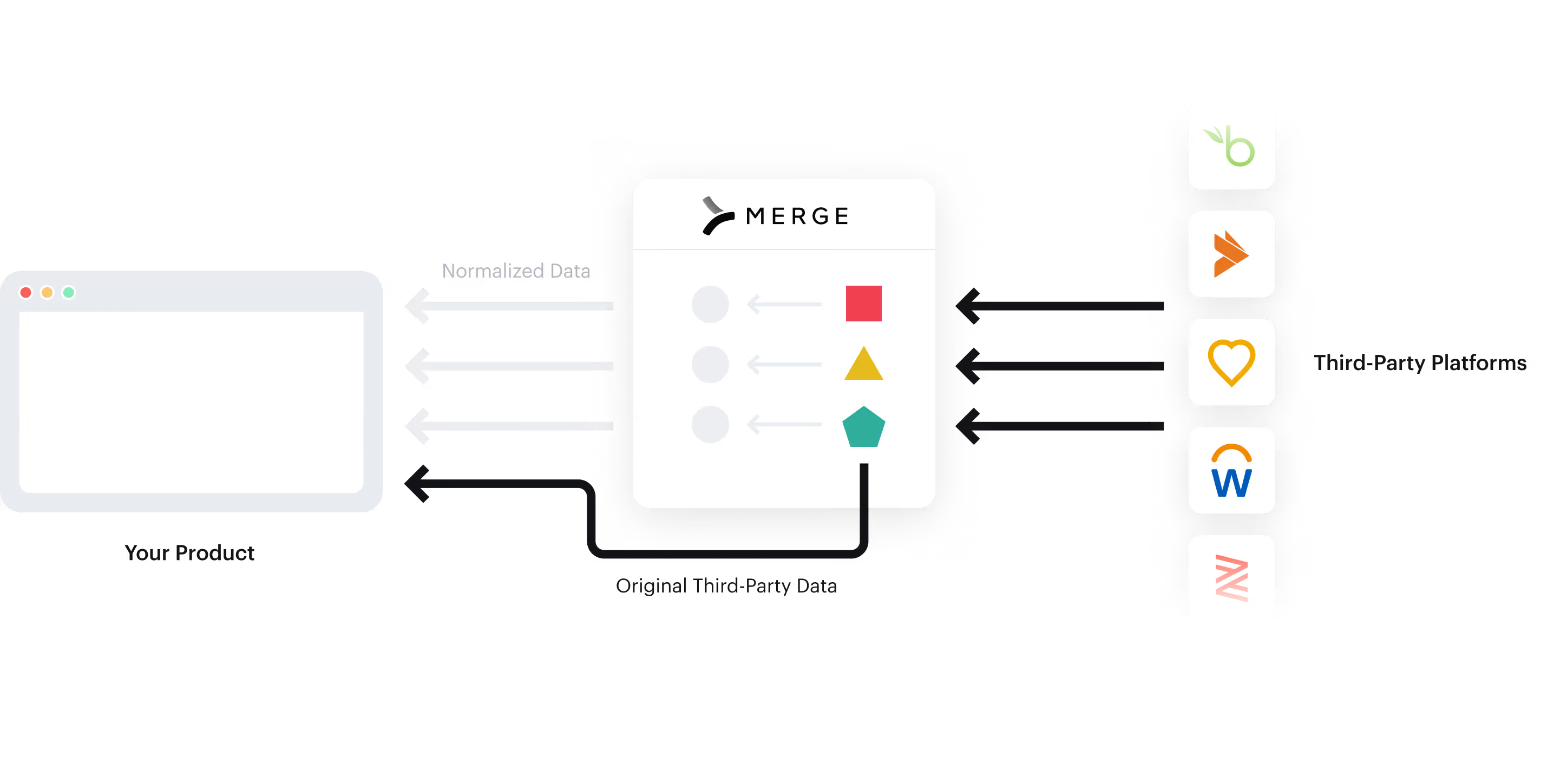
Remote Data gives you access to raw, untouched payloads from the source API—ideal for advanced debugging, audit trails, or niche use cases not covered by Common Models. For example, you can use it to pull custom info like T-Shirt size that’s not typically associated with the Employee Common Model.
You can enable Remote Data per Common Model, then add include_remote_data=true to your requests to fetch it. Each data blob includes the original API path and returned values, giving your engineers full visibility.
Passthrough requests: full control, no compromises
And finally, for when none of the above gives you quite what you need, there’s Passthrough Requests.
This feature allows you to make fully authenticated, direct API calls to any of Merge’s supported integrations—right through Merge’s infrastructure.
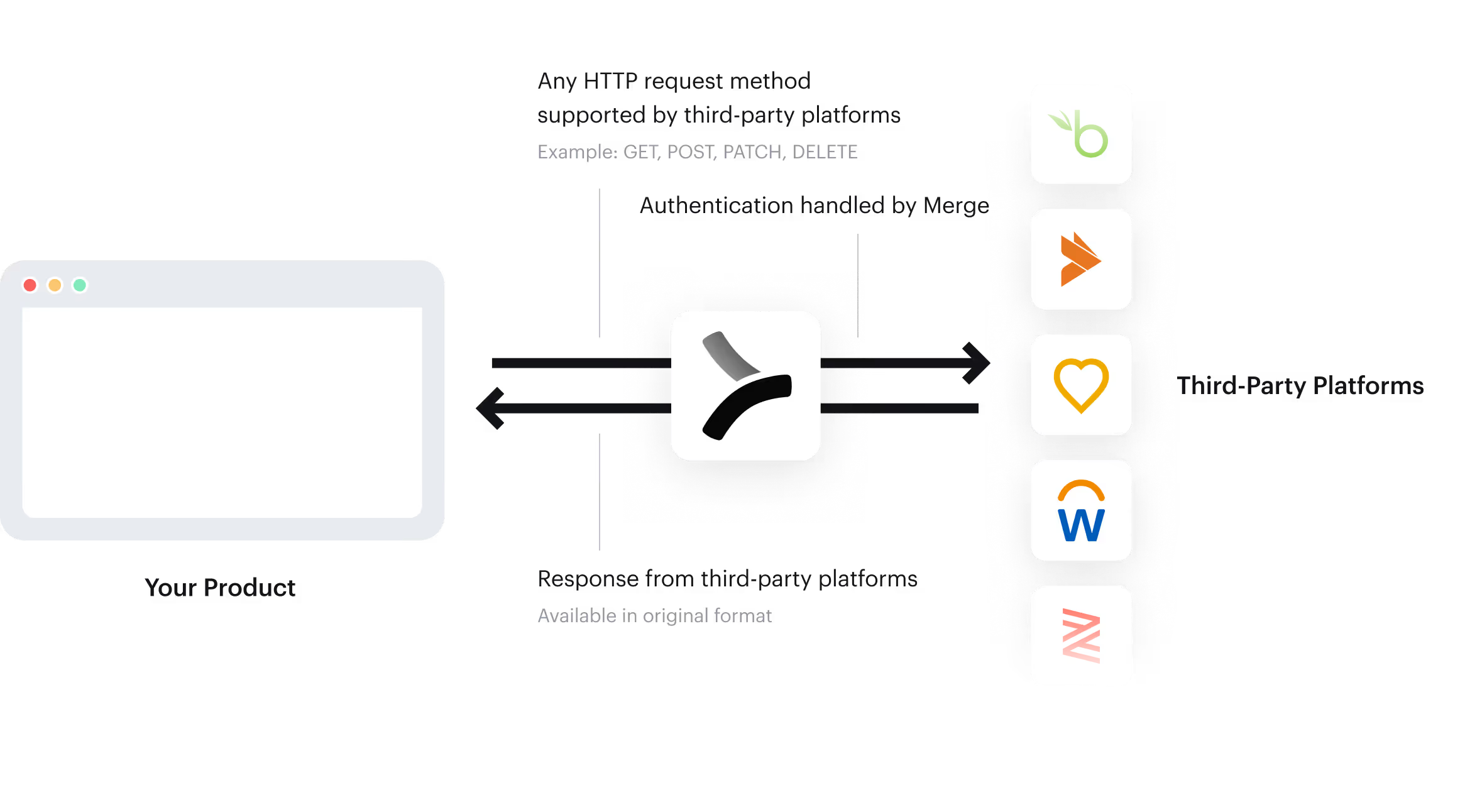
That means:
- You don’t need to manage your own OAuth flows or credentials
- You can access any endpoint exposed by the third-party API—even if Merge doesn’t support it natively
- You get consistent authentication, logging, and infrastructure management with Merge handling the plumbing
Whether you need to call /customreport2/{{company}}/Demographics in Workday or upload a PDF via HubSpot’s file API, Merge’s Passthrough Requests let you do it without leaving the Merge ecosystem.
Final thoughts: Merge is a power tool, not just a wrapper
For engineers worried about losing control by using a unified API, Merge offers the reassurance of extensibility at every level:
- Use Field Mapping to customize your data models
- Use Remote Fields to interact with custom fields
- Use Remote Data to sync in raw data
- Use Passthrough Requests to DIY, with the support of Merge’s integration infrastructure
Merge isn’t just an abstraction layer—it’s a deeply customizable platform that gives you the flexibility of direct API access, but the ergonomics of a normalized, scalable integration system.
If you want to explore your own use case, and see whether these features are right for you, then reach out to request a demo.
Gil Feig





But Merge isn’t just a Unified
API product. Merge is an integration platform to also manage customer integrations. gradient text
But Merge isn’t just a Unified
API product. Merge is an integration platform to also manage customer integrations. gradient text
But Merge isn’t just a Unified
API product. Merge is an integration platform to also manage customer integrations. gradient text
But Merge isn’t just a Unified
API product. Merge is an integration platform to also manage customer integrations. gradient text