

Table of contents

How to get your Mistral AI API key (5 steps)



Jon Gitlin
Mistral AI, a European-based AI company, offers several cutting-edge large language models (LLMs).
To leverage any of them, you can access and use Mistral AI's APIs.
The first step in using any of their endpoints is generating your API key. We’ll help you do just that by walking you through the 5 easy steps you can take.
1. Sign in or create your account
From Mistral AI’s homepage, you’ll need to click on the “Log In” button.

From there, you’ll either need to sign in or create an account.

{{this-blog-only-cta}}
2. Set up your workspace (if you’re creating an account)
If you’re creating an account, you’ll need to create a workspace, which involves giving it a name, clarifying whether it’s only for a single user or a team, and accepting Mistral AI's terms and conditions.

3. Select API Keys from the Overview page
Under the API section on the left-hand side, you should see an “API Keys” button. Go ahead and click this.

4. Create your key
You’ll now see an option to create a new key.

Once you select this, you’ll be asked to assign a name and expiration date to the key.

Related: A guide to using an AI connector
5. Copy your API key
The key would now be fully visible. You should go ahead and copy it as it won’t be shown again

Other considerations for building to Mistral AI’s API
Before building to their endpoints, it’s worth familiarizing yourself with the following:
Pricing
Mistral AI’s API costs depend on factors like the model you want to access, whether you use the batch API, and the number of tokens you need to consume.
For example, here are their costs for some of their premier models:

Learn more about Mistral AI’s API pricing.
Rate limits
Each workspace has a preset rate limit, which depends on your usage tier. The rate limits are also set by either requests per second or tokens per minute or month.
For instance, for each model, you may be able to make 1 request per second or consume either 500,000 tokens per minute or 1,000,000 tokens per month.

Learn more about Mistral AI’s rate limits.
Errors to look out for
You can come across a wide range of errors; here are just a few you might run into:
- 401 Unauthorized: This error indicates that the API request lacks valid authentication credentials. It often occurs when the API key is missing, incorrect, or associated with the wrong service
- 400 Bad Request: This can happen when the 'role' field in the message payload is incorrect—such as setting the role to “system” instead of “user” or 'tool'
- 404 Not Found: You might see this when the resource and/or model doesn’t exist, or if the endpoint URL isn’t formatted correctly
- 429 Too Many Requests: You’ve reached your rate limit and can’t make additional requests until the current window expires
Leverage Mistral AI’s models effectively with Merge Gateway
Merge Gateway is a single API and control plane for running LLM traffic in production, with built-in routing, spend controls, and request-level visibility.
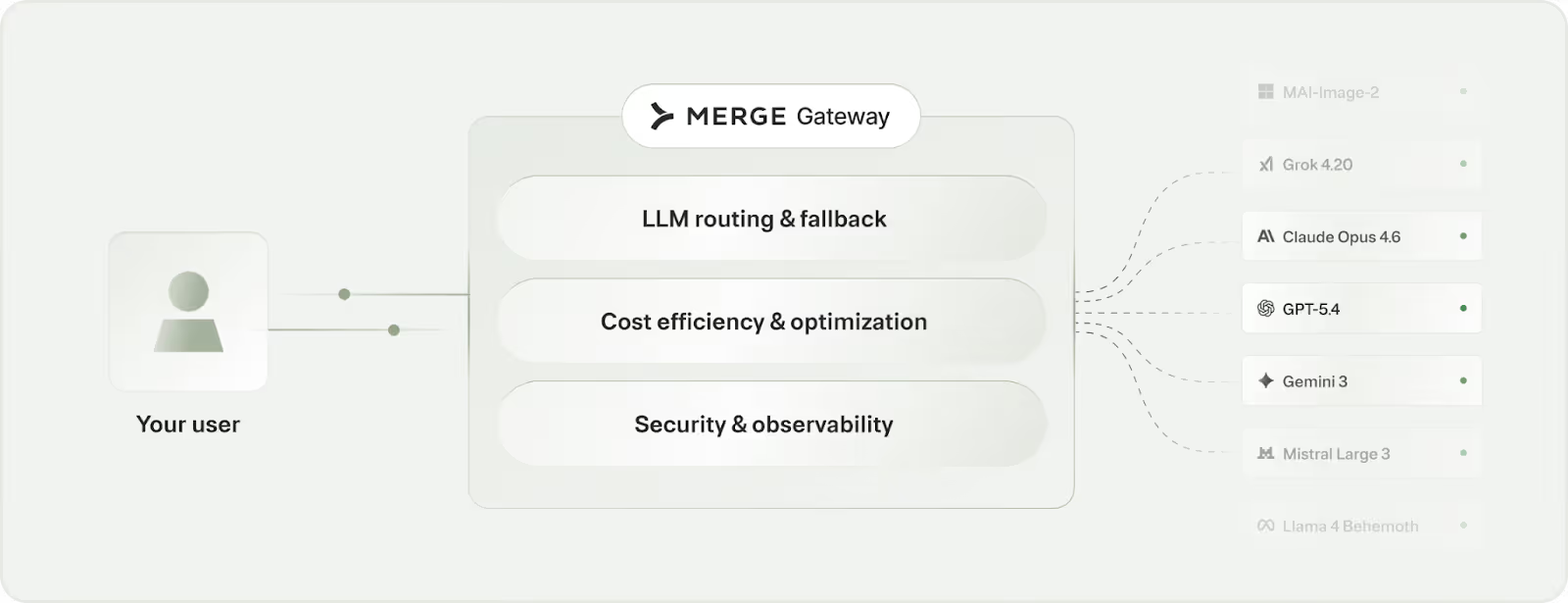
It offers:
- Efficient model selection: Automatically route each request to the right model for the job to reduce cost while protecting output quality
- Spend controls and governance: Configure budgets and usage rules by team, project, or customer tier to prevent runaway usage
- End-to-end observability + fallback: Review detailed logs and routing decisions for every request, with automatic failover when a provider degrades
Try Merge Gateway for free today!
Jon Gitlin
-p-3200.png)
.png)

Start optimizing your AI spend in production
Dynamically route each request to the best-fit model (including Mistral AI’s models) to reduce spend without compromising performance via Merge Gateway.


But Merge isn’t just a Unified
API product. Merge is an integration platform to also manage customer integrations. gradient text
But Merge isn’t just a Unified
API product. Merge is an integration platform to also manage customer integrations. gradient text
But Merge isn’t just a Unified
API product. Merge is an integration platform to also manage customer integrations. gradient text
But Merge isn’t just a Unified
API product. Merge is an integration platform to also manage customer integrations. gradient text